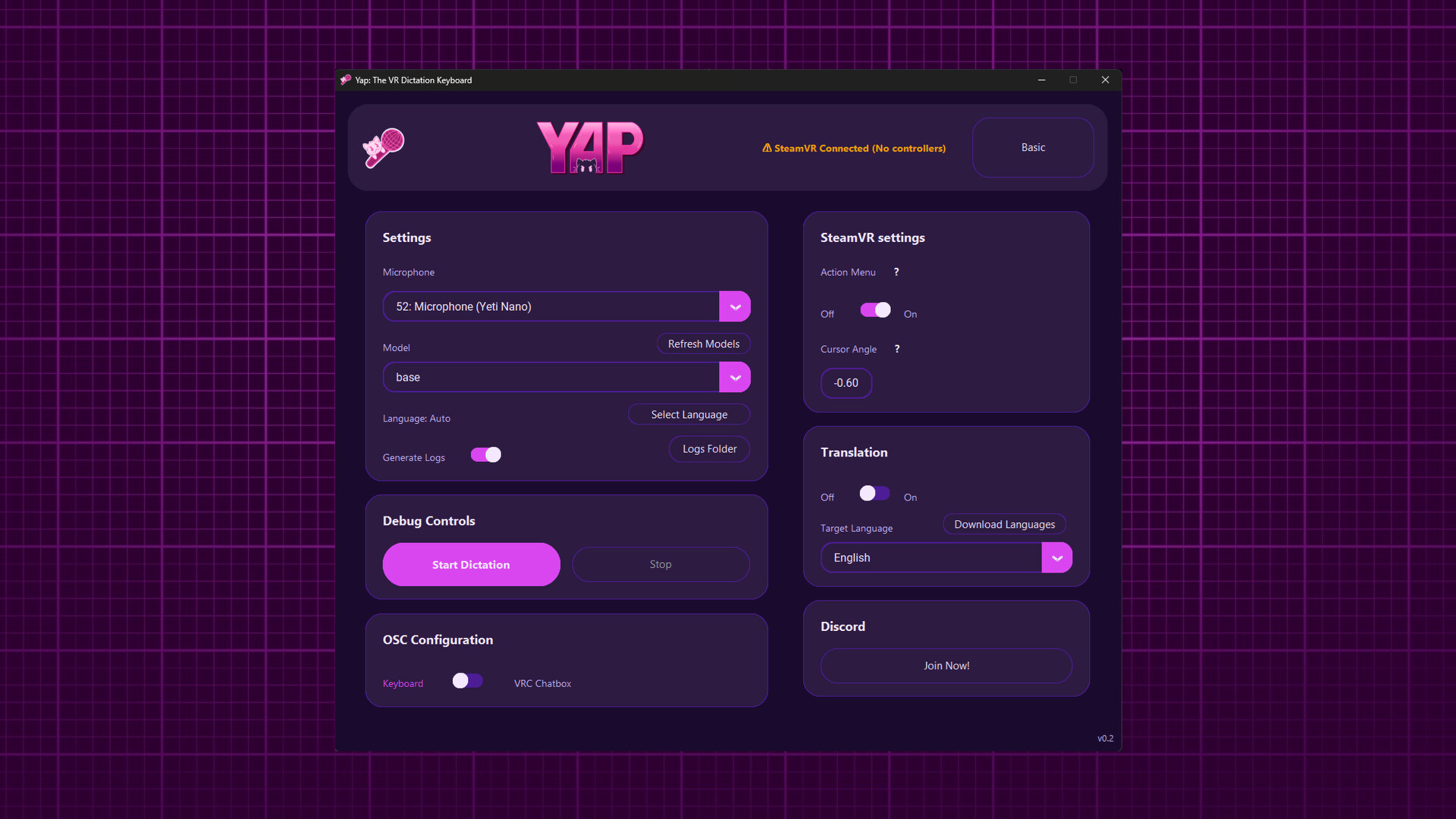
Yap brings speech-to-text directly into your VR experience. Speak naturally and watch your words appear in any application, right from VR! Ditch those clunky VR keyboards and Yap naturally!

想要将此项目添加至您的愿望单、关注它或标记为已忽略,请先登录

抢先体验软件

随着软件的发展参与其中。

注意:该抢先体验的软件内容尚不完整且也许会发生变化。如果您目前不是特别想使用这款软件,那么您 应该等待一段时间来观察软件的开发进度。了解更多

开发者的话:

为何要采用抢先体验这种模式?

“Yap is built around day-to-day usability, and Early Access allows the experience to be shaped by how people actually use it in VR. Feedback will directly guide interface decisions, workflows, and quality-of-life improvements.”

这款软件的抢先体验状态大约持续多久?

“Yap is planned to remain in Early Access for ~6 months, with timing driven by UX maturity rather than feature count.”

计划中的完整版本和抢先体验版本到底有多少不同?

“The full version will reflect accumulated user feedback, with a more polished setup flow, clearer controls, better customization, and smoother overall interaction.”

抢先体验版本的现状如何?

“The current build offers working VR dictation with local speech recognition, keyboard output, and configurable inputs within SteamVR, but still requires refinement to reduce friction and improve clarity.”

在抢先体验期间和结束之后,这款软件的价格会有所不同吗?

“Early Access is expected to be priced the same as the final release”

在开发过程中,你们是如何计划让玩家社区参与进来的?

“User feedback through Steam discussions and bug reports will directly inform UX changes, priorities, and iterative improvements throughout Early Access.”
了解更多
不支持简体中文

本产品尚未对您目前所在的地区语言提供支持。在购买请先行确认目前所支持的语言。

VR 独占

购买 Yap: The VR Dictation Keyboard

 
查看所有讨论

在讨论版中为这款软件汇报 BUG,并留下反馈

关于此软件

Yap is a speech-to-text application built specifically for VR. It replaces clunky virtual keyboards with fast, natural voice dictation that works in any PC application while you are in VR.

Key Features

  • Real-time speech recognition designed for VR use

  • Two performance modes optimized for mid-range and low-end systems

  • Controller-accessible keybinds for Copy, Paste, Select, Enter, and Delete

  • Works across all PC applications

  • VR overlay interface accessible directly from your controllers

  • High-accuracy voice recognition

  • Background operation that does not interrupt gameplay or immersion

  • Optional text translation supporting 40+ languages

How It Works

Yap runs as a SteamVR overlay and starts automatically with SteamVR. To dictate, hold Trigger + B on your controller and speak naturally. Your speech is instantly converted into text and typed into the currently focused application, with optional translation applied in real time.

Replace your virtual keyboard with your voice!

系统需求

    最低配置:
    • 需要 64 位处理器和操作系统
    • 操作系统: Requires a 64-bit processor and operating system
    • 处理器: Intel Core i5-4590/AMD FX 8350
    • 内存: 8 GB RAM
    • 显卡: NVIDIA GeForce GTX 970/AMD Radeon R9 290 or better
    • 存储空间: 需要 800 MB 可用空间
    • 支持 VR: SteamVR. Oculus Touch/Valve Index controllers
    推荐配置:
    • 需要 64 位处理器和操作系统
    • 操作系统: Requires a 64-bit processor and operating system
    • 内存: 16 GB RAM
    • 支持 VR: SteamVR. Oculus Touch/Valve Index controllers

Yap: The VR Dictation Keyboard 的顾客评测 关于用户评测 您的偏好

总体评测:
5 篇用户评测 (5 篇评测)


要查看某个日期范围内的评测,请在上方图表中点击并拖动选定的范围或是点击某特定时间柱。


按用户的游戏时间筛选此评测撰写时的评测:


无最低限制无最高限制

按选择的显示顺序显示评测


了解更多
筛选条件
排除跑题评测活动
游戏时间:
大部分在 Steam Deck 上
无其他评测符合上述筛选条件
调整上方筛选条件以查看其它评测
加载评测中…