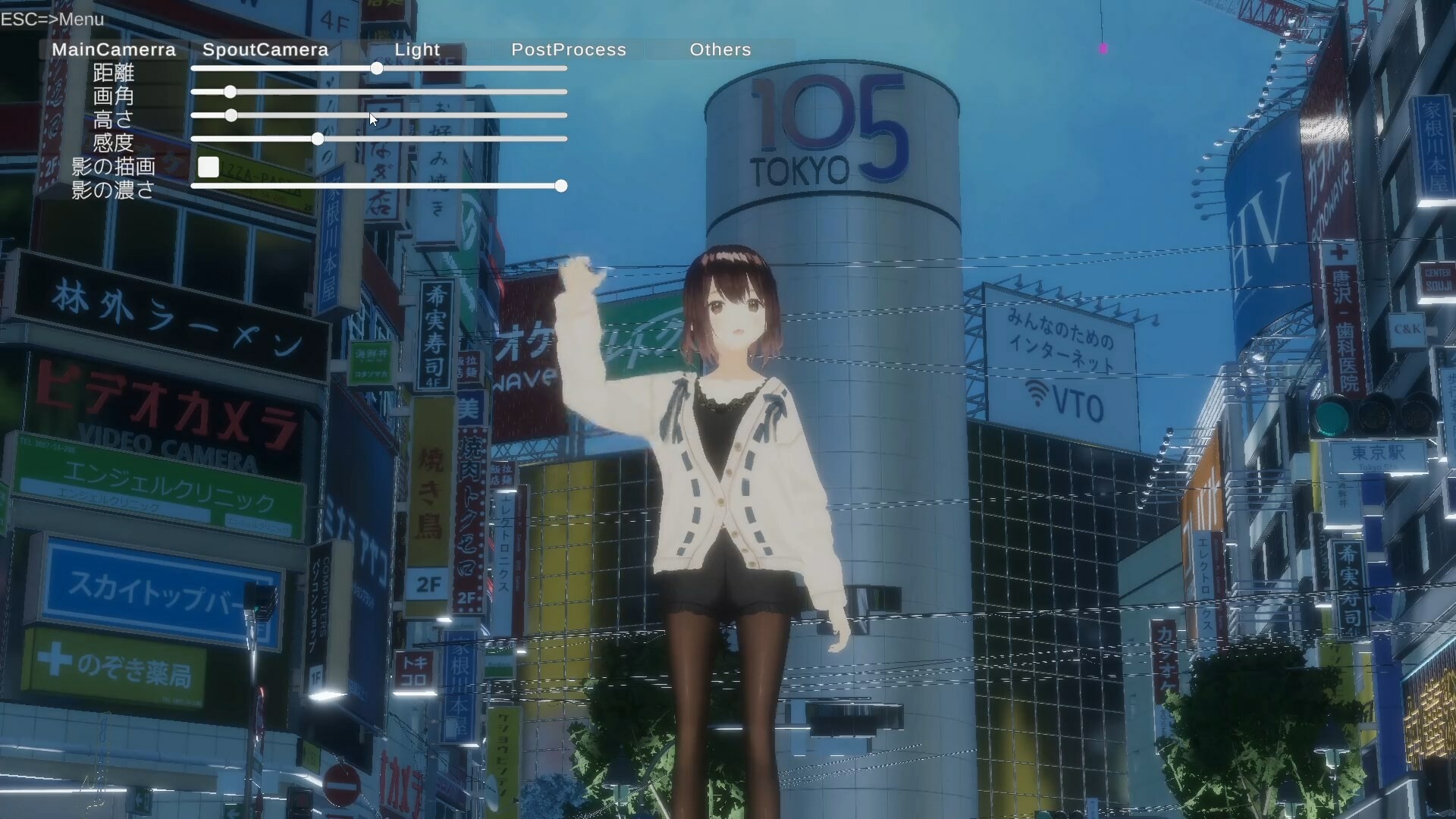
I have a 3D model, but I don’t really know how to make the most of it… There’s a collab stream coming up, but if we’re just going to be side-by-side in OBS, maybe Live2D is good enough… Have you ever felt the same way? The 3D collaboration streaming system "CollabSession" has you covered!

로그인하셔서 게임을 찜 목록에 추가하거나, 팔로우하거나 또는 제외로 지정하세요.

한국어(을)를 지원하지 않습니다

이 제품은 귀하의 로컬 언어를 지원하지 않습니다. 구매하기 전에 아래에 있는 지원하는 언어 목록을 확인해주세요.

CollabSession 사용

무료
 

소프트웨어 정보

I have a 3D model, but I don’t really know what to do with it...

There’s a collab stream coming up, but if we’re just going to sit side-by-side in OBS, maybe Live2D is enough...

But deep down, I really want to express more with 3D...

Have you ever felt the same way?

Still, doing a collab in VRChat seems like a hassle, and renting a studio—how much would that cost?

Don't worry. The 3D collaboration streaming system "CollabSession" has you covered!

Using VMC, it supports facial expressions and full-body tracking—all with just a webcam!

You can move freely around a virtual city, making it easy to collab from any location you like!

Besides standard cameras, it also supports Spout cameras!

By installing the Spout plugin in OBS, you can capture high-quality video without showing the UI to your viewers!

Supports up to 8 participants! Even with a large group, everyone can hang out in the same city!

You can view the operation manual by clicking "View the Manual" at the bottom right of the Steam store page.

━━ About Webcam Tracking ━━

※Tracking uses a webcam that has been pre-configured on Windows. If a capture card or a video device that does not show your upper body is set, tracking will not function properly.

※Linking a Pixiv account is required to use this software.

※If you want to use your own avatar, you need to register your model on VroidHub.

Some fully custom VRM models are not supported when using webcam-based tracking.

This follows the naming conventions of VRM models created with Vroid Studio.

  • Meshes corresponding to the face should be named "face", "head", "body", or "顔".

  • The Blendshape for closing the left eye must include "eye" in its name and end with "L" or "l".

  • The Blendshape for closing the right eye must include "eye" in its name and end with "R" or "r".

  • The Blendshape for opening the mouth must end with "mth_a".

※Screenshots 1-4 depict character models which are not included with the base game.

  These models are downloaded from 3rd party websites.

AI 생성 콘텐츠 사용 공개

개발사는 게임에서 AI 생성 콘텐츠를 사용하는 방법을 다음과 같이 설명합니다.

AI is used for some art and scripting.

시스템 요구 사항

    최소:
    • 운영 체제: windows 10/11
    • 프로세서: intel Core i 7 8700
    • 메모리: 16 GB RAM
    • 그래픽: Geforce GTX 1060
    • 네트워크: 초고속 인터넷 연결
    권장:
    • 운영 체제: windows 10/11
    • 프로세서: core i5 13400
    • 메모리: 32 GB RAM
    • 그래픽: NVIDIA RTX3060
    • 네트워크: 초고속 인터넷 연결

CollabSession에 대한 사용자 평가 사용자 평가 정보 환경 설정

종합 평가:
사용자 평가 3개 (평가 3개)


특정 날짜 범위에 속하는 평가를 보려면, 위의 그래프에서 선택 항목을 클릭한 후 드래그하거나 원하는 바를 클릭하세요.


평가를 작성한 시점의 사용자 플레이 시간을 기준으로 평가를 필터링:


최소 시간 없음 ~ 최대 시간 없음

선택한 표시 순서로 평가 보기


자세한 정보
필터
게임과 관련없는 평가 활동 제외
플레이 시간:
주로 Steam Deck에서 플레이
위에서 설정한 필터 조건에 맞는 평가가 없습니다
다른 평가를 보려면 위에서 필터를 조정해주세요
평가 불러오는 중...