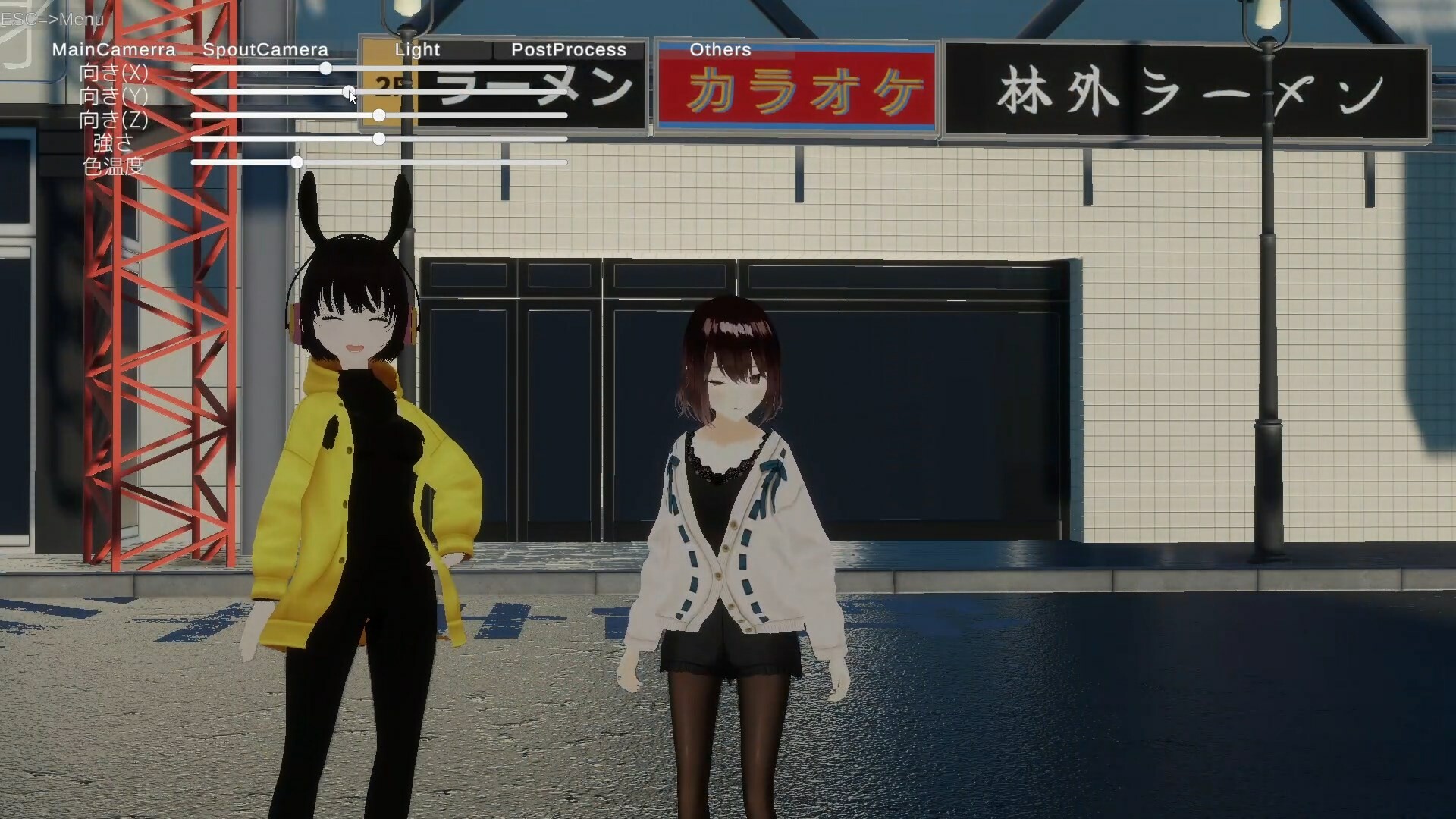
I have a 3D model, but I don’t really know how to make the most of it… There’s a collab stream coming up, but if we’re just going to be side-by-side in OBS, maybe Live2D is good enough… Have you ever felt the same way? The 3D collaboration streaming system "CollabSession" has you covered!

Connectez-vous pour ajouter cet article à votre liste de souhaits, le suivre ou l'ignorer

Français non disponible

Ce produit n'est pas disponible dans votre langue. Veuillez consulter la liste des langues disponibles ci-dessous avant de l'acheter.

Utiliser CollabSession

Gratuit
 

À propos de ce logiciel

I have a 3D model, but I don’t really know what to do with it...

There’s a collab stream coming up, but if we’re just going to sit side-by-side in OBS, maybe Live2D is enough...

But deep down, I really want to express more with 3D...

Have you ever felt the same way?

Still, doing a collab in VRChat seems like a hassle, and renting a studio—how much would that cost?

Don't worry. The 3D collaboration streaming system "CollabSession" has you covered!

Using VMC, it supports facial expressions and full-body tracking—all with just a webcam!

You can move freely around a virtual city, making it easy to collab from any location you like!

Besides standard cameras, it also supports Spout cameras!

By installing the Spout plugin in OBS, you can capture high-quality video without showing the UI to your viewers!

Supports up to 8 participants! Even with a large group, everyone can hang out in the same city!

You can view the operation manual by clicking "View the Manual" at the bottom right of the Steam store page.

━━ About Webcam Tracking ━━

※Tracking uses a webcam that has been pre-configured on Windows. If a capture card or a video device that does not show your upper body is set, tracking will not function properly.

※Linking a Pixiv account is required to use this software.

※If you want to use your own avatar, you need to register your model on VroidHub.

Some fully custom VRM models are not supported when using webcam-based tracking.

This follows the naming conventions of VRM models created with Vroid Studio.

  • Meshes corresponding to the face should be named "face", "head", "body", or "顔".

  • The Blendshape for closing the left eye must include "eye" in its name and end with "L" or "l".

  • The Blendshape for closing the right eye must include "eye" in its name and end with "R" or "r".

  • The Blendshape for opening the mouth must end with "mth_a".

※Screenshots 1-4 depict character models which are not included with the base game.

  These models are downloaded from 3rd party websites.

Divulgation de contenu généré par IA

L'équipe de développement décrit l'utilisation de contenu généré par IA dans le jeu comme suit.

AI is used for some art and scripting.

Configuration requise

    Minimale :
    • Système d'exploitation : windows 10/11
    • Processeur : intel Core i 7 8700
    • Mémoire vive : 16 GB de mémoire
    • Graphiques : Geforce GTX 1060
    • Réseau : connexion internet haut débit
    Recommandée :
    • Système d'exploitation : windows 10/11
    • Processeur : core i5 13400
    • Mémoire vive : 32 GB de mémoire
    • Graphiques : NVIDIA RTX3060
    • Réseau : connexion internet haut débit

Évaluations pour CollabSession À propos des évaluations Vos préférences

Évaluations globales :
3 évaluations (3 évaluation(s))


Pour consulter les évaluations publiées lors d'une période spécifique, cliquez et faites glisser votre sélection sur un graphique ci-dessus ou cliquez sur une barre.


Filtrer les évaluations en fonction du temps de jeu des utilisateurs au moment de leur publication :


Pas de minimum à pas de maximum

Afficher les évaluations dans l'ordre sélectionné


En savoir plus
Filtres
Activité d'évaluation hors sujet exclue
Temps de jeu : 
A joué surtout sur Steam Deck
Plus aucune évaluation ne correspond aux filtres définis ci-dessus
Ajustez les filtres ci-dessus pour voir d'autres évaluations
Chargement des évaluations...