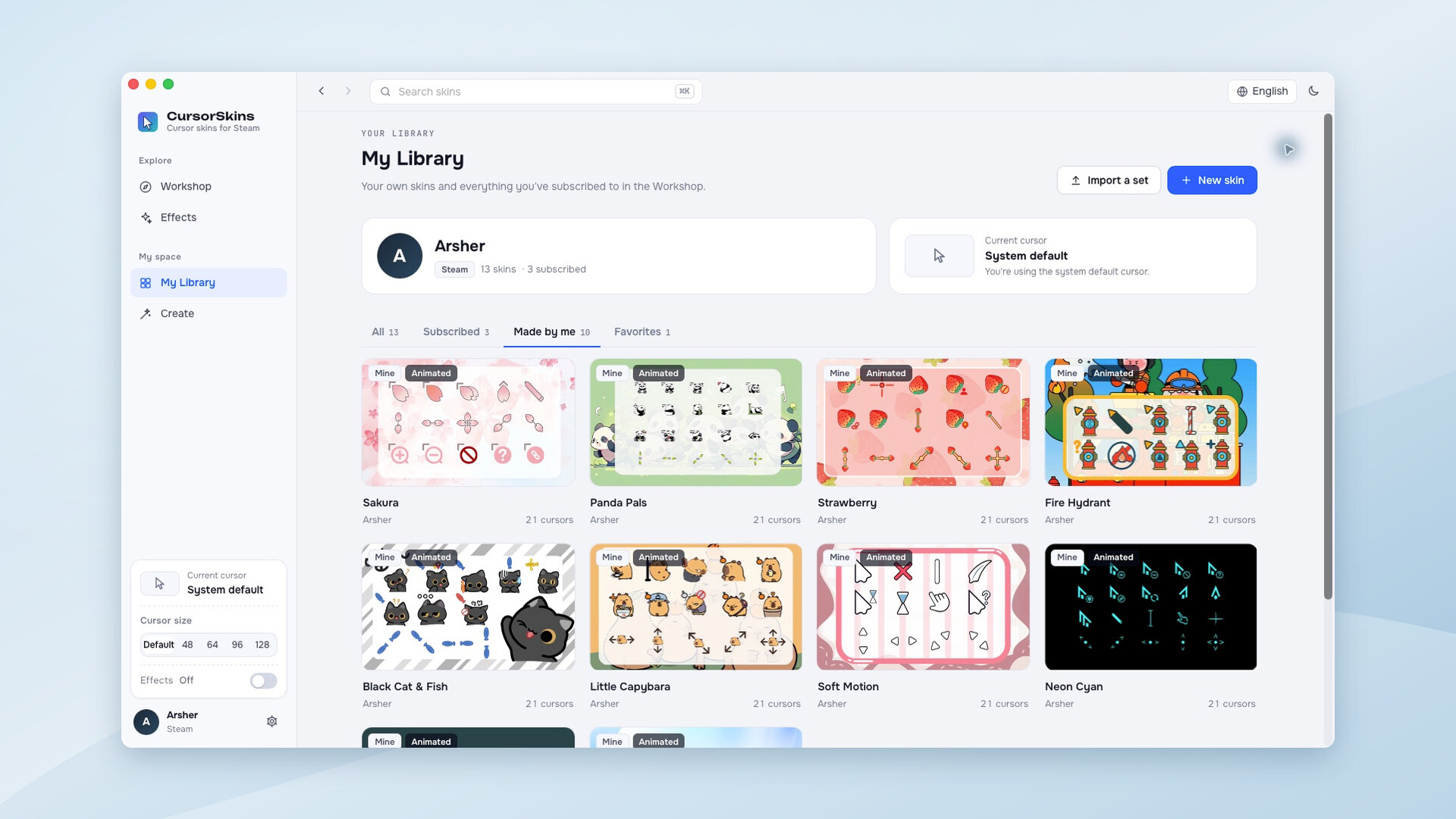
Give your Windows or macOS cursor a new look. Discover animated skins on Steam Workshop, add cursor trails and click effects, or import images to create and share your own cursor sets. Buy once, with no subscription.

Sign in to add this item to your wishlist, follow it, or mark it as ignored

This game is not yet available on Steam

Planned Release Date: November 2026

Interested?
Add to your wishlist and get notified when it becomes available.
 

About This Software

A little more personality, every time you point

Turn your everyday cursor into something you enjoy looking at. CursorSkins brings static and animated cursor skins, playful mouse effects, and a built-in editor to Windows and macOS.

Find your next favorite cursor

Browse Steam Workshop, subscribe to a skin, and apply it from your library. Go from soft blue hearts to neon pointers, strawberries, or a laid-back capybara. Preview a set in the fitting room before changing your system cursor, and restore your system cursors whenever you like.

Make movement and clicks more fun

Choose from 23 mouse effects, including cursor trails, click effects, and screen effects. Start with a preset or combine effects, tune their intensity and colors, and save your own combinations.

Make it yours, down to the hotspot

  • Import PNG and GIF images, Windows .cur / .ani cursor files, and macOS .cape cursor sets.
  • Customize the pointer, text selection, links, waiting, resizing, and other cursor states.
  • Adjust click hotspots and animation timing, copy a state, and try the result in the preview area.
  • Save your creations locally, then publish and update your cursor sets on Steam Workshop.

Windows and macOS. One purchase.

No subscription and no separate CursorSkins account. The interface supports English and Simplified Chinese. Keep the app in the system tray while you work, and use your local cursor library when Workshop is unavailable.

Good to know
Steam and an internet connection are required for Workshop features. CursorSkins customizes system cursors; apps and games that draw their own cursor may continue to use it. Available cursor states vary by operating system. Please share only artwork you created or have permission to use.

AI Generated Content Disclosure

The developers describe how their game uses AI Generated Content like this:

Generative AI was used to create some Steam store promotional artwork, library artwork and Workshop banners, and to assist with descriptive text and localization. Official cursor artwork is drawn by designers; product screenshots and demonstration videos are captured from the running application. CursorSkins does not generate AI content or connect to third-party AI services at runtime.

System Requirements

Windows
macOS
    Minimum:
    • Requires a 64-bit processor and operating system
    • OS: Windows 10 or Windows 11 (64-bit)
    • Processor: 64-bit Intel or AMD processor
    • Memory: 4 GB RAM
    • Storage: 200 MB available space
    • Additional Notes: Microsoft Edge WebView2 Runtime is required; the app provides a download link if it is missing. Steam and an internet connection are required for Workshop features. Additional storage is needed for Workshop content and the WebView2 Runtime. Apps and games that draw their own cursor may override the system cursor.
    Recommended:
    • Requires a 64-bit processor and operating system
    Minimum:
    • OS: macOS 12 Monterey or later
    • Processor: Intel or Apple Silicon processor
    • Memory: 4 GB RAM
    • Storage: 200 MB available space
    • Additional Notes: Steam and an internet connection are required for Workshop features. Additional storage is needed for Workshop content. Apps and games that draw their own cursor may override the system cursor. After logout or restart, reopen CursorSkins to reapply your selected skin.
    Recommended:
    Review Filters