SHOOT 'EM UP! Battle Marine is a simple naval barrage STG. A barrage of intense shots! Shoot 'em up! Shoot 'em up! Chain bombs with detonation, powerful laser sweeps, and jumps to collect medals! Enjoy a RETRO but NEW and exhilarating STG experience!

Connectez-vous pour ajouter cet article à votre liste de souhaits, le suivre ou l'ignorer

Français non disponible

Ce produit n'est pas disponible dans votre langue. Veuillez consulter la liste des langues disponibles ci-dessous avant de l'acheter.

Acheter Battle Marine


À propos de ce jeu

Overview

Battle Marine is a simple naval barrage STG.

Enjoy a somewhat retro yet new and exhilarating game experience by firing a barrage of shots, inducing explosions, sweeping with powerful lasers, and automatically collecting medals (recovery and score) by jumping.

Destroying enemies consecutively within a certain time frame will result in a HIT combo. Aim for 999 HITs!

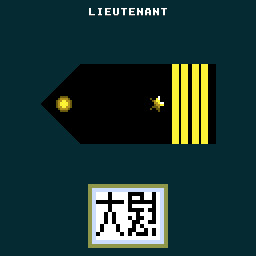
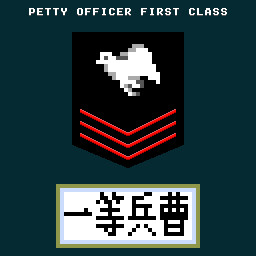
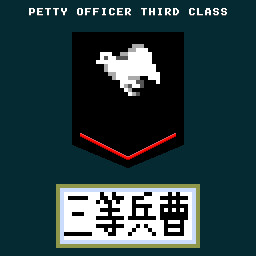
Your rank will be assessed according to the results of your play. Aim for the rank of FLEET ADMIRAL!

Controls

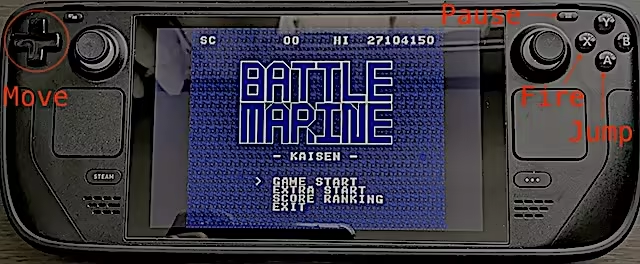
Use the cursor keys to move left and right, press X or B to shoot, and A or Y to jump.

Press and hold the B button to charge the laser, and release it when the charge is maxed out to fire the laser.

Press A briefly for small jumps and long for large jumps.

Button assignments can be freely customized in the SteamInput menu.

Keyboard Controls (Windows)

  • Cursor keys: D-Pad (Can be changed in the key configuration)

  • X key: A button (Can be changed in the key configuration)

  • Z key: B button (Can be changed in the key configuration)

  • Space key: START button (Can be changed in the key configuration)

  • ESC key: SELECT button (Can be changed in the key configuration)

  • CTRL+X: Exit the game (CTRL+Q, CTRL+C also work)

  • CTRL+R: Reset

  • Alt+Enter: Toggle full screen (CTRL+F also work)

  • CTRL+A: Toggle screen aspect mode

  • CTRL+L: Toggle scanline filter

  • CTRL+S: Screen Resolution Settings

  • CTRL+K: Key configuration for the Keyboard

  • CTRL+V: Volume control of background music and sound effects

Keyboard Controls (Linux and macOS)

  • Cursor keys: D-Pad

  • X key: A button

  • Z key: B button

  • Space key: START button

  • ESC key: SELECT button

  • Q: Exit the game

  • R: Reset

Notes on the Linux and macOS version

  • Supported screen displays are for Aspect-Fit only.

  • Configuration UI is not exist yet

Configuration for Linux and macOS

When you launch Battle Marine, a configuration file called config.json will be generated.

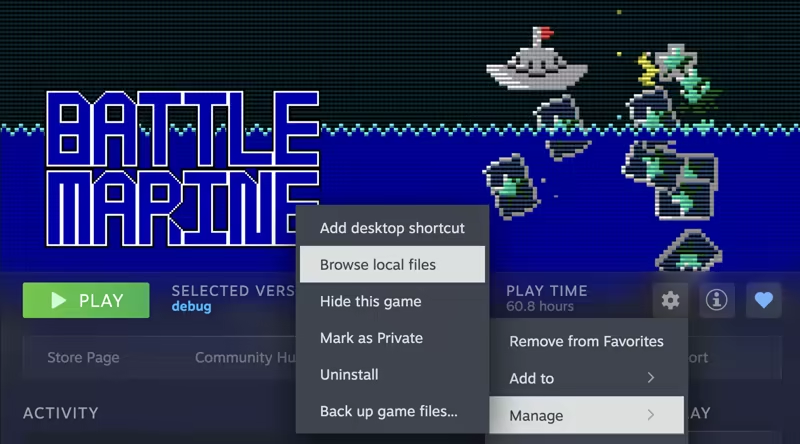
The config.json file is saved under the directory opened by opening the Battle Marine page in the Steam client and selecting "Settings Icon" > "Manage" > "Browse local files".

You can customize the following items:

  • graphic.isFullScreen: true = full screen, false = window mode

  • graphic.isScanline: true = with screen effects, false = without screen effects

  • gaphic.windowHeight: height of the screen in window mode

  • gaphic.windowWidth: width of the screen in window mode

  • sound.volumeBgm: Volume of background music (0-100)

  • sound.volumeSe: Volume of sound effect (0-100)

  • keyboard.a: Key code for A button (jump)

  • keyboard.b: key code for B button (fire)

  • keyboard.start: key code for START button (pause)

  • keyboard.select: key code for SELECT button (n/a)

  • keyboard.up: key code for up button

  • keyboard.down: key code for down button

  • keyboard.left: Key code for left button

  • keyboard.right: Key code for right button

  • keyboard.reset: Reset button key code

  • keyboard.quit: Key code for quit button

The keycode specifies the SDL keycode.

Detailed Gameplay

  • When you destroy an enemy, a green or yellow medal will appear.

  • Taking the green medal will restore your LIFE.

  • Your score will increase if you take a yellow medal.

  • If you keep defeating enemies within a certain time (120 frames), your combo will increase and medals will be collected automatically when you reach 100 HITs or more.

  • Medals are also automatically collected by jumping.

  • You are invincible during the laser (after the firing motion is complete).

  • Unlike normal STGs, explosions also have hit points.

  • If you keep collecting green medals while your LIFE is full, the yellow medal's base points will continue to increase.

  • The number of crowns at the bottom of the screen will increase for every 16 green medals you take while your LIFE is full.

  • The maximum number of crowns displayed is 30 (480 green medals), but the maximum number of crowns is 4,095 (65,535 green medals).

  • When you collide with enemy bullets, your LIFE will be reduced and the number of crowns will be strongly reduced.

  • With the exception of some enemies (crabs), yellow medals will appear when enemies are killed by lasers.

  • Obtaining a medal also resets the combo duration to 120 frames

About the GBA version

We are giving away a ROM file of the GBA version as a special offer for purchasing the game on Steam.

The GBA version ROM file can be found in the Steam client by clicking on the Battle Marine settings (gear icon) and selecting “Browse local files” under “Manage”.

The GBA version of the ROM can be played on mGBA or other emulators.

Video distribution, etc.

There are no restrictions on the distribution of this game on TV, YouTube, or other video distribution sites.

Of course, there are no restrictions on monetization.

There is no need to contact the author prior to or after the event.

Similarly, there are no restrictions on publishing screenshots in magazines, web media, social media, etc.

About VGS-Zero

This game is made with the SDK called VGS-Zero.

VGS-Zero is a virtual game machine with a fast 16MHz Z80 CPU, old-fashioned VDP (Video Display Processor) and VGS (chip-tuned sound system).

There may be many 8-bit style games, but the games made with VGS-Zero are real 8-bit games.

If you want to develop games like Battle Marine, please try to develop games with VGS-Zero.

Games you develop with VGS-Zero can be sold on Steam (Windows, Linux and macOS) using the VGS-Zero SDK for Steam.

Divulgation de contenu généré par IA

L'équipe de développement décrit l'utilisation de contenu généré par IA dans le jeu comme suit.

The main capsule image that appears in the card when sharing Battle Marine's store page URL on social media such as Twitter is created using a generative AI.

Description du contenu pour adultes

Voici la description de l'équipe de développement à propos du contenu du produit :

The game contains depictions of violent shootings and explosions that may be reminiscent of war.

Configuration requise

Windows
macOS
SteamOS + Linux
    Minimale :
    • Système d'exploitation : Windows 10
    • Processeur : Intel Atom Processor x7 Z8700/1.6GHz
    • Mémoire vive : 2 GB de mémoire
    • Graphiques : Intel HD Graphics
    • DirectX : Version 9.0c
    • Espace disque : 20 MB d'espace disque disponible
    Recommandée :
    • Système d'exploitation : Windows 11
    • Processeur : Core i5 1135G7(Tiger Lake)/2.4GHz/4 cores
    • Mémoire vive : 4 GB de mémoire
    • Graphiques : NVIDIA® RTX™ 2000 Ada Laptop GPU
    • DirectX : Version 9.0c
    • Espace disque : 20 MB d'espace disque disponible
    Minimale :
    • Nécessite un processeur Apple
    • Système d'exploitation : Tahoe 26.1
    • Processeur : Apple Silicon M1
    • Mémoire vive : 8 GB de mémoire
    • Graphiques : Apple Silicon M1
    Recommandée :
    • Nécessite un processeur Apple
    • Système d'exploitation : Tahoe 26.1
    • Processeur : Apple Silicon M3
    • Mémoire vive : 16 GB de mémoire
    • Graphiques : Apple Silicon M3
    Minimale :
    • Système d'exploitation : Ubuntu 18.04 LTS
    • Processeur : Intel Core i5 1.3 GHz
    • Mémoire vive : 4 GB de mémoire
    • Graphiques : Intel HD Graphics 5000
    Recommandée :
    • Système d'exploitation : SteamOS latest version
    • Processeur : Zen 2 4c/8t, 2.4-3.5GHz
    • Mémoire vive : 16 GB de mémoire
    • Graphiques : 8 RDNA 2 CU, 1.6GHz (1.6 TFlops FP32)

Évaluations pour Battle Marine À propos des évaluations Vos préférences

Évaluations globales :
9 évaluations (9 évaluation(s))


Pour consulter les évaluations publiées lors d'une période spécifique, cliquez et faites glisser votre sélection sur un graphique ci-dessus ou cliquez sur une barre.


Filtrer les évaluations en fonction du temps de jeu au moment de leur publication :


Pas de minimum à pas de maximum

Afficher les évaluations dans l'ordre sélectionné


En savoir plus
Filtres
Activité d'évaluation hors sujet exclue
Temps de jeu : 
A joué surtout sur Steam Deck
Système d'exploitation :
Processeur :
Carte graphique :
Type de périphérique :
Plus aucune évaluation ne correspond aux filtres définis ci-dessus
Ajustez les filtres ci-dessus pour voir d'autres évaluations
Chargement des évaluations...