SHOOT 'EM UP! Battle Marine is a simple naval barrage STG. A barrage of intense shots! Shoot 'em up! Shoot 'em up! Chain bombs with detonation, powerful laser sweeps, and jumps to collect medals! Enjoy a RETRO but NEW and exhilarating STG experience!

Abyste si mohli tento produkt přidat do seznamu přání, začít ho sledovat nebo ho zařadit mezi ignorované, musíte se nejprve přihlásit.

Čeština není podporována

Tento produkt nepodporuje Váš místní jazyk. Seznam podporovaných jazyků je k dispozici níže na této stránce.

Zakoupit Battle Marine


Informace o hře

Overview

Battle Marine is a simple naval barrage STG.

Enjoy a somewhat retro yet new and exhilarating game experience by firing a barrage of shots, inducing explosions, sweeping with powerful lasers, and automatically collecting medals (recovery and score) by jumping.

Destroying enemies consecutively within a certain time frame will result in a HIT combo. Aim for 999 HITs!

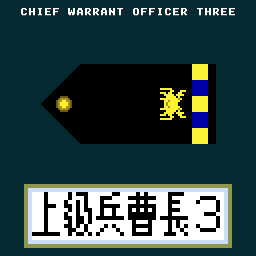
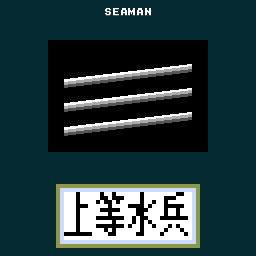
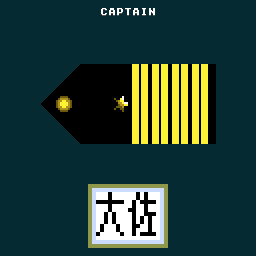
Your rank will be assessed according to the results of your play. Aim for the rank of FLEET ADMIRAL!

Controls

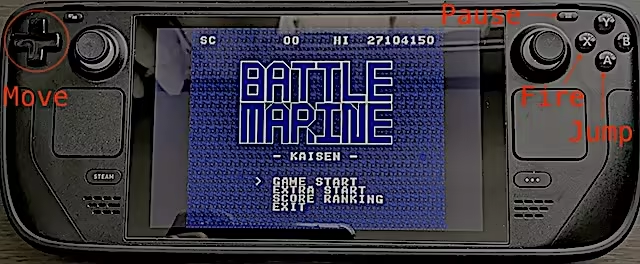
Use the cursor keys to move left and right, press X or B to shoot, and A or Y to jump.

Press and hold the B button to charge the laser, and release it when the charge is maxed out to fire the laser.

Press A briefly for small jumps and long for large jumps.

Button assignments can be freely customized in the SteamInput menu.

Keyboard Controls (Windows)

  • Cursor keys: D-Pad (Can be changed in the key configuration)

  • X key: A button (Can be changed in the key configuration)

  • Z key: B button (Can be changed in the key configuration)

  • Space key: START button (Can be changed in the key configuration)

  • ESC key: SELECT button (Can be changed in the key configuration)

  • CTRL+X: Exit the game (CTRL+Q, CTRL+C also work)

  • CTRL+R: Reset

  • Alt+Enter: Toggle full screen (CTRL+F also work)

  • CTRL+A: Toggle screen aspect mode

  • CTRL+L: Toggle scanline filter

  • CTRL+S: Screen Resolution Settings

  • CTRL+K: Key configuration for the Keyboard

  • CTRL+V: Volume control of background music and sound effects

Keyboard Controls (Linux and macOS)

  • Cursor keys: D-Pad

  • X key: A button

  • Z key: B button

  • Space key: START button

  • ESC key: SELECT button

  • Q: Exit the game

  • R: Reset

Notes on the Linux and macOS version

  • Supported screen displays are for Aspect-Fit only.

  • Configuration UI is not exist yet

Configuration for Linux and macOS

When you launch Battle Marine, a configuration file called config.json will be generated.

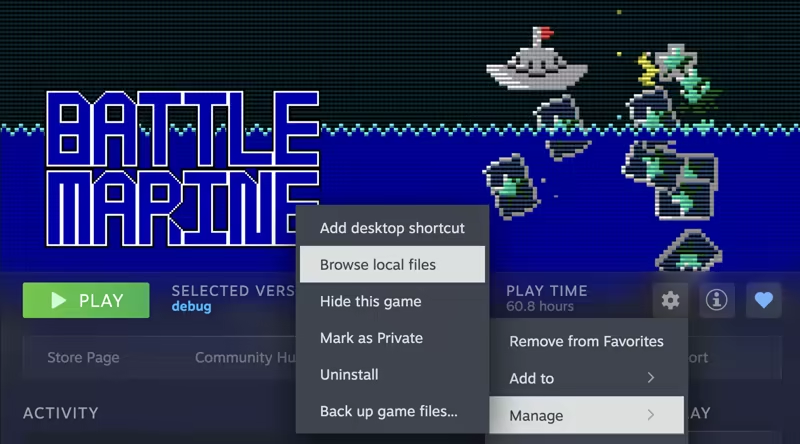
The config.json file is saved under the directory opened by opening the Battle Marine page in the Steam client and selecting "Settings Icon" > "Manage" > "Browse local files".

You can customize the following items:

  • graphic.isFullScreen: true = full screen, false = window mode

  • graphic.isScanline: true = with screen effects, false = without screen effects

  • gaphic.windowHeight: height of the screen in window mode

  • gaphic.windowWidth: width of the screen in window mode

  • sound.volumeBgm: Volume of background music (0-100)

  • sound.volumeSe: Volume of sound effect (0-100)

  • keyboard.a: Key code for A button (jump)

  • keyboard.b: key code for B button (fire)

  • keyboard.start: key code for START button (pause)

  • keyboard.select: key code for SELECT button (n/a)

  • keyboard.up: key code for up button

  • keyboard.down: key code for down button

  • keyboard.left: Key code for left button

  • keyboard.right: Key code for right button

  • keyboard.reset: Reset button key code

  • keyboard.quit: Key code for quit button

The keycode specifies the SDL keycode.

Detailed Gameplay

  • When you destroy an enemy, a green or yellow medal will appear.

  • Taking the green medal will restore your LIFE.

  • Your score will increase if you take a yellow medal.

  • If you keep defeating enemies within a certain time (120 frames), your combo will increase and medals will be collected automatically when you reach 100 HITs or more.

  • Medals are also automatically collected by jumping.

  • You are invincible during the laser (after the firing motion is complete).

  • Unlike normal STGs, explosions also have hit points.

  • If you keep collecting green medals while your LIFE is full, the yellow medal's base points will continue to increase.

  • The number of crowns at the bottom of the screen will increase for every 16 green medals you take while your LIFE is full.

  • The maximum number of crowns displayed is 30 (480 green medals), but the maximum number of crowns is 4,095 (65,535 green medals).

  • When you collide with enemy bullets, your LIFE will be reduced and the number of crowns will be strongly reduced.

  • With the exception of some enemies (crabs), yellow medals will appear when enemies are killed by lasers.

  • Obtaining a medal also resets the combo duration to 120 frames

About the GBA version

We are giving away a ROM file of the GBA version as a special offer for purchasing the game on Steam.

The GBA version ROM file can be found in the Steam client by clicking on the Battle Marine settings (gear icon) and selecting “Browse local files” under “Manage”.

The GBA version of the ROM can be played on mGBA or other emulators.

Video distribution, etc.

There are no restrictions on the distribution of this game on TV, YouTube, or other video distribution sites.

Of course, there are no restrictions on monetization.

There is no need to contact the author prior to or after the event.

Similarly, there are no restrictions on publishing screenshots in magazines, web media, social media, etc.

About VGS-Zero

This game is made with the SDK called VGS-Zero.

VGS-Zero is a virtual game machine with a fast 16MHz Z80 CPU, old-fashioned VDP (Video Display Processor) and VGS (chip-tuned sound system).

There may be many 8-bit style games, but the games made with VGS-Zero are real 8-bit games.

If you want to develop games like Battle Marine, please try to develop games with VGS-Zero.

Games you develop with VGS-Zero can be sold on Steam (Windows, Linux and macOS) using the VGS-Zero SDK for Steam.

Informace o obsahu vytvářeném AI

Jak využití obsahu vytvářeného AI v tomto produktu popisují jeho vývojáři:

The main capsule image that appears in the card when sharing Battle Marine's store page URL on social media such as Twitter is created using a generative AI.

Popis obsahu pro dospělé

Jak obsah tohoto produktu popisují jeho vývojáři:

The game contains depictions of violent shootings and explosions that may be reminiscent of war.

Systémové požadavky

Windows
macOS
SteamOS + Linux
    Minimální:
    • OS: Windows 10
    • Procesor: Intel Atom Processor x7 Z8700/1.6GHz
    • Paměť: 2 GB RAM
    • Grafická karta: Intel HD Graphics
    • DirectX: Verze 9.0c
    • Pevný disk: 20 MB volného místa
    Doporučené:
    • OS: Windows 11
    • Procesor: Core i5 1135G7(Tiger Lake)/2.4GHz/4 cores
    • Paměť: 4 GB RAM
    • Grafická karta: NVIDIA® RTX™ 2000 Ada Laptop GPU
    • DirectX: Verze 9.0c
    • Pevný disk: 20 MB volného místa
    Minimální:
    • Vyžaduje procesor Apple
    • OS: Tahoe 26.1
    • Procesor: Apple Silicon M1
    • Paměť: 8 GB RAM
    • Grafická karta: Apple Silicon M1
    Doporučené:
    • Vyžaduje procesor Apple
    • OS: Tahoe 26.1
    • Procesor: Apple Silicon M3
    • Paměť: 16 GB RAM
    • Grafická karta: Apple Silicon M3
    Minimální:
    • OS: Ubuntu 18.04 LTS
    • Procesor: Intel Core i5 1.3 GHz
    • Paměť: 4 GB RAM
    • Grafická karta: Intel HD Graphics 5000
    Doporučené:
    • OS: SteamOS latest version
    • Procesor: Zen 2 4c/8t, 2.4-3.5GHz
    • Paměť: 16 GB RAM
    • Grafická karta: 8 RDNA 2 CU, 1.6GHz (1.6 TFlops FP32)

Uživatelské recenze produktu Battle Marine Informace o recenzích Vaše předvolby

Všechny recenze:
9 uživatelských recenzí (9 recenzí)


Pro zobrazení recenzí z daného časového rozmezí ho tažením vyberte v grafu výše nebo přímo klikněte na určitý sloupec.


Recenze budou filtrovány dle odehraného času uživatelů v době jejich psaní.


Žádné minimumŽádné maximum

Recenze budou zobrazeny ve vybraném pořadí.


Více informací
Filtry
Nesouvisející recenze jsou vyloučeny
Odehraný čas:
Recenze primárně ze zařízení Steam Deck
Operační systém:
CPU:
GPU:
Typ zařízení:
Filtrům neodpovídají žádné další recenze
Abyste viděli všechny recenze, upravte filtry výše
Načítání recenzí...