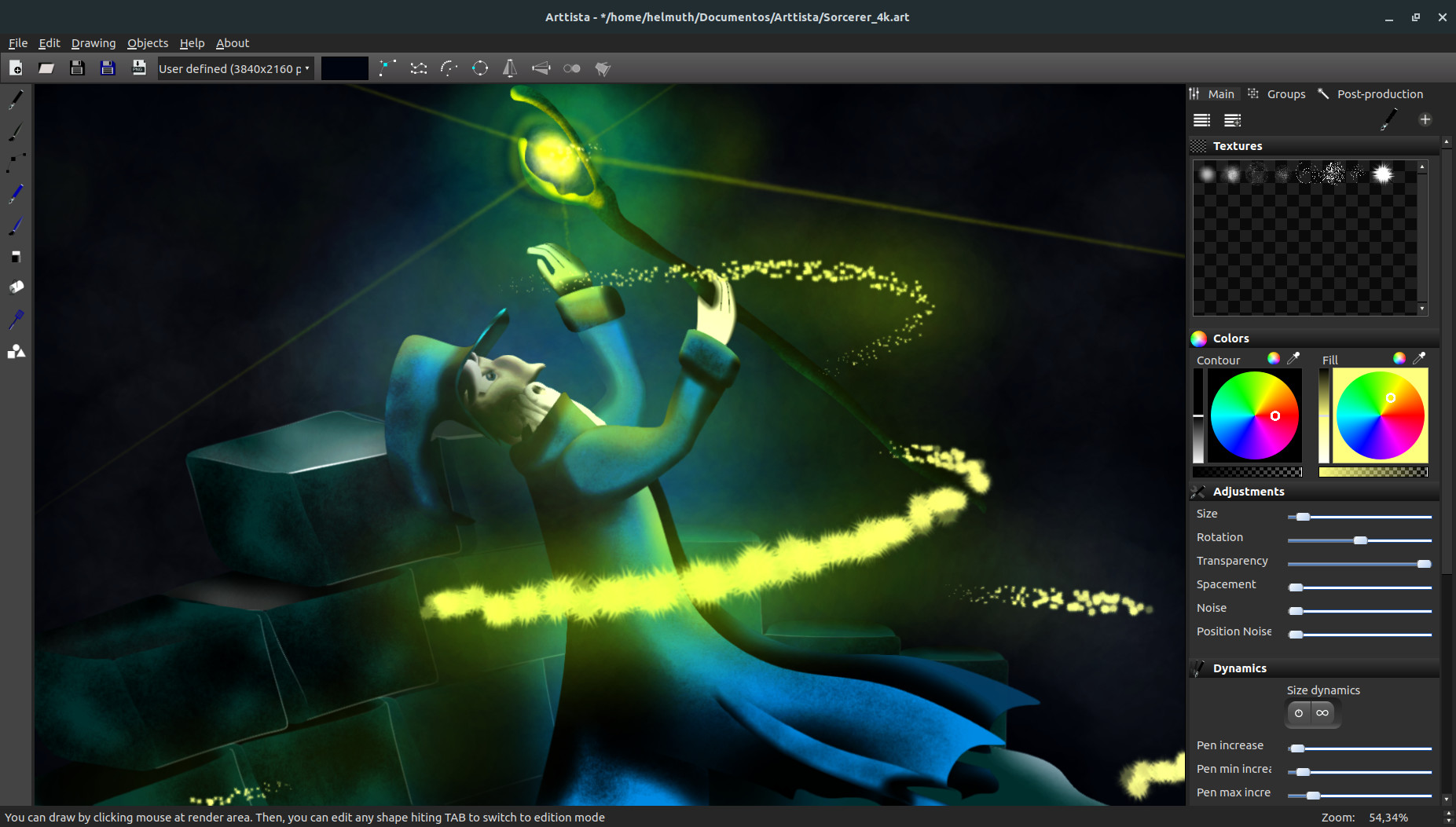
Create 2D animations and illustrations in a professional cartoon style, for films, motion graphics, and games. Light, fast, and no subscription.

Bu öğeyi istek listenize eklemek, takip etmek veya yok sayıldı olarak işaretlemek için giriş yapın

Türkçe desteklenmemektedir

Bu ürün sizin dilinizi desteklememektedir. Lütfen satın almadan önce aşağıdaki desteklenen diller listesini gözden geçirin.

Arttista Satın Alın


Bu Yazılım Hakkında

Create 2D Animations and Illustrations in Professional Cartoon or Game Style

Bring your creative vision to life with Arttista, a powerful vector drawing and animation application for Windows, macOS, and Linux. Designed for artists, animators, and game developers, Arttista combines the precision of vector graphics with the organic feel of hand-drawn art, letting you create expressive, professional-quality illustrations and animations with ease. Whether you’re producing cartoons, motion graphics, or game assets, Arttista delivers fluid, natural results while keeping every element fully editable.

Why Choose Arttista?

  • Hand-Drawn Look with Vector Control: Achieve organic, expressive strokes that feel like pencil or paint, but remain fully editable vectors.

  • Powerful Animation Tools: Animate using frame-by-frame, bone-based rigs, and inverse kinematics for smooth, natural motion.

  • Flexible Brushes and Pens: Create custom brushes and pens with textures, rotation, size, and alpha dynamics for unlimited creative possibilities.

  • Fast and Lightweight: Arttista is optimized for speed and responsiveness, even on complex projects.

  • Versatile Export Options: Export images (PNG, JPEG), animations (PNG sequences, AVI, MJPEG), and spritesheets for games.

  • Professional Use Across Media: Perfect for films, series, motion graphics, and games.

  • Purchase Once, Use Forever: No subscription required — own your tools completely.

Key Features

  • Brushes & Pens

  • Fully customizable with textures, rotation, and dynamic behavior

  • Paint freely or inside selected objects

  • Save brushes and pens to libraries for reuse across projects

Line Dynamics

  • Individual points can have unique size, color, and transparency

  • Flexible editing without splitting objects

Eraser

  • Behaves like a real eraser with textures and dynamics

  • Enables precise finishing while maintaining vector editability

Animation

  • Frame-by-frame and keyframe-based animation

  • Copy, move, and reverse animations easily

  • Keyframe interpolation with linear and easing options

Bones System & IK

  • Attach bones to characters or objects for hierarchical control

  • Share skeletons across characters for faster animation

  • Inverse kinematics for fluid, realistic movement

  • Efficient creation of cycles like walking and running

Shapes Library

  • Predefined shapes plus the ability to export your own drawings

  • Supports animated shapes for reuse in new projects

Professional Results, Fast Workflow

Arttista lets you draw like traditional media and edit like vector software, combining artistic freedom with technical control. You’ll spend less time wrestling with software and more time creating, producing results that look natural, lively, and polished, ready for professional projects or game development.

Continual Improvement

Arttista evolves with feedback from its users, adding new features and refining tools, making it a software that grows alongside your creativity. Your ideas can shape the future of Arttista, ensuring it remains a top tool for professional 2D animation and illustration.

Supported import Image files

  • JPEG

  • PNG

Supported export Image files

  • PNG

Supported export animation files

  • PNG SEQUENCE

  • AVI (Raw and MJPEG)

  • SpriteSheet for Games

Supported selection of content to export

  • All objects in the scene

  • Only Selected objects in the scene

Supported import vector files

  • ART (Arttista vector files)

  • SVG

Sistem Gereksinimleri

Windows
macOS
SteamOS + Linux
    Minimum:
    • 64-bit işlemci ve işletim sistemi gerektirir
    • İşletim Sistemi: Windows 10 or 11
    • İşlemci: I3 or higher
    • Bellek: 8 GB RAM
    • Ekran Kartı: NVIDIA GTX 745
    • Depolama: 200 MB kullanılabilir alan
    Önerilen:
    • 64-bit işlemci ve işletim sistemi gerektirir
    • İşletim Sistemi: Windows 10 or 11
    • İşlemci: i7
    • Bellek: 16 GB RAM
    • Ekran Kartı: NVIDIA 1030 or higher
    • Depolama: 200 MB kullanılabilir alan
    Minimum:
    • İşletim Sistemi: MacOS Catalina
    • İşlemci: Intel Core I5(or higher) or Apple M's Familly(via Rosetta)
    • Bellek: 4 GB RAM
    • Ekran Kartı: Intel HD Graphics 4000
    • Depolama: 200 MB kullanılabilir alan
    Önerilen:
    • İşletim Sistemi: MacOS Catalina
    • İşlemci: Intel Core I5(or higher) or Apple M's Familly(via Rosetta)
    • Bellek: 8 GB RAM
    • Ekran Kartı: Radeon Pro 5300
    • Depolama: 200 MB kullanılabilir alan
    Minimum:
    • İşletim Sistemi: Ubuntu 18.04
    • İşlemci: I3 or higher
    • Ekran Kartı: NVIDIA GTX 745
    • Depolama: 200 MB kullanılabilir alan
    Önerilen:
    • İşletim Sistemi: Ubuntu 18.04
    • İşlemci: i7
    • Ekran Kartı: NVIDIA 1030 or higher
    • Depolama: 200 MB kullanılabilir alan

Arttista için müşteri incelemeleri Kullanıcı incelemeleri hakkında Tercihleriniz

Toplam İnceleme:
4 kullanıcı incelemesi (4 inceleme)


Belirli bir tarih aralığındaki incelemeleri görebilmek için lütfen yukarıdaki grafikten istediğiniz tarih aralığını sürükleyerek seçin veya bir çubuğa tıklayın.


İncelemeleri, oyuncuların inceleme gönderdiği tarihteki oynama sürelerine göre filtrele:


Minimum yok - Maksimum yok

İncelemeleri seçili görüntüleme sırasına göre göster


Daha Fazlasını Öğrenin
Filtreler
Konu Dışı İnceleme Etkinliği Dahil Edilmiyor
Oynama Süresi:
Çoğunlukla Steam Deck'te Oynayanlar
İşletim Sistemi:
İşlemci:
Ekran Kartı:
Aygıt Türü:
Yukarıdaki seçili filtreler ile eşleşen başka inceleme bulunmuyor
Diğer incelemeleri görmek için yukarıdaki filtreyi ayarlayın
İncelemeler yükleniyor...