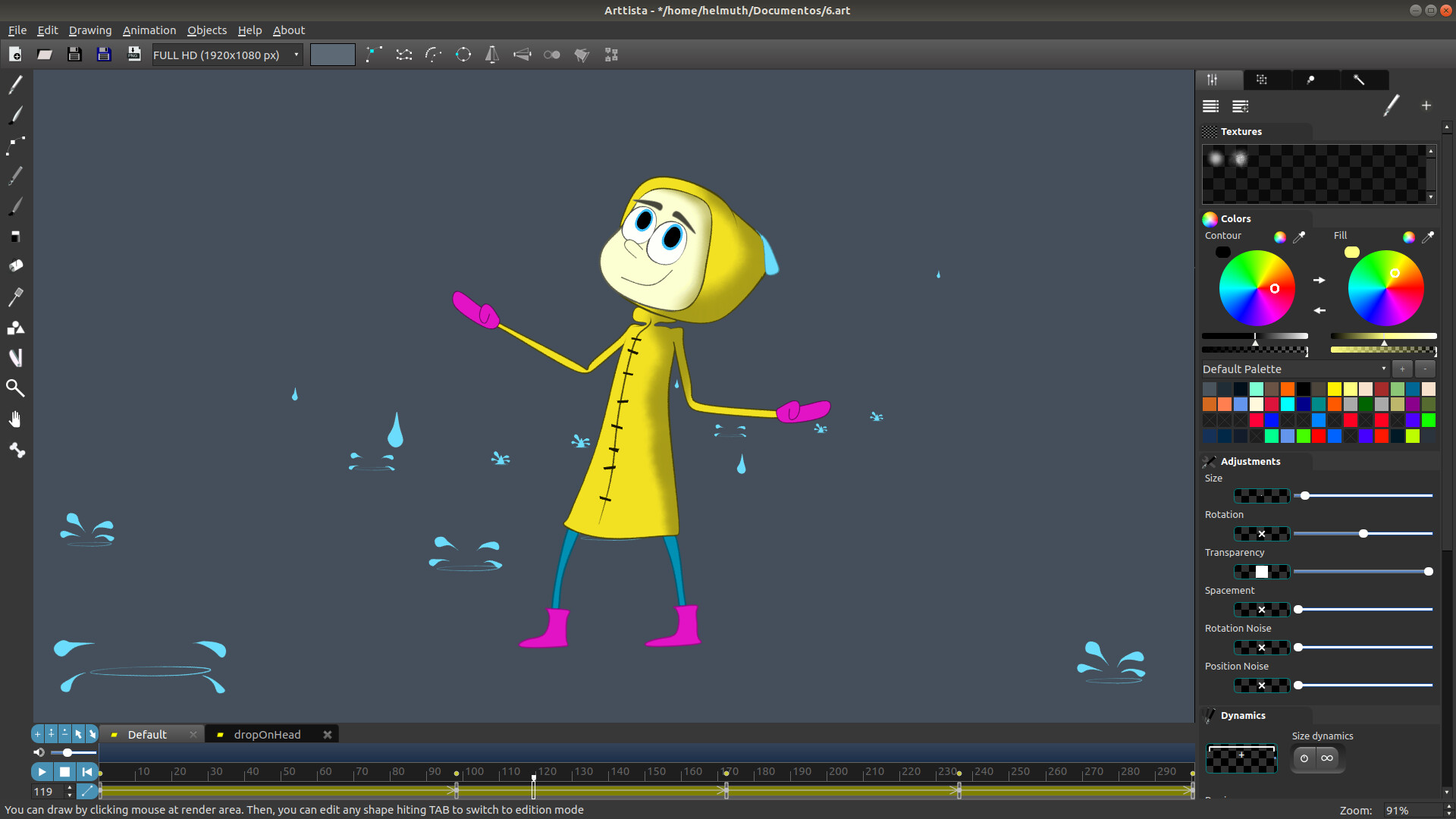
Create 2D animations and illustrations in a professional cartoon style, for films, motion graphics, and games. Light, fast, and no subscription.

Conectează-te pentru a adăuga acest articol în lista ta de dorințe, a-l urmări sau a-l marca drept ignorat.

Nu este disponibil în limba: Română

Acest produs nu este disponibil în limba ta locală. Te rugăm să consulți lista de mai jos cu limbile în care jocul este disponibil înainte de achiziționare

Cumpără Arttista


Despre acest Software

Create 2D Animations and Illustrations in Professional Cartoon or Game Style

Bring your creative vision to life with Arttista, a powerful vector drawing and animation application for Windows, macOS, and Linux. Designed for artists, animators, and game developers, Arttista combines the precision of vector graphics with the organic feel of hand-drawn art, letting you create expressive, professional-quality illustrations and animations with ease. Whether you’re producing cartoons, motion graphics, or game assets, Arttista delivers fluid, natural results while keeping every element fully editable.

Why Choose Arttista?

  • Hand-Drawn Look with Vector Control: Achieve organic, expressive strokes that feel like pencil or paint, but remain fully editable vectors.

  • Powerful Animation Tools: Animate using frame-by-frame, bone-based rigs, and inverse kinematics for smooth, natural motion.

  • Flexible Brushes and Pens: Create custom brushes and pens with textures, rotation, size, and alpha dynamics for unlimited creative possibilities.

  • Fast and Lightweight: Arttista is optimized for speed and responsiveness, even on complex projects.

  • Versatile Export Options: Export images (PNG, JPEG), animations (PNG sequences, AVI, MJPEG), and spritesheets for games.

  • Professional Use Across Media: Perfect for films, series, motion graphics, and games.

  • Purchase Once, Use Forever: No subscription required — own your tools completely.

Key Features

  • Brushes & Pens

  • Fully customizable with textures, rotation, and dynamic behavior

  • Paint freely or inside selected objects

  • Save brushes and pens to libraries for reuse across projects

Line Dynamics

  • Individual points can have unique size, color, and transparency

  • Flexible editing without splitting objects

Eraser

  • Behaves like a real eraser with textures and dynamics

  • Enables precise finishing while maintaining vector editability

Animation

  • Frame-by-frame and keyframe-based animation

  • Copy, move, and reverse animations easily

  • Keyframe interpolation with linear and easing options

Bones System & IK

  • Attach bones to characters or objects for hierarchical control

  • Share skeletons across characters for faster animation

  • Inverse kinematics for fluid, realistic movement

  • Efficient creation of cycles like walking and running

Shapes Library

  • Predefined shapes plus the ability to export your own drawings

  • Supports animated shapes for reuse in new projects

Professional Results, Fast Workflow

Arttista lets you draw like traditional media and edit like vector software, combining artistic freedom with technical control. You’ll spend less time wrestling with software and more time creating, producing results that look natural, lively, and polished, ready for professional projects or game development.

Continual Improvement

Arttista evolves with feedback from its users, adding new features and refining tools, making it a software that grows alongside your creativity. Your ideas can shape the future of Arttista, ensuring it remains a top tool for professional 2D animation and illustration.

Supported import Image files

  • JPEG

  • PNG

Supported export Image files

  • PNG

Supported export animation files

  • PNG SEQUENCE

  • AVI (Raw and MJPEG)

  • SpriteSheet for Games

Supported selection of content to export

  • All objects in the scene

  • Only Selected objects in the scene

Supported import vector files

  • ART (Arttista vector files)

  • SVG

Cerințe de sistem

Windows
macOS
SteamOS + Linux
    Minim:
    • Necesită un procesor și sistem de operare pe 64 de biți
    • SO: Windows 10 or 11
    • Procesor: i5 or higher
    • Memorie: 8 GB RAM
    • Grafică: NVIDIA GTX 745
    • Stocare: 1500 MB spațiu disponibil
    Recomandat:
    • Necesită un procesor și sistem de operare pe 64 de biți
    • SO: Windows 10 or 11
    • Procesor: i7
    • Memorie: 16 GB RAM
    • Grafică: NVIDIA 1030 or higher
    • Stocare: 1500 MB spațiu disponibil
    Minim:
    • SO: MacOS Catalina
    • Procesor: Intel Core I5(or higher) or Apple M's Familly(via Rosetta)
    • Memorie: 4 GB RAM
    • Grafică: Intel HD Graphics 4000
    • Stocare: 1500 MB spațiu disponibil
    Recomandat:
    • SO: MacOS Catalina
    • Procesor: Intel Core I5(or higher) or Apple M's Familly(via Rosetta)
    • Memorie: 8 GB RAM
    • Grafică: Radeon Pro 5300
    • Stocare: 1500 MB spațiu disponibil
    Minim:
    • SO: Ubuntu 22(or compatible)
    • Procesor: I3 or higher
    • Grafică: NVIDIA GTX 745
    • Stocare: 1500 MB spațiu disponibil
    Recomandat:
    • SO: Ubuntu 22(or compatible)
    • Procesor: i7
    • Grafică: NVIDIA 1030 or higher
    • Stocare: 1500 MB spațiu disponibil

Recenziile clienților pentru Arttista Despre recenziile utilizatorilor Preferințele tale

Recenzii generale:
4 recenzii ale utilizatorilor (4 recenzii)


Pentru a vedea recenziile dintr-un anumit interval calendaristic, te rugăm să faci clic și să tragi o selecție pe un grafic de mai sus sau apasă pe o bară specifică.


Filtrează recenziile în funcție de timpul petrecut de recenzor în joc până la momentul scrierii acestora:


Niciun minimNiciun maxim

Arată recenziile în ordinea de afișare selectată


Află mai multe
Filtre
Se exclude activitatea cu recenzii irelevante
Timp petrecut:
Jucat în principal pe Steam Deck
Sistem de operare:
Procesor:
Placă video:
Tipul dispozitivului: