登入以將此項目新增至您的願望清單、關注它,或標記為已忽略

不支援繁體中文

本產品尚不支援您的目前所在地的語言。購買前請先確認語言支援清單。

購買 FMVMachine


關於此軟體

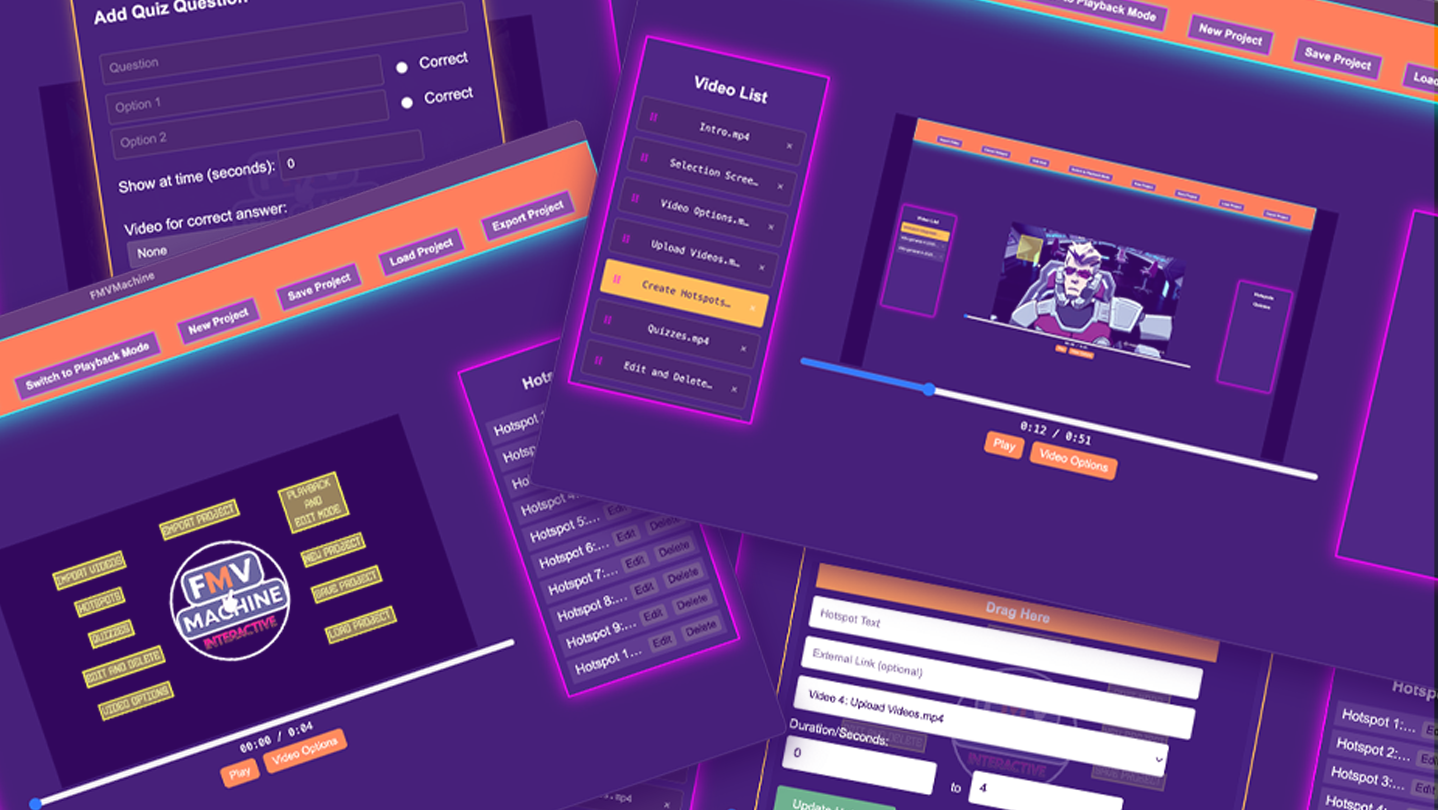
FMVMachine makes it easy to build branching narratives, pitches, and marketing videos with interactive hotspots, quizzes, and seamless video transitions. This no-code tool makes it easy to create and self-host your own interactive video and educational experiences.

All the projects you create are fully responsive across most resolution sizes and devices.

You own and control everything you create. Build locally and privately on your computer or laptop. No cloud servers or subscriptions. 

Use for any use case including commercial use.

The following are the key features of FMVMachine:

  • Import and work with multiple videos within the same project

  • Create, edit, and delete multiple responsive and interactive hotspots across multiple videos within the same project. When clicked, you can choose to display text, open a link, or link to and play another video from the imported videos. You can also choose the time interval of when the hotspot will be visible during the video playback.

  • Create, edit, or delete multiple responsive and interactive quizzes across multiple videos in your project. You can create a question along with multiple choice questions. You can also link to and play a video based on a right or wrong choice. You can even choose when during your video playback the quiz will appear.

  • You have an edit and playback mode that you can switch between. The edit mode is where you will edit, add, or delete from your existing project. The playback mode allows you to test everything that you've created.

  • The video options allow you to either loop the current video at the end of playback or play another video.

  • You can save your project, including all videos and options, into a simple .proj file that you can open across any device using FMVMachine. Keep in mind that your saved project file will be as large as the video files you use.

  • The new project button allows you to erase everything and start with a blank slate.

  • You can load ANY FMVMachine .proj save file into FMVMachine using the load project button.

  • The export button exports your project. When exported, everything required for your project to be distributed online will be pre-created and pre-packaged into a zip file. Simply unzip the file and inside the folder you will find everything already structured and ready to go. You can send the zip file to share with friends, family, or clients. You can also upload the entire folder to your own web host or wherever you choose to share online that hosts HTML.

AI 生成內容聲明

開發者針對他們的遊戲使用 AI 生成內容方式的說明如下:

The sample videos you see loaded in the app for the purposes of creating screenshots, a trailer, and a tutorial were generated with Ai.

系統需求

Windows
macOS
    最低配備:
    • 作業系統: Windows 10/11
    • 處理器: Intel Core i3-3220 or AMD FX-4300
    • 記憶體: 4 GB 記憶體
    • 顯示卡: Intel HD Graphics 4000 or NVIDIA GeForce GT 730 or AMD Radeon R5 240
    • DirectX: 版本:11
    • 儲存空間: 2 GB 可用空間
    建議配備:
    • DirectX: 版本:11
    最低配備:
    • 作業系統: macOS 11 or later
    • 處理器: Intel Core i3-3220 or Apple M1
    • 記憶體: 4 GB 記憶體
    • 顯示卡: Intel HD Graphics 4000
    • 儲存空間: 2 GB 可用空間

FMVMachine 的顧客評論 關於使用者評論 您的偏好設定

整體評論:
1 篇使用者評論 (1 篇評論)


如欲檢視特定日期範圍內的評論,請在上方圖表框選一段日期範圍,或點擊直條。


依照使用者撰寫評論當時的遊戲時數篩選:


不限最低時數不限最高時數

以所選顯示順序顯示評論


進一步了解
篩選條件
排除離題評論活動
遊戲時數:
主要在 Steam Deck 上遊玩
作業系統:
CPU:
GPU:
裝置類型:
無其它評論符合上述篩選條件
調整上方的篩選條件以檢視其它評論
評論讀取中…