로그인하셔서 게임을 찜 목록에 추가하거나, 팔로우하거나 또는 제외로 지정하세요.

한국어(을)를 지원하지 않습니다

이 제품은 귀하의 로컬 언어를 지원하지 않습니다. 구매하기 전에 아래에 있는 지원하는 언어 목록을 확인해주세요.

FMVMachine 구매


소프트웨어 정보

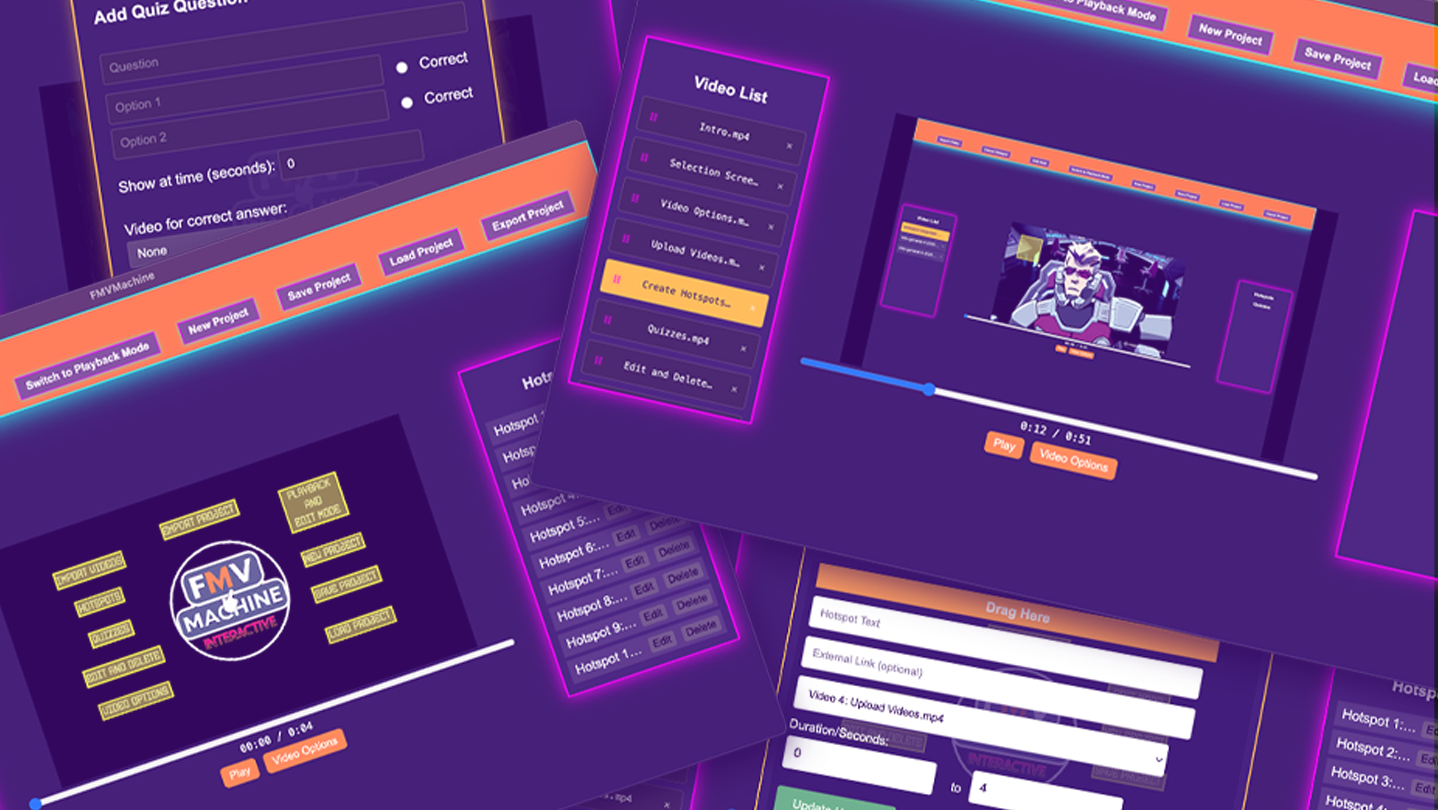
FMVMachine makes it easy to build branching narratives, pitches, and marketing videos with interactive hotspots, quizzes, and seamless video transitions. This no-code tool makes it easy to create and self-host your own interactive video and educational experiences.

All the projects you create are fully responsive across most resolution sizes and devices.

You own and control everything you create. Build locally and privately on your computer or laptop. No cloud servers or subscriptions. 

Use for any use case including commercial use.

The following are the key features of FMVMachine:

  • Import and work with multiple videos within the same project

  • Create, edit, and delete multiple responsive and interactive hotspots across multiple videos within the same project. When clicked, you can choose to display text, open a link, or link to and play another video from the imported videos. You can also choose the time interval of when the hotspot will be visible during the video playback.

  • Create, edit, or delete multiple responsive and interactive quizzes across multiple videos in your project. You can create a question along with multiple choice questions. You can also link to and play a video based on a right or wrong choice. You can even choose when during your video playback the quiz will appear.

  • You have an edit and playback mode that you can switch between. The edit mode is where you will edit, add, or delete from your existing project. The playback mode allows you to test everything that you've created.

  • The video options allow you to either loop the current video at the end of playback or play another video.

  • You can save your project, including all videos and options, into a simple .proj file that you can open across any device using FMVMachine. Keep in mind that your saved project file will be as large as the video files you use.

  • The new project button allows you to erase everything and start with a blank slate.

  • You can load ANY FMVMachine .proj save file into FMVMachine using the load project button.

  • The export button exports your project. When exported, everything required for your project to be distributed online will be pre-created and pre-packaged into a zip file. Simply unzip the file and inside the folder you will find everything already structured and ready to go. You can send the zip file to share with friends, family, or clients. You can also upload the entire folder to your own web host or wherever you choose to share online that hosts HTML.

AI 생성 콘텐츠 사용 공개

개발사는 게임에서 AI 생성 콘텐츠를 사용하는 방법을 다음과 같이 설명합니다.

The sample videos you see loaded in the app for the purposes of creating screenshots, a trailer, and a tutorial were generated with Ai.

시스템 요구 사항

Windows
macOS
    최소:
    • 운영 체제: Windows 10/11
    • 프로세서: Intel Core i3-3220 or AMD FX-4300
    • 메모리: 4 GB RAM
    • 그래픽: Intel HD Graphics 4000 or NVIDIA GeForce GT 730 or AMD Radeon R5 240
    • DirectX: 버전 11
    • 저장 공간: 2 GB 사용 가능 공간
    권장:
    • DirectX: 버전 11
    최소:
    • 운영 체제: macOS 11 or later
    • 프로세서: Intel Core i3-3220 or Apple M1
    • 메모리: 4 GB RAM
    • 그래픽: Intel HD Graphics 4000
    • 저장 공간: 2 GB 사용 가능 공간

FMVMachine에 대한 사용자 평가 사용자 평가 정보 환경 설정

종합 평가:
사용자 평가 1개 (평가 1개)


특정 날짜 범위에 속하는 평가를 보려면, 위의 그래프에서 선택 항목을 클릭한 후 드래그하거나 원하는 바를 클릭하세요.


평가를 작성한 시점의 사용자 플레이 시간을 기준으로 평가를 필터링:


최소 시간 없음 ~ 최대 시간 없음

선택한 표시 순서로 평가 보기


자세한 정보
필터
게임과 관련없는 평가 활동 제외
플레이 시간:
주로 Steam Deck에서 플레이
운영 체제:
CPU:
GPU:
기기 유형:
위에서 설정한 필터 조건에 맞는 평가가 없습니다
다른 평가를 보려면 위에서 필터를 조정해주세요
평가 불러오는 중...