Prevent OLED burn-in with adaptive overlays that track static pixels in real time. Works in borderless fullscreen games, multi-monitor setups, and lets you create custom protection presets for work, gaming, or media.
Tags

Sign in to add this item to your wishlist, follow it, or mark it as ignored

Early Access Software

Get involved with this software as it develops.

Note: This Early Access software is not complete and may or may not change further. If you are not excited to use this software in its current state, then you should wait to see if it progresses further in development. Learn more

What the developers have to say:

Why Early Access?

“OLED Guard Pro is a highly technical application that interacts with many different hardware configurations, monitors, GPU drivers, and software environments.

While the core protection system is already fully functional, releasing in Early Access allows us to test the software across a wider range of real-world setups and gather feedback from users with different OLED monitors, multi-monitor configurations, and gaming workflows.

Community feedback will help us improve compatibility, refine protection algorithms, expand customization options, and ensure the app works reliably across a wide variety of systems.”

Approximately how long will this software be in Early Access?

“We expect OLED Guard Pro to remain in Early Access for approximately 6 months, though the exact timeline may change depending on development progress and user feedback.”

How is the full version planned to differ from the Early Access version?

“The Early Access version already contains the complete core protection system, including real-time burn-in analysis, adaptive overlays, multi-monitor support, and app profiles.

During Early Access we plan to continue improving the application by expanding features and polishing existing systems. Areas we may focus on include:

• additional overlay protection modes
• expanded monitor control capabilities
• more advanced statistics and analytics
• improved visualization and debugging tools
• additional customization options and presets
• broader monitor compatibility and stability improvements
• overall UI polish and usability improvements

The goal is to evolve OLED Guard Pro into the most advanced and reliable OLED protection tool available for PC users.”

What is the current state of the Early Access version?

“The Early Access version already includes the core functionality of OLED Guard Pro and is fully usable for daily protection.

Current features include:

• real-time OLED burn-in detection and protection
• adaptive protection overlays
• multi-monitor support
• edge vignette protection
• application-based profiles
• customizable protection presets
• live statistics and monitoring
• monitor control via DDC/CI
• debug visualizations and heatmaps
• system tray integration and global hotkeys

The software is stable and functional, but Early Access allows us to continue refining performance, compatibility, and usability with the help of community feedback.”

Will this software be priced differently during and after Early Access?

“We plan to offer the application at a discounted price during Early Access as a thank-you to early supporters.

As development progresses and new features are added, the price may increase closer to full release.

Early Access supporters will receive the full version and all future updates included with their purchase.”

How are you planning on involving the Community in your development process?

“Community feedback will play an important role during Early Access.

We plan to gather feedback from users regarding:

• hardware compatibility with different OLED monitors
• usability improvements and workflow suggestions
• feature requests and customization ideas
• performance tuning across different systems

Players will be able to share feedback through the Steam Community hub, discussions, and bug reports.

This feedback will help guide development priorities and ensure OLED Guard Pro evolves into a tool that meets the needs of real users with real OLED setups.”
Read more

Buy OLED Guard Pro

 
See all discussions

Report bugs and leave feedback for this software on the discussion boards

About This Software

Protect the pixels that stay still

Adaptive OLED protection for work, gaming, and multi-monitor PCs.

Taskbars, browser controls, editing panels, dashboards, and game HUDs can remain unchanged for hours, causing some OLED pixels to age faster than others.

OLED Guard Pro analyzes brightness, motion, stability, and exposure over time. As risk builds, it gradually
dims the affected areas. When the content changes, visible protection releases promptly instead of lingering over the
new scene.

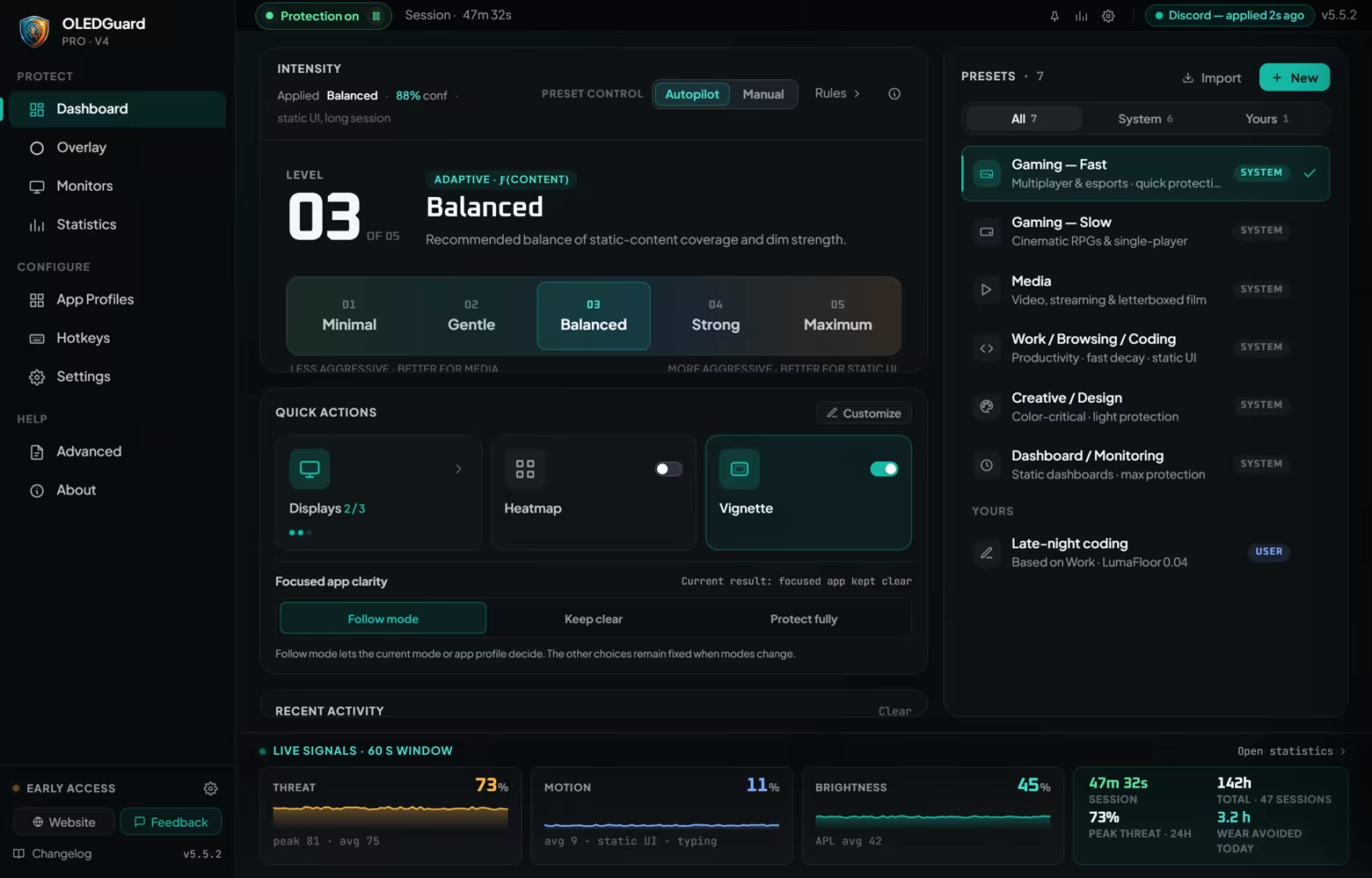
Use one simple Intensity control and let Autopilot handle the rest, or open the advanced controls and tune the
engine yourself.

Protection that adapts — and lets go

OLED Guard separates how quickly protection builds from how quickly obsolete protection disappears.

  • Relaxed waits for content to remain static for a long time.

  • Balanced provides natural timing for everyday work and slower games.

  • Responsive protects persistent elements faster.

  • Auto selects a tier from the current activity and tells you what it chose and why.

Changing Responsiveness does not make old protection remain on changed content. Every tier is designed to release
promptly when the protected shape is no longer present.

Built for borderless fullscreen gaming

OLED Guard Pro continues operating over windowed and borderless fullscreen games without injecting code into the
game or modifying its rendering engine.

Game IQ (Beta) learns where each game places persistent HUD elements such as health bars, minimaps, scores,
and ability icons.

  • HUD layouts are learned separately for each game.

  • Recognized HUDs remain protected during controller play, spectating, pauses, and hands-off moments.

  • The current screen is checked before remembered protection is displayed, so an old score, message, or HUD shape does not remain over a menu, replay, or replacement scene.

  • Learning and saved HUD regions remain local to your PC.

Choose Gaming — Fast for multiplayer and esports, or Gaming — Slow for RPGs, strategy games, and
longer cinematic sessions. Autopilot can choose automatically.

Compatibility note: Windowed and borderless fullscreen games are supported. A true legacy exclusive-fullscreen game cannot display a Windows overlay; OLED Guard detects that state, pauses presentation, and resumes when the game returns to a composited mode.

Six presets for different kinds of content

  • Gaming — Fast

  • Gaming — Slow

  • Media

  • Work / Browsing / Coding

  • Creative / Design

  • Dashboard / Monitoring

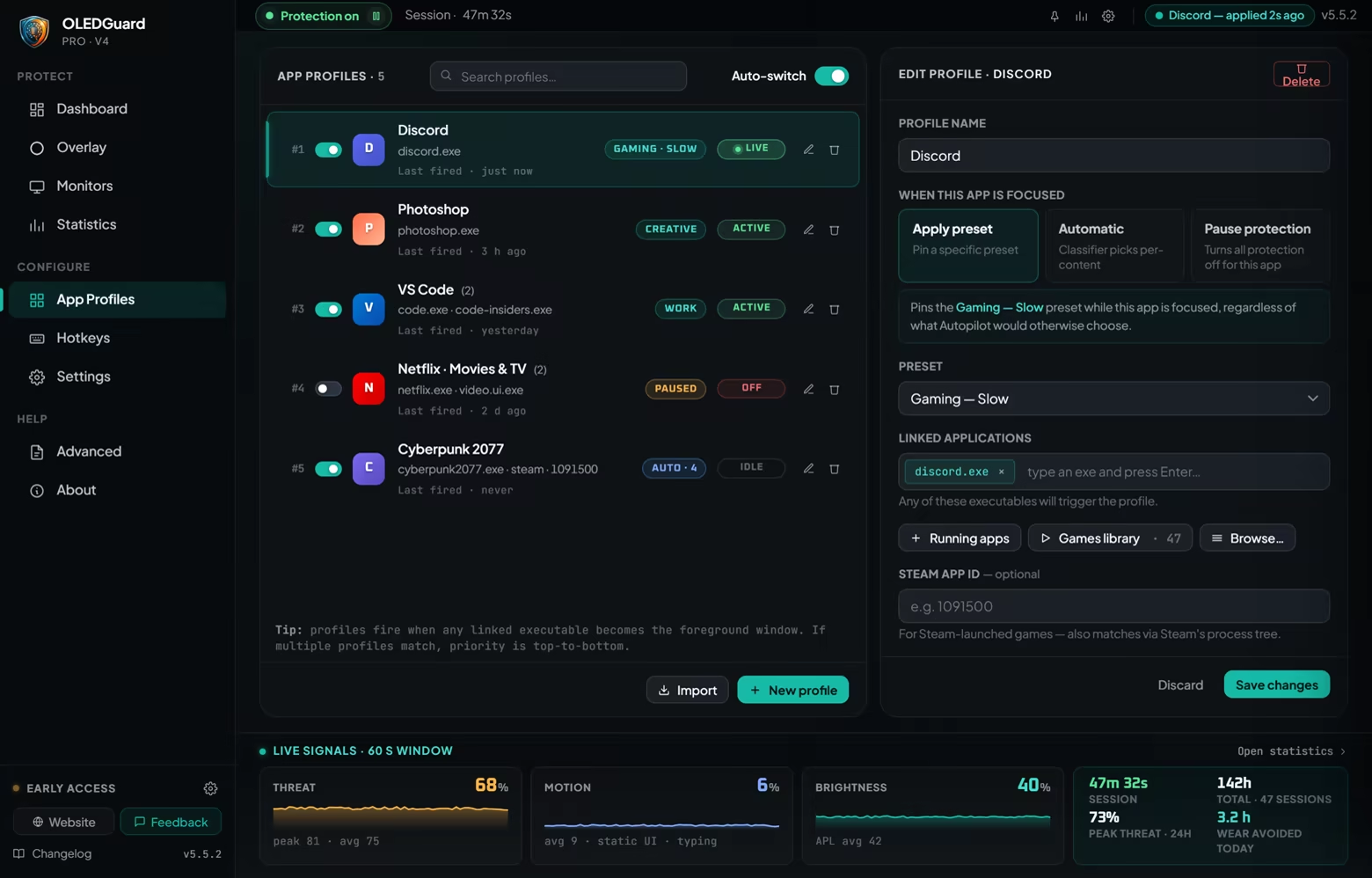
App Profiles can automatically activate a preset and optional Intensity override whenever a selected application
becomes active. Pick an installed Steam game, a running application, or any executable on your PC.

Focused-app behavior is one clear choice: let protection Follow mode, Keep the focused app clear, or Protect it fully.

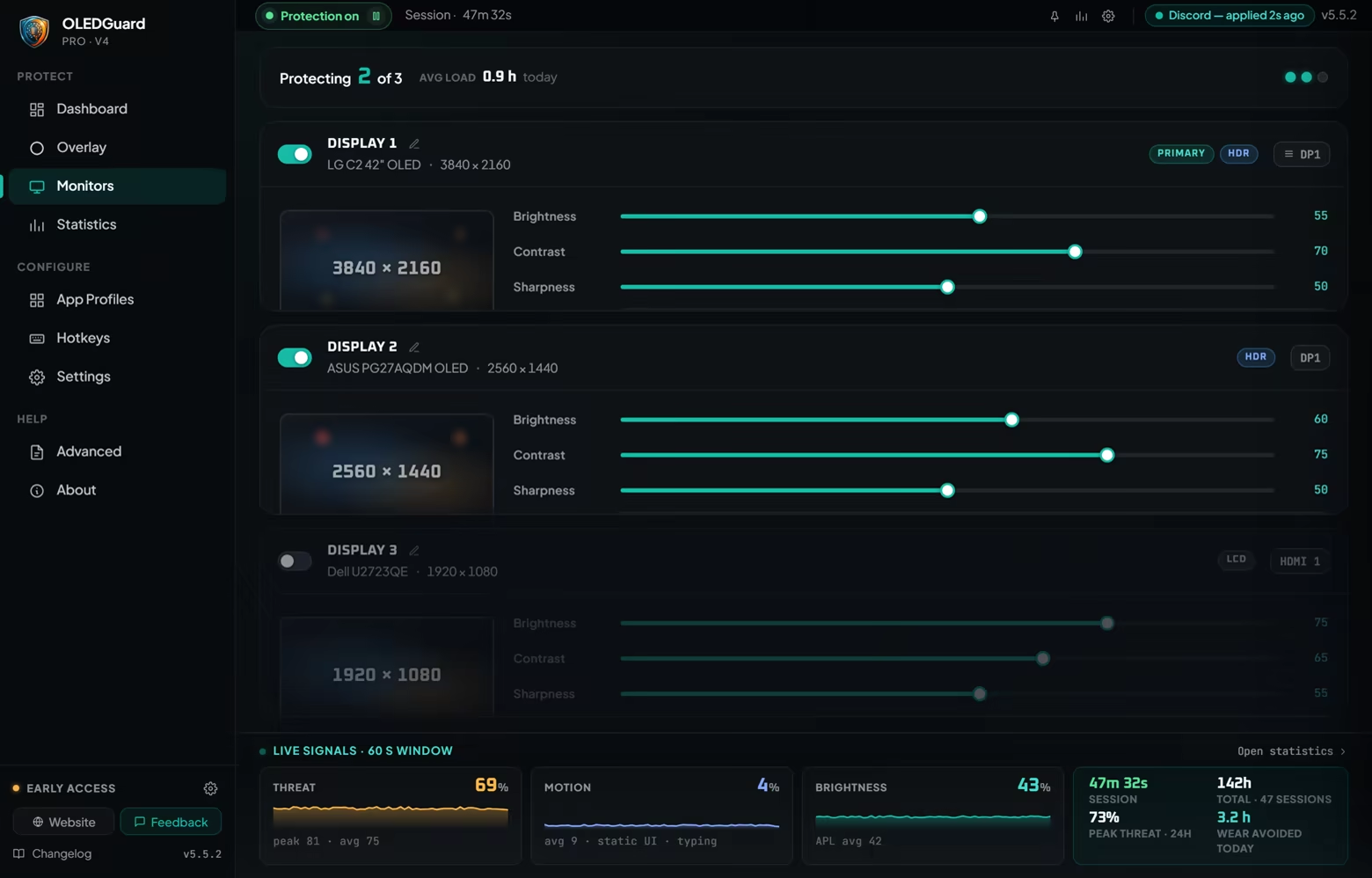
Independent multi-monitor protection

Every connected display receives its own capture, exposure history, and protection state. You can enable or disable
protection separately for each monitor without disturbing the others.

OLED Guard supports modern desktop configurations including HDR, high-refresh displays, G-Sync and FreeSync, mixed-DPI layouts, docking, and monitor hot-plugging.

Away Mode goes further while you are gone

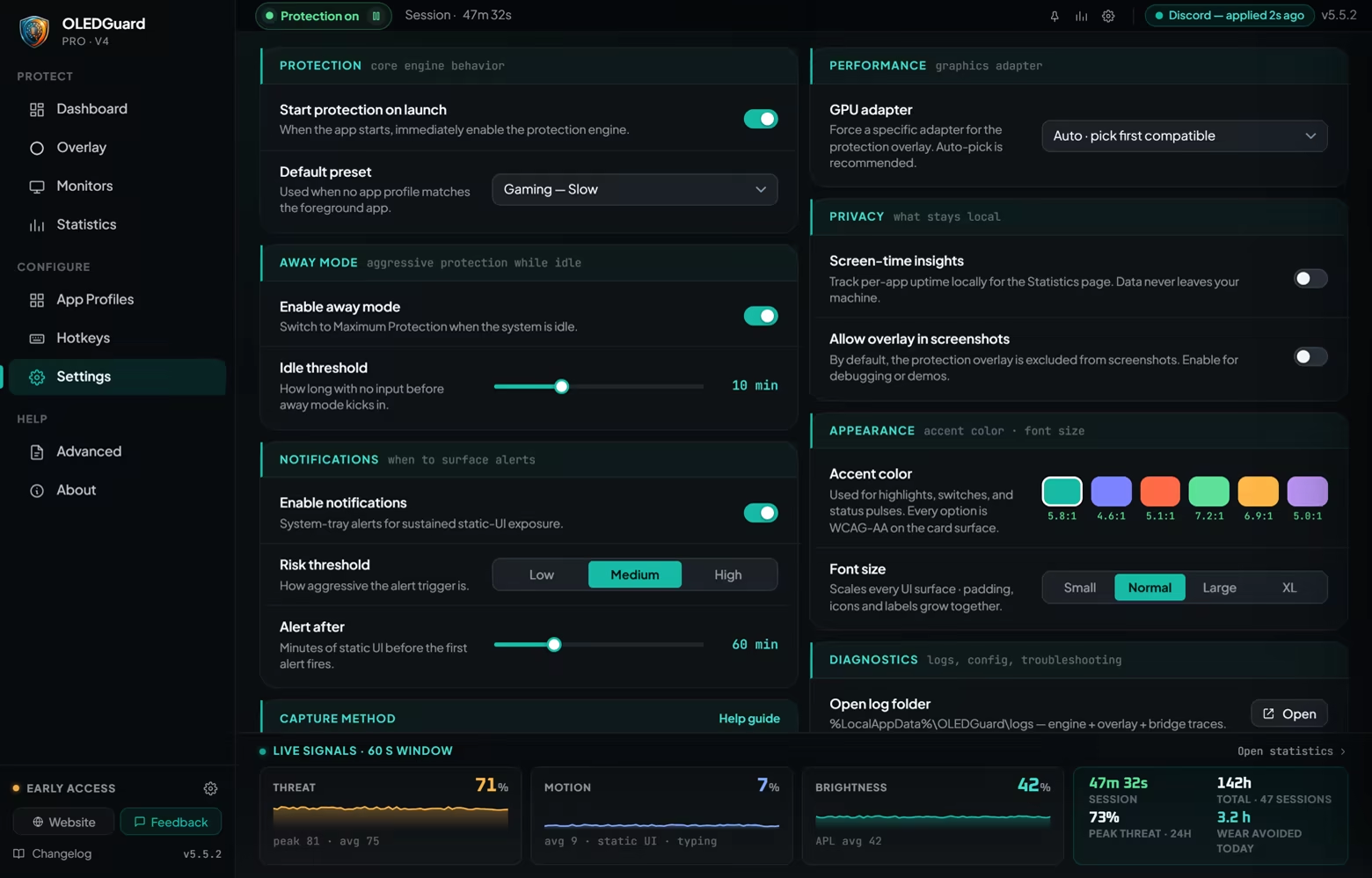
After a configurable idle period, Away Mode applies a deep, uniform overlay dim.

If a monitor supports DDC/CI brightness control, OLED Guard can also lower its hardware brightness to 20% of that
monitor’s range. It never raises a display that is already dimmer, and restores each monitor’s exact previous value
when you return or quit.

Restore information is saved before brightness changes, allowing OLED Guard to recover the original level after an
interrupted session or restart.

Choose how protection looks

  • Fine Grain adds a subtle moving texture that helps soften visible banding.

  • Smooth provides clean, even dimming without a visible texture.

  • Seven dark tint choices let you match the appearance to your display.

  • Optional per-side vignette controls provide additional protection around screen edges.

  • Dark Mode offers a predictable, uniform full-screen dim whenever you want it.

See what the engine is doing

The dashboard explains its decisions through live brightness, motion, threat, capture-health, and coverage signals.

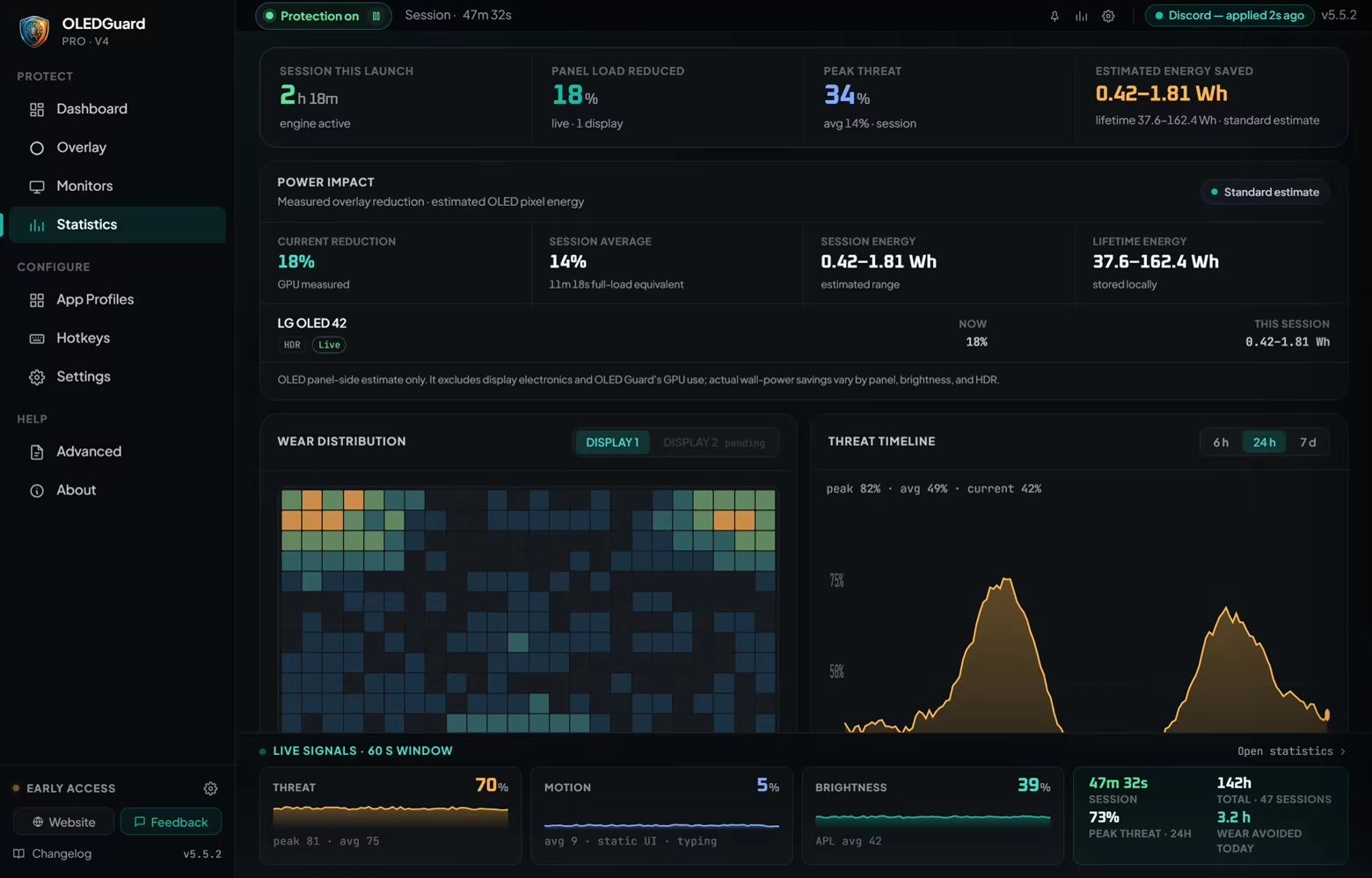
Statistics include:

  • Current and average panel-load reduction

  • Session and lifetime protection history

  • Threat timelines and wear distribution

  • Estimated OLED pixel-energy savings

  • OLED Guard’s own live CPU, GPU, and memory use

Local and private by design

Screen analysis runs locally through a GPU-accelerated pipeline. Captured frames remain on your computer and are
not uploaded to a cloud analysis service.

Game IQ’s learned HUD information is also stored locally. Visualization tools are available when you want to
inspect where protection is being applied and why.

Key features

  • Adaptive per-pixel OLED protection

  • Prompt release when screen content changes

  • Game IQ with local per-game HUD learning

  • Windowed and borderless fullscreen gaming support

  • Autopilot with visible decisions and explanations

  • Six purpose-built presets and custom presets

  • Application-specific profiles

  • Independent multi-monitor pipelines

  • HDR and variable-refresh display support

  • Away Mode with optional DDC/CI brightness reduction

  • Fine Grain and Smooth overlay finishes

  • Vignette and uniform Dark Mode

  • Live protection, resource-use, and power-impact statistics

  • Configurable global hotkeys and system-tray operation

Important to know

  • OLED Guard is preventative software intended to help reduce uneven OLED wear. It cannot repair burn-in that already exists, and no software can guarantee that burn-in will never occur.

  • DDC/CI features depend on the monitor, connection type, firmware, and whether DDC/CI is enabled in the monitor’s settings.

Protect your OLED while you work, create, watch, and play.

System Requirements

    Minimum:
    • Requires a 64-bit processor and operating system
    • OS: 10
    • Processor: dual core x64
    • Memory: 2 GB RAM
    • DirectX: Version 11
    • Storage: 50 MB available space
    Recommended:
    • Requires a 64-bit processor and operating system
    • OS: 11
    • Processor: quad core x64
    • Memory: 4 GB RAM
    • DirectX: Version 12
    • Storage: 300 MB available space
Review Filters