Zaloguj się, aby dodać tę pozycję do listy życzeń, zacząć ją obserwować lub oznaczyć jako ignorowaną

Polski język nie jest obsługiwany

Ten produkt nie obsługuje twojego lokalnego języka. Przed zakupem zapoznaj się z listą obsługiwanych języków, która znajduje się poniżej.

Obsługa VR

Użyj Belle II in Virtual Reality

Bezpłatne
 

O tym programie

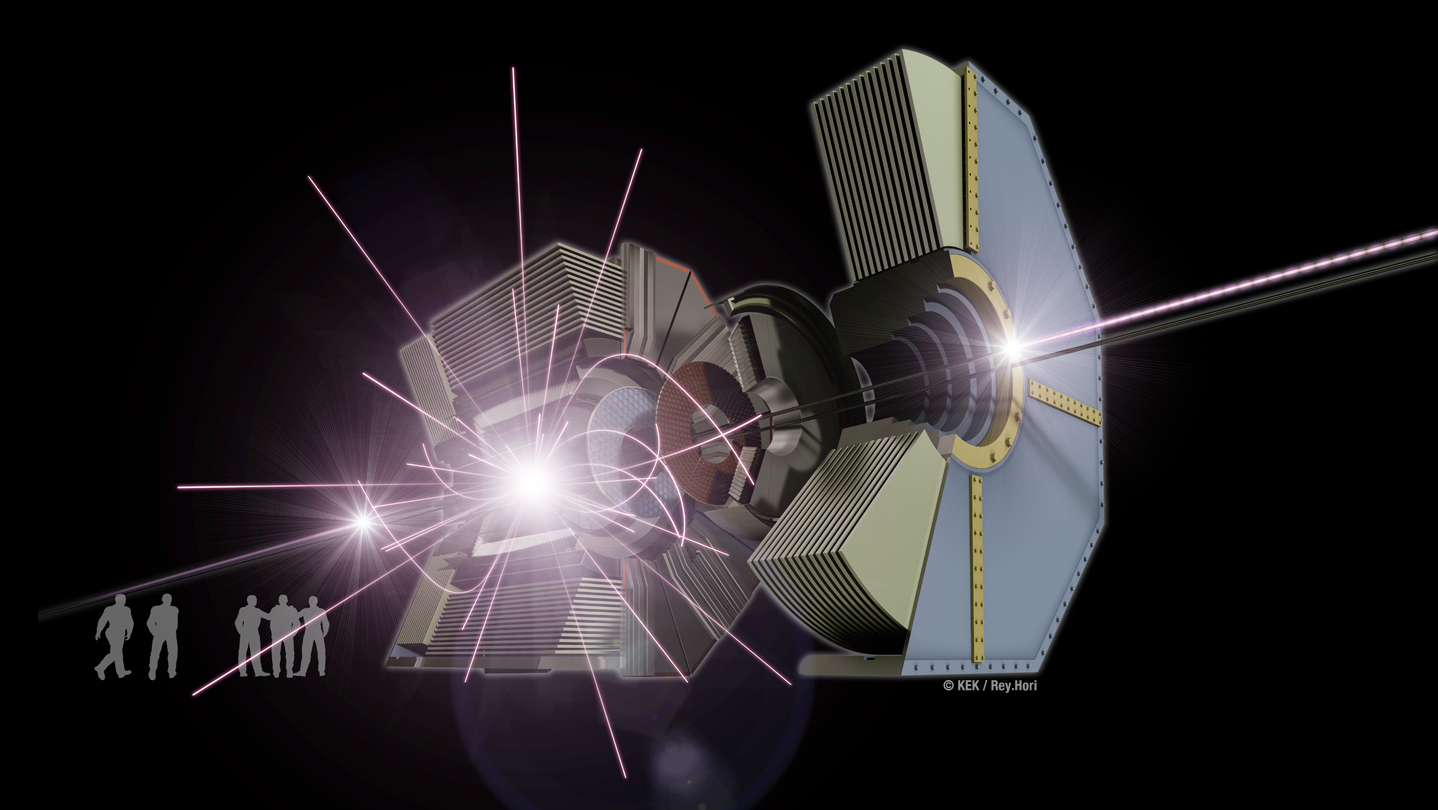
This virtual reality model of the Belle II experiment at the KEK laboratory in Japan shows the marvels of the subatomic world, where matter and antimatter collide at nearly the speed of light, converting energy to matter and back again according to Einstein’s famous formula E = m c squared, all in the blink of an eye. Watch and control the simulation of each collision event in which an electron and its antimatter counterpart collide and morph into other forms of subatomic matter that move through the Belle II apparatus.

There are three variants of the Windows app: for the Oculus Rift, the HTC Vive, and the computer screen. The Mac OSX and Linux apps display on the computer screen.

Please see pages 1-4 of the quick-reference guide for the hand-controller joystick and button mappings for your controller (Xbox controller, Oculus Touch, or Vive) or for your computer's keyboard/mouse.

When you start the app, you see the true-scale Belle II apparatus (relocated from Japan into the CUBE at Virginia Tech). The exterior container fades away, exposing the active detector elements inside. The first electron-positron-collision event is loaded and then animated for its 100-nanosecond duration, showing the detailed trajectories of the incoming particles along the two beam lines and of the by-products from the collision of one electron with one positron. At the end of this collision history, the particle sprites and trails are erased so that you see only the hits recorded by the active detector elements in the "snapshot" of the collision event. Beam-line particle bunches pass through each other every 4 nanoseconds but only a few of these bunch crossings result in a collision; the colliding particles are highlighted in the animation. The beam-line particle bunches circulate in the vacuum beam lines of the 3-kilometer-circumference SuperKEKB accelerator; only the short section nearest the Belle II apparatus is shown in this app.

With your controllers, you may move horizontally and vertically to enter the detector's interior and rotate your viewpoint. By turning your head, you may view the detector and the collision by-products from different orientations. You may rewind and fast-forward through the history timeline of each collision event, pause/resume, and slow down or speed up the animation rate. You may zoom in or out with your controllers if you enable this feature in the in-game menu (guide page 6).

Gazing at one of the particle sprites, you may select it to expose a panel of detailed information about the particle (guide page 5). Check the SAVE box to copy this information to the virtual panel on one wall. Gazing at the rows on this wall, you may select among them to display the sum of the kinematic quantities in the bottom row. Check the FOCUS box on the sprite's info panel to highlight only the generational chain of daughters from this parent, temporarily hiding all other particle sprites and trajectories. In this state, bring up a similar information panel to UNFOCUS the generational chain and re-display all of the sprites and trajectories.

With your controllers, toggle the display of the in-game menu or reposition it in front of you. Choose among three sub-menus (guide page 6) to control aspects of the event animation. The event-history timeline is always visible at the bottom of the menu: with your gaze and selection, you may scrub through this timeline and change the animation rate. In the TRANSFORM sub-menu, you may reposition yourself and scale the size of the detector (nominally at the true scale of 1:1); you may also enable the use of the controller hot-keys for menu-free zooming. In the DETECTOR sub-menu, you may change the visibility of parts of the Belle II apparatus (the active parts record the event snapshots, the passive parts provide the supporting structure). In the PARTICLES sub-menu, you control the visibility of some or all of the particle sprites and the sprite size; gazing at the entries in the event list, you may select among the available collision events (guide page 7). You may edit the event sequence or add new event histories by following the instructions on guide page 8.

Enjoy your explorations of the subatomic world with the Belle II detector!

Wymagania systemowe

Windows
macOS
SteamOS + Linux
    Konfiguracja minimalna:
    • Wymaga 64-bitowego procesora i systemu operacyjnego
    • System operacyjny: 10
    • Procesor: Intel or AMD
    • Pamięć: 8000 MB RAM
    • Karta graficzna: GPU
    • DirectX: Wersja 10
    • Miejsce na dysku: 1000 MB dostępnej przestrzeni
    • Karta dźwiękowa: any
    • Obsługa VR: SteamVR or Oculus PC
    • Dodatkowe uwagi: VR-ready but will display on screen without VR equipment
    Konfiguracja zalecana:
    • Wymaga 64-bitowego procesora i systemu operacyjnego
    • System operacyjny: 10
    • Procesor: Intel Core i7
    • Pamięć: 16000 MB RAM
    • Karta graficzna: GeForce GTX 1060 6GB
    • DirectX: Wersja 10
    • Miejsce na dysku: 1000 MB dostępnej przestrzeni
    • Dodatkowe uwagi: HDMI port, 2 USB-3 ports, VR gear (Oculus Rift or HTC Vive)
    Konfiguracja minimalna:
    • System operacyjny: 10
    • Procesor: Intel
    • Pamięć: 8000 MB RAM
    • Karta graficzna: GPU
    • Miejsce na dysku: 1000 MB dostępnej przestrzeni
    • Karta dźwiękowa: any
    • Dodatkowe uwagi: VR-ready (HTC Vive; requires SteamVR BETA opt-in) but will display on screen without VR equipment
    Konfiguracja zalecana:
    • System operacyjny: 10.13
    • Procesor: Intel Core i7
    • Pamięć: 16000 MB RAM
    • Karta graficzna: Radeon Pro 500 series
    • Miejsce na dysku: 1000 MB dostępnej przestrzeni
    • Dodatkowe uwagi: For VR, you must opt in to the SteamVR BETA.
    Konfiguracja minimalna:
    • System operacyjny: Ubuntu 14.04.5
    • Procesor: Intel core i7
    • Pamięć: 8000 MB RAM
    • Karta graficzna: GPU
    • Miejsce na dysku: 1000 MB dostępnej przestrzeni
    • Karta dźwiękowa: any
    • Dodatkowe uwagi: Displays on screen (no VR)
    Konfiguracja zalecana:
    • Pamięć: 16000 MB RAM
    • Karta graficzna: GeForce GTX
    • Miejsce na dysku: 1000 MB dostępnej przestrzeni

Recenzje klientów dla produktu Belle II in Virtual Reality O recenzjach użytkowników Twoje preferencje

Ogólne recenzje:
Pozytywne (13)


Aby zobaczyć recenzje w wybranym zakresie dat, kliknij i przeciągnij zaznaczenie na powyższym wykresie lub kliknij na wybrany słupek.


Filtruj recenzje według czasu gry użytkownika w momencie publikacji recenzji:


Bez minimum do Bez maksimum

Pokaż recenzje w wybranej kolejności wyświetlania


Dowiedz się więcej
Filtry
Wyłączanie okresów występowania recenzji nie na temat
Czas gry:
Głównie Steam Deck
Brak recenzji pasujących do filtrów ustawionych powyżej
Dostosuj filtry powyżej, by zobaczyć inne recenzje
Wczytywanie recenzji…