Login untuk menambahkan item ini ke wishlist-mu, mengikutinya, atau mengabaikannya

Bhs. Indonesia tidak didukung

Produk ini tidak didukung dalam bahasamu. Silakan tinjau daftar bahasa yang didukung di bawah ini sebelum melakukan pembelian.

Mendukung VR

Gunakan Belle II in Virtual Reality

Gratis
 

Tentang Software Ini

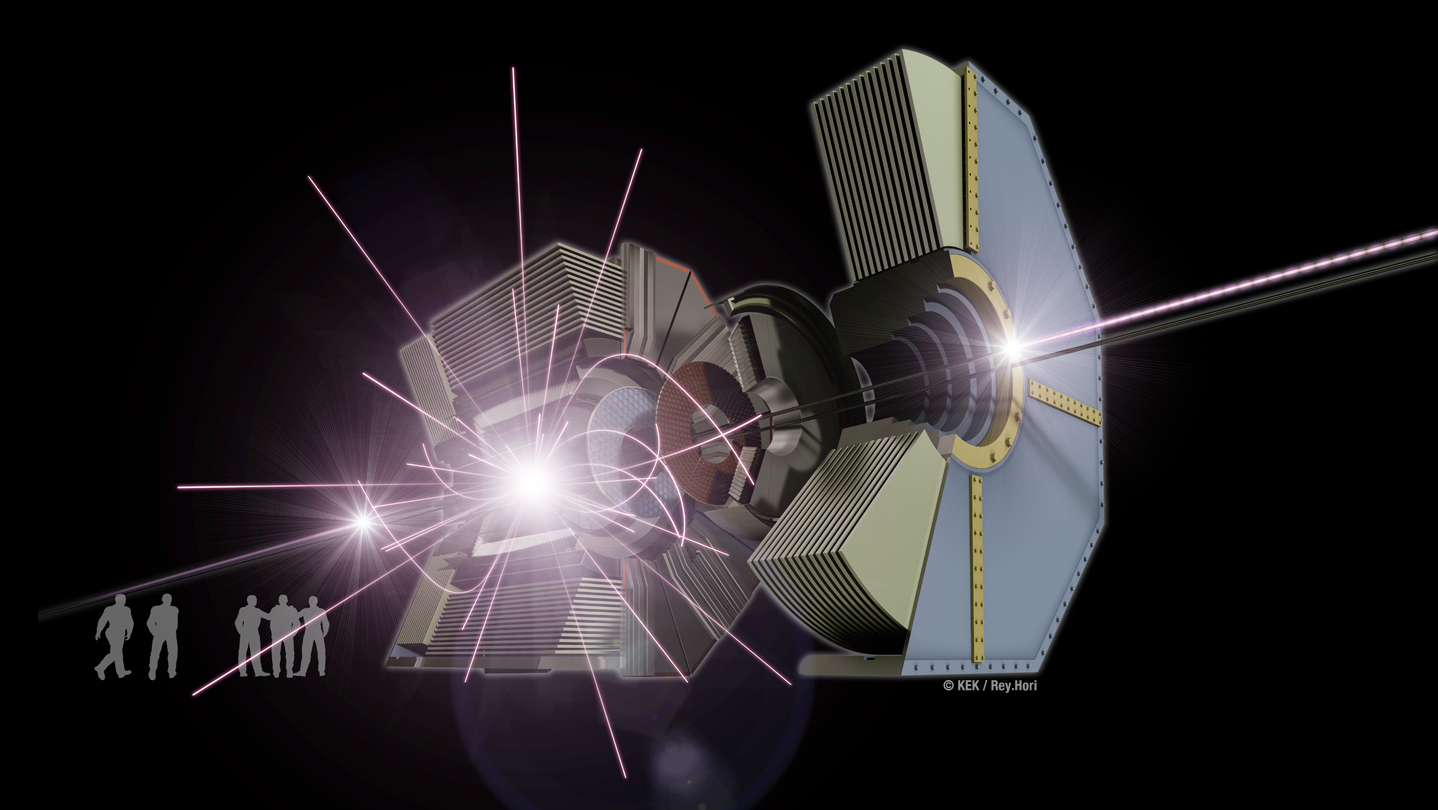
This virtual reality model of the Belle II experiment at the KEK laboratory in Japan shows the marvels of the subatomic world, where matter and antimatter collide at nearly the speed of light, converting energy to matter and back again according to Einstein’s famous formula E = m c squared, all in the blink of an eye. Watch and control the simulation of each collision event in which an electron and its antimatter counterpart collide and morph into other forms of subatomic matter that move through the Belle II apparatus.

There are three variants of the Windows app: for the Oculus Rift, the HTC Vive, and the computer screen. The Mac OSX and Linux apps display on the computer screen.

Please see pages 1-4 of the quick-reference guide for the hand-controller joystick and button mappings for your controller (Xbox controller, Oculus Touch, or Vive) or for your computer's keyboard/mouse.

When you start the app, you see the true-scale Belle II apparatus (relocated from Japan into the CUBE at Virginia Tech). The exterior container fades away, exposing the active detector elements inside. The first electron-positron-collision event is loaded and then animated for its 100-nanosecond duration, showing the detailed trajectories of the incoming particles along the two beam lines and of the by-products from the collision of one electron with one positron. At the end of this collision history, the particle sprites and trails are erased so that you see only the hits recorded by the active detector elements in the "snapshot" of the collision event. Beam-line particle bunches pass through each other every 4 nanoseconds but only a few of these bunch crossings result in a collision; the colliding particles are highlighted in the animation. The beam-line particle bunches circulate in the vacuum beam lines of the 3-kilometer-circumference SuperKEKB accelerator; only the short section nearest the Belle II apparatus is shown in this app.

With your controllers, you may move horizontally and vertically to enter the detector's interior and rotate your viewpoint. By turning your head, you may view the detector and the collision by-products from different orientations. You may rewind and fast-forward through the history timeline of each collision event, pause/resume, and slow down or speed up the animation rate. You may zoom in or out with your controllers if you enable this feature in the in-game menu (guide page 6).

Gazing at one of the particle sprites, you may select it to expose a panel of detailed information about the particle (guide page 5). Check the SAVE box to copy this information to the virtual panel on one wall. Gazing at the rows on this wall, you may select among them to display the sum of the kinematic quantities in the bottom row. Check the FOCUS box on the sprite's info panel to highlight only the generational chain of daughters from this parent, temporarily hiding all other particle sprites and trajectories. In this state, bring up a similar information panel to UNFOCUS the generational chain and re-display all of the sprites and trajectories.

With your controllers, toggle the display of the in-game menu or reposition it in front of you. Choose among three sub-menus (guide page 6) to control aspects of the event animation. The event-history timeline is always visible at the bottom of the menu: with your gaze and selection, you may scrub through this timeline and change the animation rate. In the TRANSFORM sub-menu, you may reposition yourself and scale the size of the detector (nominally at the true scale of 1:1); you may also enable the use of the controller hot-keys for menu-free zooming. In the DETECTOR sub-menu, you may change the visibility of parts of the Belle II apparatus (the active parts record the event snapshots, the passive parts provide the supporting structure). In the PARTICLES sub-menu, you control the visibility of some or all of the particle sprites and the sprite size; gazing at the entries in the event list, you may select among the available collision events (guide page 7). You may edit the event sequence or add new event histories by following the instructions on guide page 8.

Enjoy your explorations of the subatomic world with the Belle II detector!

Persyaratan Sistem

Windows
macOS
SteamOS + Linux
    Minimum:
    • Prosesor 64-bit dan OS diperlukan
    • OS: 10
    • Prosesor: Intel or AMD
    • Memori: 8000 MB RAM
    • Grafis: GPU
    • DirectX: Versi 10
    • Penyimpanan: 1000 MB ruang tersedia
    • Kartu suara: any
    • Mendukung VR: SteamVR or Oculus PC
    • Catatan Tambahan: VR-ready but will display on screen without VR equipment
    Direkomendasikan:
    • Prosesor 64-bit dan OS diperlukan
    • OS: 10
    • Prosesor: Intel Core i7
    • Memori: 16000 MB RAM
    • Grafis: GeForce GTX 1060 6GB
    • DirectX: Versi 10
    • Penyimpanan: 1000 MB ruang tersedia
    • Catatan Tambahan: HDMI port, 2 USB-3 ports, VR gear (Oculus Rift or HTC Vive)
    Minimum:
    • OS: 10
    • Prosesor: Intel
    • Memori: 8000 MB RAM
    • Grafis: GPU
    • Penyimpanan: 1000 MB ruang tersedia
    • Kartu suara: any
    • Catatan Tambahan: VR-ready (HTC Vive; requires SteamVR BETA opt-in) but will display on screen without VR equipment
    Direkomendasikan:
    • OS: 10.13
    • Prosesor: Intel Core i7
    • Memori: 16000 MB RAM
    • Grafis: Radeon Pro 500 series
    • Penyimpanan: 1000 MB ruang tersedia
    • Catatan Tambahan: For VR, you must opt in to the SteamVR BETA.
    Minimum:
    • OS: Ubuntu 14.04.5
    • Prosesor: Intel core i7
    • Memori: 8000 MB RAM
    • Grafis: GPU
    • Penyimpanan: 1000 MB ruang tersedia
    • Kartu suara: any
    • Catatan Tambahan: Displays on screen (no VR)
    Direkomendasikan:
    • Memori: 16000 MB RAM
    • Grafis: GeForce GTX
    • Penyimpanan: 1000 MB ruang tersedia

Ulasan pelanggan untuk Belle II in Virtual Reality Tentang ulasan pengguna Preferensimu

Ulasan Umum:
Positif (13 ulasan)


Untuk melihat ulasan dalam rentang tanggal tertentu, klik dan seret pilihan pada grafik di atas atau klik bilah spesifik.


Ulasan filter berdasarkan waktu bermain pengguna saat ulasan ditulis:


Tidak ada minimum sampai Tidak ada maksimum

Tampilkan ulasan dalam urutan tampilan yang dipilih


Pelajari Lebih Lanjut
Filter
Tidak Termasuk Aktivitas Ulasan Keluar Topik
Waktu bermain:
Seringnya Dimainkan di Steam Deck
OS:
CPU:
GPU:
Jenis Perangkat:
Tidak ada ulasan lainnya yang cocok dengan filter di atas
Sesuaikan filter di atas untuk melihat ulasan lainnya
Memuat ulasan...