Daftar masuk untuk menambah item ini ke senarai hajat anda, ikuti atau tandakannya sebagai diabaikan

Bahasa Bahasa Melayu tidak disokong

Produk ini tidak menyokong bahasa tempatan anda. Sila semak senarai bahasa yang disokong di bawah sebelum membuat pembelian

Notis: The Official AppGameKit Tutorial Guide Vol 2 tidak tersedia di gedung Steam lagi.

Kandungan Boleh Muat Turun

Kandungan ini memerlukan aplikasi asas AppGameKit Classic: Easy Game Development di Steam untuk berfungsi.


Tentang Kandungan Ini

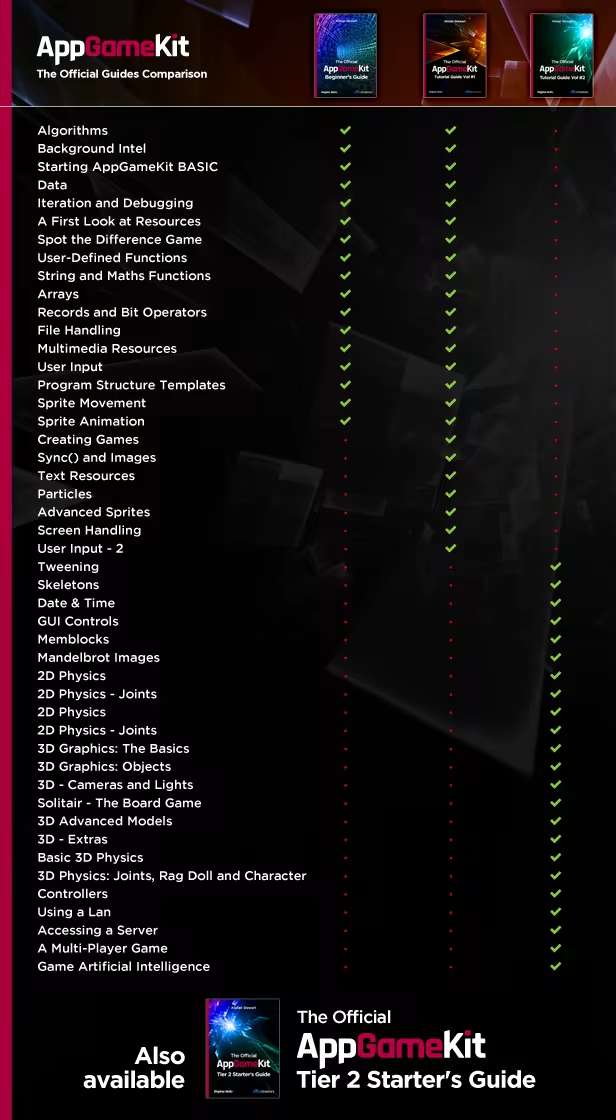
The Official AppGameKit Tutorial Guide Volume 2 has over 900 pages and gives you the expertise needed to fully express your imagination and create your own professional-level games. The Guide explores the more advanced commands of AppGameKit, with detailed explanations of the statements, often with sample programs to show exactly how the statements operate and how they can be used. The Volume 2 Guide tackles more complex categories such as 3D, terrains, physics and memblocks, and builds on the areas covered in Volume 1.

The Official AppGameKit Tutorial Guides are so much more than just reference books - they are designed to train you in the art of computer programming.

It will teach you how to:

  • Tween 2D animations
  • Work with bone animations with Skeletons
  • Create Graphical User Interfaces
  • Understand the benefits of Memblocks
  • Create Beautiful Fractal Images
  • Learn about 2D Physics
  • Grasp the basics of 3D Graphics
  • Control Cameras and Lights in a 3D Scene
  • See the logic behind a 3D Solitaire game
  • Learn about game networking
  • Access Servers
  • Study a multiplayer game
  • Investigate game AI

The Official AppGameKit Tutorial Guide Volume 2 includes these sections:

1. Tweening

  • Tweening Concepts
  • Sprite Tweening
  • Text and Character Tweening
  • Custom Tweening
  • Chaining Tweens

2. Skeletons

  • Skeleton Animation Structure
  • Controlling an Animation
  • Manipulating Bones

3 Date & Time

  • Current Date and Time Commands
  • Unix Date and Time Commands
  • Creating New Date Functions

4 GUI Controls

  • Creating a Button Control
  • Creating a Modal Dialog Box
  • Creating a Checkbox Control
  • Creating a Radio Button Control
  • Creating a Frame Control
  • Creating a Pop-Up Menu
  • Creating a Numeric Keypad

5 Memblocks

  • What is a Memblock?
  • Accessing a Memblock
  • Using Memblocks to Create Data Structures
  • Memblocks and Files
  • Image Memblocks
  • Manipulating an Image in a Memblock
  • Creating a New Image within a Memblock
  • The Mandelbrot Set Project

6 Mandelbrot Images

  • What is a Mandelbrot Image
  • Imaginary Numbers
  • Zooming in on the Mandelbrot Image
  • Real Number Limitations

7 2D Physics

  • Using AGK’s 2D Physics Engine
  • Giving a Sprite Velocity
  • Setting a Sprite’s Bounce Factor
  • Adding Spin
  • Adjusting Friction
  • Setting Mass
  • Detecting Collisions
  • Bounding Boxes for Physics
  • Physics and Ray Casting
  • Physics Debugging

8 2D Physics - Joints

  • Joint Concepts
  • Weld Joint
  • Distance Joint
  • Mouse Joint
  • Revolute Joint
  • Joint Motors
  • Prismatic Joint
  • Gear Joint
  • Pulley Joint

9 3D Graphics: The Basics

  • Defining 3D Space
  • Axes, Planes and Coordinates
  • Elements of a 3D Model
  • Model Resolution
  • 3D Primitives
  • Texturing Models
  • Local Axes
  • Introduction to Lighting
  • Basic Camera Control

10 3D Graphics: Objects

  • Creating 3D Primitives
  • Colouring and Texturing
  • Object Transparency
  • Backface Culling
  • Moving, Rotating and Scaling Objects
  • Resetting Local Axes and Angles
  • Tweening Objects

11 3D - Cameras and Lights

  • Camera-Related Statements
  • 3D to Screen Mapping
  • Light-Related Statements
  • First Person Perspective
  • Billboarding
  • Camera Tweening

12 Solitaire - The Board Game

  • Structuring Data
  • Logic for Replayable Games
  • Device Dependent Interfaces

13 3D Advanced Models

  • Multiple Mesh Models
  • Meshes and Memblocks
  • Parent Child Models
  • Animated Bone Models

14 3D - Extras

  • Fog
  • Sky Boxes
  • Terrain
  • 3D Vector Mathematics
  • Ray Tracing
  • Shadows
  • Particles
  • Shaders

15 Basic 3D Physics

  • Setting up 3D Physics in an App
  • 3D Bounding Volume Options
  • Applying Forces
  • Friction and Damping
  • Collision Handling
  • 3D Ray and Sphere Casts

16 3D Physics: Joints, Rag Doll, and Character Controllers

  • Creating 3D Joints
  • Using Rag Doll Commands
  • Character Contollers

17 Using a Lan

  • Networking Basics
  • Setting Up and Managing a Network
  • Creating a Network Function Library
  • Sending Messages
  • Local Variables
  • Broadcasting
  • Network Timing
  • Sockets

18 Accessing a Server

  • Accessing the Internet
  • Transmitting and Receiving Files

19 A Multi-Player Game

  • Creating a 2-Player Networked Game

20 Game Artificial Intelligence

  • An Overview of AI
  • The Game of Gomoku
  • Making a Game Intelligent

The Official AppGameKit Tutorial Guide Vol 2 is written and designed by Alistair Stewart, owner of 'Digital Skills' and author of the 'Hands On' series of books. He has many years experience creating educational material to help anyone learn how to program computers. Alistair also authored The Official AppGameKit Tutorial Guide Vol 1:

Keperluan Sistem

Windows
macOS
SteamOS + Linux
    Minimum:
    • OS *: Windows XP SP2 or better
    • Pemproses: Intel Celeron / Athlon Sempron or better
    • Memori: 1 GB RAM
    • Grafik: Open GL 2.0 compatible or better
    • DirectX: Versi 9.0c
    • Storan: 100 MB ruang tersedia
    • Kad Bunyi: N/A
    Dicadangkan:
    • OS *: Windows 7 or better
    • Pemproses: Intel Core 2 / Athlon 2 X2 or better
    • Memori: 2 GB RAM
    • Grafik: Nvidia Geforce 470GTX Titan / ATI Radeon 5850 or better
    • DirectX: Versi 9.0c
    • Storan: 100 MB ruang tersedia
    • Kad Bunyi: N/A
* Mulai 1 Januari 2024, Steam Client hanya akan menyokong Windows 10 dan versi yang lebih baharu.
    Minimum:
    • OS: Mountain Lion 10.8 or better for IDE (10.7 for compiled apps)
    • Pemproses: Intel Celeron or better
    • Memori: 1 GB RAM
    • Grafik: Open GL 2.0 compatible or better
    • Storan: 100 MB ruang tersedia
    • Kad Bunyi: N/A
    Dicadangkan:
    • OS: Mountain Lion 10.9 or better
    • Pemproses: Intel Core 2 or better
    • Memori: 2 GB RAM
    • Grafik: Nvidia / ATI (shader model 4.0+, year 2009) or better
    • Storan: 100 MB ruang tersedia
    • Kad Bunyi: N/A
* Mulai 15 Februari 2024, Steam Client tidak akan menyokong permainan 32-bit atau macOS 10.14 atau lebih rendah lagi.
    Minimum:
    • OS: Ubuntu 14.04 (may work with others)
    • Pemproses: Intel Celeron / Athlon Sempron or better
    • Memori: 1 GB RAM
    • Grafik: Open GL 2.0 compatible or better
    • Storan: 100 MB ruang tersedia
    • Kad Bunyi: N/A
    Dicadangkan:
    • OS: Ubuntu 14.04 (may work with others)
    • Pemproses: Intel Core 2 / Athlon 2 X2 or better
    • Memori: 2 GB RAM
    • Grafik: Nvidia Geforce 470GTX Titan / ATI Radeon 5850 or better
    • Storan: 100 MB ruang tersedia
    • Kad Bunyi: N/A

Ulasan pelanggan untuk The Official AppGameKit Tutorial Guide Vol 2 Tentang ulasan pengguna Pilihan anda

Keseluruhan Ulasan:
4 ulasan pengguna (4 ulasan)


Untuk melihat ulasan dalam sesuatu jangka masa tarikh, sila klik dan seret pilihan pada graf di atas atau klik pada bar tertentu.


Tunjuk ulasan dalam susunan paparan yang dipilih


Ketahui Lebih Lanjut
Penapis
Tidak termasuk Aktiviti Ulasan di Luar Topik
Masa bermain:
Kerap Dimainkan di Steam Deck
Operating System:
CPU:
GPU:
Device Type:
Penapis Ulasan