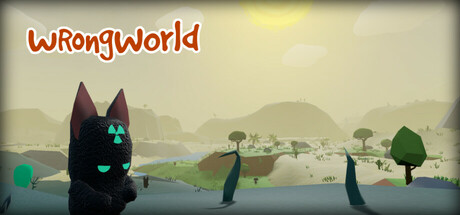
Crash-landed on a surreal, low-poly world filled with freakish inhabitants, choose between permadeath and non-permadeath modes and embark on an epic (and ridiculous) survival adventure. Will you manage to stay alive as you unravel the mysteries of Wrongworld and search for a way home?
All Reviews:
Very Positive (138) - 94% of the 138 user reviews for this game are positive.
Release Date:
11 May, 2018
Developer:
Publisher:

Sign in to add this item to your wishlist, follow it, or mark it as not interested

Buy Wrongworld

12,49€
 

Recent updates View all (26)

22 March

Update 1.4.1


Update 1.4.1 is here, so Steam should do its thing and download it for you soon. Here be the details:


----- SALAD FINGERS & THE FLYING SPAGHETTI MONSTER* -----
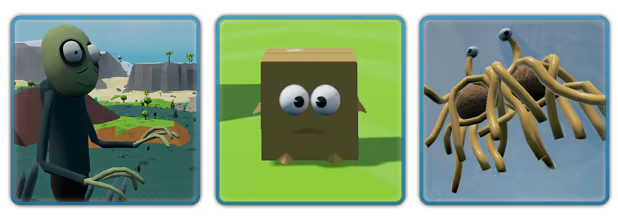
Salad Fingers is now roaming around Wrongworld, hoping to add to his collection of Rusty Spoons. Keep your eyes peeled for them on your travels, and you might be able to help him out...

You may also encounter a holy altar to the Flying Spaghetti Monster. If you are able to track down some lost Mysterious Emblems and return them to His altar, perhaps you will be touched by His noodly appendage and receive a powerful artifact in return...

A few more spoiler-ish details: Both Salad Fingers and the Flying Spaghetti Monster altar require you to track down missing items that have been scattered around the world (5 x Rusty Spoons & 4 x Mysterious Emblems), and are designed to add another aspect to the game which encourages players to explore every nook and cranny. They're completely optional, but, if you decide to take on these challenges and need some help tracking down those hard-to-find Rusty Spoons and Mysterious Emblems, you may find it useful to equip your Metal Detector while you hunt for them... That may make them a little easier to spot.


----- MORE POINTS OF INTEREST* -----
A few more minor points of interest have been added.

* New points of interest (including Salad Fingers and the Flying Spaghetti Monster altar) require you to start a new game in order for them to be added to the world during the initial world randomisation. It's set up this way purely because I don't want the new things I add to potentially interfere with existing save games.


----- CRAFTING MENU UI UPDATES -----
I've updated the Crafting Menu so that recipes will now be greyed-out if you do not have the required resources in your Inventory.

It doesn't check whether you're near the required crafting structure (such as a Workbench), and instead just greys them out based on the items you have on you.


----- NEW CRAFTABLE RECIPES -----
Once you have a Workbench, you may now notice you're able to craft a few new things. Nothing game-changing, and I'll let you discover them yourself, but I thought I should explain a couple of them:

You can now craft Old Boots yourself (which, as I'm sure some of you will know, should make getting the help of a certain inhabitant of Wrongworld a little easier). Because of this change, it no longer made sense to be able to unbootify Old Boots with a simple right-click; instead, you'll now need to use the "Refine" section of the Crafting Menu to turn Old Boots into Leather, and vice versa (and you'll need to be at your Workbench).

I'm sure that this change will catch me out repeatedly, and I'll continue right-clicking on Old Boots for a long time to come due to force of habit, but I hope you agree that this change makes sense.


----- NEW UNLOCKABLE RECIPE -----
Once you've reached XP level 5... As well as unlocking the "Infini-Bomb" recipe, it'll now also unlock a new "Reality Manipulator" recipe. Craft one of these and you'll be able to control the random events in the game and the weather.

I decided to add this for two reasons:

1) Fun! Now you can endlessly replay your favourite random events, or simply cancel events that you don't want to deal with again (I'm looking at you, Tornado)! :)
2) As some of the Steam Achievements are tied to a specific random event, I didn't want people to be indefinitely reliant on RNG. With the Reality Manipulator, you can simply summon the events you haven't already experienced whenever you want.

Yes, the Reality Manipulator is massively over-powered, but it's just for fun, and you'll need to be pretty late on in the game anyway before you're able to build it (it requires a Nuclear Reactor). Plus, I assume most people will have already finished the game (or be on the verge of finishing it) before they're able to build this, or, indeed, have any interest in building it.


----- POINTLESS GRAPHICAL IMPROVEMENTS -----
If you raise your eyeballs and look up to the sky, you should now see some utterly pointless clouds floating around, and - unlike regular Earth clouds that are very boring and just slowly float across the sky - Wrongworld clouds will randomly phase in and out of existence from time to time, just for fun!

Some of the textures have also been slightly improved, including the biome and water textures. Minor tweaks, but I think it's an improvement! :)

Let me know if any of these graphical tweaks affect the performance on your machine. They shouldn't, but I just thought I'd mention that.


----- NEW SOUND SETTING -----
There's a new option in the Settings > Sound menu, but it's a very slight spoiler, I suppose, so... You now have the option to mute Boxy McBox, if you're sick of his farty movement noise.

I've resisted adding this option for a long time, purely because I'm very attached to my beloved little Boxy, and I feel like this update has to hurt his feelings a bit. I'M SORRY, BOXY! PLEASE FORGIVE ME!


----- NEW STEAM ACHIEVEMENTS -----
To coincide with the new POIs, there are now 5 new Steam Achievements to be unlocked.


----- CREDITS UPDATE -----
I've updated the credits to add a thanks to Bobby Henderson (the creator of The Flying Spaghetti Monster) and David Firth (the creator of Salad Fingers), both of which kindly gave me their blessing to include their creations in Wrongworld. If you're unfamiliar with either of these clever and talented chaps, you can learn more here (and you really should):

Bobby Henderson: https://www.venganza.org
David Firth: http://www.fat-pie.com

And you can now access the credits via the Title Screen... ...once you've clicked on the main character enough times to pop both of his eyes out. A new link to "View Credits" will appear at the top-right of the screen.

I've also tweaked the way the ship moves and rotates during the credits, because I've seen it misbehaving in a few YouTube videos. It should always be spinning a bit and also pointing itself in the direction of its movement, so please feel free to let me know if it's still misbehaving. Weirdly, on just one of my test computers, its rotation is still a little glitchy. I'll continue to look into this, but it's such a minor thing, I didn't think it was worth delaying this update for it.


----- RANDOM UPDATES/FIXES -----
- Rotating structures/items using Construction Mode should hopefully be a little more controllable (as it's now modified based on the frame rate, meaning it shouldn't spin at warp speed on high framerates).
- Radioactive Rabbits shouldn't be able to get stuck on trees now... They might teleport up on to a tree, but they should come back down again pretty quickly if they don't have line of sight to the player.
- Tweaked the way using Construction Mode to move items works, so it should no longer be possible for items to get stuck on trees and things while you're running around (if an item you're moving ends up too far away from the player, it'll now teleport closer to the player, bypassing any scenery that might be in the way).
- Tweaked the order in which the world is randomised to (hopefully) fix a couple of rare issues with beaches.
- Updated the potential loot from those metal reward crates to include some of the new craftables.
- Updated the tooltips for Old Boots and the Metal Detector (if you already have these in your Inventory, you'll need to drop them and pick them up again for the tooltip to update).
- Fixed an issue with the Nuclear Vacuum's combat collision/ability to actually hit beasties.
- Changed the way the physics of both the Nuclear Vacuum and the Tornado work. I'd seen both of these things not working properly in some videos online, so hopefully this change should fix those issues. Feel free to give them a test and let me know if they're working for you. To clarify, holding RMB while you have the Vacuum equipped should cause nearby items to be sucked towards you and then be automatically picked up (assuming you have room in your Inventory); and the Tornado should suck up you and any nearby beasties once you're within a certain range of it (in some videos, I'd seen it make some players just twitch along the ground, rather than scooping them it... Assuming it's working correctly now, it should actually lift the player way up into the air). If you wanna give it a try, hop on to Creative Mode and build yourself a new Reality Maniputalor; that should help you test it pretty quickly :)
- The Probe Console can now find two new locations for you (assuming you've started a new game and those POIs actually exist in the world).
- The Hatch has been updated to help clarify how it works... You'll now find a sign on the side of it...
- The Snake Pyramid event has been tweaked a tiny bit... You can now walk up the outer walls of the Pyramid, rather than being required to walk up the paths. This change will make the event a bit easier in general, but it was necessary as I was recently informed that it was technically possible (although very unlikely) for the Pyramid to spawn in a way that could permanently trap the player against a couple of unwalkable hills, which was less than ideal!
- The Stonehenge-style random portals have a few new potential effects to choose from (related to Salad Fingers, the Flying Spaghetti Monster, and another couple of POIs). I've also fixed an amusing bug that occurred if you saved and quit the game whilst experiencing its player-shrinking effect... Previously, once you reloaded, you'd be stuck at that tiny, shrunken size forever! I was tempted to leave that in because it amused me a lot, but it was technically a potentially problematic bug, so it had to go :(


That's all for now. As always, if you have any feedback or encounter any problems, please do not hesitate to let me know. And feel free to come and say hello on the Wrongworld Discord.
20 comments Read more

25 January

Update 1.3.1 (25th January)


Update 1.3.1 is finally here, so Steam should digitally vomit it on to your computer shortly. Here's what's new:


----- THE COMPUTER SYSTEM -----
Once you've built an Electronics Workbench, you'll now have access to a new "Computer System" recipe, which lets you do a few different things:

- ONLINE BANKING
Via the wonders of the WrongWeb internet, you can transfer Coins from your inventory directly into an online bank balance, and back again. Don't ask me how it works. Magic, I assume.

- ONLINE SHOP
You can also use the Computer System to access an online shop, allowing you to both sell unwanted surplus supplies and buy exclusive furniture (which is 3D printed from the comfort of your own home).

- SELLING RESOURCES
The list of resources you can sell is fixed and never changes. The interface shows how many of each particular resource you'll need to exchange in order to have 1 Coin added directly to your bank balance. If you don't have enough of a particular resource in your inventory, the option to sell it will be greyed out. In the not-too-distant future, I'll probably roll out a similar system to the Crafting Menu, so it greys out recipes you don't have the resources for... That's been on my list of things to do forever! :)

- BUYING FURNITURE
The list of items you can buy is randomised every day at 6am. There'll be 5 random items for sale each day, so it's worth checking in daily if there's something in particular you want. I've done it this way to keep the available furniture a little more mysterious, and it also allows me to infinitely expand on this system in future without having to wrestle with a bloated user interface.

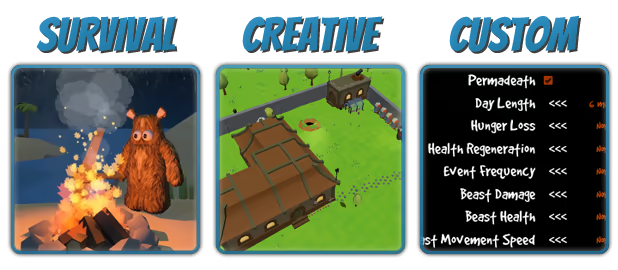
In Creative Mode, all of the furniture is available, all of the time, and it's free to purchase. So, it does indeed make the interface quite bloated, but at least people can really go to town and quickly create some epic mansions if they so choose!

- MORE COMPUTER SYSTEM INFO
If you start a new game, a few of these Computer Systems will be randomly dotted around the world, so you don't technically ever need to build one, but having one in your house would certainly make things a lot easier. And these randomly-spawned ones can't be moved either, so you won't be able to simply steal them like you can with some other structures :)

At the moment, all the furniture you can buy is completely and utterly pointless, and is purely decorative. However, in future, I plan to start adding specific uses to pieces of furniture (like an oven that can be used like a Cooking Pot, or a bed that actually lets you sleep in it). But, personally speaking, I've still been having a lot of fun with the pointless furniture as it is. If, like me, you're one of those people who spends hours fiddling around with their houses in games, slightly obsessively arranging things for no reason whatsoever, you'll probably appreciate this stuff, and you'll definitely appreciate this next part:


----- CONSTRUCTION MODE IMPROVEMENTS -----
Previously, Construction Mode (activated with "C" by default) allowed you to move structures around however you want, but you couldn't move pick-up-able items. If you wanted to move an item, you'd have to pick it up then drag it back out of your inventory, whereupon it'd be unceremoniously dumped back out into the world.

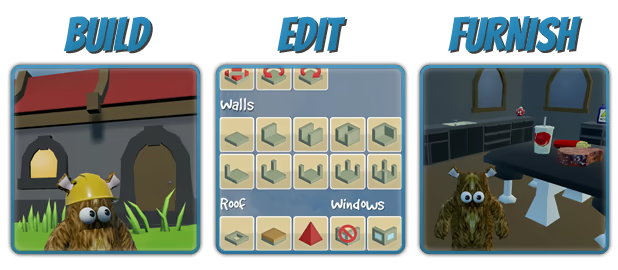
You can now use Construction Mode to drag items around however you want, which is pretty darn useful when you've just bought, say, a shiny new bookcase and want to put stuff on it. Just aim at the item in question, hold RMB, and move around however you want.

Using the power of physics, this new system also allows you to (very inaccurately) throw items around. Once I got this system up and running, I had a surprisingly large amount of fun filling up a bookcase with pies and then trying to knock them off by hurling things at them, coconut shy-style. I then started playing a game that I now refer to as "Bathketball", which involves attempting to throw a lump of coal into a bath in the distance. Next on my list of similarly pointless things: the creation of a bowling alley using potion bottles and stones :) I should probably add some kind of football or basketball-style models to make such silliness easier. Anyway, enough rambling...

I've also improved how items and structures are rotated (the default controls being "comma" and "period/full stop" while moving things) when in Construction Mode: Previously, structures simply rotated 5 degrees at a time, but that sometimes meant you couldn't align things exactly as you wanted. Now, things start rotating at 1 degree per tick, and it steady picks up speed until it's spinning stupidly fast. It should make precise alignment of things a little easier/possible. The rotation of structures that you've only just built and are selecting an initial location for still use the same, fixed-speed rotation as always; it's only the Construction Mode rotation system that has been altered. I imagine I'll end up standardising both those systems at some point in the near future, though, once I know for sure that the new Construction Mode rotation acceleration doesn't break everything!

Oh, also, the player now becomes transparent when using Construction Mode to move something, just so you can see exactly where you're positioning something, especially useful when moving small items.


----- A WORD ON COINS -----
Because Coins are now easier to get your hands via selling resources, I've removed the Refining recipe that allowed you to turn a Coin into a piece of Gold Ore. You can still turn a Gold Ore into a Coin using a Smelter, but not back again. It'd have unbalanced the value of Gold Ore, so the recipe has been removed.

In future, depending on feedback about the prices of the new furniture - and just feedback in general - I may also make Coins a more common drop from regular beasties. We shall see.


----- RANDOM UPDATES/FIXES -----
- Updated the Crafting Menu icon for the Probe Console (because I noticed it still showed the original version of the Console - the one with little Search and Home buttons physically on the front of it).
- Added a tip that appears after buying furniture to explain how to move it.
- Tweaked the horribly confusing and devastatingly ugly Gamepad Controls image, just to clarify that left/right D-pad will rotate things. I still plan to overhaul all the gamepad controls in general at some point soon-ish because I know they're not great!


Anyway, that's all for now. As always, if you have any feedback or encounter any problems, please do let me know. And feel free to come and say hello on the Wrongworld Discord.
13 comments Read more

Reviews

“A free-roaming survival game that’s easily the best I’ve played in years.”
Rock, Paper, Shotgun

“A game that you should experience, even if you feel as if you have already experienced everything that this genre has to offer.”
Darkstation

“Wrongworld is better than sleep.”
Gaming Nexus

About This Game

Crash-landed on a surreal, low-poly world filled with freakish inhabitants, choose between permadeath and non-permadeath modes and embark on an epic (and ridiculous) survival adventure. Will you manage to stay alive as you unravel the mysteries of Wrongworld and search for a way home?

STRIVE TO SURVIVE

Thrown in at the deep end, you'll have to figure out the world for yourself, while hopefully not dying in the process. But you probably will. That's okay, though - just pick yourself up, dust yourself off, and try to learn from your fatal experience. And with a choice of permadeath and non-permadeath modes, you can tweak the difficulty to suit your needs.

BUILD AN EPIC BASE

Gather resources from across the land, craft all kinds of awesome gear, and build yourself an epic new home. From basics like campfires, simple tools and cooked meals all the way to jet packs, magic potions, nuclear-powered vacuum cleaners and maybe even a replacement rocket ship.

SILLINESS APLENTY

It might be a brutal world, but you may as well chuckle at the ridiculousness of it all as you go. Obliterate trees with your forehead, fast travel as a non-human cannonball, and become best friends with a cardboard box.

RANDOMLY GENERATED

The world is completely randomly generated with every new game. And with a bunch of random events to discover/be subjected to, you're likely to face different hurdles every time you play.

COMMENTS FROM AWESOME PEOPLE


"I don't think I've been this excited for a game in a while... This is just so much fun!"
Pungence

"Better than it has any right to be."
Jim Sterling

"I love your game."
IGP

System Requirements

    Minimum:
    • OS: Windows XP
    • Processor: Yes, a processor is required. My 2011 middle-of-the-road laptop can just about cope. But to err on the side of caution and also try to sound a little less clueless about hardware, I'll say an Intel i3 or better is probably wise.
    • Memory: 4 GB RAM
    • Graphics: You don't need a beast - as mentioned above, my ancient laptop (it's called Larry, by the way) has something known as a Radeon HD 6520G stuffed inside it, and it can just about deliver 30fps with all the settings on "Low". Definitely wouldn't want to go older/lamer than that, but the fact you're actually looking at 3-dimensional games on Steam makes me think you've probably already got that covered. But it is quite important that your graphics card supports DirectX 11. Things can get a little wonky on DX10.
    • DirectX: Version 11
    • Storage: 500 MB available space
    • Sound Card: As far as I can tell, any on-board chip should work. At least, none of the test machines I have access to have had any problems with sound.

What Curators Say

22 Curators have reviewed this product. Click here to see them.

Customer reviews

Review Type


Purchase Type


Language


Date Range
To view reviews within a date range, please click and drag a selection on a graph above or click on a specific bar.

Show graph


Display As:
Review Beta NEW!
When enabled, will sort reviews by new Helpfulness score. Read more about it in the blog post.
Show graph
 
Hide graph
 
Filters
Review Helpfulness Beta Enabled
There are no more reviews that match the filters set above
Adjust the filters above to see other reviews
Loading reviews...