PS5 games are built for a controller. ConsoleMouse lets you play your own PS5 with mouse and keyboard, through your Windows PC, no adapter box. Play on the TV or stream picture and sound to the PC, upscaled for big monitors. Needs your PS5, a PlayStation Network account and Windows 11.
Release Date:
Coming soon
Developer:
Publisher:
Tags

Sign in to add this item to your wishlist, follow it, or mark it as ignored

This game is not yet available on Steam

Coming soon

Interested?
Add to your wishlist and get notified when it becomes available.
 

About This Software

Your PS5. Your mouse and keyboard.

PS5 games are built for a controller. ConsoleMouse connects your mouse and keyboard to your own PS5 through your Windows PC, using Remote Play over your home network. No adapter box, no capture card, nothing plugged into the console.

Sharper on big monitors

The PS5 Remote Play stream is up to 1080p at 60 frames per second. In PC Play, ConsoleMouse upscales it to your 1440p or 4K monitor with NVIDIA RTX Video Super Resolution on GeForce RTX 20 series and newer, or AMD FSR 1 on any graphics card. The stream stays 1080p; you get a sharper, cleaner picture on a large screen.

Two ways to play

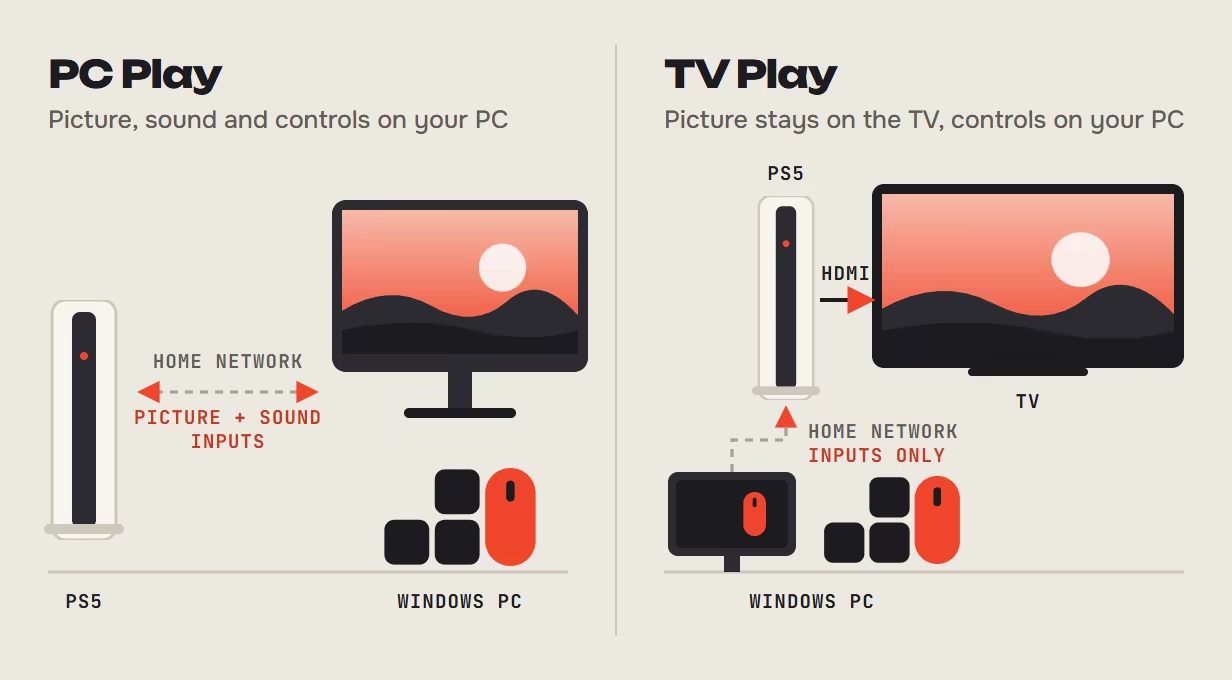
TV Play – the picture stays on the TV or monitor connected to your PS5 by HDMI. Your PC only sends your inputs.
PC Play – picture and sound from your PS5 stream to the same PC your mouse and keyboard are plugged into.
One app; you choose each session.

Set up in minutes, tuned per game

  • Guided setup: ConsoleMouse finds your PS5, walks you through Sony's own "Link Device" step on the TV, and you pick your mouse and keyboard by simply using them.
  • Profiles per game with rebindable keys.
  • Situations such as on foot, driving and menus switch automatically in supported profiles when you enter or leave a vehicle. F-keys correct it when needed.
  • Fixed key for the PS button, F10 starts and stops control, Ctrl+Alt+Backspace releases everything instantly.

What you need

  • Your own PS5 and a PlayStation Network account. The account signed in on the TV is the one you link.
  • A Windows 11 (64-bit) PC or laptop with your mouse and keyboard plugged into it.
  • PC and PS5 on the same home network, wired recommended.
  • Your PS5 controller for the one-time linking on the TV.
  • The games you own.

Good to know

Mouse movement is translated into stick input, so the aiming and turn speed a game allows its controller still apply, and the feel depends on the game and the profile. It is not a native PC mouse; it is your mouse and keyboard on your PS5.

PlayStation and PS5 are trademarks of Sony Interactive Entertainment Inc. ConsoleMouse is not affiliated with Sony.

AI Generated Content Disclosure

The developers describe how their game uses AI Generated Content like this:

Generative AI was used to create static store-page text, illustrations and brand graphics, and the narrator voice in the trailer (AI text-to-speech). The app itself does not generate AI content.

System Requirements

    Minimum:
    • Requires a 64-bit processor and operating system
    • OS: Windows 11 (64-bit)
    • Additional Notes: Mouse and keyboard connect to the same Windows PC or notebook, which stays awake in both modes. Your own console and game are required. TV Play uses direct console-to-TV/monitor HDMI.
    Recommended:
    • Requires a 64-bit processor and operating system
Review Filters