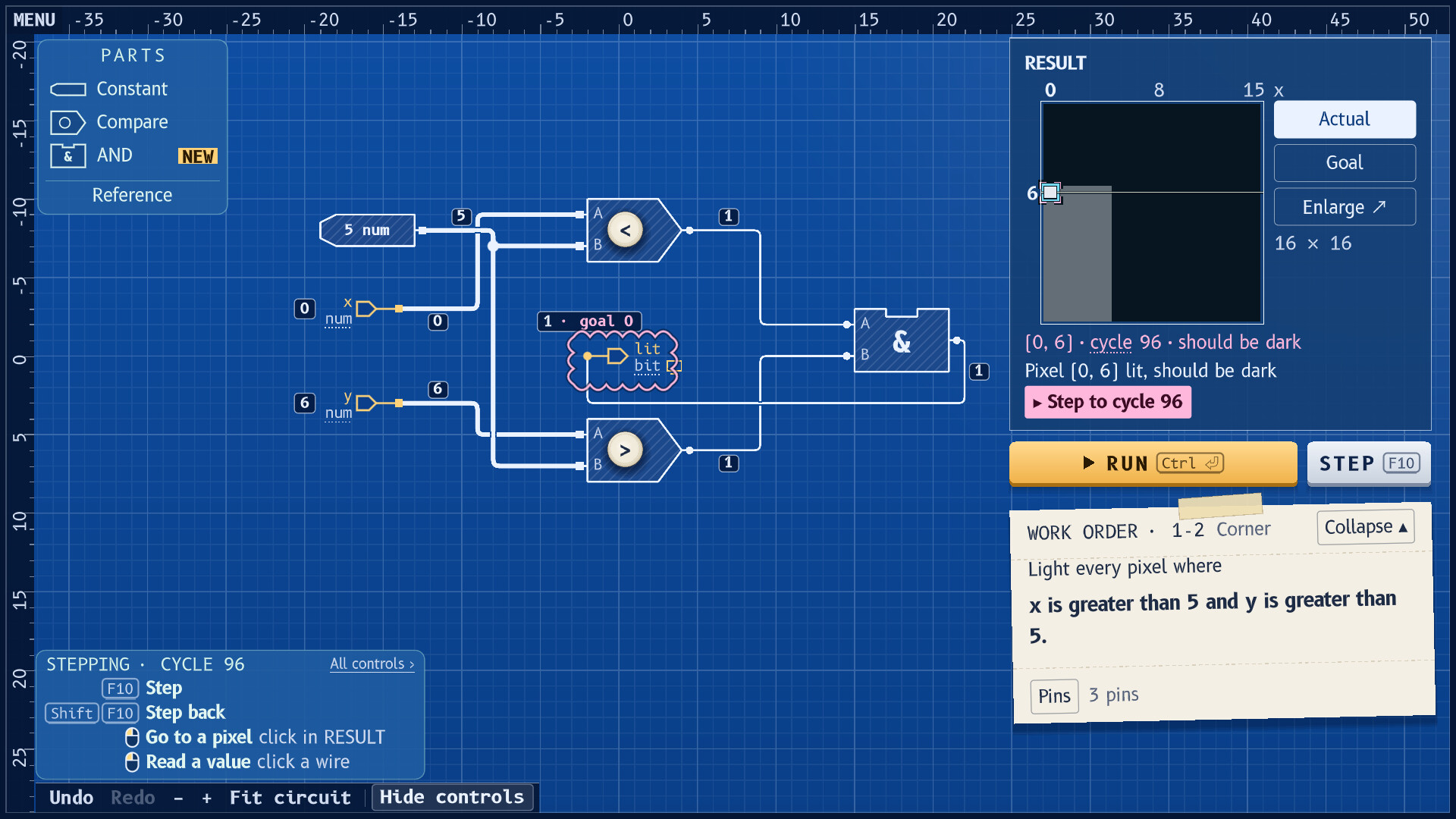
Ever wonder how a GPU draws a triangle? In Hello Triangle, you build one yourself. Wire comparators, adders, and multipliers into graphics hardware, press Run, and watch your circuit draw the screen pixel by pixel—from a single triangle up to a rotating 3D cube.

Sign in to add this item to your wishlist, follow it, or mark it as ignored

Coming Soon To Early Access

The developers of this game intend to release as a work in progress, developing with the feedback of players.

Note: Games in Early Access are not complete and may or may not change further. If you are not excited to play this game in its current state, then you should wait to see if the game progresses further in development. Learn more

What the developers have to say:

Why Early Access?

“Hello Triangle is built level by level, and player feedback has already shaped a lot of how it plays. During the demo, players showed us where the circuit editor felt clunky and where the difficulty jumped too fast, which led to changes in both the tools and the levels.

Early Access lets us develop the later acts the same way—having players actually build, test, and optimize their own GPUs, and using that feedback to keep improving the game.”

Approximately how long will this game be in Early Access?

“We currently expect Early Access to last about a year. We plan to release the remaining acts as separate updates, though the timing may shift depending on development progress and player feedback.”

How is the full version planned to differ from the Early Access version?

“We plan to expand beyond the first two acts with three additional acts:

- Speed: Tiles and multiple cores working together, exploring what makes a GPU fast.
- Surfaces: Texture mapping and how texture memory works.
- Programmable: Building a shader core that runs a supplied program.

We'd also like to expand the game based on what players want to see. Some ideas we're currently considering include a creative mode, exporting circuits to Verilog, and importing your own 3D models and scenes for your GPU to render. These are still possibilities we're exploring rather than locked-in promises.”

What is the current state of the Early Access version?

“Acts 1 and 2 are complete, with 20 levels taking you from lighting up half a screen to drawing a solid cube rotating in 3D—all generated by the circuits you build.

Every level is fully playable and scored. The parts you build are saved for future levels, so going back to optimize an earlier part's performance will also help your later designs.

The first two acts offer several hours of play, with plenty of room to spend more time experimenting with different designs and chasing better scores.”

Will the game be priced differently during and after Early Access?

“We may increase the price as new acts are added. Players who buy during Early Access will get all of those updates and the full release at no extra cost.”

How are you planning on involving the Community in your development process?

“We welcome feedback through Steam discussions, reviews, and email. Whether it's a confusing concept, a sudden difficulty spike, an awkward editor control, or a bug, hearing about it helps us figure out what needs work.

Player feedback has already led to a lot of changes since the demo came out. We plan to keep working this way throughout Early Access, and we'll use patch notes and devlogs to share what we've changed and how player feedback shaped those decisions.”
Read more

Download Hello Triangle: Build a GPU - Demo

This game is not yet available on Steam

Planned Release Date: Q1 2027

Interested?
Add to your wishlist and get notified when it becomes available.
 

Report bugs and leave feedback for this game on the discussion boards

See all discussions

About This Game

Ever wonder how a GPU draws a triangle? In this game, you build one to find out.

Hello Triangle is a puzzle game about designing graphics hardware. Each level gives you a target image to draw and a set of basic parts: comparators, adders, multipliers, and registers. You wire them together, press Run, and watch your circuit draw the image pixel by pixel.

  • Step-by-step pixel debugging: If your circuit draws a wrong pixel, it gets marked right on the image. You can click that pixel to rewind the simulation to the exact clock cycle where your circuit drew it.

  • Working with hardware: Because you're building circuits instead of writing code, you don't have loops or functions. If you want to repeat something, you wire up a counter. If you want to do two things at the same time, you build a second unit—which takes up more space on the board.

  • Plain English first, terminology later: Levels explain the problem in everyday terms without heavy textbook jargon. Once you get your circuit working, the game tells you what real hardware engineers call it, and saves your design as a reusable part for later levels.

  • Area, delay, and cycle tracking: Every working circuit is scored on board area, signal delay, and clock cycles, and the game saves your best scores for each level.

No hardware background needed

If you know a bit of math or programming, you'll be fine. You start with ready-to-use arithmetic parts rather than raw logic gates, and every level builds directly on what you made in previous levels. Over time, those parts come together into a working GPU that you designed yourself.

Runs in a custom simulator

Your GPU runs inside the game's simulator, meaning every pixel on the virtual screen is actually calculated by the circuit you wired. Obviously it won't run CUDA or OpenGL, and it's not going to replace your real graphics card, but the underlying math and logic are the real thing.

Early Access

The Early Access version includes Acts 1 and 2 (20 levels total), taking you from lighting up half a screen to rendering a rotating 3D cube with your own circuit. For the full release, we're planning additional acts focused on rendering speed (tiles and multi-core), textures, and a programmable shader core.

AI Generated Content Disclosure

The developers describe how their game uses AI Generated Content like this:

Art and music made with AI tools.

System Requirements

Windows
macOS
SteamOS + Linux
    Minimum:
    • Requires a 64-bit processor and operating system
    • OS: Windows 10 or 11, 64-bit
    • Processor: 64-bit (x86-64)
    • Memory: 2 GB RAM
    • Graphics: OpenGL 3.3 or DirectX 11
    • DirectX: Version 11
    • Storage: 500 MB available space
    • Additional Notes: A mouse or trackpad, and a keyboard. A window of at least 960 × 640.
    Recommended:
    • Requires a 64-bit processor and operating system
    Minimum:
    • OS: macOS 11 or later
    • Processor: Intel or Apple silicon
    • Memory: 2 GB RAM
    • Storage: 500 MB available space
    • Additional Notes: A mouse or trackpad, and a keyboard. A window of at least 960 × 640.
    Recommended:
      Minimum:
      • OS: 64-bit Linux distro with glibc 2.28 or later, or SteamOS
      • Processor: 64-bit (x86-64)
      • Memory: 2 GB RAM
      • Graphics: OpenGL 3.3
      • Storage: 500 MB available space
      • Additional Notes: A mouse or trackpad, and a keyboard. A window of at least 960 × 640.
      Recommended:
      Review Filters