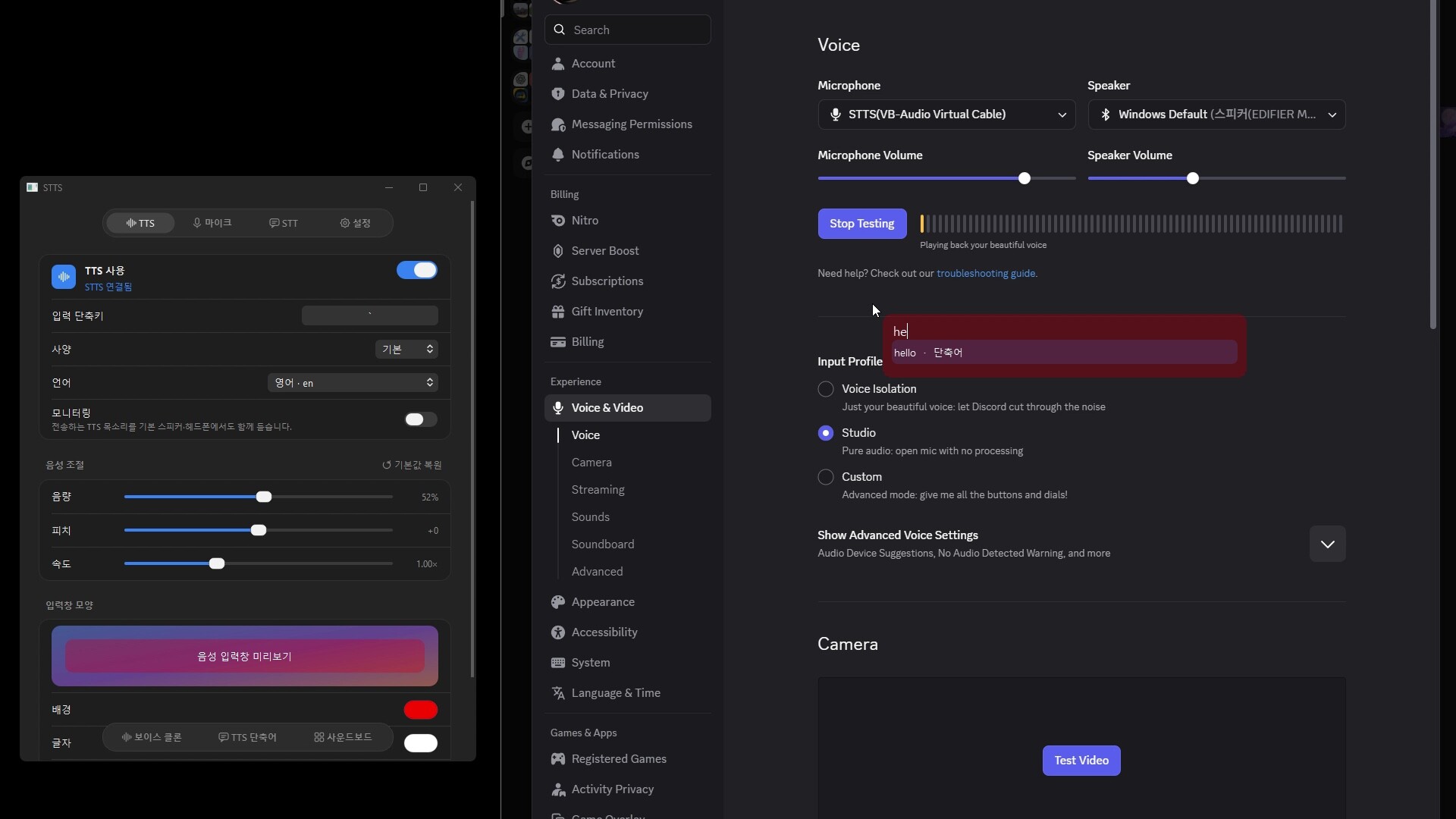
Talk in voice chat without leaving your game. Press a hotkey, type a sentence, and STTS speaks it through a virtual microphone in Discord or any voice app, in a preset or cloned voice. Live captions show what others say.

Zaloguj się, aby dodać tę pozycję do listy życzeń, zacząć ją obserwować lub oznaczyć jako ignorowaną

Polski język nie jest obsługiwany

Ten produkt nie obsługuje twojego lokalnego języka. Przed zakupem zapoznaj się z listą obsługiwanych języków, która znajduje się poniżej.

Ta gra nie jest jeszcze dostępna na Steam

Planowana data wydania: październik 2026

Interesuje cię ten produkt?
Dodaj go do swojej listy życzeń i otrzymaj powiadomienie, gdy stanie się dostępny.
 

O tym programie

Talk in voice chat without leaving your game. Press one hotkey, type a sentence, and STTS speaks it into Discord or any other voice app through a virtual microphone. No alt-tabbing, and no need to use your own voice. When friends talk, STTS shows what they say as live captions.

Features

  • Use it while you play: press the hotkey during a game and a small input box appears on top. Type, press Enter, and it is spoken right away. Shake the mouse to close it. Works with windowed and borderless fullscreen games.
  • Text to speech: press a shortcut, type, and your sentence is sent to the virtual microphone.
  • Live captions: voices you hear in voice chat are transcribed on screen in real time.
  • Voice cloning: register a voice from a 3 to 30 second recording.
  • Phrases and autocomplete: save sentences you use often and type less.
  • Soundboard: play saved sounds, or send one by typing its name.
  • Voice controls: adjust volume, pitch and speed.
  • Local models: Whisper, Qwen3-TTS and Supertonic run on your own PC or Mac.

Getting started

  1. Launch STTS. On Windows, STTS installs its virtual microphone on first run after you approve the administrator prompt.
  2. In Discord, open Settings > Voice & Video and choose STTS as the input device.
  3. Turn on TTS and send a sentence with the input shortcut. Turn on STT to see captions.

Privacy

Voices, scripts and models are stored on your device, and local models run on your device. The default voice, gTTS, sends the text you type to Google to generate speech. Choose a local voice model if you do not want your text to leave your device.

Notes

  • Models are downloaded on first use.
  • Windows: STTS uses VB-CABLE by VB-Audio Software as its virtual microphone. VB-CABLE is donationware; you can support its developer at .
  • macOS: requires Apple Silicon and macOS 26 or later.

Free on GitHub

STTS is free to use, and its full source code is public on GitHub, so you can build the same version yourself for personal use. Streaming and making videos with STTS are allowed. The Steam version gives you ready-to-run Windows and macOS builds with automatic updates through Steam, and buying it supports continued development.

Oświadczenie w sprawie treści generowanych przez SI

Producenci opisują, jak ich gra korzysta z treści generowanych przez SI, w następujący sposób:

STTS uses AI speech models while you use it. Text you type is turned into speech by text-to-speech models (gTTS, Qwen3-TTS, Supertonic), including voice cloning from a short recording you provide. Speech you hear is transcribed into captions by Whisper. No AI-generated content is pre-rendered or shipped with the app.

Wymagania systemowe

Windows
macOS
    Konfiguracja minimalna:
    • Wymaga 64-bitowego procesora i systemu operacyjnego
    • System operacyjny: Windows 10 22H2 or Windows 11 (64-bit)
    • Procesor: x64 quad-core CPU
    • Pamięć: 8 GB RAM
    • Karta graficzna: Optional: NVIDIA GPU (CUDA) for faster local models. Runs on CPU otherwise.
    • Sieć: Szerokopasmowe połączenie internetowe
    • Miejsce na dysku: 12 GB dostępnej przestrzeni
    • Dodatkowe uwagi: Installs the VB-CABLE virtual audio driver (donationware by VB-Audio, on first run with administrator approval. Local AI models are downloaded on first use (up to about 5 GB). Internet is required to download models and for the default gTTS voice.
    Konfiguracja zalecana:
    • Wymaga 64-bitowego procesora i systemu operacyjnego
    Konfiguracja minimalna:
    • Wymaga procesora Apple
    • System operacyjny: macOS 26 or later
    • Procesor: Apple Silicon (M1 or later). Intel Macs are not supported.
    • Pamięć: 8 GB RAM
    • Karta graficzna: Apple Silicon integrated GPU
    • Sieć: Szerokopasmowe połączenie internetowe
    • Miejsce na dysku: 8 GB dostępnej przestrzeni
    • Dodatkowe uwagi: Includes the STTS virtual microphone. Local AI models are downloaded on first use (up to about 5 GB). Internet is required to download models and for the default gTTS voice.
    Konfiguracja zalecana:
    • Wymaga procesora Apple
Filtry recenzji