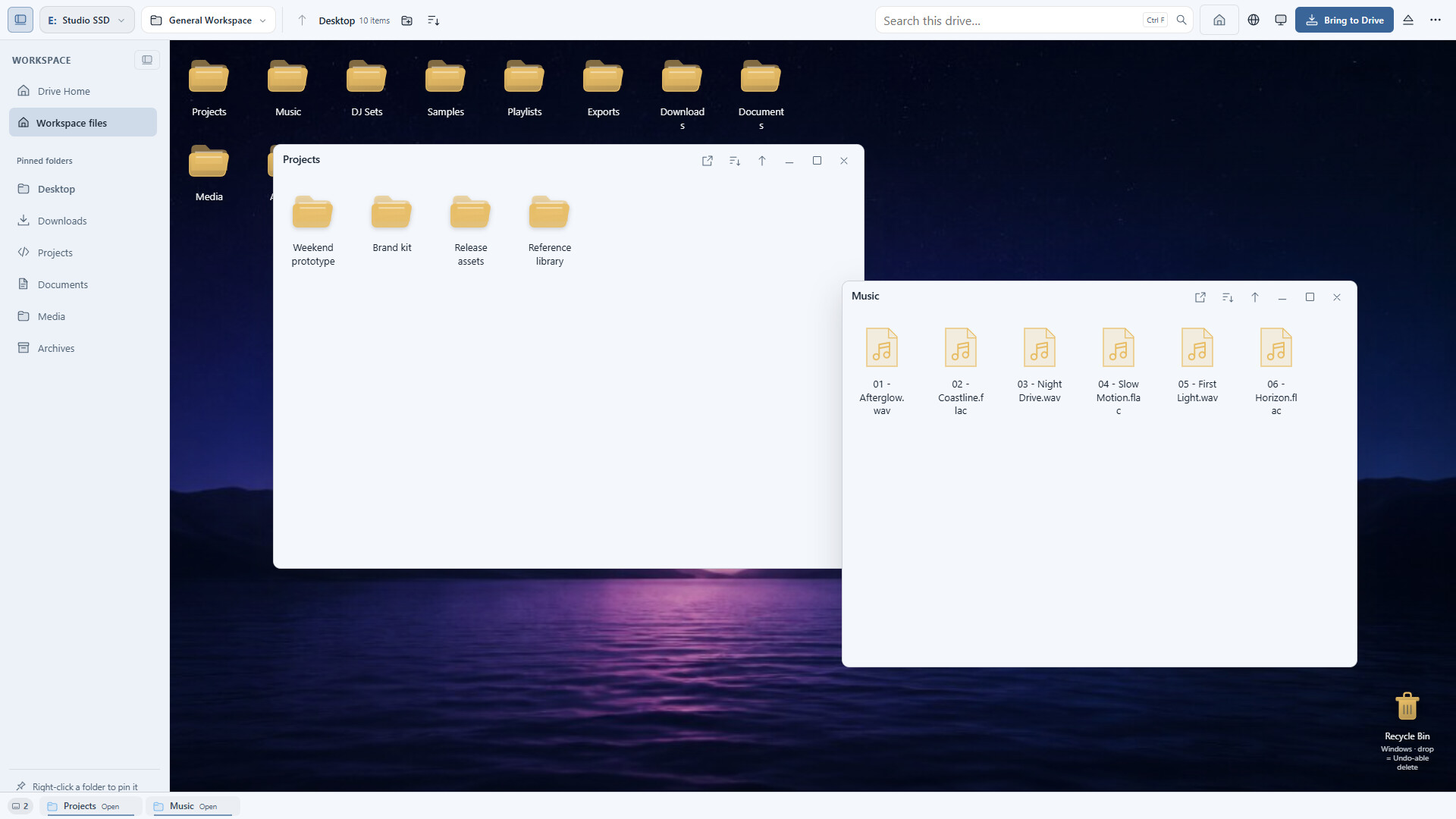
Stop treating your external SSD like a dumping ground. DriveDeck turns it into a portable desktop you can live in: drop files, organize, run verified transfers and safely eject. Your workspace travels with your files.
วันวางจำหน่าย:
เตรียมวางจำหน่าย
ผู้พัฒนา:
ผู้จัดจำหน่าย:
แท็ก

เข้าสู่ระบบ เพื่อเพิ่มผลิตภัณฑ์นี้ลงในสิ่งที่อยากได้ของคุณ ติดตาม หรือทำเครื่องหมายเป็นถูกละเว้น

ไม่รองรับภาษาไทย

ผลิตภัณฑ์นี้ไม่รองรับภาษาท้องถิ่นของคุณ โปรดตรวจสอบรายชื่อภาษาที่รองรับก่อนทำการสั่งซื้อ

เกมนี้ยังไม่พร้อมใช้งานบน Steam

เตรียมวางจำหน่าย

น่าสนใจ?
เพิ่มในสิ่งที่คุณอยากได้ และรับการแจ้งเตือนเมื่อผลิตภัณฑ์พร้อมใช้งาน
 

เกี่ยวกับซอฟต์แวร์นี้

Stop treating your drive like a dumping ground.

Your external SSD has the space. What it doesn't have is a home. DriveDeck turns it into a desktop you can actually live in: drop files, organize them, transfer with confidence and safely eject when you're done. Plug in, and your whole workspace is right there.

Plug in. Claim it. It's yours.

DriveDeck detects your drives the moment they connect. Claim a drive and it opens to a large-icon desktop with pins for the places you use most: Desktop, Downloads, Projects, Archives, Music and DJ Sets. No more digging through nested folders to find last week's work.

Transfers you don't have to babysit.

Queue up big copies, pause or cancel when you need to, and resume where you left off. Want proof every byte arrived intact? Turn on optional BLAKE3 verification. Bringing in music? Import tracks with their tags so your library lands organized.

Find anything. Undo everything.

Quick Look previews, thumbnails and indexed search get you to the right file fast. Undo and redo keep mistakes from becoming disasters, and trash lives on the drive itself, so deleted files travel with your workspace instead of cluttering your PC.

Eject without the gamble.

Safe eject is gated while copies are still running, so you never yank a drive mid-transfer. Keep an eye on drive health with SMART / NVMe status before small problems become big ones.

Built to be trusted.

  • Signed installer
  • In-app updates
  • Accessibility support built in
  • Windows first

What you get

  • Automatic drive detection and drive claiming
  • A large-icon desktop with pinned folders for your drive
  • A transfer queue with pause, cancel, resume and optional BLAKE3 verification
  • Music import with tags
  • Quick Look, thumbnails, indexed search, undo/redo and on-drive trash
  • Safe eject protection and SMART / NVMe health

Version 1.0 is complete and ready for launch. Get ready: your drive is about to get a desktop.

Good to know

DriveDeck is Windows software. External drives, music and other files are not included. DriveDeck organizes and transfers your existing files; it does not add storage capacity.

ความต้องการระบบ

    ขั้นต่ำ:
    • ต้องการโปรเซสเซอร์และระบบปฏิบัติการแบบ 64 บิต
    • ระบบปฏิบัติการ: Windows 10 or Windows 11 (64-bit)
    • หมายเหตุเพิ่มเติม: Microsoft Edge WebView2 Runtime required. External drive required for external-drive workspaces. Internet access required for web browsing and downloads. Games, music, and storage devices are not included.
    แนะนำ:
    • ต้องการโปรเซสเซอร์และระบบปฏิบัติการแบบ 64 บิต
    • ระบบปฏิบัติการ: Windows 10 or Windows 11 (64-bit)
    • โปรเซสเซอร์: Dual-core 2.0 GHz or better
    • หน่วยความจำ: แรม 8 GB
    • กราฟิกส์: DirectX 11 compatible; any modern integrated or discrete GPU
    • DirectX: เวอร์ชัน 11
    • พื้นที่จัดเก็บข้อมูล: พื้นที่ว่างที่พร้อมใช้งาน 250 MB
    • หมายเหตุเพิ่มเติม: Microsoft Edge WebView2 Runtime required. External USB SSD recommended for the best experience.
ตัวกรองบทวิจารณ์