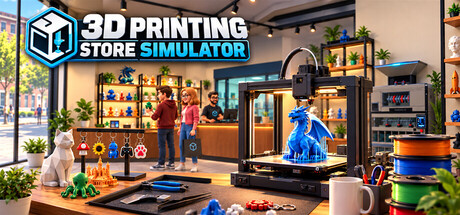
Build and manage your own 3D printing store. Print products, manage filament and inventory, create multicolor prints, assemble finished items, set prices, serve customers, recycle waste, and expand your workshop with better equipment.

เข้าสู่ระบบ เพื่อเพิ่มผลิตภัณฑ์นี้ลงในสิ่งที่อยากได้ของคุณ ติดตาม หรือทำเครื่องหมายเป็นถูกละเว้น

ไม่รองรับภาษาไทย

ผลิตภัณฑ์นี้ไม่รองรับภาษาท้องถิ่นของคุณ โปรดตรวจสอบรายชื่อภาษาที่รองรับก่อนทำการสั่งซื้อ

เกมนี้ยังไม่พร้อมใช้งานบน Steam

เตรียมวางจำหน่าย

น่าสนใจ?
เพิ่มในสิ่งที่คุณอยากได้ และรับการแจ้งเตือนเมื่อผลิตภัณฑ์พร้อมใช้งาน
 

เกี่ยวกับเกมนี้

Build Your Own 3D Printing Business

Turn an empty shop into a growing 3D printing business in 3D Printing Store Simulator.

Choose what to print, manage your filament, organize your shelves, set your prices, and keep your store stocked as customers arrive looking for the right products. Start small and gradually expand your production capabilities with better equipment and more advanced products.

Print Your Products

Your products don't simply appear in stock — you make them.

Load filament into your 3D printers, choose a model, select the quantity, and start printing. Different products require different amounts of filament depending on their size and geometry, so every print has a real material cost.

Produce a growing range of products in different sizes, from small decorative items to large, high-value prints.

Master Multicolor Printing

Advanced printers support multicolor production using multiple filament spools.

Some products require two, three, or even four different colors. Make sure the correct filament colors are loaded and that each spool has enough material before starting the job.

Every color used in a print consumes filament individually, making filament selection and stock management an important part of your production process.

Assemble Finished Products

Not every product is ready to sell when it leaves the printer.

Print keychains, move them to your assembly workbench, add the required hardware, and finish them using your tools. Once assembled, organize the finished products on dedicated display stands and prepare them for sale.

Printing is only the beginning of the production process.

Manage Your Store

Decide how your store operates.

Arrange shelves and equipment, organize products, manage inventory, and set your own selling prices. Keep an eye on production costs and make sure popular products stay in stock.

Customers have different product preferences, color preferences, and budgets, so a well-stocked and varied store gives you more opportunities to make a sale.

Complete Special Orders

Some customers want something specific.

Take on special orders, produce the requested item, and prepare it for the customer. Special orders give you another reason to manage production capacity alongside your regular store inventory.

Turn Waste Back Into Material

3D printing creates waste — but it doesn't have to stay waste.

Collect leftover printing material and failed or discarded plastic in your waste system, then process it using recycling equipment. Recover useful material and make waste management part of your production strategy.

Expand Your Workshop

As your business grows, expand your store and workshop with new equipment, production areas, storage, displays, and more advanced 3D printers.

Move from simple single-color production to more capable printing and assembly workflows as your shop becomes a larger 3D printing business.

From Filament to Finished Product

In 3D Printing Store Simulator, you control the entire process:

Order supplies → Load filament → Print → Assemble → Stock → Price → Sell → Recycle → Expand

Build the store your way and turn rolls of filament into a successful business.

การเปิดเผยข้อมูลเกี่ยวกับเนื้อหาที่สร้างด้วย AI

ผู้พัฒนาอธิบายว่าเกมของตนใช้เนื้อหาที่สร้างด้วย AI ในลักษณะนี้:

Generative AI tools were used during development to assist in creating some pre-generated 3D assets. All AI-assisted content is created and reviewed during development. The game does not generate AI content during gameplay and does not connect to external AI services.

ความต้องการระบบ

    ขั้นต่ำ:
    • ระบบปฏิบัติการ: Windows 10 64-bit
    • โปรเซสเซอร์: Intel Core i5-8400 / AMD Ryzen 5 2600
    • หน่วยความจำ: แรม 8 GB
    • กราฟิกส์: GTX 1060 6 GB / RX 580 8 GB
    • DirectX: เวอร์ชัน 11
    • พื้นที่จัดเก็บข้อมูล: พื้นที่ว่างที่พร้อมใช้งาน 5 GB
    แนะนำ:
    • ระบบปฏิบัติการ: Windows 11 64-bit
    • โปรเซสเซอร์: Intel Core i5-12400 / AMD Ryzen 5 5600
    • หน่วยความจำ: แรม 16 GB
    • กราฟิกส์: RTX 2060 / RX 6600
    • DirectX: เวอร์ชัน 11
    • พื้นที่จัดเก็บข้อมูล: พื้นที่ว่างที่พร้อมใช้งาน 5 GB
ตัวกรองบทวิจารณ์