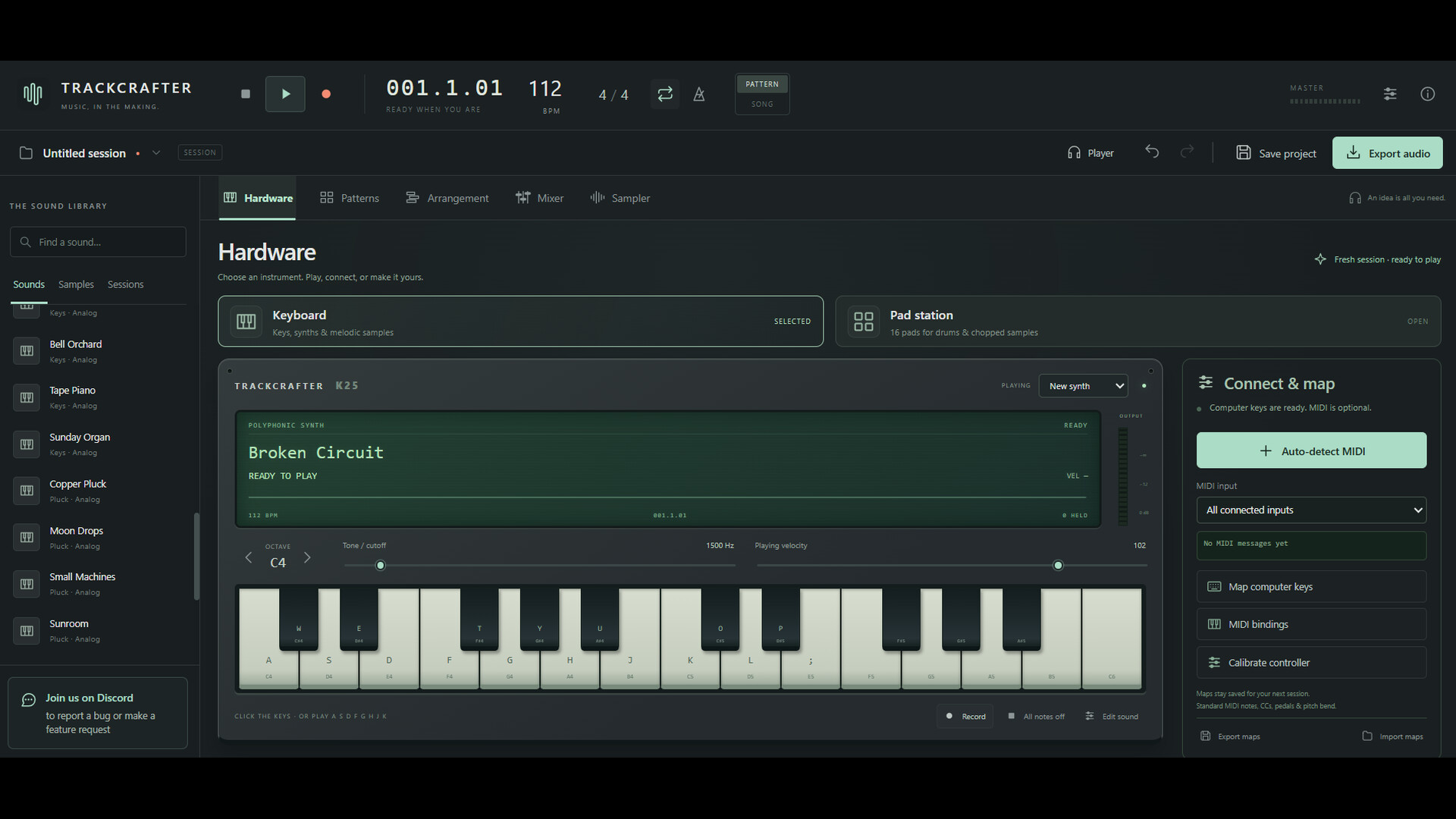
Make music with TrackCrafter. Play synths, build beats, record audio, and arrange full tracks. Connect a MIDI controller or use your computer keyboard. Import MP3s and WAVs, shape your sound with effects, and export your finished mix.

Sign in to add this item to your wishlist, follow it, or mark it as ignored

Early Access Software

Get involved with this software as it develops.

Note: This Early Access software is not complete and may or may not change further. If you are not excited to use this software in its current state, then you should wait to see if it progresses further in development. Learn more

What the developers have to say:

Why Early Access?

“TrackCrafter is already a functional music workstation, but I want real users to help shape where it goes next. Early Access lets me improve workflows, fix rough edges, and prioritize new instruments, sampling tools, effects, and other features based on how people actually use the software.”

Approximately how long will this software be in Early Access?

“3-6 months. Q1 2027 tentative 1.0.”

How is the full version planned to differ from the Early Access version?

“TrackCrafter is already being built around a complete creative loop: play, sequence, sample, arrange, mix, save, and export. Early Access is where we plan to take that foundation much further.
We plan to expand TrackCrafter with additional instruments, deeper sampling tools, more effects, improved MIDI workflows, recording and editing features, and other capabilities suggested by the people actually using it.
The long-term goal is for TrackCrafter to grow naturally from an approachable music workstation into an increasingly capable production environment without losing the speed and simplicity that make it fun to use.
The roadmap is intentionally flexible. We would rather build the features users actually want than promise a rigid checklist years in advance.”

What is the current state of the Early Access version?

“TrackCrafter is intended to be useful from day one—not a placeholder waiting to become a product later.
The Early Access version lets users create music with built-in instruments and drums, sequence and arrange ideas, work with samples, use computer-keyboard and MIDI input, mix their project, save their work, and export finished audio.
Early Access development will focus on improving reliability and workflow while expanding what TrackCrafter can do. Some areas will be simpler than they may ultimately become, and users should expect the interface, feature set, and production tools to evolve as development continues.
If you like the idea of getting in early, making music now, and watching the workstation grow around real user feedback, Early Access is for you.”

Will this software be priced differently during and after Early Access?

“Yes. We plan to gradually increase the price as TrackCrafter gains substantial new features and becomes a more capable music-production environment.
We want the Early Access price to reward the people willing to discover TrackCrafter early and help shape its development. Existing owners will continue receiving updates as the software grows.
Price increases will be tied to meaningful improvements in the product rather than every small update. We plan to give the community advance notice when a price increase is approaching.”

How are you planning on involving the Community in your development process?

“Community feedback is a central part of how we plan to develop TrackCrafter.
We want to hear what people are actually trying to make, where the workflow gets in their way, which tools they keep reaching for, and what feature would make TrackCrafter more useful to them.
We plan to use Steam Discussions, our Discord community, bug reports, feature requests, and direct user feedback to help prioritize development. Small quality-of-life requests may become quick improvements, while repeated requests for larger capabilities can influence major future updates.
TrackCrafter is not being developed around a rigid feature list. The goal is to build a strong foundation, put it in the hands of real musicians and creators, and let actual usage help determine where the software goes next.”
Read more
This game is not yet available on Steam

Planned Release Date: October 2026

Interested?
Add to your wishlist and get notified when it becomes available.
 

Report bugs and leave feedback for this software on the discussion boards

See all discussions

About This Software

**Turn your ideas into music.**

Build a beat, play a melody, or start with a sample. TrackCrafter brings instruments, recording, sampling, and mixing into one music-making workspace, giving you the tools to take an idea through to a finished track.

- **Play your way.** Make music with an on-screen keyboard and drum pads, your computer keyboard, or a compatible MIDI controller. Automatic device detection, manual mapping, and calibration help you set up your controls.

- **Build beats and full songs.** Create drum patterns, write melodies with built-in synthesizers, and arrange your parts into a complete song. Experiment with sounds, layer your ideas, and hear them come together.

- **Find a sound. Make it yours.** Listen to MP3 and WAV files in the compact built-in player, then import a whole file or a selected section directly into your project. Trim samples, slice them into pieces, and play them from the pads.

- **Record, mix, and share.** Record audio, balance your tracks, and shape your sound with effects. Export your finished mix as a WAV file.

- **Make yourself comfortable.** Choose the original Studio Black theme or the bold red and electric yellow of Red Voltage. Hover over controls for tooltips that explain what they do.

**Help shape what comes next.**

TrackCrafter is an audio program by Face One, and we want to build it alongside the people making music with it.

We’re accepting feature requests and working directly with users to improve the experience. Tell us what you’re creating, what gets in your way, and which tools would help you do more. Use the in-app community button to share ideas, report bugs, and talk with us.

Our goal is to make the best music-making software we can—and your feedback will help guide what comes next.

System Requirements

    Minimum:
    • OS: Windows 10, 64-bit
    • Processor: Dual-core Intel or AMD, 2.0 GHz
    • Memory: 4 GB RAM
    • Graphics: Integrated graphics
    • Storage: 1 GB available space
    • Sound Card: Windows-compatible audio device
    Recommended:
    • OS: Windows 11, 64-bit
    • Processor: Quad-core Intel or AMD, 3.0 GHz
    • Graphics: Integrated graphics
    • Storage: 1 GB available space
    • Sound Card: Windows-compatible audio device
Review Filters