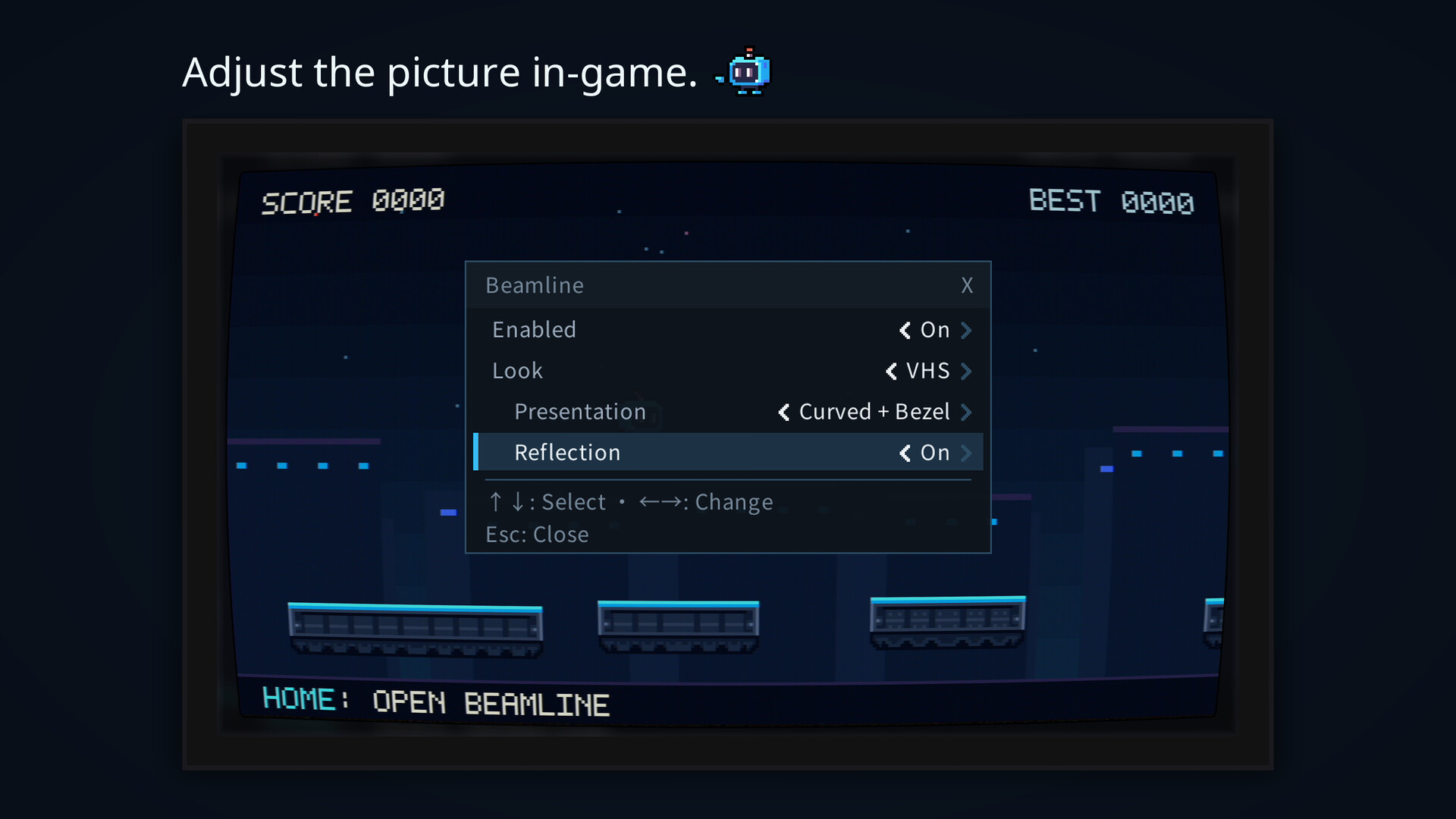
Bring curated CRT, LCD and VHS looks into supported games. Set up a game in Beamline, launch it as usual, and tune the picture from the in-game overlay.
วันวางจำหน่าย:
2 พ.ย. 2026
ผู้พัฒนา:
ผู้จัดจำหน่าย:
แท็ก

เข้าสู่ระบบ เพื่อเพิ่มผลิตภัณฑ์นี้ลงในสิ่งที่อยากได้ของคุณ ติดตาม หรือทำเครื่องหมายเป็นถูกละเว้น

ไม่รองรับภาษาไทย

ผลิตภัณฑ์นี้ไม่รองรับภาษาท้องถิ่นของคุณ โปรดตรวจสอบรายชื่อภาษาที่รองรับก่อนทำการสั่งซื้อ

เกมนี้ยังไม่พร้อมใช้งานบน Steam

วันวางจำหน่ายที่วางแผนไว้: 2 พ.ย. 2026

แอปพลิเคชันนี้จะปลดล็อกในอีกประมาณ 3 สัปดาห์

น่าสนใจ?
เพิ่มในสิ่งที่คุณอยากได้ และรับการแจ้งเตือนเมื่อผลิตภัณฑ์พร้อมใช้งาน
 

เกี่ยวกับซอฟต์แวร์นี้

Beamline brings curated CRT, LCD and VHS looks directly into supported games. Set up a game in Beamline, launch it as usual, then tune the picture from the in-game overlay while you play. The Beamline app does not need to stay open.

Choose your look

CRT Core gives you a cleaner scanline-and-glow look, while CRT Studio pushes the effect further for a stronger CRT presentation.

LCD Light and Strong recreate the visible cell structure of an LCD, with optional ghosting for motion trails.

VHS adds tape softness, color bleed and noise.

CRT and VHS can be shown flat, curved, or with a curved bezel. Optional reflections let the image cast light onto the surrounding housing.

Adjust it in-game

Press Home to open the overlay, or choose a different shortcut. Change looks and options with a keyboard or mouse, see the result immediately, and switch Beamline off at any time to compare with the original picture.

Try Beamline in the built-in minigame

Beamline Jump is included so you can try the setup process, learn the controls and experiment with the overlay before using Beamline with another game.

Optional pixel-grid tools

For pixel-art games, Detect Grid can try to identify the game's original pixel grid and align CRT or LCD patterns to it.

Detection is optional and may not always find a reliable grid. You can also set the grid manually, or use Virtual Resolution to create a coarser effect without changing the game's own resolution.

Before you use it

Compatibility varies by game, renderer and display mode. Beamline does not work with every game, and successful setup does not guarantee compatibility.

Use Beamline only where the game's rules allow graphics modifications.

Effects require additional GPU headroom, with performance cost depending on resolution and the options you choose.

Linux / SteamOS

Beamline is a Windows application and is also supported on Linux and SteamOS through Proton, with included native Linux components for platform integration. See the documentation for detailed requirements and compatibility notes.

การเปิดเผยข้อมูลเกี่ยวกับเนื้อหาที่สร้างด้วย AI

ผู้พัฒนาอธิบายว่าเกมของตนใช้เนื้อหาที่สร้างด้วย AI ในลักษณะนี้:

Some Beamline pixel art and localization were created or revised with generative AI assistance. Beamline does not use generative AI at runtime or connect to external AI services.

ความต้องการระบบ

    ขั้นต่ำ:
    • ต้องการโปรเซสเซอร์และระบบปฏิบัติการแบบ 64 บิต
    • ระบบปฏิบัติการ: Windows 10 or later (64-bit)
    • โปรเซสเซอร์: x86-64 processor
    • กราฟิกส์: Graphics hardware and drivers compatible with your game, with additional GPU headroom for effects.
    • หมายเหตุเพิ่มเติม: Requires a supported game. Compatibility varies by game, renderer and display mode. The in-game overlay supports keyboard or mouse input. Microsoft Visual C++ v14 runtime required (provided through Steam). Games retain their own system requirements. Effect cost varies with resolution and selected options.
    แนะนำ:
    • ต้องการโปรเซสเซอร์และระบบปฏิบัติการแบบ 64 บิต
ตัวกรองบทวิจารณ์