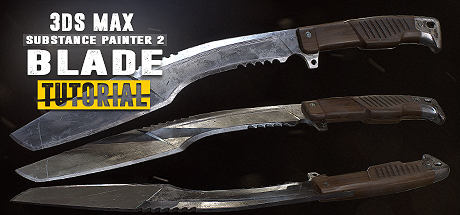
Blade Tutorial: 3Ds Max 2017 and Substance Painter 2
Follow along for free as we create a first person kukri knife in 3Ds Max & Substance Painter 2. Reach Substance Painter expert level as we create 10 more texture versions in the paid extended edition. Turn your passion into a profession and start creating game art today!

想要将此项目添加至您的愿望单、关注它或标记为已忽略,请先登录

不支持简体中文

本产品尚未对您目前所在的地区语言提供支持。在购买请先行确认目前所支持的语言。

注意: Blade Tutorial: 3Ds Max 2017 and Substance Painter 2 已在 Steam 停售。
 

系列目录

该系列目前无可用内容。
init_data: 0.0121, render: 0.0121

Steam 视频

该内容只支持在线视频格式。更多关于在线视频的信息可在 Steam 在线视频常见问题中找到。

Downloadable Files

Download the associated files for this tutorial to your Steam Client:

  • Downloadable Content for Free Videos
  • Downloadable Content for Extended Paid Videos (available only after purchasing the Extended Texturing package)
The files will appear in the Library / Software section of the Steam Client.

关于此剧集

Create a first person kukri knife


Follow along for free in this compact ~3 hour long tutorial as we model and texture a game ready first person kukri knife. Every step is documented without any fast forwarding. At the end of the free part you have the option to learn even more with the extended edition in which we go over 10 more triple A quality PBR textures.

The modeling part covers the scene setup followed by the low and high-poly modeling in which we make use of advanced actions, modifiers and tools to help us create our kukri. After the modeling process we will jump straight into the UVW Editor and focus on the importance of an optimized UV-Layout to get the maximum out of our texture.

In the Substance Painter 2 part we will then bake our normal map as well as other important support maps. Right after that you will learn how to create an ultra realistic texture for our kukri. Learn how to create our base layer materials and how to use procedural textures, masks and generators to form up the wear and tear on our kukri resulting in a photo realistic appearance.

What are the requirements?

It is recommended to follow the course with the same software we use throughout the tutorial:
3Ds Max 2017 (can be 2016 and 2015 too) and Substance Painter 2.

Who is the target audience?

This tutorial is aimed at beginners as well as intermediate.
I try to avoid heavy use of shortcuts as much as I can during the lesson so that you can see which actions I use.

What do I get from this course?

  • Nearly 3 hours of free fully documented and commented content.
  • Knowledge in modeling, unwrapping and texturing.
  • Essential reference images.
  • Final high-poly and low-poly kukri for those that just want to follow the texturing part.

Instructor Biography

Hi! I'm Tim - Senior 3D Artist at Ubisoft Toronto.
I'm originally from Germany where I started my 3D Artist career at Crytek. I worked on titles such as Far Cry 4, Splinter Cell Blacklist and the Crysis series as well as other non disclosed titles.
In my spare time I enjoy creating tutorials in which I share all my tips and tricks which I gathered over the years. Let me help you avoiding mistakes and equipping you with powerful techniques and knowledge in game ready 3D art creation. See you in the tutorial! Cheers, Tim

Relevant links:

  • Learn more at
  • Facebook
  • All tutorials
  • Artstation

系统需求

Windows
macOS
SteamOS + Linux
    最低配置:
    • 操作系统 *: Windows 7
    • 处理器: 英特尔酷睿 2 处理器或相同性能的 AMD 处理器
    • 内存: 1 GB RAM
    • 网络: 宽带互联网连接
    • 存储空间: 需要 200 MB 可用空间
    • 附注事项: 5Mbit/s 的网络带宽适合 540p,3Mbit/s 的网络带宽适合 360p。
    推荐配置:
    • 操作系统: Windows 10
    • 处理器: 推荐搭载英特尔酷睿 I3 和以上的处理器,或相同性能的 AMD 处理器播放 1080p 高清视频
    • 内存: 2 GB RAM
    • 网络: 宽带互联网连接
    • 存储空间: 需要 500 MB 可用空间
    • 附注事项: 12Mbit/s 的网络带宽适合 1080p,8Mbit/s 的网络带宽适合 720p。
* 2024 年 1 月 1 日(PT)起,Steam 客户端将仅支持 Windows 10 及更新版本。
    最低配置:
    • 操作系统: Mac OSX 10.7
    • 处理器: 英特尔酷睿 2 处理器或相同性能的 AMD 处理器
    • 内存: 1 GB RAM
    • 网络: 宽带互联网连接
    • 存储空间: 需要 200 MB 可用空间
    • 附注事项: 5Mbit/s 的网络带宽适合 540p,3Mbit/s 的网络带宽适合 360p。
    推荐配置:
    • 操作系统: Mac OSX 10.10+
    • 处理器: 推荐搭载英特尔酷睿 I3 和以上的处理器,或相同性能的 AMD 处理器播放 1080p 高清视频
    • 内存: 2 GB RAM
    • 网络: 宽带互联网连接
    • 存储空间: 需要 500 MB 可用空间
    • 附注事项: 12Mbit/s 的网络带宽适合 1080p,8Mbit/s 的网络带宽适合 720p。
* 2024 年 2 月 15 日(PT)起,Steam 客户端将不再支持 32 位游戏及 macOS 10.14 或更低版本。
    最低配置:
    • 操作系统: Linux Ubuntu 12.04 或更高版本,SteamOS 2.20 或更高版本
    • 处理器: 英特尔酷睿 2 处理器或相同性能的 AMD 处理器
    • 内存: 1 GB RAM
    • 网络: 宽带互联网连接
    • 存储空间: 需要 200 MB 可用空间
    • 附注事项: 5Mbit/s 的网络带宽适合 540p,3Mbit/s 的网络带宽适合 360p。
    推荐配置:
    • 操作系统: Linux Ubuntu 12.04 或更高版本,SteamOS 2.20 或更高版本
    • 处理器: 推荐搭载英特尔酷睿 I3 和以上的处理器,或相同性能的 AMD 处理器播放 1080p 高清视频
    • 内存: 2 GB RAM
    • 网络: 宽带互联网连接
    • 存储空间: 需要 500 MB 可用空间
    • 附注事项: 12Mbit/s 的网络带宽适合 1080p,8Mbit/s 的网络带宽适合 720p。

Blade Tutorial: 3Ds Max 2017 and Substance Painter 2 的顾客评测 关于用户评测 您的偏好

总体评测:
好评 (14 篇评测)


要查看某个日期范围内的评测,请在上方图表中点击并拖动选定的范围或是点击某特定时间柱。


按用户的游戏时间筛选此评测撰写时的评测:


无最低限制无最高限制

按选择的显示顺序显示评测


了解更多
筛选条件
排除跑题评测活动
游戏时间:
大部分在 Steam Deck 上
Operating System:
CPU:
GPU:
Device Type: