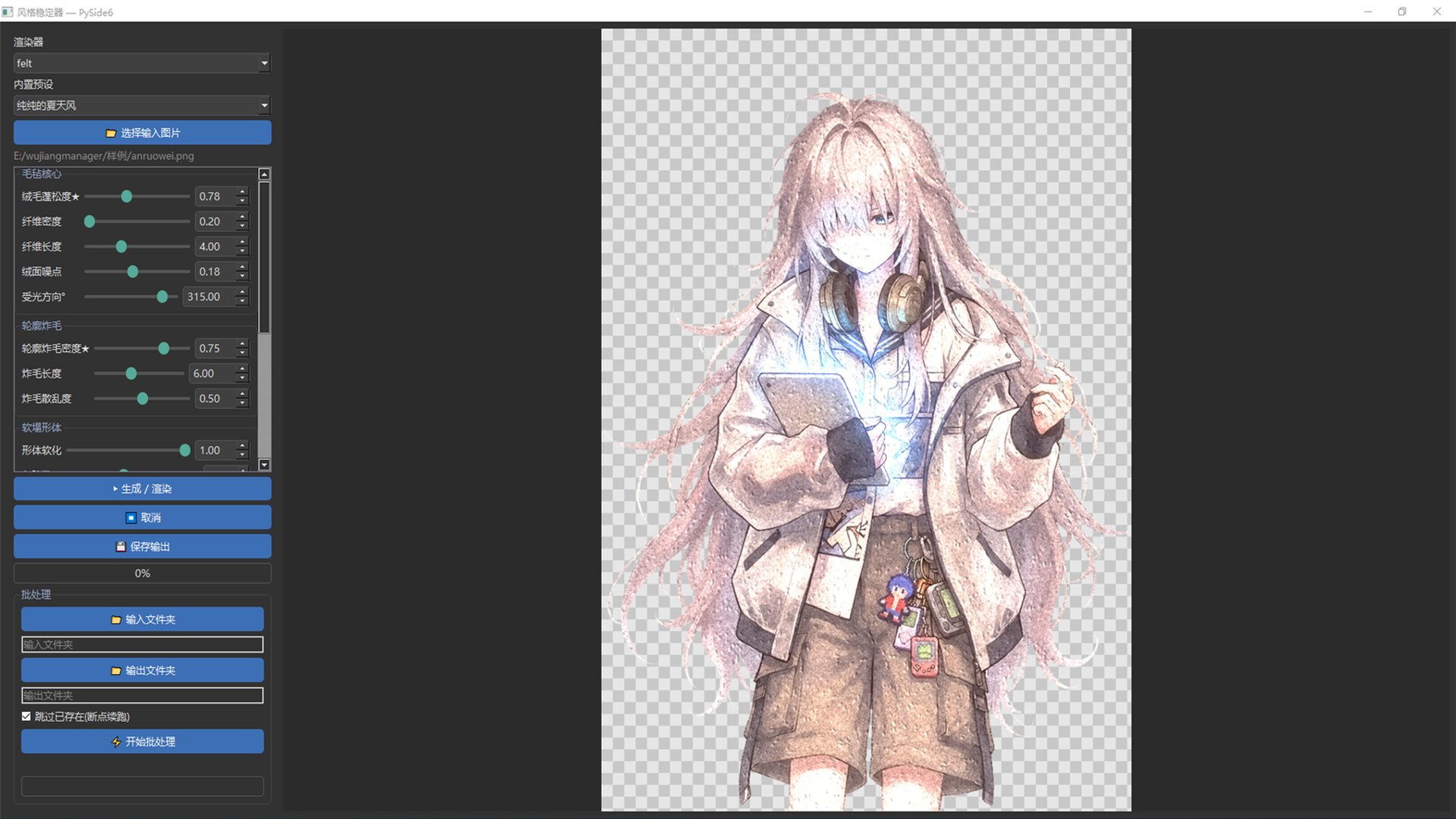
A locally run batch image stylization tool. Transform illustrations and character art into five distinct art styles: impasto oil painting, felt, pencil, cel shading, and pixel. It supports folder batch processing and parameter presets. No internet required, no GPU needed, and zero images uploaded.

Sign in to add this item to your wishlist, follow it, or mark it as ignored

Early Access Software

Get involved with this software as it develops.

Note: This Early Access software is not complete and may or may not change further. If you are not excited to use this software in its current state, then you should wait to see if it progresses further in development. Learn more

What the developers have to say:

Why Early Access?

“The core effects of our five distinct art styles are already well-developed and stable. However, finding out which styles resonate most and how to fine-tune the parameters for the smoothest workflow requires feedback from real users. Rather than working behind closed doors, we want to collaborate with early adopters to polish and refine the experience.”

Approximately how long will this software be in Early Access?

“We estimate Early Access will last around 6 to 12 months, depending on the pace of user feedback and the development progress of new art styles.”

How is the full version planned to differ from the Early Access version?

“We plan to add preset import/export and community sharing, introduce more art styles, refine the UI/UX, and optimize batch-processing performance.”

What is the current state of the Early Access version?

“All five art styles are fully functional. Key features—such as single and batch rendering, real-time previews, and checkpoint resumption (resuming interrupted tasks)—are already complete. The main missing elements are preset community sharing and some UI polish.”

Will this software be priced differently during and after Early Access?

“The price may increase slightly upon the full official release. Purchasing during Early Access locks in the current price.”

How are you planning on involving the Community in your development process?

“Active Feedback & Discussion: We will closely monitor the Steam Community Hub to gather feedback on parameter usability, UI/UX feel, and batch-processing performance.


Feature & Style Voting: The priority of upcoming art styles and new features will be heavily influenced by community feedback and polls—letting users help decide which styles we develop next.


Transparent Updates & Community Presets: We will keep the development process transparent through regular patch notes and devlogs. Additionally, standout presets created by the community may be featured and integrated into official presets in future updates.
”
Read more
English language not supported

This product does not have support for your local language. Please review the supported language list below before purchasing

Buy 风格稳定器

INTRODUCTORY OFFER! Offer ends October 18

10% off. $19.99 normally, discounted to $17.99
 

Report bugs and leave feedback for this software on the discussion boards

See all discussions

About This Software

About

Style Stabilizer is an image stylization tool that runs entirely on your own computer. It turns your illustrations, character art, and now real photos as well into five hand-crafted art styles with consistent results.

This is not generative AI. It doesn't "redraw" your work or invent new content. Instead, it analyzes the line art, color regions, subject, and highlights in your image. It then adds brushwork and material texture while keeping your original composition and shapes intact. The same settings on the same image always produce the same result. That consistency is where the name "Stabilizer" comes from.

Five Art Styles

  • Impasto Oil: brushstrokes that follow the structure of the image, with the weight of layered paint

  • Needle Felt: a fuzzy wool texture across the subject, with naturally frayed outlines

  • Colored Pencil: paper grain and hatched, layered color with a soft hand-drawn warmth

  • Cel Shading: flat color separation and crisp shadows for an instant anime look

  • Pixel Art: a reduced palette on a pixel grid, perfect for retro looks and game assets

New: Direct Photo Restyling

Beyond illustrations and character art, you can now drop in real photos and convert them into any of the five styles. Travel shots, pet photos, street scenes, and still lifes can all become paintings.

Built for Large Images and Batches

  • Full-resolution output: no downscaling, no compression. Very large artworks are processed in tiles and seamlessly blended back together. The output matches your original dimensions exactly

  • 1:1 region preview: click anywhere on the thumbnail to render just that area at full detail. You can tweak settings without waiting for the whole image every time

  • Folder batch processing: choose an input folder and an output folder to process an entire set in one go. If a batch is interrupted, you can resume it and skip files that are already done

  • Transparency preserved: character art with a transparent background stays a transparent PNG, ready to use

Presets and Recipes

  • Every style comes with built-in presets, plus detailed parameters for fine-tuning your own look

  • Export presets as .stylep files to share with friends or your team

  • Every output PNG automatically embeds the recipe used to create it. Load the image later and all of your settings are restored, so you never lose a setup you liked

Privacy and Requirements

  • Fully offline. No internet connection or account required

  • No uploads, ever. Every image is processed on your own machine

  • No dedicated GPU needed. A regular CPU is all it takes

Who It's For

  • Illustrators who want to quickly try different styles on their work

  • Indie game and visual novel developers who need assets in a unified style

  • Anyone who wants to turn photos into hand-drawn-style artwork

  • Creators who value privacy and would rather not upload images to online services

System Requirements

    Minimum:
    • OS: OS Windows 10 (64-bit)
    • Processor: Dual-core 2.0 GHz (Intel Core i3 or equivalent AMD)
    • Memory: 4096  MB RAM
    • Graphics: No special requirements; integrated graphics are sufficient
    • Storage: 500 MB available space
    Recommended:
    • OS: Windows 10 / 11 (64-bit)
    • Processor: Quad-core 3.0 GHz (Intel Core i5 or equivalent AMD) or better
    • Memory: 8192 MB RAM
    • Graphics: No special requirements (CPU-based rendering; a dedicated GPU does not affect performance)
    • Storage: 500 MB available space
Review Filters