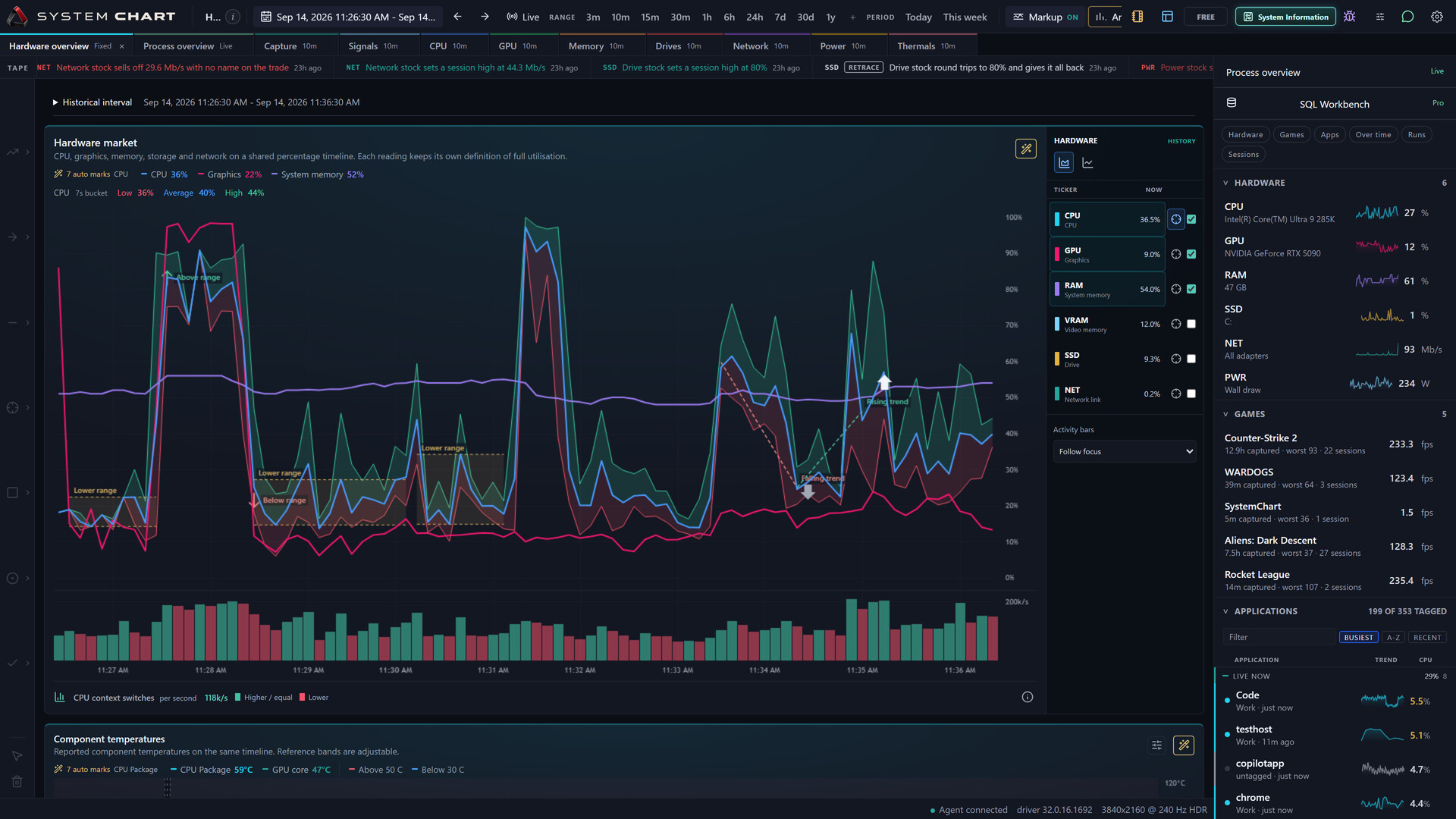
Missed the spike? Revisit your PC's hardware, process and game activity on one timeline. Inspect the slow moment, follow captured readings and keep the evidence, with CPU, GPU, memory and supported frame-time history stored on your PC.

Zaloguj się, aby dodać tę pozycję do listy życzeń, zacząć ją obserwować lub oznaczyć jako ignorowaną

Polski język nie jest obsługiwany

Ten produkt nie obsługuje twojego lokalnego języka. Przed zakupem zapoznaj się z listą obsługiwanych języków, która znajduje się poniżej.

Ta gra nie jest jeszcze dostępna na Steam

Wkrótce dostępne

Interesuje cię ten produkt?
Dodaj go do swojej listy życzeń i otrzymaj powiadomienie, gdy stanie się dostępny.
 

O tym programie

Your PC, with a history


Missed the spike? Go back to it. SystemChart captures your PC's hardware, application activity and supported game frame times on a shared timeline, so the evidence is still there after the moment has passed.

Inspect the interval around a hitch. Follow CPU, GPU, memory and storage activity. See what was running alongside it. Keep the history on your PC and export the evidence you choose.

Free and Pro at a glance


SystemChart is one application. The Free base app includes the same supported sensors and capture quality as Pro. SystemChart Pro is an optional DLC planned for the Steam release and is not currently available on Steam. No separate Pro installation is needed.

  • Free: eleven built-in pages, live process details, hardware information, automatic markup, Findings, exact-interval investigations and ordinary CSV, JSON and chart-image exports.
  • Free: a 60-day history window within storage constraints, a basic frame counter with size and corner controls, and every application and tray icon finish.
  • Pro: custom workspaces, manual studies and drawings, Compare, game and application benchmarks, watch-rule authoring and read-only SQL authoring and execution.
  • Pro: consolidated investigation reports, a desktop widget, additional themes and ranked frame-counter/session presentation. Pro removes the edition time limit on history within your storage budget.
  • Pro: optional in-app assistant and local MCP integration using a compatible model or agent you supply. No model service is included. Steam integration remains subject to content review.

Follow the moment across your machine


A live number cannot explain what happened ten minutes ago. Start with the hardware overview, hold an exact interval and inspect its readings together. Built-in pages cover CPU, GPU, memory, drives, network, power, thermals, signals, processes and capture.

Game histories retain supported frame rate, slow-frame and frame-time measurements. Application histories show captured resource use. A timing match is useful context, not proof that one application caused the slowdown.

Go deeper with your own tools


The Pro SQL Workbench loads a bounded selection into an isolated in-memory SQLite worker. Review a query, run it against that snapshot, inspect a table or chart and export CSV. Saved SQL never runs automatically and cannot write to the capture database.

Bring a compatible local model or hosted API connection, or connect your own local MCP client. Agents can inspect supported diagnostics, open charts and offer SQL for review. Your questions and returned context may go to the model provider you choose. Check the readings before relying on an answer.

Local capture, clear limits


Captured history is stored on your PC. Capture does not require a SystemChart account. Diagnostic reports are shared only after your approval. Closing the Steam chart window leaves the native recorder running.

Sensor availability depends on hardware and drivers. Supported NVIDIA cards expose extra board readings. AMD and Intel graphics currently use Windows load and dedicated-memory counters. Optional CPU and motherboard sensors require supported hardware and explicit setup.

Estimated wall power, energy and electricity cost are models, not plug-in meter measurements. Supported GPU board power is reported separately. Frame capture uses PresentMon and Windows tracing permissions. Game and anti-cheat compatibility vary. The frame counter supports windowed and borderless presentation; exclusive-fullscreen coverage is not promised.

History contains only activity captured while SystemChart was running. Missing capture cannot be reconstructed. Long-range exports can contain stated-resolution buckets rather than every raw tick. Losing Pro does not itself delete existing readings or authored work. Normal retention and your storage constraints still apply.

SystemChart observes captured activity. It does not overclock your hardware or guarantee an FPS improvement. This release targets Windows 11 x64. macOS, Linux, SteamOS and native ARM64 are not supported.

Oświadczenie w sprawie treści generowanych przez SI

Producenci opisują, jak ich gra korzysta z treści generowanych przez SI, w następujący sposób:

Generative AI assisted with SystemChart's branding and store descriptions. The optional assistant uses a user-configured model to select diagnostic tools. In the Steam app, SystemChart writes the displayed summaries from validated tool results; free-form model text is not displayed. External AI clients connected through the optional tool server control their own responses. Core capture and charts do not require AI. No model or hosted inference service is included.

Wymagania systemowe

    Konfiguracja minimalna:
    • Wymaga 64-bitowego procesora i systemu operacyjnego
    • System operacyjny: Windows 11 (64-bit)
    • Procesor: Intel or AMD x64 processor
    • Pamięć: 8 GB RAM
    • Karta graficzna: Windows-compatible graphics and current drivers; available telemetry varies by GPU
    • Miejsce na dysku: 1 GB dostępnej przestrzeni
    • Dodatkowe uwagi: Additional space is needed for captured history. Microsoft Edge WebView2 is required for the interface; its bootstrapper is included. Frame capture requires Windows tracing permissions.
    Konfiguracja zalecana:
    • Wymaga 64-bitowego procesora i systemu operacyjnego
Filtry recenzji