Make Games Possible - Can I Run It? System Requirements Checker & PC Performance Mode
One slider makes your PC faster for games. Quiet to Max sets the Windows power plan, processor state and game priority — saved per game, applied at launch, undone on exit. No overclocking, anti-cheat safe. Plus free verdicts on any Steam game and a one-click check of your whole library.
Release Date:
28 Sep, 2026
Developer:
Publisher:
Tags

Sign in to add this item to your wishlist, follow it, or mark it as ignored

This game is not yet available on Steam

Planned Release Date: 28 Sep, 2026

This application will unlock in approximately 11 days

Interested?
Add to your wishlist and get notified when it becomes available.
 

From the developer: Strange Video Editor

Make Games Possible is free and made by the team behind Strange Video Editor, a fast video editor that runs entirely on your PC with no subscription. Cut your game clips with it. Everything in this free app stays free either way.

About This Software

PC performance mode

One slider from Quiet to Max sets your Windows power plan, processor maximum state and the game's process priority. Save it per game and it applies automatically when that game launches and restores when it closes. It never touches clocks, voltages, fan curves or game files, and it never injects anything into a game, so it is safe alongside anti-cheat. Applying asks for Windows administrator approval once.

Will this game run on my PC? Find out in seconds, for free.

Make Games Possible reads your PC's hardware, pulls the official system requirements of any Steam game, and tells you plainly: does it run, which graphics preset to expect, and which part is holding you back. No account, no ads, nothing locked.


Check your whole Steam library in one click

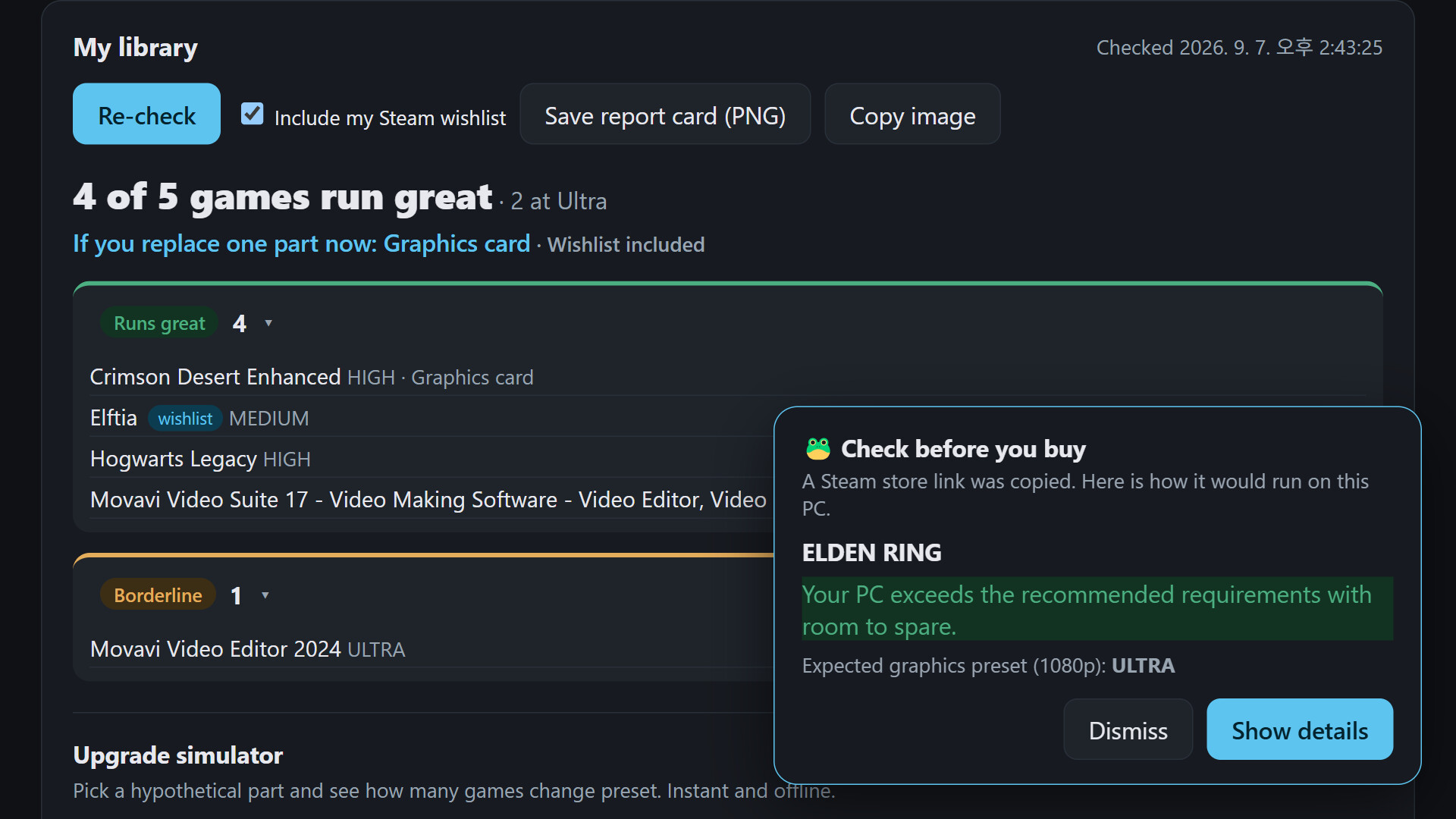
Every installed game, plus your public wishlist, sorted into "runs great", "borderline" and "no". You get one summary line, such as "92 of 137 run great · 40 at Ultra", and a clear answer to "if I upgrade one part, which one?"

Can I run it? Verdict for any game

Pick a running game, an installed one, or search the Steam store. The app compares your CPU, graphics card, RAM, video memory and storage against the minimum and recommended requirements and explains the result in plain language: expected preset at 1080p, rough FPS range, and the bottleneck.

Upgrade simulator

Choose a different GPU, CPU or RAM from the list and see instantly how many of your games change preset. Decide before you buy.

Check before you buy

Copy any Steam store link and a verdict card pops up for that game. Off by default; turn it on once and switch it off any time.

Live check

While the analyzed game is running, the app reads total CPU and GPU load and shows whether reality matches the prediction.

Share your PC's report card

Export a report image with your verdicts and post it anywhere.

Honest notes

• Verdicts are estimates based on public requirement listings and our own hardware tier table. Real performance varies with drivers, thermals and background apps.

• Requirements are fetched from the Steam store and cached for 30 days, so an internet connection is needed for games you have not checked before.

• This app is made by the developer of Strange Video Editor, a paid video editor sold on Steam. A card inside the app introduces it and can play a one-minute intro video. Watching is optional and unlocks nothing: every feature of this app is free for everyone.

• Windows 10 (version 2004) or newer, 64-bit. Not supported on Steam Deck or Linux.

• Interface in English, Korean, Japanese and Simplified Chinese.

AI Generated Content Disclosure

The developers describe how their game uses AI Generated Content like this:

This application does not use AI at runtime. Compatibility verdicts, expected
presets and the performance recommendation come from a deterministic rule set
and the developer's own hardware tier table, with no AI model involved.

AI was used only for pre-made promotional material: the narration of the
optional intro video for the developer's other product (synthetic text-to-speech
with a preset voice) and parts of the store page artwork, which were generated
with an image model and then edited by the developer. All in-app artwork,
including the mascot, is first-party.


System Requirements

    Minimum:
    • Requires a 64-bit processor and operating system
    • OS: Windows 10 version 2004 (64-bit) or newer
    • Processor: Any 64-bit (x64) CPU
    • Memory: 4 GB RAM
    • Graphics: Any GPU with a current driver
    • Network: Broadband Internet connection
    • Storage: 500 MB available space
    • Additional Notes: Steam client installed and signed in is recommended for the library check and wishlist. Internet is needed to fetch a game's requirements from the Steam store (cached 30 days). Applying a performance mode asks for Windows administrator approval once. Not supported on Steam Deck or Linux.
    Recommended:
    • Requires a 64-bit processor and operating system
    • OS: Windows 11 (64-bit)
    • Processor: Any 64-bit CPU
    • Memory: 8 GB RAM
    • Graphics: Discrete GPU
    • Network: Broadband Internet connection
    • Storage: 500 MB available space
Review Filters