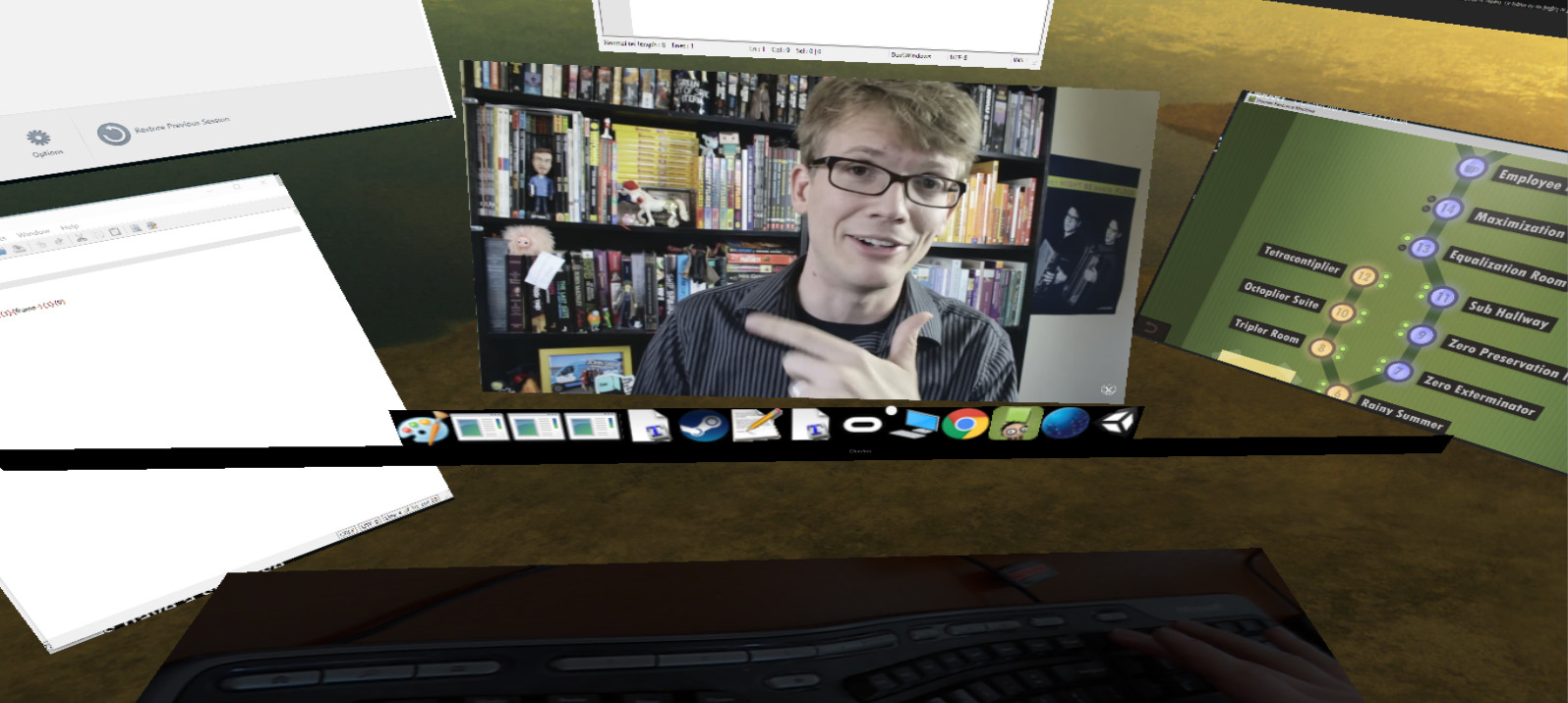
A program in VR that lets you have as many virtual monitors as you want.

Log in om dit item aan je verlanglijst toe te voegen, het te volgen of te negeren

Vroegtijdige toegang

Raak betrokken bij deze software terwijl het zich ontwikkelt.

Opmerking: Deze software in vroegtijdige toegang is nog niet voltooid en kan mogelijk wel of niet veranderen. Als je niet staat te springen om deze software in de huidige staat te spelen, kun je beter afwachten hoe het zich verder ontwikkelt. Meer informatie

Opmerking: De laatste update door de ontwikkelaars was meer dan 9 jaar geleden. De informatie en tijdlijn die de ontwikkelaars hier beschrijven, zijn mogelijk niet meer up-to-date.
Wat de ontwikkelaars zeggen:

Waarom vroegtijdige toegang?

'Multiscreens has the basic functionality working so I wanted to get this out so everyone could start using it. It is not as polished as I'd like/is missing some features I would like to add (such as curved screens or moving windows with your mouse), but I figured the best way to do this would be to get community input so I can have a better idea of what things work or don't work.'

Hoelang blijft deze software ongeveer in vroegtijdige toegang?

'Until it is ready! More seriously, this depends on the number of features that we find essential for a unlimited virtual monitor program to have. Once I can get it to the point where someone can pick it up and say "this is exactly what I wanted" and have things intuitive enough that they can immediately use it.'

Hoe gaat de volledige versie verschillen van de versie met vroegtijdige toegang?

'It will have curved screens (with an orbit type mode that lets you put screens around you), allow you to move screens with your mouse, and allow you to capture the desktop and almost any window. It will also feel very polished and be very easy to naturally pick up and use. More specifically, in terms of priority:

- Polish to make everything look cleaner and more usable.

- Making a desktop capture that allows you to see your entire desktop similar to other Virtual Monitor programs if you prefer to interact with it that way. This also allows capture of any window as long as it is in the foreground of your monitor, which is guaranteed if you are focused on it. The code here is working, there is just a small dll import error that prevents others from currently using it. Once this is fixed you should have capture mode working well.

- Minor text fixes

- Letting you drag windows around and focus on them with your mouse (instead of a keyboard or gamepad) since this is really the natural way to interact with them

- A "polar mode" - right now all of the screens are rectangular, in the future curved screens will be added and you'll be able to interact with them in a bubble around you if desired

- Various ways of making text more readable

- Vive and touch controller support so you can use them as mice/to drag around windows

- Allowing you to render a window at higher resolution than your current physical monitor (for things like HD videos).

Eventually I'd like to make it so you can share your screens with others over the internet, but this isn't a priority until the important features above are added and polished first alongside any needed bug fixes.'

Wat is de huidige staat van de versie met vroegtijdige toegang?

'You are able to capture most windows at a configurable frame rate (per window). As a baseline test, if you are using the min specs it can reliably capture 6 youtube videos steaming at the same time at a good FPS with minimal/no Judder.

You can move windows around in space (by "grabbing them" and looking around) and make them bigger or smaller. There is no input lag, and right click and other menus will appear as they typically would in a window.

Once you exit out of Multscreens and come back in the windows will "remember" where they were.'

Zal deze software anders geprijsd worden tijdens en na vroegtijdige toegang?

'The price will go up slightly once we finish early access, however anyone that has purchased Multiscreens during early access will get all the additional features for free.'

Hoe zijn jullie van plan de community te betrekken bij het ontwikkelproces?

'I'm putting this up now so I can get feedback! I think it's functional enough that people could find it useful as it is right now, and I'd like to make this the best product for people as I can, which involves getting their feedback about what is important/what works and what doesn't.'
Meer informatie
Alleen VR

Multiscreens kopen

 
Alle discussies weergeven

Meld bugs en laat feedback voor deze software achter op de discussiefora

Over deze software

Multiscreens is a early-access program that lets you have as many screens as you want in VR. Specifically, each program is its own screen and can be moved around as desired.

Right now you can:

- Change the target framerate of each window captured
- Play multiple videos simultaneously (just make sure if you are in chrome to disable Hardware Acceleration in advanced settings) while playing a game
- Turn on supersampling
- Control everything with your mouse which leaves your keyboard and controller free for typical use (there is also a mouse sensitivity setting)
- Move windows freely in a 3D space around you and make them bigger or smaller as desired
- Capture right click menus and other context menus
- Capture the mouse on the currently active window
- No Headless Ghosts are required, this program works fine when you simply have a single physical monitor (or headless ghost) plugged in
- Minimize (hide) windows as desired
- Change focus between windows with a single click
- Use a webcam that's displayed below you to see your keyboard while in VR
- Multiscreens can technically capture every window, but some it can only capture while they are currently focused
- There is a "virtual taskbar" that allows you to bring up programs you have opened by clicking on their icons below
- You can change this Taskbar's position
- Reset view

Current limitations (in order of planned feature addition):

- Screens can't be curved yet
- You generally need to open windows before opening Multiscreens, it's difficult to start programs while in Multiscreens (I'm going to add a search bar to open any program you currently have installed and allow you to "pin" programs to your taskbar)
- Can't capture the entire desktop
- Vive controller support doesn't exist yet, everything is currently controlled with your mouse

Enjoy, and let me know what you think! I'm happy to listen to feedback and will try and make this the best product for all of you as possible :)

Systeemeisen

    Minimum:
    • Vereist een 64-bitsprocessor en -besturingssysteem
    • Besturingssysteem *: Windows 7, Windows 8.1, Windows 10
    • Processor: Intel i5-4590
    • Geheugen: 8 GB RAM
    • Grafische kaart: NVIDIA GTX 970 or AMD 290
    • DirectX: Versie 11
    • Opslagruimte: 100 MB beschikbare ruimte
    • VR-ondersteuning: SteamVR or Oculus PC. Keyboard or gamepad required
    Aanbevolen:
    • Vereist een 64-bitsprocessor en -besturingssysteem
* Vanaf 1 januari 2024 ondersteunt de Steam-client alleen Windows 10 en latere versies.

Klantenrecensies voor Multiscreens Over gebruikersrecensies Je voorkeuren

Algemene recensies:
Negatief (10 recensies)


Om recensies in een datumbereik te bekijken, klik en sleep je een selectie op een grafiek hierboven of klik je op een specifieke balk.


Filter recensies op speeltijden van gebruikers toen ze geschreven werden:


Geen minimum tot Geen maximum

Recensies weergeven in de geselecteerde volgorde


Meer informatie
Filters
Irrelevante recensieactiviteit uitgesloten
Speeltijd:
Vooral gespeeld op de Steam Deck
Er zijn geen recensies meer die met bovenstaande filters overeenkomen
Pas de filters hierboven aan om andere recensies te zien
Recensies laden ...