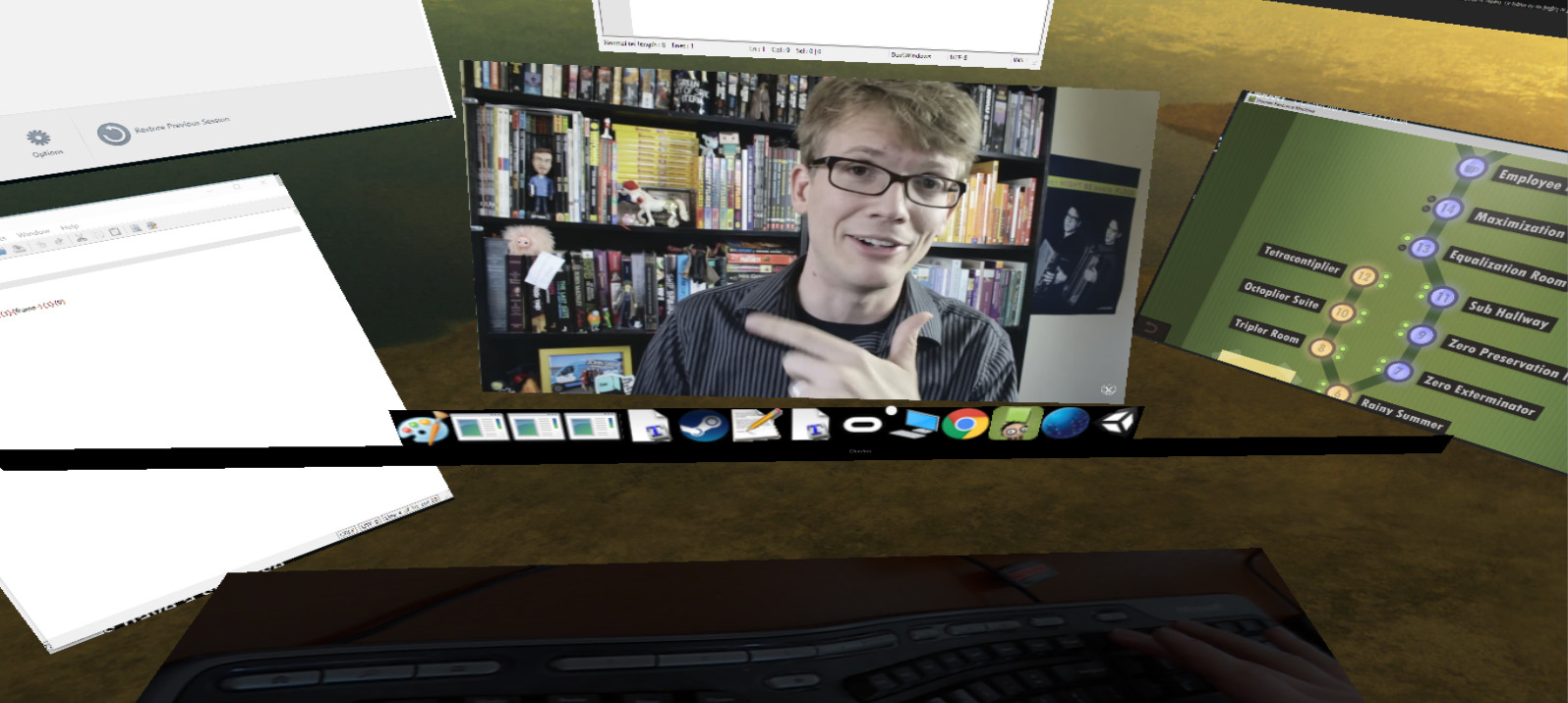
A program in VR that lets you have as many virtual monitors as you want.

Abyste mohli tento produkt přidat do svého seznamu přání, začít ho sledovat nebo ho zařadit mezi ignorované, musíte se nejprve přihlásit.

Software s předběžným přístupem

Vyzkoušejte tento software již během jeho vývoje.

Poznámka: Tento software ještě není dokončen a během vývoje se může výrazně změnit. Pokud Vás nyní nezaujal, zkuste počkat, než se dostane do další fáze vývoje. Více informací zde

Poznámka: K poslední aktualizaci došlo před více než 9 lety. Informace a plány zde popisované vývojáři už nemusí být aktuální.
Zpráva od vývojářů:

Proč předběžný přístup?

„Multiscreens has the basic functionality working so I wanted to get this out so everyone could start using it. It is not as polished as I'd like/is missing some features I would like to add (such as curved screens or moving windows with your mouse), but I figured the best way to do this would be to get community input so I can have a better idea of what things work or don't work.“

Přibližně jak dlouho bude tento software v předběžném přístupu?

„Until it is ready! More seriously, this depends on the number of features that we find essential for a unlimited virtual monitor program to have. Once I can get it to the point where someone can pick it up and say "this is exactly what I wanted" and have things intuitive enough that they can immediately use it.“

Jak se bude plná verze lišit od předběžného přístupu?

„It will have curved screens (with an orbit type mode that lets you put screens around you), allow you to move screens with your mouse, and allow you to capture the desktop and almost any window. It will also feel very polished and be very easy to naturally pick up and use. More specifically, in terms of priority:

- Polish to make everything look cleaner and more usable.

- Making a desktop capture that allows you to see your entire desktop similar to other Virtual Monitor programs if you prefer to interact with it that way. This also allows capture of any window as long as it is in the foreground of your monitor, which is guaranteed if you are focused on it. The code here is working, there is just a small dll import error that prevents others from currently using it. Once this is fixed you should have capture mode working well.

- Minor text fixes

- Letting you drag windows around and focus on them with your mouse (instead of a keyboard or gamepad) since this is really the natural way to interact with them

- A "polar mode" - right now all of the screens are rectangular, in the future curved screens will be added and you'll be able to interact with them in a bubble around you if desired

- Various ways of making text more readable

- Vive and touch controller support so you can use them as mice/to drag around windows

- Allowing you to render a window at higher resolution than your current physical monitor (for things like HD videos).

Eventually I'd like to make it so you can share your screens with others over the internet, but this isn't a priority until the important features above are added and polished first alongside any needed bug fixes.“

V jaké fázi vývoje se hra nachází?

„You are able to capture most windows at a configurable frame rate (per window). As a baseline test, if you are using the min specs it can reliably capture 6 youtube videos steaming at the same time at a good FPS with minimal/no Judder.

You can move windows around in space (by "grabbing them" and looking around) and make them bigger or smaller. There is no input lag, and right click and other menus will appear as they typically would in a window.

Once you exit out of Multscreens and come back in the windows will "remember" where they were.“

Změní se cena softwaru po skončení předběžného přístupu?

„The price will go up slightly once we finish early access, however anyone that has purchased Multiscreens during early access will get all the additional features for free.“

Jak plánujete zapojit komunitu do vývoje této hry?

„I'm putting this up now so I can get feedback! I think it's functional enough that people could find it useful as it is right now, and I'd like to make this the best product for people as I can, which involves getting their feedback about what is important/what works and what doesn't.“
Zjistit více
Čeština není podporována

Tento produkt nepodporuje Váš místní jazyk. Seznam podporovaných jazyků je k dispozici níže na této stránce.

Pouze VR

Zakoupit Multiscreens

 
Zobrazit všechny diskuze

Pro nahlášení chyb či podání zpětné vazby navštivte diskuze k tomuto produktu

Informace o softwaru

Multiscreens is a early-access program that lets you have as many screens as you want in VR. Specifically, each program is its own screen and can be moved around as desired.

Right now you can:

- Change the target framerate of each window captured
- Play multiple videos simultaneously (just make sure if you are in chrome to disable Hardware Acceleration in advanced settings) while playing a game
- Turn on supersampling
- Control everything with your mouse which leaves your keyboard and controller free for typical use (there is also a mouse sensitivity setting)
- Move windows freely in a 3D space around you and make them bigger or smaller as desired
- Capture right click menus and other context menus
- Capture the mouse on the currently active window
- No Headless Ghosts are required, this program works fine when you simply have a single physical monitor (or headless ghost) plugged in
- Minimize (hide) windows as desired
- Change focus between windows with a single click
- Use a webcam that's displayed below you to see your keyboard while in VR
- Multiscreens can technically capture every window, but some it can only capture while they are currently focused
- There is a "virtual taskbar" that allows you to bring up programs you have opened by clicking on their icons below
- You can change this Taskbar's position
- Reset view

Current limitations (in order of planned feature addition):

- Screens can't be curved yet
- You generally need to open windows before opening Multiscreens, it's difficult to start programs while in Multiscreens (I'm going to add a search bar to open any program you currently have installed and allow you to "pin" programs to your taskbar)
- Can't capture the entire desktop
- Vive controller support doesn't exist yet, everything is currently controlled with your mouse

Enjoy, and let me know what you think! I'm happy to listen to feedback and will try and make this the best product for all of you as possible :)

Systémové požadavky

    Minimální:
    • Vyžaduje 64bitový procesor a operační systém
    • OS *: Windows 7, Windows 8.1, Windows 10
    • Procesor: Intel i5-4590
    • Paměť: 8 GB RAM
    • Grafická karta: NVIDIA GTX 970 or AMD 290
    • DirectX: Verze 11
    • Pevný disk: 100 MB volného místa
    • Podpora VR: SteamVR or Oculus PC. Keyboard or gamepad required
    Doporučené:
    • Vyžaduje 64bitový procesor a operační systém
* Od 1. ledna 2024 podporuje klient služby Steam pouze systém Windows 10 a novější.

Uživatelské recenze produktu Multiscreens Informace o recenzích Vaše předvolby

Všechny recenze:
Záporné (10 recenzí)


Pro zobrazení recenzí z daného časového rozmezí ho tažením vyberte v grafu výše nebo přímo klikněte na určitý sloupec.


Recenze budou filtrovány dle odehraného času uživatelů v době jejich psaní.


Žádné minimumŽádné maximum

Recenze budou zobrazeny ve vybraném pořadí.


Více informací
Filtry
Nesouvisející recenze jsou vyloučeny
Odehraný čas:
Recenze primárně ze zařízení Steam Deck
Filtrům neodpovídají žádné další recenze
Abyste viděli všechny recenze, upravte filtry výše
Načítání recenzí...