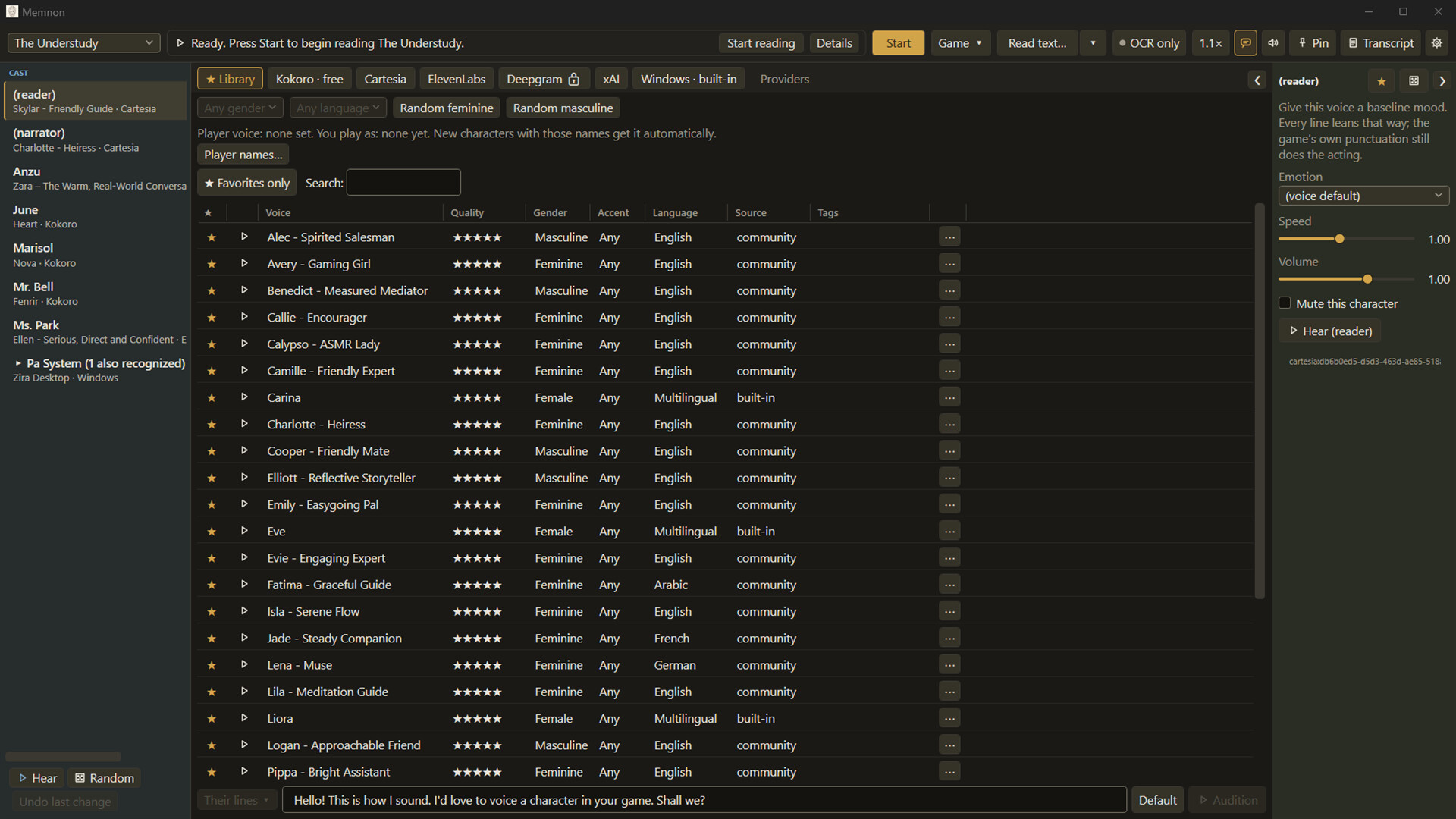
Memnon reads your game's dialogue out loud while you play. It reads the name plate too, so it knows who is talking and speaks each line in that character's chosen voice. No key to press. The built-in voices run on your PC with the internet off. One purchase, and no account creation needed.

Sign in to add this item to your wishlist, follow it, or mark it as ignored

This game is not yet available on Steam

Planned Release Date: Sep 7, 2026

This application will unlock in approximately 2 weeks

Interested?
Add to your wishlist and get notified when it becomes available.
 

About This Software

Memnon sits next to your game and just reads the dialogue out loud. It picks up nameplates and automatically uses the voice you assigned to each character. No key press needed. A long visual novel can have more words than the entire Lord of the Rings trilogy, and none of them are spoken. Until now.

How it works

  1. Draw three boxes once. One around the dialogue text, one around the speaker’s name, and one around the dialogue box itself. The setup wizard walks you through it and takes about a minute.
  2. Give your characters voices. Every new name Memnon sees gets added to the cast list. A small popup lets you pick a voice without interrupting the game much.
  3. Play. Memnon keeps watching the screen. Lines get spoken as they appear, in the right voice, without you doing anything else. The dialogue-box guard stops it from reading random junk.
If you ever want a specific line on demand, there’s a hotkey. You can also snip any other part of the screen and hear it. There is also a Read text window: paste or type anything at all, and it plays in the reader voice.

Script Sync

If you can get the game’s script as a file, Script Sync pushes accuracy the rest of the way. Import it once. Whenever the screen text closely matches a line in the file, Memnon speaks the exact line the writer wrote with near-perfect accuracy. Everything stays on your machine.

The casting studio

There are 28 voices built in. You can audition any of them on an actual line from your game before you decide. You can also blend two or more Kokoro voices with a mix slider if you want something that isn’t on the list. Voices you like get saved to your library and carry over to the next game, so your favorite narrator follows you around.

Per character you can set volume, mute them completely, or fix how their name is pronounced. Spelling a name the way it sounds takes maybe thirty seconds and tells Memnon how to handle the tricky ones.

Hotkeys let you pause, jump back or forward a line, and change the reading speed without leaving the game. There’s also a full transcript of everything that was said. Click any line to hear it again.

One purchase, voices already on your PC

You buy Memnon once. The 28 voices come with it and run entirely on your own computer. No monthly fee, no reading limits. You can pull the network cable and it keeps working.

No account. Nothing to sign into. No server between you and your machine.

If you want to use a paid cloud voice (Cartesia, ElevenLabs, Deepgram), just paste in your own API key. Memnon calls the provider directly. They bill you at their rates under your account. I never see the key and I don’t take a cut. Completely optional. The app is fully usable without it.

Your game is never touched. Memnon doesn’t install a mod, patch any files, or inject anything. It just watches the screen and plays audio. Uninstall it and your game is exactly the same as before.

What to expect

Memnon reads your game’s dialogue right off the screen. That works in basically any game, but how well depends on the game.

Screen reading (OCR) is how it works. On a normal dialogue box with a clean font, it reads correctly almost every time. Games with handwritten fonts, see-through text boxes, or heavy text effects will trip it up more often. There’s usually a short pause (less than a second) between the text settling and the voice starting.

If a game gives it trouble, you’ve got tools: fix pronunciation of any name or word, mute characters you don’t want voiced, or switch to “only read when I press a key” for busy screens.

I’d rather you know all this before you buy than after. If you mostly play visual novels, this is going to feel like magic. If you play games with wild stylized text, expect some misreads.

Games I’ve tested

Games I’ve played this against, and how it goes:

  • Doki Doki Literature Club - Works great. The stylized dialogue background trips a read now and then, common with VNs.
  • Of the Devil - Works great.
  • CLANNAD - Works. Clean dialogue box, reads reliably.
  • Aurelia - Struggles. Pixel font over background art with a see-through text box.
  • Undertale - Struggles. Text appears in three different places; Memnon only reads the box you drew, so the rest needs the press-to-read key.

I keep this list updated on the store page and at memnon.gg. If your game reads badly, tell me which one. What people actually play is what I’ll focus on next.

If reading is the hard part

Memnon was built to voice game dialogue. That turns out to matter most to people for whom a wall of text is difficult: dyslexia, ADHD, low vision, or just eyes that are done for the day. For all of those, Memnon does the whole job right now. The story comes through the speakers while you play, at the speed you set, in the voices you chose.

For blind players, here’s exactly where things stand. Dialogue gets voiced. Someone can do the two-minute setup for you, or you can import a shared profile so you don’t have to draw the regions yourself. There’s also a “read the whole window” mode that skips drawing boxes entirely. Everything on screen gets read as raw text (menus included). Proper menu navigation is the next big thing I’m building.

Memnon’s own window is keyboard-navigable, respects Windows High Contrast, and works alongside NVDA. It’s not a screen reader and doesn’t try to be.

Before you buy

Windows only (Windows 10 version 1809 or newer). Runs on CPU. No GPU required. Most games can stay in fullscreen. A few older ones use exclusive fullscreen and capture as a black screen. Switching them to windowed or borderless fixes it, and the app will tell you when that’s the problem.

Screen reading uses Windows’ own text recognition, which may need a one-time English (US) language pack from Microsoft. The app links you straight to the right Settings page.

Steam Deck is not supported. The Windows APIs this relies on don’t exist under Proton.

Full system requirements are in the panel on this page. Support FAQ is pinned in the community hub.

AI Generated Content Disclosure

The developers describe how their game uses AI Generated Content like this:

All speech audio is generated at runtime by a local text-to-speech model (Kokoro) running on the player's PC. Memnon reads text that is already visible on the player's screen and speaks it aloud. It does not write stories, create images, or generate any other content. If the player connects their own cloud API key, those voices are synthesized by their chosen provider under their own account.

Some of the app's code was written with the assistance of AI coding tools. All artwork and store assets are human-made.

System Requirements

    Minimum:
    • Requires a 64-bit processor and operating system
    • OS: Windows 10 version 1809 or newer (64-bit)
    • Processor: x64 dual-core, 2.0 GHz
    • Memory: 8 GB RAM
    • Graphics: Not required. Runs entirely on CPU.
    • Storage: 2 MB available space
    • Sound Card: Any Windows audio output device
    • Additional Notes: No internet connection required for local voices. No account or sign-in required. Screen reading needs the English (US) language feature of Windows; the app walks you through enabling it. The rare game using exclusive fullscreen needs switching to windowed or borderless. Steam Deck is not supported.
    Recommended:
    • Requires a 64-bit processor and operating system
Review Filters