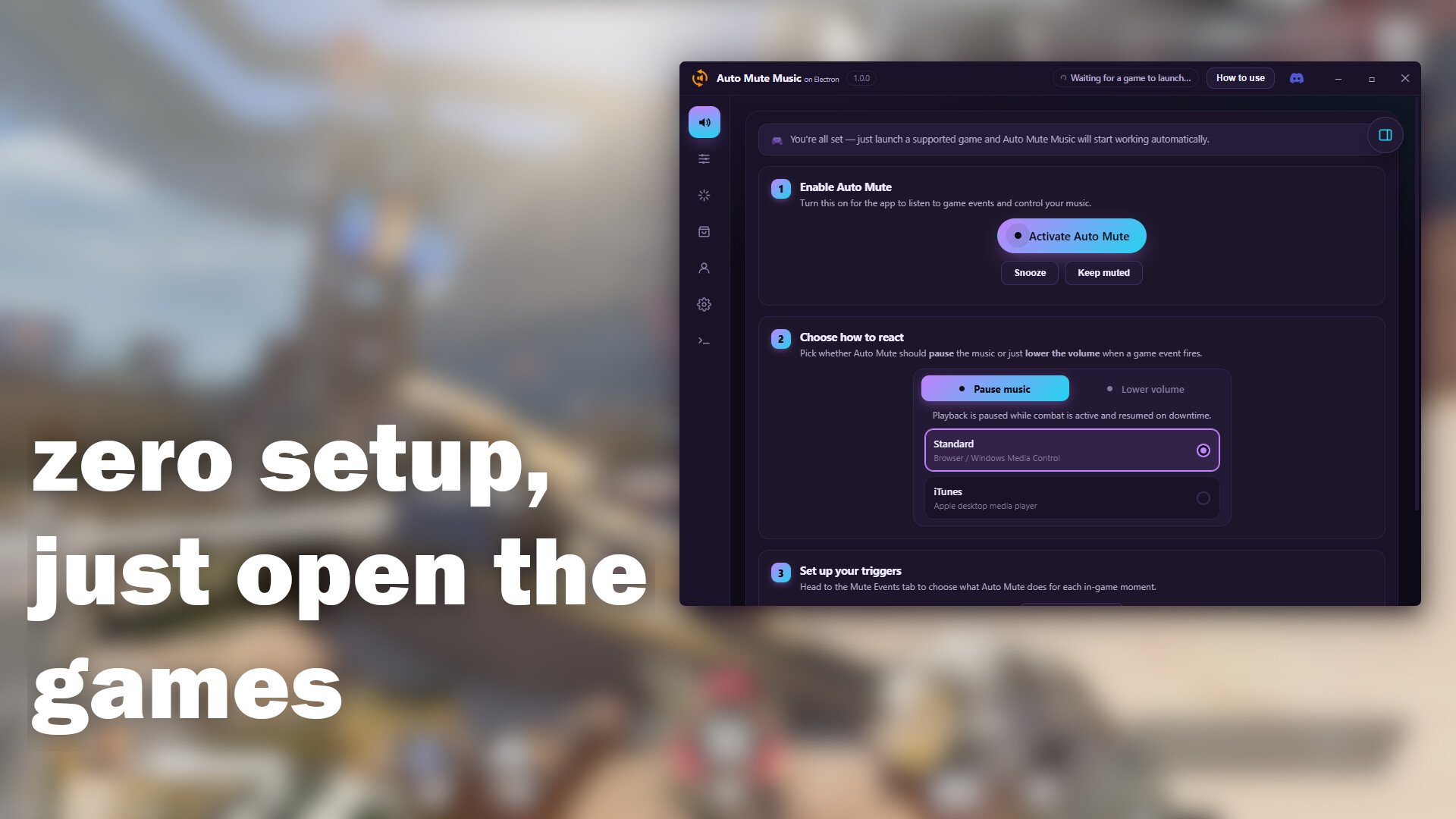
Auto Mute Music automatically pauses or lowers your background music (Spotify, browser, iTunes, and more) or the game sounds during combat in your favorite games, then brings it back during downtime. Customize triggers per game, use quick presets, and track it all via a live in-game overlay.
Release Date:
Coming soon
Developer:
Publisher:
Tags

Sign in to add this item to your wishlist, follow it, or mark it as ignored

This game is not yet available on Steam

Coming soon

Interested?
Add to your wishlist and get notified when it becomes available.
 

About This Software

Play Your Favorite Music. Never Miss a Footstep 🎧🔥

Want to vibe to your favorite playlist while gaming, but sick of getting blindsided because you couldn't hear the enemy?

Auto Mute Music (AMM) is the ultimate, zero-setup background music controller designed for competitive gamers. It automatically pauses or ducks your music — or lowers the game's own volume — during intense, clutch moments (like when a round starts or when you're alive) and brings it back when it's safe (buy phases, lobby time, or after you're eliminated).

No more Alt-Tabbing. No more manual muting. Just pure focus when you need it, and good vibes when you don't.

⭐ Key Features

  • 100% Automatic Control: Instantly reacts when the action starts, and resumes when you die, the round ends, or you're back in the lobby.
  • Two Ways to React: Fully pause your music, or just lower the volume (ducking) of your music or the game itself so it keeps playing quietly underneath the action — your choice, per game.
  • Fine-Tuned Volume Ducking: Set your own pause/play volume levels and fade duration, choose exactly which apps get ducked (yes, even the game's own audio), and optionally duck your whole system volume at once.
  • 21 Supported Games, each with its own fully customizable trigger list — pick exactly which in-game moments pause, resume, or do nothing.
  • Event Effects: Wire any in-game moment to a sound cue or a full-screen visual — fireworks on a win, a lightning strike on a headshot, a screen shake on death — just drag a trigger and an effect together.
  • AMM Store: Browse and download extra sound effects, screen effects, and full color themes to make AMM (and your reactions) truly yours.
  • Full In-Game Overlay: The entire AMM control panel — triggers, Event Effects, the Store — is available as an in-game overlay, so you never have to Alt-Tab out to change anything.
  • Quick Presets & Share Codes: Apply an Aggressive / Balanced / Minimal preset in one click, or share your exact trigger setup with friends as a code.
  • Zero Performance Impact: Lightweight and fully optimized so your FPS stays buttery smooth.
  • Zero Setup Required: Just install, launch your game, play your music, and you're good to go!

🎮 Supported Games

Valorant • Apex Legends • Fortnite • Counter-Strike 2 (CS2) • PUBG: BATTLEGROUNDS • Rainbow Six Siege • League of Legends • Teamfight Tactics • Dota 2 • Overwatch 2 • Call of Duty • CoD: Warzone • Rocket League • Marvel Rivals • The Finals • Escape from Tarkov • Minecraft • Minecraft Bedrock • Warframe • Splitgate • Path of Exile

Each game gets its own dedicated set of triggers (kill, death, respawn, round start/end, match start/end, and more, depending on the title) that you can individually set to Play, Pause, or leave alone.

Valorant bonus: optional custom sound effects on kill / death / assist / headshot, plus an early-access "pause before round start" mode for bomb rounds.

🎵 Works With (Almost) Any Music Source

  • Standard mode: Works with virtually anything that shows up in Windows' media controls — Spotify, YouTube / YouTube Music, SoundCloud, Twitch, VLC, Apple Music, Tidal, Deezer, and any Chromium or Firefox-based browser.
  • iTunes: Native, direct integration for classic iTunes on Windows.
  • Choose your exact source: If more than one app is playing audio at once, pick precisely which one AMM should control instead of leaving it to guesswork.

🎇 Event Effects & the AMM Store

Turn any in-game moment into a show. Drag a trigger (kill, death, round start, victory...) onto an effect and AMM will fire it automatically — a sound cue, or a full-screen visual like Fireworks, Lightning Strike, Shockwave, Confetti Burst, Meteor Storm, and more.

Want more? Head into the AMM Store to browse and download extra sound packs, screen effects, and full custom color themes for the app — many are free, with some exclusive extras reserved for Pro Muter.

🆓 Free vs. ⭐ Pro Muter

Auto Mute Music is free to use, full stop — every trigger, every game, both pause styles, Event Effects, the AMM Store, snooze, Discord status, and playback controls (play/pause/skip) are available to everyone at no cost. The free version shows the occasional light, non-intrusive ad to keep the lights on.

Pro Muter (one-time purchase) adds:

  • No ads
  • Custom color themes for every AMM window, plus exclusive Store-only themes and effects
  • Hide the app on boot / skip the loading screen
  • Adjustable in-game overlay background opacity
  • Song & game name shown in your Discord status
  • Your personal music-muting activity dashboard
  • Remote control from AMM Mobile
  • Early access to new features

🛠️ More Under the Hood

  • Snooze / Keep Muted: Temporarily suspend Auto Mute for a few minutes, or instantly silence your music and ignore all triggers until you turn it back on.
  • Auto-Resume: Automatically resume playback a few seconds after a pause, even without a matching "play" trigger.
  • In-Game Trigger Notifications: A small, optional toast in the corner of your screen confirms exactly when and why AMM just reacted.
  • Discord Rich Presence: Show what AMM is doing to your music live on your Discord profile.
  • 14 Languages: English, Japanese, Korean, German, French, Spanish, Italian, Portuguese (Brazil), Russian, Turkish, Polish, Dutch, and Simplified/Traditional Chinese.

🚀 How to Use

  • Download & install Auto Mute Music.
  • Launch any of the supported games (the app starts automatically in the background).
  • Play your music however you like — Spotify, YouTube, or your favorite app.
  • Pick how you want AMM to react (pause or lower volume) and jump into a match — the rest happens automatically.

AI Generated Content Disclosure

The developers describe how their game uses AI Generated Content like this:

The text on this store page was drafted with the assistance of a generative AI writing tool and reviewed and edited by the developer before publishing.

System Requirements

    Minimum:
    • Requires a 64-bit processor and operating system
    • OS: Windows 10 64-bit, version 1809 or later
    • Processor: Dual-core 2.0 GHz or faster (Intel/AMD, x64)
    • Memory: 4 GB RAM
    • Graphics: DirectX 10 compatible graphics card (required for in-game overlay hook compatibility)
    • Storage: 300 MB available space
    Recommended:
    • Requires a 64-bit processor and operating system
    • OS: Windows 11 64-bit (latest update) or Windows 10 64-bit, version 21H2 or later
    • Processor: Quad-core 2.5 GHz or faster (Intel/AMD, x64)
    • Memory: 8 GB RAM
    • Graphics: DirectX 12 compatible graphics card
    • Storage: 500 MB available space
Review Filters