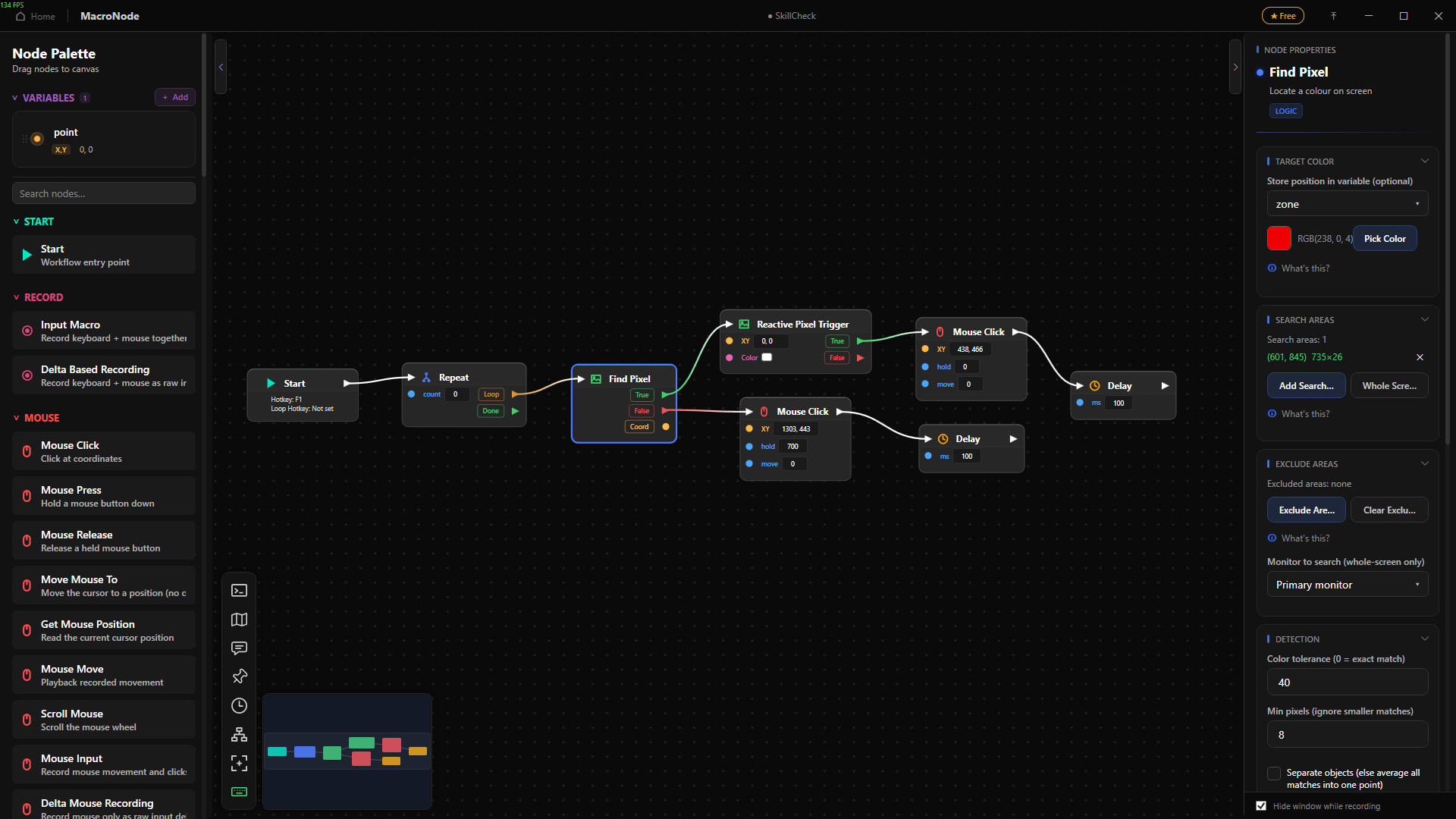
MacroNode is a Windows visual automation tool where you build macros by wiring nodes on a canvas. It handles mouse and keyboard input, image, color and OCR screen detection, branching, variables, hotkeys, letting you create real programmable workflows without writing any code.
Release Date:
Aug 21, 2026
Developer:
Publisher:
Tags

Sign in to add this item to your wishlist, follow it, or mark it as ignored

Free Demo

Play MacroNode Demo

Check out the full game


About This Demo

The computer should be doing this part

MacroNode is a visual editor for building the thing you do repeatedly for you. Drag nodes onto a canvas, connect them with wires, press Run. No scripting language, no config files, nothing to memorize before you get your first useful macro working.

It can see the screen

A macro that only clicks fixed coordinates breaks the moment a window moves or a list loads slowly. MacroNode can reacts to what is actually on screen:

  • Find Images and use the coordinates. Hand it a screenshot of a button, an icon or a checkbox and it finds it wherever it lands for you to click or do other actions.

  • Read text. OCR pulls numbers, names and status labels off the screen and into a variable, including from apps that will not let you select or copy anything. An optional second engine runs a local text recognition model for rotated lines, unusual fonts and text on busy backgrounds.

  • Watch a pixel. Check a color, wait for it to change, or react the moment it does. The simplest way to know a progress bar finished or a status light went green.

  • Wait for the right moment. Wait for an image, a window, a color or a file instead of guessing at a delay and hoping.

Searches can be limited to areas you draw or to a single monitor, so a check costs a few milliseconds instead of scanning your whole desktop.

Record it. Then edit it.

Press record, do the task once, stop. You get a node holding every movement, click and keypress with real timing.

you can open that recording and edit your macro with the same node editor. It lays out as a chain of cards, and the cards are the ordinary nodes you already know. A pause is a Delay. A click is a Mouse Click. A burst of typing collapses into one "43 key presses" card you can open up. Delete the stray click you did not mean to record. Retime a pause. Move a whole mouse path somewhere else without losing the shape of the movement. Go back, and the recording is updated, still a recording, turning a re-record into a quick fix.

It is a real program, not a click list

  • Loops, while loops, break and stop

  • Branches on images, text, pixels, windows, files and comparisons

  • Typed variables (number, text, Boolean, coordinate, color) declared in a side panel

  • Math nodes and a formula field, so "total * 1.2 + fee" simply works

  • Groups: fold a chunk of the graph into one reusable node with its own inputs and outputs

  • Parallel branches, error ports on anything that can fail, undo and redo, copy and paste, a minimap

Anything that can fail gets an error output, so a missing window or a file that never appeared routes somewhere sensible instead of killing the run halfway through.

Launch it the way that suits you

  • Hotkeys. Bind a workflow to a key. It runs in the background from any app.

  • Radial menu. Hold a key or a mouse button, a wheel appears, flick to the macro you want.

  • Time triggers. Run on a schedule: weekly, once, or when the app starts. Good for the report nobody remembers to pull on Monday.

See what it is doing

Nodes that read the screen has a live debug option to show where it detects its target. The overlay is invisible to screen captures, so it can never become something a later search matches. Has a live console, a variable watch that updates mid run, and a glow on whichever node is executing, and you debug by looking rather than guessing.

Games as well

The same screen reading and input nodes can handle repetitive in-game work

Yours, and offline

Everything runs on your machine. No account, no cloud, no telemetry. The AI text engine ships inside the app and never sends an image anywhere, which matters when the screen it is reading has your work on it. Workflows are plain files you can save, back up and pass to someone else. English and Spanish included.

Try it before you buy it

The free demo includes the whole editor and every node. It is capped at one hotkey binding and one radial slot. Time triggers plus saved custom nodes are reserved for the full version.

System Requirements

    Minimum:
    • Requires a 64-bit processor and operating system
    • OS: Windows x64
    • Memory: 600 MB RAM
    • Storage: 300 MB available space
    Recommended:
    • Requires a 64-bit processor and operating system
    • OS: Windows x64
    • Memory: 600 MB RAM
    • Storage: 300 MB available space
Review Filters