Image Toolkit: 16 image tools in one app — resize, crop, compress, watermark removal, collage, color picker, and more. All-in-one solution. Local processing, privacy-protected, lightweight and clean.

Sign in to add this item to your wishlist, follow it, or mark it as ignored

This game is not yet available on Steam

Coming soon

Interested?
Add to your wishlist and get notified when it becomes available.
 

About This Software

═══════════════════════════════════════

Huiyu Image Tools

All-in-One Image Toolkit

═══════════════════════════════════════

16 powerful image tools in one app. 100% local processing. Your privacy, protected.

A comprehensive image toolkit combining editing, format conversion, and color design. All operations run locally on your computer - images never leave your device. Your privacy always comes first.

🖼️ Image Editing

📐 Image Resizer

Resize images by pixels, percentage, or aspect ratio. Batch process multiple images in one go.

🎯 Multiple modes —— Pixels / percentage / aspect ratio / custom dimensions

📦 Batch processing —— Resize multiple images at once

🎨 Quality preserved —— Smart interpolation for crisp results

💾 Format support —— JPG / PNG / WebP and more

✂️ Image Cropper

Free crop, fixed aspect ratio, or preset sizes. Crop exactly how you want it.

🆓 Free crop —— Drag selection, totally flexible

📏 Aspect lock —— 1:1 / 4:3 / 16:9 and more presets

📱 Social presets —— Popular social media sizes ready to use

🔍 Pixel-perfect —— Keyboard fine-tuning for precision

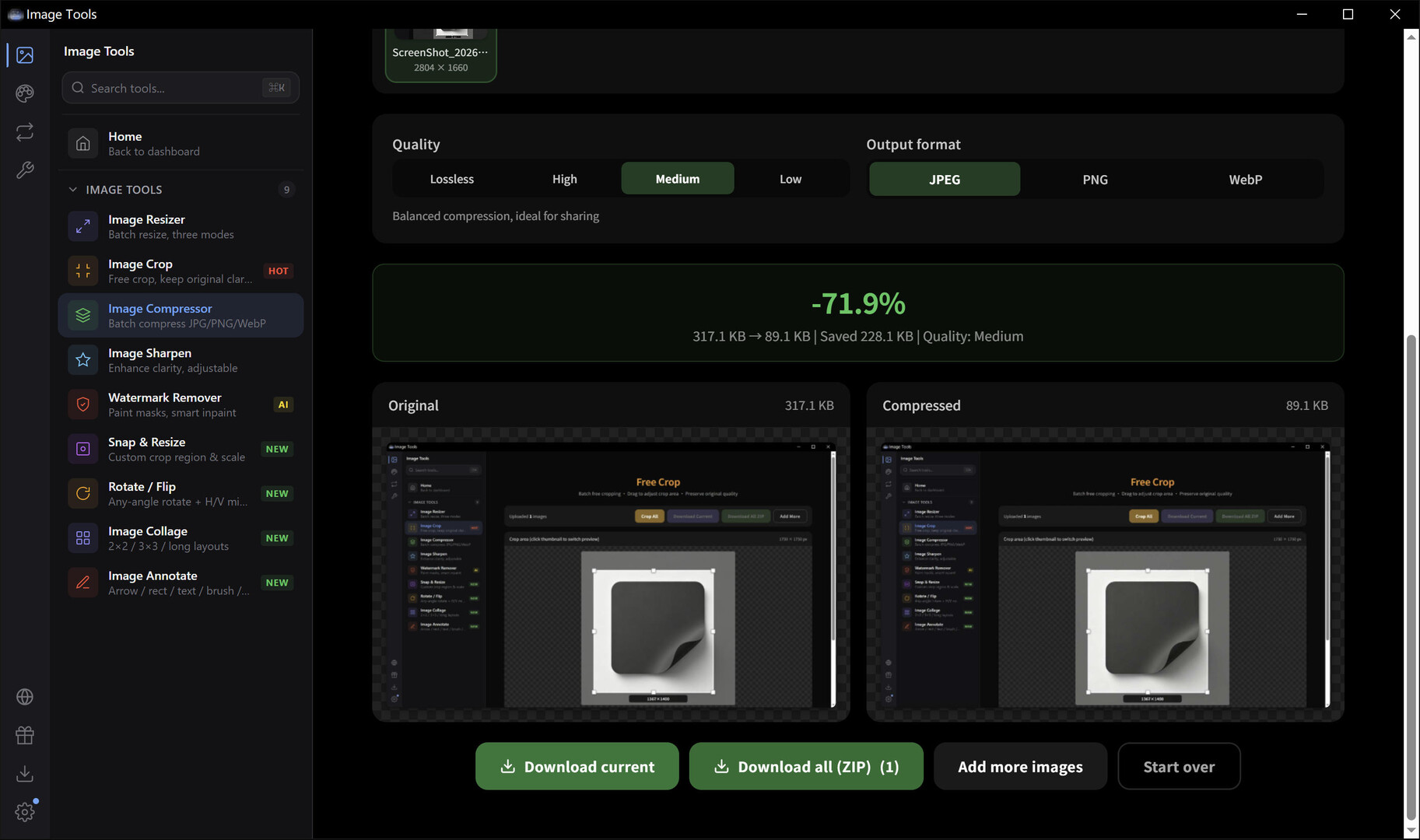
📦 Image Compressor

Dramatically reduce file size while maintaining visual quality. Save storage space instantly.

⚡ Lightning fast —— Local processing, done in seconds

🎚️ Quality slider —— Real-time preview of compression

📊 Size comparison —— Before/after sizes at a glance

🔄 Batch compress —— Multiple images, one click

✨ Image Sharpener

Bring blurry photos into focus. Enhance details and make images pop.

🔍 Smart sharpen —— Edge-aware, only sharpens details

🎚️ Adjustable intensity —— Mild / medium / strong

🖼️ Live preview —— Side-by-side comparison

💾 Lossless export —— High-quality output

🧹 Watermark Remover

AI-powered inpainting removes watermarks, text, and blemishes. Restore clean, natural-looking images.

🎨 Brush tool —— Manually mark areas to remove

🤖 Smart repair —— AI fills in surrounding textures

🖌️ Adjustable brush —— Multiple sizes for precision

📸 Natural results —— Smooth, seamless restoration

🎯 SnapResize Smart Crop

AI detects the main subject and keeps it in frame when cropping. Every pixel counts.

🧠 Smart composition —— Face/subject detection, auto-centered

📐 Any ratio —— Set target dimensions freely

⚡ One-click results —— Upload and go

🎬 Thumbnail magic —— Perfect for e-commerce & social

🔄 Rotate & Flip

Rotate by any angle, flip horizontally or vertically. Fix orientation in seconds.

🔃 Free rotation —— 0-360 degrees, any angle

↔️ Flip horizontal —— Mirror left-right

↕️ Flip vertical —— Mirror top-bottom

⚡ Quick 90° —— One-click left/right rotation

🖼️ Image Collage

Combine multiple photos into one. Horizontal, vertical, or grid layouts — unleash your creativity.

➡️ Horizontal —— Side by side

⬇️ Vertical —— Stacked top to bottom

🔲 Grid layout —— Rows and columns, freely combined

📏 Adjustable gaps —— Spacing & borders, fully customizable

✏️ Image Annotator

Text, arrows, shapes, mosaics - rich annotation tools for crystal-clear communication.

🔤 Text labels —— Fonts, colors, sizes galore

➡️ Arrow markers —— Point to what matters

🟥 Shape highlights —— Rectangles, circles, freehand

🧩 Pixel mosaic —— Blur out sensitive info instantly

🔄 Conversion & Metadata

🔀 Format Converter

Convert between JPG, PNG, WebP, BMP, ICO and more. Batch mode for maximum efficiency.

🎨 Multi-format —— JPG / PNG / WebP / BMP / TIFF

🔄 Batch convert —— Whole folders in one operation

🎚️ Quality control —— Compression level adjustable

📂 Folder structure preserved —— Organized output

📋 EXIF Viewer

Inspect photo metadata - camera info, lens specs, GPS location, and more.

📷 Camera info —— Body / lens / aperture / shutter / ISO

🗺️ GPS data —— See where the photo was taken

📅 Timestamps —— Capture time & modification date

📤 One-click copy —— Copy data to clipboard instantly

🔖 Favicon Generator

Generate multi-size ICO icons for websites, apps, and folders in one click.

🎯 Multi-size output —— 16/32/48/64/128/256 px

💻 Website favicon —— Generate favicon.ico instantly

📁 Folder icons —— Customize your folder look

⚡ One-click generation —— Upload, get full icon pack

🎨 Color Design Tools

🎨 Palette Generator

Automatically extract dominant colors from any image. Generate harmonious color schemes effortlessly.

🖼️ Image-based —— Upload an image, get its palette

🌈 Multiple schemes —— Several options to choose from

🔢 HEX/RGB/HSL —— Copy values in any format

💾 Export & share —— Save and share your palettes

🎯 Color Match

Transfer the color style of one image to another. Unify your visual aesthetic.

🎨 Style transfer —— Apply reference tone to target image

📊 Histogram matching —— Precise brightness & color distribution

⚡ Live preview —— See results instantly

💾 HD export —— High-quality download

💧 Color Picker

Pick colors from anywhere on screen. Get precise color values - a designer's best friend.

🎯 Pixel-perfect —— Magnified view for accuracy

🔢 Multi-format output —— HEX / RGB / HSL / HSV

📋 History —— Auto-saves picked colors

⌨️ Shortcut —— Summon anytime, maximum efficiency

🤖 AI Color Scheme

Enter one color, let AI generate a complete palette. Endless design inspiration.

🧠 AI-powered —— Smart, harmonious color generation

🌈 Multiple modes —— Complementary / analogous / triadic / split and more

🎨 Real-time preview —— See schemes instantly

💾 One-click copy —— Grab values and go

🚀 Features

🔒 Privacy First

All image processing happens on your device. Your data never leaves your computer.

💾 Local only —— Zero image uploads to any server

🔐 Privacy guaranteed —— Process sensitive photos with confidence

⚡ Blazing fast —— Local computation, no network waits

🚫 No tracking —— We collect zero user data

⌨️ Command Palette

Ctrl+K to summon. Search and launch any tool instantly. Keyboard lovers rejoice.

🔍 Global search —— Find any tool in milliseconds

⌨️ Keyboard-driven —— Full keyboard, no mouse needed

📊 Smart ranking —— Frequently used tools first

⚡ Instant response —— Zero delay, zero waiting

📥 Download Center

Manage all your results in one place. Batch download everything with a single click.

📦 Unified management —— All output files in one view

🔽 Batch download —— Zip and download all at once

📊 Progress tracking —— Real-time processing status

🗂️ History —— Revisit past work anytime

🌍 Bilingual Support

Simplified Chinese and English. For users around the world.

🇨🇳 简体中文 —— Native-level experience

🇺🇸 English —— Fluent English interface

🔄 One-click switch —— Change language anytime

🌐 Many languages

🖱️ Native Drag & Drop

Drag image files right into the window. Automatically opens the right tool. Intuitive and fast.

📂 Drag files in —— Drop into window, start working

🔗 Smart matching —— Auto-selects the best tool for the job

📁 Batch drag —— Drop multiple images at once

⚡ Instant load —— Zero waiting, instant results

🎮 Steam Integration

Exclusive Steam experience. Rich Presence shows friends which tool you're using.

👤 User recognition —— Shows current Steam user info

🎯 Rich Presence —— Friends see what you're working on

🛒 Store link —— One click to more Huiyu products

🔌 Graceful fallback —— Works fine without Steam running

⚡ Lightweight & Fast

Built with Tauri. Tiny installer, lightning-fast startup, minimal resource usage.

📦 Tiny size —— Installer is only ~18 MB

🚀 Instant startup —— Click and it's open

💾 Low memory —— Barely any footprint in background

🖼️ Native feel —— Smooth desktop experience

═══════════════════════════════════════

16 image tools. One powerful app.

Local. Private. Lightning fast.

═══════════════════════════════════════

System Requirements

    Minimum:
    • Requires a 64-bit processor and operating system
    • OS: Windows 10 64-bit
    • Processor: 1.5 GHz Dual-Core Processor
    • Memory: 4 GB RAM
    • Graphics: DirectX 11 compatible GPU
    • DirectX: Version 11
    • Storage: 50 MB available space
    • Sound Card: Any
    Recommended:
    • Requires a 64-bit processor and operating system
    • OS: Windows 11 64-bit
    • Processor: 2 GHz Quad-Core Processor
    • Memory: 8 GB RAM
    • Graphics: DirectX 12 compatible GPU
    • DirectX: Version 11
    • Storage: 100 MB available space
    • Sound Card: Any
There are no reviews for this product

You can write your own review for this product to share your experience with the community. Use the area above the purchase buttons on this page to write your review.

Review Filters