A lightweight, high-precision framerate limiter for Windows.

Sign in to add this item to your wishlist, follow it, or mark it as ignored

Early Access Software

Get involved with this software as it develops.

Note: This Early Access software is not complete and may or may not change further. If you are not excited to use this software in its current state, then you should wait to see if it progresses further in development. Learn more

What the developers have to say:

Why Early Access?

“PC gaming features thousands of different hardware combinations, operating systems, and game engines. We are using Early Access to test framepacer across as many configurations as possible to ensure broad compatibility. With the community's help, we plan to refine the software so it runs reliably on any setup.”

Approximately how long will this software be in Early Access?

“We expect framepacer to remain in early access for at least 6 months.”

How is the full version planned to differ from the Early Access version?

“We aim to support as much games and hardware configurations as we can.”

What is the current state of the Early Access version?

“We support DirectX, Vulkan, OpenGL and DirectDraw games.”

Will this software be priced differently during and after Early Access?

“Once the app leaves early access and reaches full release, we plan to increase the price.”

How are you planning on involving the Community in your development process?

“We rely on community feedback to identify bugs and compatibility issues. Users can report their findings via the Steam Community Hub or directly via email.”
Read more

Buy framepacer

 
See all discussions

Report bugs and leave feedback for this software on the discussion boards

About This Software

Console Smoothness on PC

Why does 30 FPS feel smooth on a console but not on PC?

The answer is frame pacing.

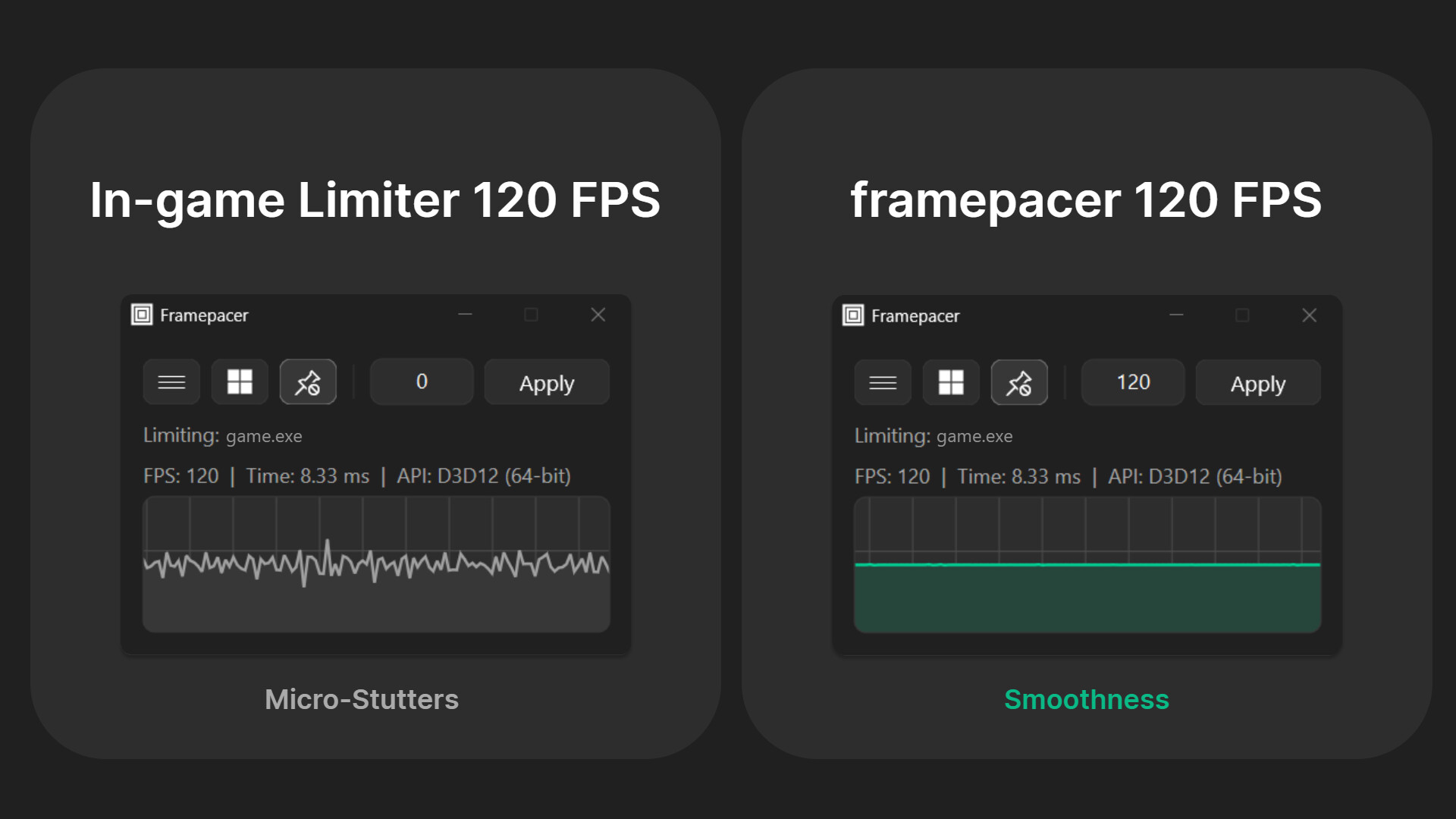
framepacer is a high-precision framerate limiter for Windows that eliminates stutters and bad frame pacing. By ensuring every single picture is delivered to your screen with exact, identical timing, framepacer makes your PC games run with console smoothness in just one click.

Key Features

  • Precise Frame Pacing: Standard in-game limiters and driver-level caps often fluctuate, causing micro-stutters. framepacer locks your frametimes to a perfectly flat line, giving you smooth gameplay.

  • Max Out Your Graphics: Instead of wasting GPU power rendering hundreds of unnecessary frames, lock your framerate and use the extra performance for higher graphics settings, ray tracing, or increased resolution.

  • Cool, Quiet, & Efficient: A stable framerate prevents your PC from working harder than it needs to. This significantly reduces GPU temperatures, quiets down loud fans, saves power, and extends the lifespan of your hardware.

  • Change FPS Mid-Game: Unlike driver-level limiters that require you to restart your game to apply changes, framepacer allows you to change your target FPS anytime.

  • Live Frametime Graph: See the smoothness for yourself. framepacer features a minimalist interface with a live frametime graph.

  • Lightweight & Simple: One click is all it takes to achieve console smoothness.

Recommended Setup

Follow these steps for the ultimate console-like experience on your PC:

  • 1. Set Your FPS Limit: Set a target that your PC can consistently maintain. To avoid conflicts, make sure to turn off all other in-game or driver-level limiters.

  • 2. Match Your Monitor: Enable G-Sync/FreeSync (for gaming monitors with VRR) OR enable V-Sync in your game settings (for standard monitors with fixed refresh rates) to eliminate screen tearing.

  • 3. Enable Motion Blur: Turn this on in your game's graphics settings. It mimics real camera exposure, filling the gaps between frames to soften quick camera movements.

  • 4. Play with a Gamepad: Connect a controller. Analog sticks feel smooth at all FPS levels, whereas a mouse requires much higher FPS to feel the same.

For a full configuration guide and recommended FPS limits, visit framepacer's website.

⚠️ WARNING ⚠️

Using framepacer in competitive games with aggressive anti-cheat (EAC, BattlEye, Vanguard) may result in bans. Use at your own risk. Always check a game's anti-cheat policy before using any frame-limiting utility.

AI Generated Content Disclosure

The developers describe how their game uses AI Generated Content like this:

Generative AI was utilized to produce the mockup video game background you see on the store page. The framepacer application itself does not include AI-generated material.

System Requirements

    Minimum:
    • Requires a 64-bit processor and operating system
    • OS: Windows 10 22H2
    • Processor: 64-bit processor
    • Memory: 4 GB RAM
    • Graphics: Modern integrated graphics
    • Storage: 25 MB available space
    Recommended:
    • Requires a 64-bit processor and operating system
    • OS: Windows 11
    • Processor: 64-bit Processor
    • Memory: 8 GB RAM
    • Graphics: Modern GPU supporting Variable Refresh Rate (G-Sync/FreeSync)
    • Storage: 25 MB available space
    • Additional Notes: VRR-compatible display (G-Sync/FreeSync)

Customer reviews for framepacer About user reviews Your preferences

Overall Reviews:
1 user reviews (1 reviews)


To view reviews within a date range, please click and drag a selection on a graph above or click on a specific bar.


Filter reviews by the user's playtime when the review was written:


No minimum to No maximum

Show reviews in selected display order


Learn More
Filters
Excluding Off-topic Review Activity
Playtime:
Played Mostly on Steam Deck
Operating System:
CPU:
GPU:
Device Type:
Review Filters