A simple desktop soundboard that lets you play audio clips directly through your microphone in any game or voice chat. Instantly expand your collection of audio clips with full Steam Workshop and Linux support.

Abyste si mohli tento produkt přidat do seznamu přání, začít ho sledovat nebo ho zařadit mezi ignorované, musíte se nejprve přihlásit.

Čeština není podporována

Tento produkt nepodporuje Váš místní jazyk. Seznam podporovaných jazyků je k dispozici níže na této stránce.

Tato hra prozatím není dostupná ve službě Steam

Zanedlouho vychází

Máte zájem o tento produkt?
Přidejte si ho do seznamu přání, ať nepropásnete vydání.
 

Informace o softwaru

Take Control of Your Voice Chat

Elevate your gaming lobbies, live streams, and Discord calls. SoundRelay is a modern, high-performance desktop soundboard built specifically to inject custom audio directly into your microphone feed. Whether you want to drop the perfect sound effect in a clutch moment, troll your friends in proximity chat, or enhance your tabletop RPG streams, you can trigger your favorite audio clips with zero hardware stutter.

Unlike legacy soundboards that rely on outdated frameworks, SoundRelay leverages hardware-accelerated audio processing to deliver native-level performance without suffocating your CPU while you game.

Key Features

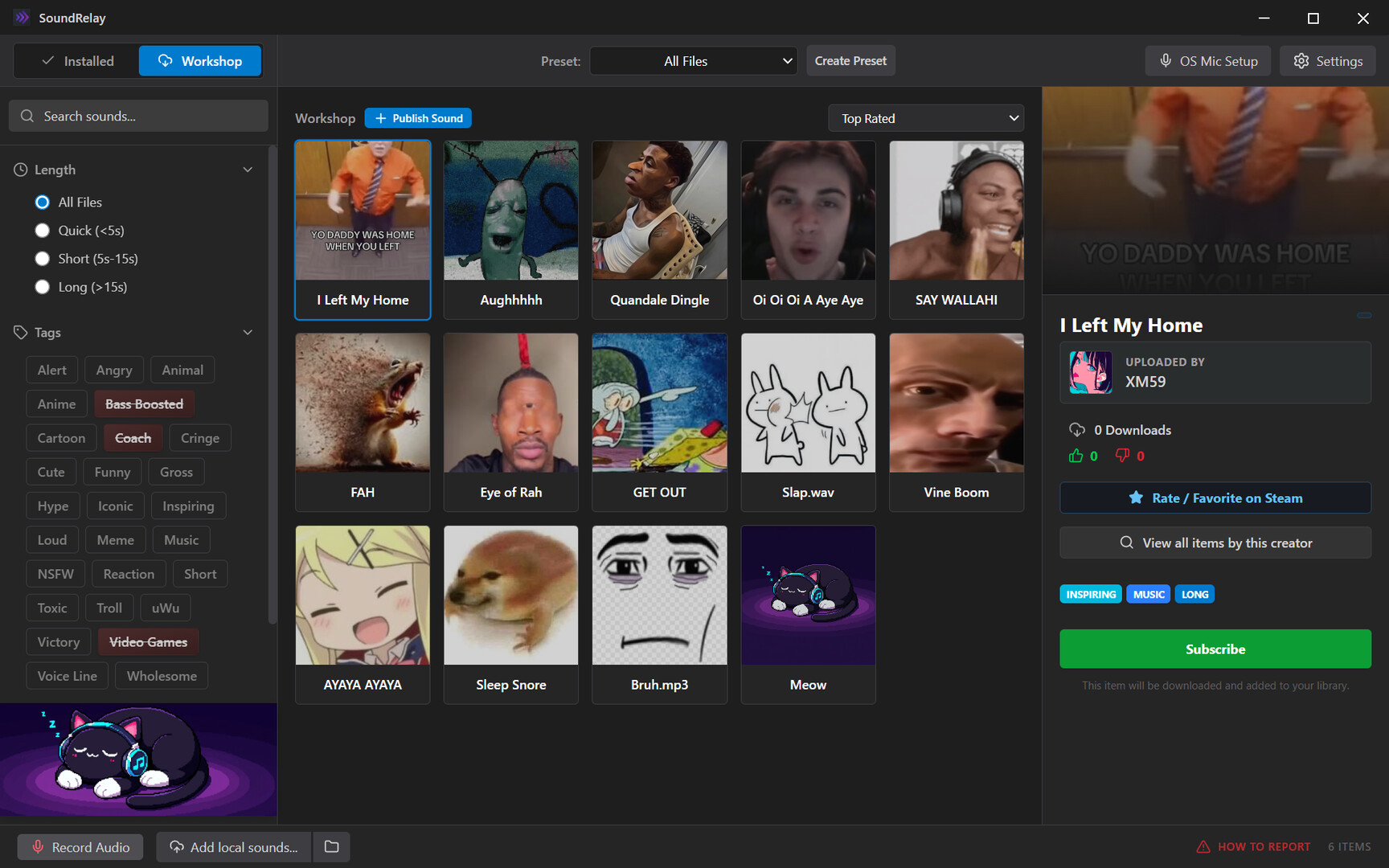
  • Endless Audio via Steam Workshop: Never run out of sounds. Browse, download, and share thousands of community-created audio clips, memes, and sound effects right from the app. With instant subscription syncing, automatic dead-file cleanup, and an intuitive tag filtering system, your library grows as fast as the community does.

  • Intelligent Steam Cloud Sync: We built a custom data-reconciliation engine to protect your library. Because Steam imposes a strict 10GB cloud limit, SoundRelay smartly reserves 1GB exclusively for your lightweight layouts, hotkeys, and metadata. You maintain complete control over the remaining 9GB, allowing you to selectively opt-in your heaviest audio files for cross-device syncing without ever breaking your save data.

  • Native Linux & Steam Deck Support: Built with first-class support for the Linux desktop ecosystem. SoundRelay bypasses complex sandboxes to communicate directly with both PipeWire and PulseAudio, automatically generating native virtual audio sinks on the fly. (And yes, it even runs flawlessly on the Steam Deck for all your handheld proximity-chat trolling needs!)

  • Seamless Mic Injection: Play audio clips directly through your microphone. Your friends, teammates, and stream viewers will hear the audio crystal clear, perfectly mixed with your actual voice.

  • Zero Latency Performance: Offloaded audio math and OS-level routing mean your audio plays the exact millisecond you press the global hotkey, with virtually zero impact on your game's framerate.

  • Modern, Customizable UI: A sleek, industrial dark-tech interface designed for speed. Organize your sounds with custom tags, visual icons, and personalized preset banks.

How It Works: Windows & The Virtual Audio Bridge

To bypass strict Windows operating system limitations and broadcast sound directly into games like Counter-Strike, Lethal Company, or Discord, this application utilizes a Virtual Audio Cable.

Guided Setup Wizard: You don't need to be an audio engineer to set this up. The app features a built-in, automated onboarding wizard that handles the installation of the virtual audio driver and guides you step-by-step through configuring your Windows OS and game settings for flawless, echo-free routing.

Third-Party Software Attribution

For Windows users, this application achieves its advanced audio routing by utilizing VB-Audio Virtual Cable (VB-Cable). VB-Cable is a trademark of VB-Audio Software, copyright © VB-Audio Software. All rights reserved. VB-Cable is integrated and redistributed under their standard donationware licensing guidelines. If you find this audio routing functionality valuable for your setup, we highly encourage you to support the original creators by visiting and donating at .

Informace o obsahu vytvářeném AI

Jak využití obsahu vytvářeného AI v tomto produktu popisují jeho vývojáři:

AI was used throughout the development of this Application. Many aspects of the UI and audio optimization were created by AI tools.

Systémové požadavky

Windows
SteamOS + Linux
    Minimální:
    • OS: Windows 10, 11
    • Procesor: Dirt
    • Paměť: 8 GB RAM
    Doporučené:
    • OS: Windows 10, 11
    • Paměť: 8 GB RAM
    Minimální:
    • OS: Most Linux Distros are supported
    • Procesor: Dirt
    • Připojení: Širokopásmové připojení k internetu
    • Pevný disk: 10 GB volného místa
    Doporučené:
    • OS: Most Linux Distros are supported
    • Procesor: GreentopHouse
    • Připojení: Širokopásmové připojení k internetu
    • Pevný disk: 10 GB volného místa
K tomuto produktu nebyly dosud zveřejněny žádné recenze

Podělte se s komunitou o své zkušenosti s tímto produktem! Využijte příslušného pole výše na této stránce a napište vlastní recenzi.

Filtry recenzí