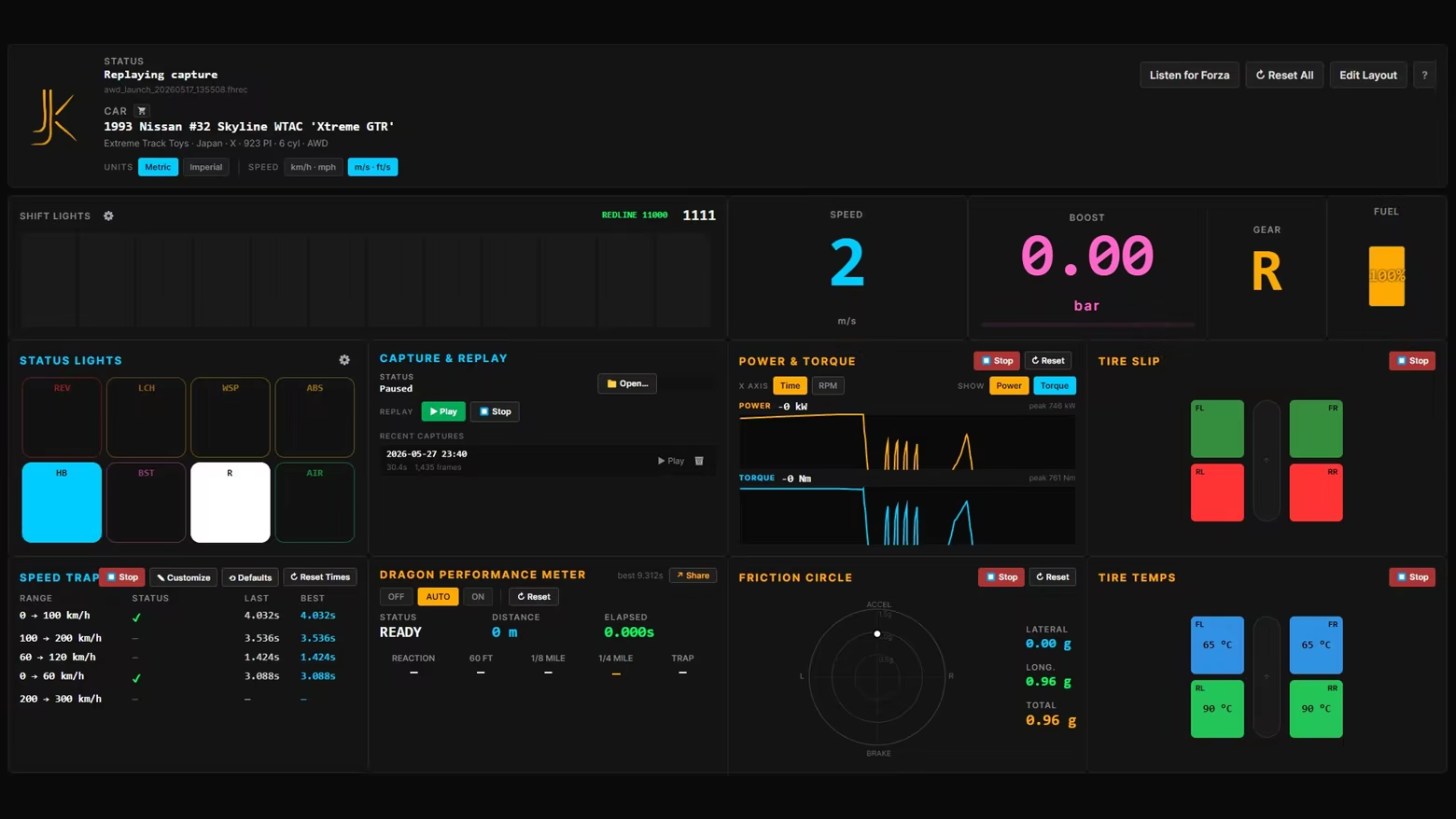
Real-time telemetry dashboard for Forza Horizon 6. 16 customizable widgets — Dedicated DRAGon drag racing timer, speed trap, session recorder/reviewer, customizable shift light, 60ft/¼ mile splits, friction circle, tire heatmap, status lights and more. Nothing leaves your machine. Windows only.

Sign in to add this item to your wishlist, follow it, or mark it as ignored

This game is not yet available on Steam

Planned Release Date: July 2026

Interested?
Add to your wishlist and get notified when it becomes available.
 

About This Game

Drive. Record. Review. Drive better.

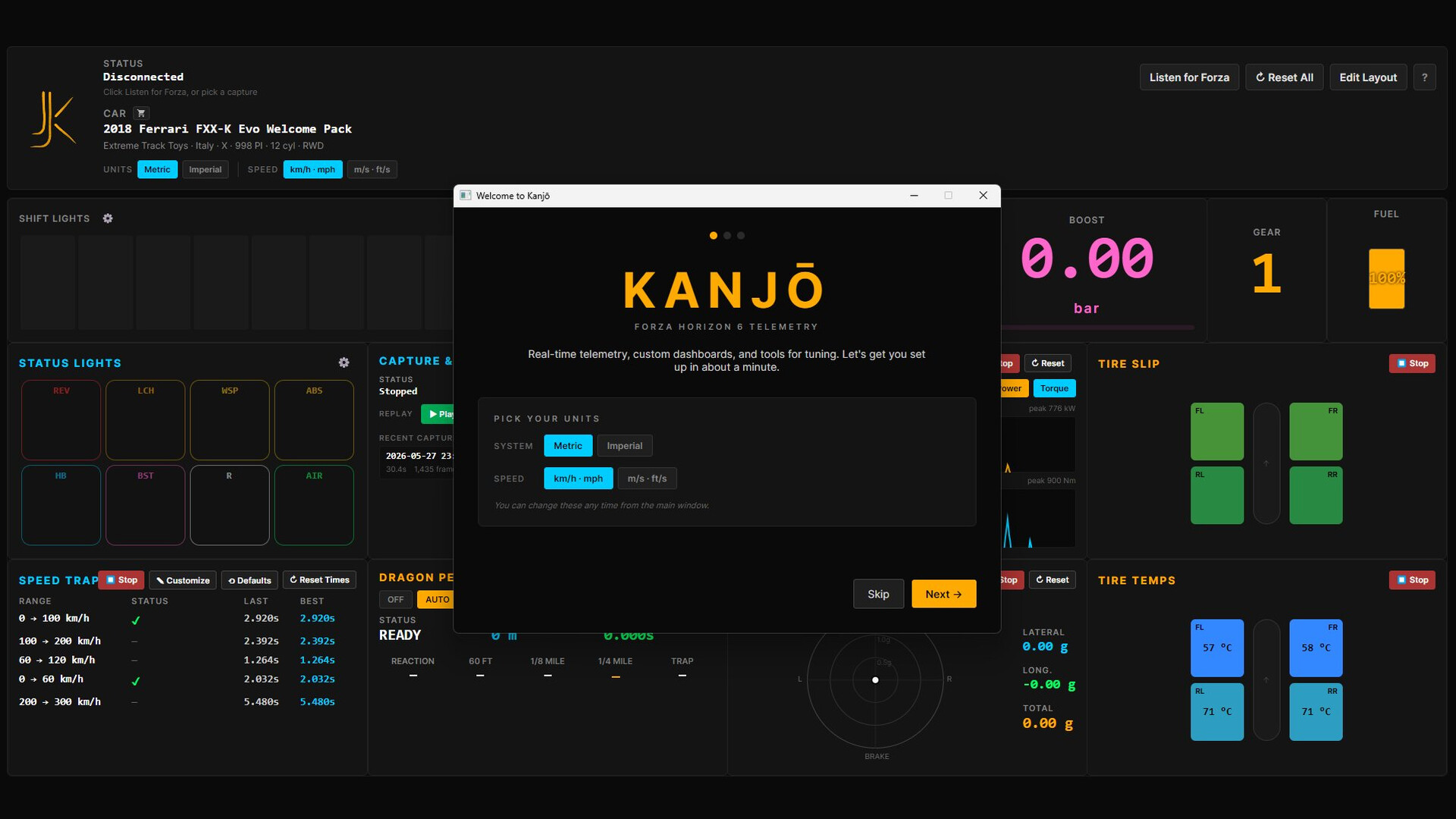
Real-time telemetry dashboard for Forza Horizon 6. Run it live on a second screen while you drive — speed, RPM, gear, boost, shift lights, friction circle moving with every input. Then replay the session frame-by-frame to see exactly where the time went, what the tires did, when the limiter caught you. Same data, two ways. Drive better the next lap.

Two ways to use it

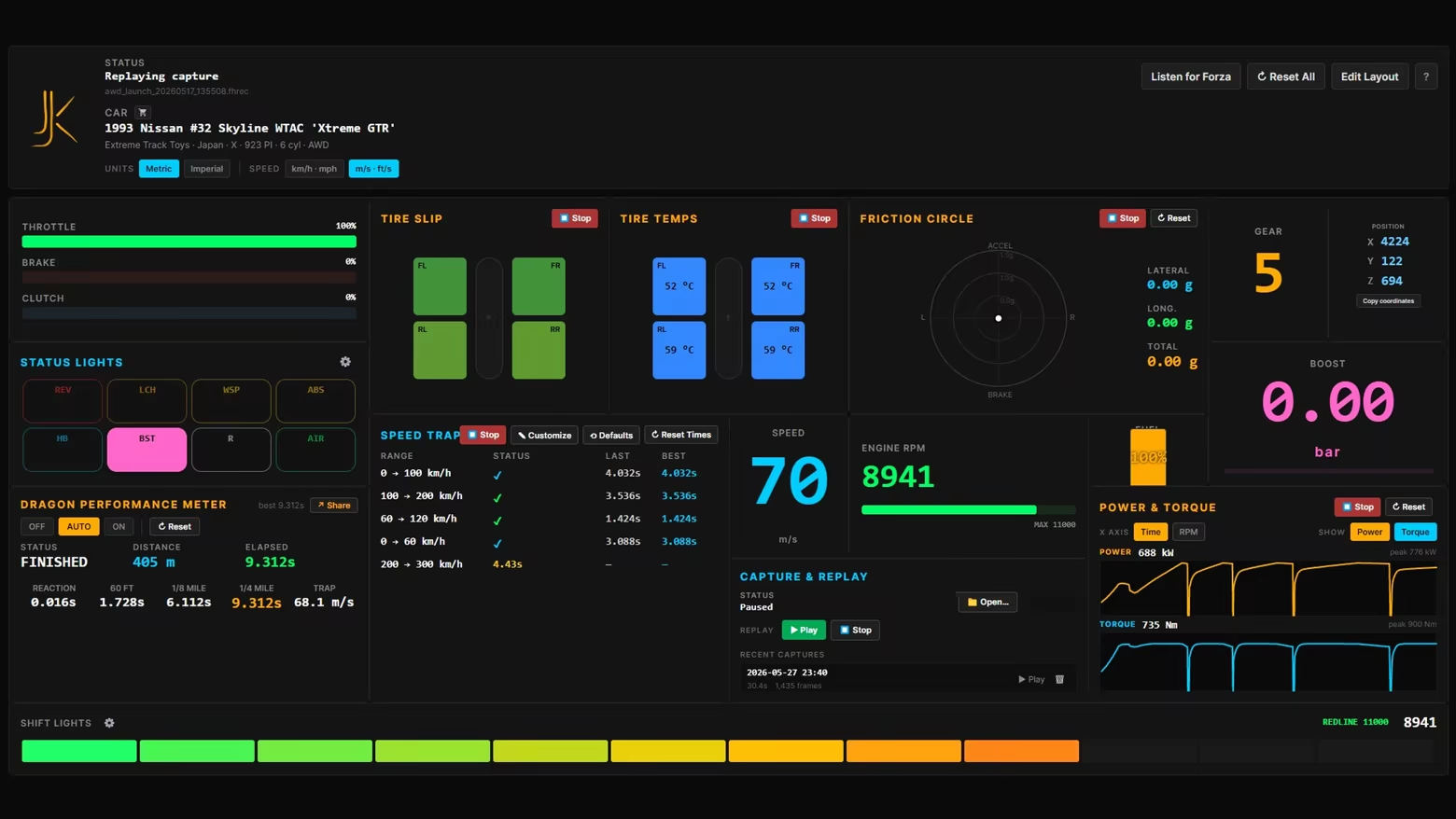
Live second-screen. Drop Kanjo Telemetry on a laptop, second monitor, or tablet next to your wheel. Sixteen telemetry widgets you arrange yourself — drag, resize, snap-to-grid. Glance over for the gear you need, the shift point you missed, the tire that's going off. Your custom dashboard, always on, always live.

Post-session review. Hit record before a run. Drive. Hit stop. Kanjo Telemetry writes every packet to disk. Play it back at any time, scrubbable from start to finish, every widget reacting to historical data exactly as it did live. Compare runs. Find the corner where you lost a tenth.

That's the loop. Drive, record, review, repeat.

DRAGon Performance Meter

The drag racer's headline widget. Stage at the line. DRAGon detects your launch, starts the clock the instant the car rolls, and tracks every split as you accelerate: reaction time, 60 ft, 1/8 mile, 1/4 mile, trap speed. Roll back to a standstill and it re-arms itself for the next pull — no button, no reset, just line up and go again.

Three modes — OFF, AUTO (arms itself when you stop at the line), ON (manual arm) — for free-roam practice or structured runs. Best run is remembered automatically.

Records board. Every finished run is filed into a personal hall of fame: your best 1/4 mile in each performance class — D through X — split by drivetrain (FWD / RWD / AWD) and aspiration (naturally aspirated or boosted, read straight from boost telemetry). Forty-eight categories, each one holding the fastest car you've ever run it in. Beat your S1 RWD turbo time and you'll know it. Chase your own ghosts across the whole garage.

Hit Share and Kanjo Telemetry exports a clean timeslip PNG — car name, performance class, drivetrain, driver name, every split. Auto-filled from a built-in catalog of 578+ FH6 cars by ordinal ID, so you're not retyping the car every run. Save it, post it, prove it.

Tuning Calculator

A complete setup in seconds — then make it yours.

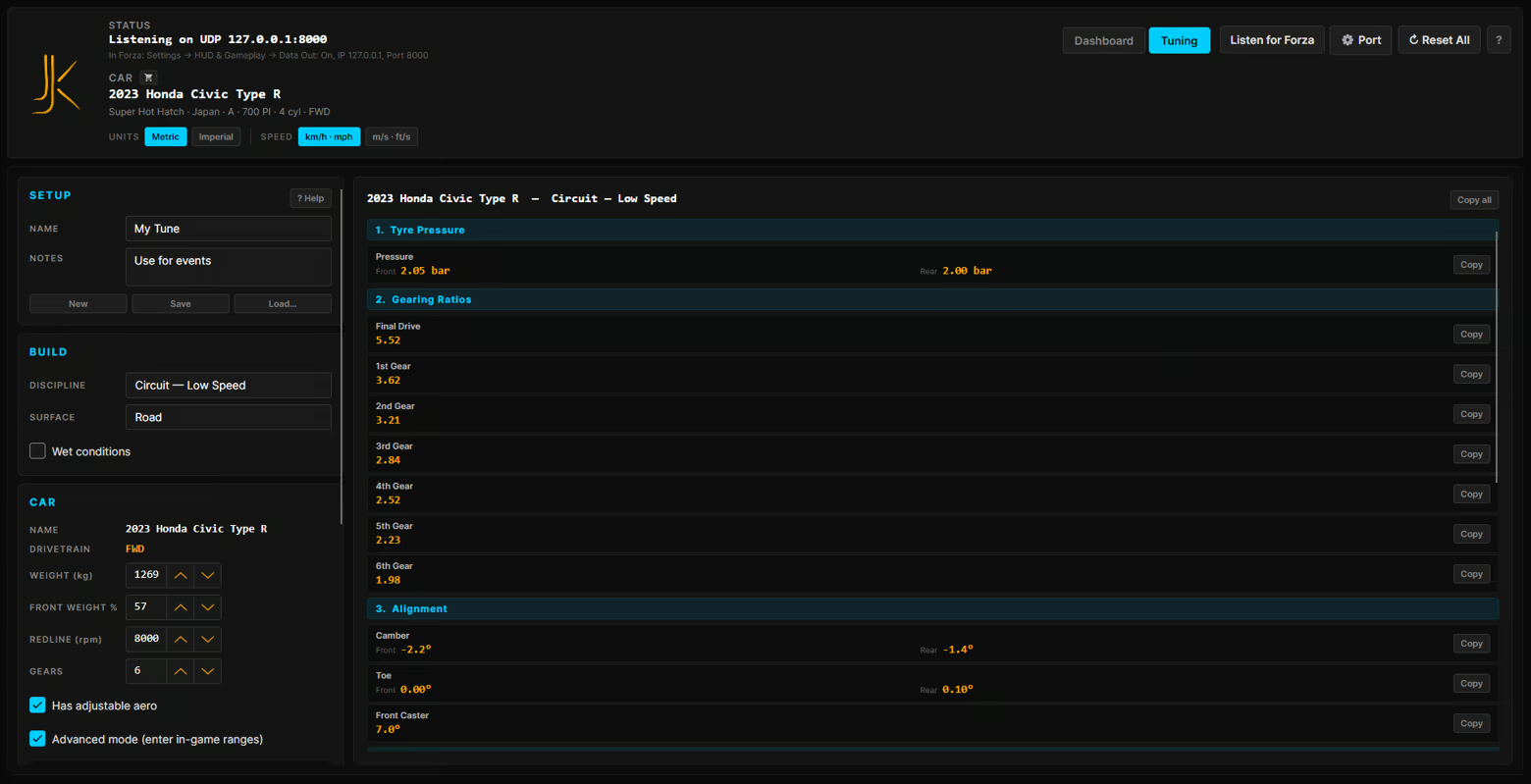
Most tuning calculators are a website in another tab and a spreadsheet you fight with. This one is built into the dashboard, reads your car straight off the telemetry feed, and outputs values grouped exactly like Forza's tuning menu — so you copy down the page and drive.

Pick what you're building for. Ten disciplines, each with its own philosophy:

  • Circuit — Low / Medium / High Speed — track racing, from tight technical layouts to fast flowing sweepers

  • Road Racing — versatile all-round grip for mixed road courses

  • Drag — 1/4 / 1/2 / 1 Mile — launch- and gearing-focused, tuned to the distance

  • Drift — high front camber, rear-biased balance, built to hold an angle

  • Offroad — soft, long-travel, durable over rough ground

  • Rally — mixed-surface pace, sitting between road and dirt

Layer on the conditions — Road, Dirt or Snow surface plus a Wet toggle — and the baseline adapts.

Enter two numbers, get a full tune. Type your car's weight and front weight % off the stat screen; drivetrain and redline auto-fill from live telemetry. Hit Calculate, and out comes a complete setup: tyre pressures, gearing, alignment (camber / toe / caster), anti-roll bars, springs and ride height, damping, aero, brakes, and differential. Every value in metric or imperial — your choice. Copy any single row, or copy the whole sheet, and type it straight into the game.

Gearing optimised from your actual dyno. Capture a power curve first — one clean pull to redline — and the calculator spaces your gears around your real power and torque peaks, where your engine actually makes its money. Not a generic curve. Yours.

Save your tunes. Name them, add notes, and load them back from the tune library, organised by the car they belong to — the same 578-car catalog the rest of Kanjo uses.

A baseline, not a black box. The calculator hands you a smart, physics-aware starting point — and a built-in help panel breaks down what every setting does and which way to lean it. Skip the blank page. Start from something that already works, then refine it by feel.

Speed Trap

Five configurable speed ranges, tracked simultaneously. 0–100, 100–200, 60–120, 0–60, 200–300 km/h — or set your own. Each range tracks LAST (most recent attempt) and BEST (personal record, persistent). Run the same drag a hundred times, watch your splits sharpen over the session. Click Customize to redefine the ranges, Defaults to restore, Reset Times to start clean.

Session reviewer (Capture & Replay)

Press record. Drive. Press stop. Kanjo Telemetry writes the entire telemetry stream to a .fhrec file in your Documents folder. Open it any time — every widget reacts to the captured data as if it were live. Replay paused. Replay playing. Speed Trap splits show what you actually hit. DRAGon plays back the run exactly. Friction Circle traces the same arc. Tire temps climb and fall on the same timeline.

This is the closest thing FH6 has to a session telemetry browser. Use it to figure out why your hot lap was a hot lap. Why the cold-tire launch went wrong. Why you couldn't catch the slide on turn 4. Then go back and do it better.

Power & Torque

Live dyno that draws both curves as you sweep through the rev range. Switch between time-axis (rolling 10-second window) and RPM-axis (full dyno sweep). Peak power and peak torque are tracked and labeled automatically — verify in-game tuner results, find where your engine actually makes its money, validate that turbo upgrade. Both curves can be toggled independently.

Friction Circle

Plots lateral G against longitudinal G in real time. A fading colored trail shows where your grip has been over the last several seconds. The dot turns red when you're at the limit — the trail tells you how often you live there. Read understeer, oversteer, and four-wheel drift the way the car itself sees them. Combined with the tire heatmap, you'll see exactly which corner cooked which tire.

Every other widget, briefly

  • Speed — km/h, mph, m/s, or ft/s; pick per session

  • RPM — live engine RPM with peak tracking

  • Gear — current gear, big and unambiguous; Reverse and Neutral handled correctly

  • Pedals — throttle, brake, clutch, handbrake as horizontal bars; see your inputs the way a coach would

  • Boost — in bar or psi, vacuum tracked

  • Fuel — vertical gauge, red below 10%

  • Position — X/Y/Z world coordinates with one-click copy

  • Shift Lights — programmable LED strip across the bottom; default fires at 96% of redline, override per car in RPM or %; goes solid red at the limiter

  • Status Lights — eight chips for REV (rev limiter), LCH (launch held), WSP (wheelspin), ABS (wheel locking), HB (handbrake), BST (boost building), R (reverse), AIR (all four wheels off the ground)

  • Tire Slip — per-wheel slip ratio, color-coded for grip vs spin

  • Tire Heatmap — all four corners in °C or °F; grey-cold, green-working, red-overheating

Add any widget, remove any widget, resize, rearrange. Save the layout. It comes back exactly the way you left it.

How it works

  • In Forza Horizon 6: enable UDP telemetry in the HUD settings. Data Out: On. IP: 127.0.0.1 (or your second machine's LAN address). Port: matches Kanjo Telemetry . Format: Dash.

  • Launch Kanjo Telemetry .

  • Drive.

No game mod. No account. No internet. No cloud. Kanjo Telemetry reads the UDP stream FH6 already broadcasts.

Privacy

Nothing leaves your machine. Telemetry, captures, layouts, settings — all local. Crash logs are written to %AppData%Kanjocrash-logs and are never transmitted automatically. If you choose to report a bug, you choose what to share.

System Requirements

    Minimum:
    • Requires a 64-bit processor and operating system
    • OS: Windows 10 64-bit / Windows 11
    • Processor: Any 64-Bit CPU
    • Memory: 1 GB RAM
    • DirectX: Version 11
    • Storage: 100 MB available space
    • Additional Notes: - Forza Horizon 6 must be running on the same PC, or on another PC on the same LAN. UDP telemetry must be enabled in FH6's HUD settings (Data Out: On, Format: Dash).
    Recommended:
    • Requires a 64-bit processor and operating system
There are no reviews for this product

You can write your own review for this product to share your experience with the community. Use the area above the purchase buttons on this page to write your review.

Review Filters