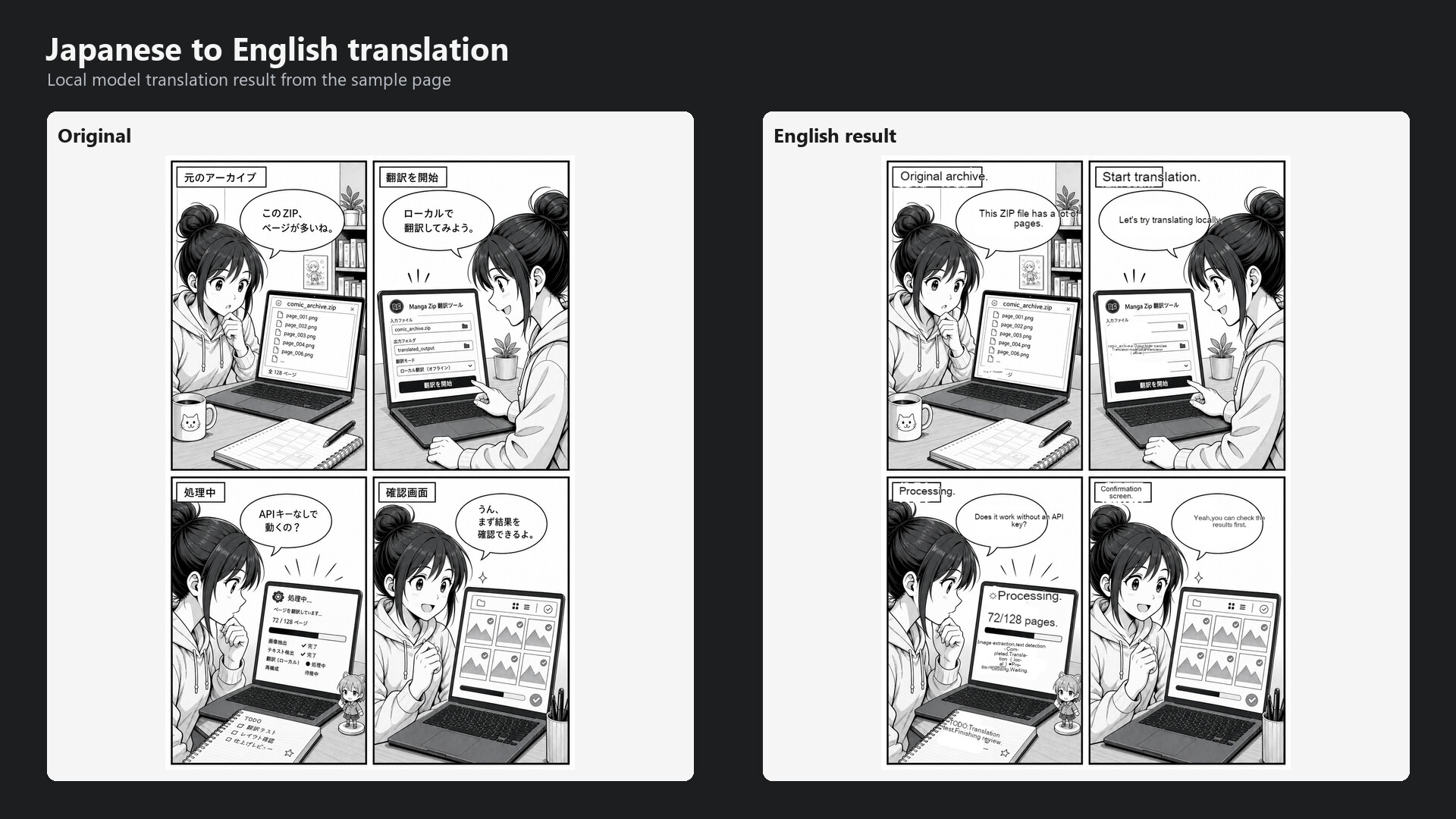
Translate user-owned ZIP/CBZ comic archives and JPG, PNG, or WEBP images on Windows. Run OCR, translation, and typesetting through a local-first workflow, preview results, and export images or ZIP archives.

Sign in to add this item to your wishlist, follow it, or mark it as ignored

Coming soon

This item is not yet available

Interested?
Add to your wishlist and get notified when it becomes available.
 

About This Software

Manga Archive Translator is a Windows desktop app for translating manga, comic, and scanned image files that you own or are authorized to process.

Import a ZIP/CBZ archive or individual image files, choose a translation setup, and add the job to the queue. Processed pages can be reviewed before exporting them as image files or a ZIP archive.

Key features

- Import ZIP/CBZ comic image archives

- Import individual JPG, JPEG, PNG, WEBP, BMP, TIFF, and TIF image files

- Run OCR, translation, text removal, inpainting, and typesetting

- Queue multiple files for sequential processing

- Preview processed results before export

- Export translated pages as image files or ZIP archives

Local-first translation

The app is designed around a local-first workflow. Model weights are not bundled with the application. To use local AI translation, you need to install or select a compatible local model yourself after reviewing the model provider's terms and system requirements.

Translation quality and speed depend on your hardware, selected model, and source image quality. An NVIDIA GPU is recommended.

Content ownership

Manga Archive Translator does not include manga, comics, scan data, copyrighted sample archives, or content download sources.

This app is intended for content you own, created yourself, or are authorized to process. You are responsible for ensuring that your input files and output usage comply with applicable law and rights-holder terms.

Open source notices

This distribution includes GPL source availability notices and third-party license information. The launch package includes the required license files and source offer information.

AI Generated Content Disclosure

The developers describe how their game uses AI Generated Content like this:

Manga Archive Translator can use local AI translation models to translate text from manga archive files provided by the user. It does not generate original artwork, audio, characters, story content, or executable code.

System Requirements

    Minimum:
    • Requires a 64-bit processor and operating system
    • OS: Windows 10 64-bit
    • Processor: 64-bit dual-core processor
    • Memory: 8 GB RAM
    • Graphics: NVIDIA GPU recommended for local model translation; CPU mode may be slow
    • DirectX: Version 11
    • Storage: 2 GB available space
    • Additional Notes: 2 GB available space for the app; additional space required for models and output files
    Recommended:
    • Requires a 64-bit processor and operating system
    • OS: Windows 11 64-bit
    • Processor: Modern 64-bit quad-core processor
    • Memory: 16 GB RAM
    • Graphics: NVIDIA GPU with 8 GB VRAM or better recommended for local model workflows
    • DirectX: Version 12
    • Storage: 20 GB available space
    • Additional Notes: 20 GB available space recommended for local models, runtime files, and output archives
There are no reviews for this product

You can write your own review for this product to share your experience with the community. Use the area above the purchase buttons on this page to write your review.