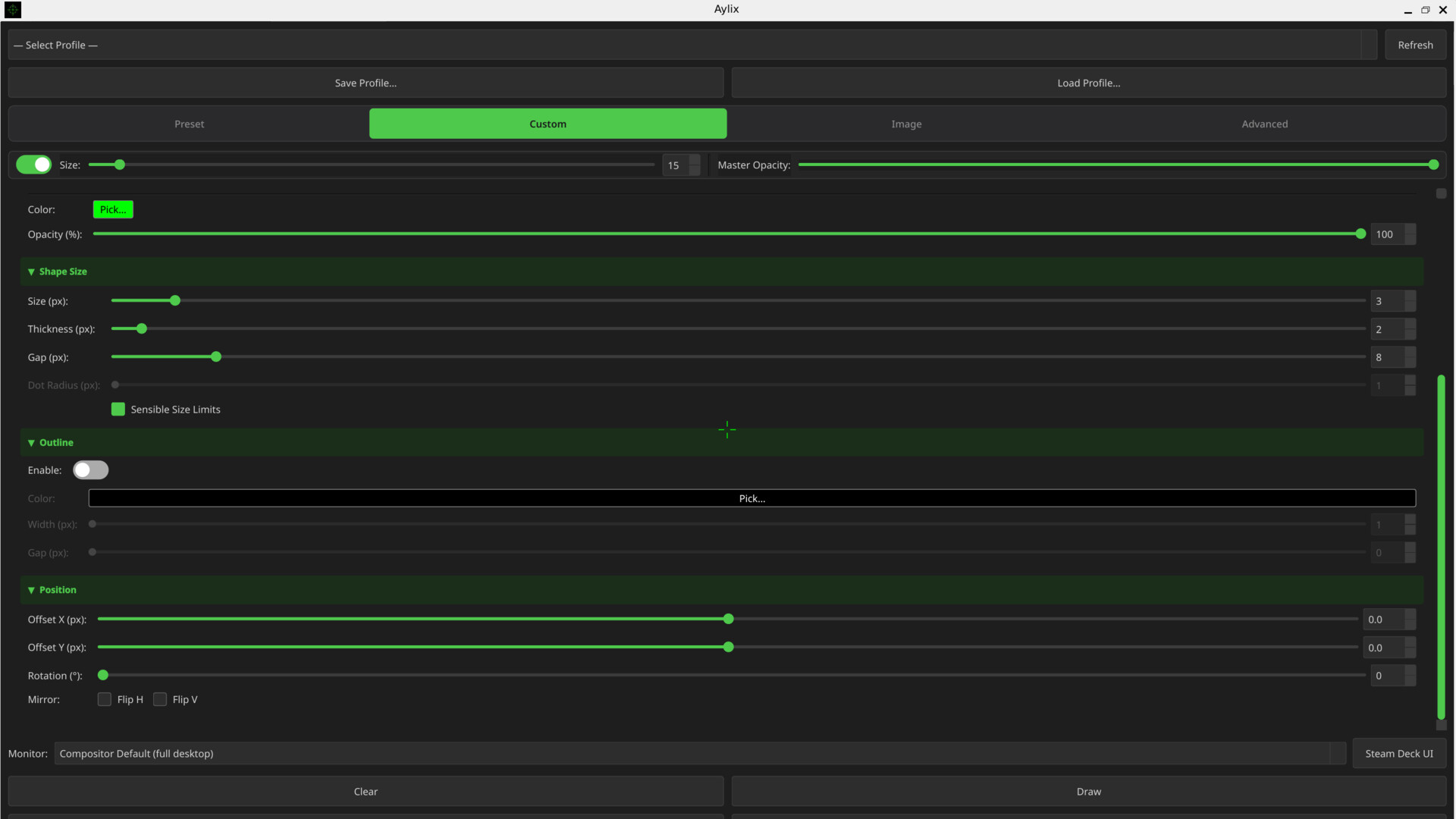
Aylix is the only customizable crosshair overlay that integrates reliably and natively with modern Linux Distros and Steam Deck. Renders in its own context without hooking into other graphics pipelines or processes. Powerful crosshair controls with layers of customization. Zero CPU overhead at idle.

Connectez-vous pour ajouter cet article à votre liste de souhaits, le suivre ou l'ignorer

Français non disponible

Ce produit n'est pas disponible dans votre langue. Veuillez consulter la liste des langues disponibles ci-dessous avant de l'acheter.

Acheter Aylix: Linux Aiming Crosshair Overlay


À propos de ce logiciel

Put your crosshair anywhere on a modern Linux system. KDE or Gnome. Desktop, Laptop, or Steam Deck. Yours to design. Fedora, Mint, Debian, CachyOS, Arch or Bazzite? It just works.

Aylix is the customizable crosshair overlay that Linux and Steam Deck users have been waiting for. Aylix overlays a crosshair on any game. Use this tool to customize and maintain a consistent crosshair across all of your games. Improve your aim by using a stable aiming interface rather than shifting to presets that the developers chose. Most overlay tools are built with other platforms in mind. Aylix was built from the ground up for Linux with two primary goals in mind: compatibility and performance.

Compatibility. The program is the equivalent of rendering a window or another separate application on top of your game. Aylix never hooks into games, other processes, game rendering pipelines, Vulkan, or Mangohud. It simply uses techniques native to the OS and Linux environments. This makes it compatible across almost everything running Linux from Debian to Arch to Steam Deck. It runs completely independently from your games so it is completely anticheat friendly.

Performance. Aylix reserves a small amount of resources on the GPU for the overlay. And the CPU is completely asleep while in game. So there is no performance impact while gaming. This is especially important in esports titles where the CPU is often the system bottleneck. Keep the competition in-game since Aylix never competes with your game for resources like overlays on other platforms do.

Linux without compromise, clean by design. Just click run and Aylix will run in the background on top of your game without having to reconfigure or worrying about dependencies. No workarounds. No fragile overlays. No modification of game files. No code injection. No interference with game processes. You will always have your personalized crosshair across games when you need it.

Precision personalized. Adjust size, color, shape, position, style, and so much more. The possibilities are endless. If the presets do not work out for you, try the custom editor with fully layered designs. And if that still doesn’t work? Move over to image mode and import your own crosshair image with full control over how and where it is displayed on screen. Scales cleanly across different resolutions and setups.

Take it anywhere. Bring your fully customized crosshair to Steam Deck Desktop Mode or create one with a UI designed specifically for it. ***Must be in Desktop mode for Steam Deck crosshair to work due to limitations in Game Mode. (Future versions of Aylix will attempt to address this)***. Live on the edge with Arch or take it easy with Debian. Take the middle of the road with Fedora. X11 or Wayland. The choice of tools should be entirely dependent on your terms not on the distro you chose.

Constantly evolving. Planned improvements include expanded desktop environment support. Even more customization options. And community inspired direction.

Divulgation de contenu généré par IA

L'équipe de développement décrit l'utilisation de contenu généré par IA dans le jeu comme suit.

Generative AI tools were used in the creation of select marketing materials, including the promotional video, icons, and store images.

Configuration requise

    Minimale :
    • Système d'exploitation : Linux: SteamOS (Desktop Mode), Wayland, X11
    • Processeur : Intel Core i3-2100 / AMD FX-4300 or equivalent
    • Mémoire vive : 512 MB de mémoire
    • Graphiques : Integrated Graphics
    • Espace disque : 150 MB d'espace disque disponible
    • Carte son : None
    • Notes supplémentaires : Only works on Steam Deck in Desktop Mode
    Recommandée :
    • Système d'exploitation : Linux: Fedora, Debian, Arch, CachyOS, Manjaro, Endeavor, Bazzite, openSUSE, Ubuntu, Mint, SteamOS (Desktop Mode)
    • Processeur : Intel Core i5-4460 / AMD Ryzen 3 1200 or equivalent
    • Mémoire vive : 1 GB de mémoire
    • Graphiques : Nvidia, AMD, Intel Arc
    • Espace disque : 1024 MB d'espace disque disponible
    • Carte son : Any
    • Notes supplémentaires : Compatible with modern X11 and Wayland Distros

Évaluations pour Aylix: Linux Native Crosshair Overlay À propos des évaluations Vos préférences

Évaluations globales :
3 évaluations (3 évaluation(s))


Pour consulter les évaluations publiées lors d'une période spécifique, cliquez et faites glisser votre sélection sur un graphique ci-dessus ou cliquez sur une barre.


Filtrer les évaluations en fonction du temps de jeu au moment de leur publication :


Pas de minimum à pas de maximum

Afficher les évaluations dans l'ordre sélectionné


En savoir plus
Filtres
Activité d'évaluation hors sujet exclue
Temps de jeu : 
A joué surtout sur Steam Deck
Système d'exploitation :
Processeur :
Carte graphique :
Type de périphérique :