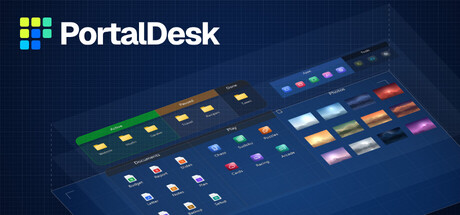
Turn a cluttered desktop into a calm, organized workspace. Group icons into beautifully styled fences, open any folder as a live portal, and bring everything to the front with one shortcut. Lightweight, and a one-time purchase - no subscription.

Sign in to add this item to your wishlist, follow it, or mark it as ignored

Early Access Software

Get involved with this software as it develops.

Note: This Early Access software is not complete and may or may not change further. If you are not excited to use this software in its current state, then you should wait to see if it progresses further in development. Learn more

What the developers have to say:

Why Early Access?

“PortalDesk already does its main job: you can fence your desktop icons, style every fence and use it day to day. But every desktop is different - icon counts, monitor setups, display scaling, other software touching the desktop. I want real-world feedback from many different PCs before I call it finished, and I want to choose the remaining features together with the people who use it.”

Approximately how long will this software be in Early Access?

“My current estimate is about 3 to 6 months. The real time depends on what I learn from players and how stable it proves on different setups, so please treat this as an estimate, not a promise.”

How is the full version planned to differ from the Early Access version?

“The full version is planned to add some or all of the following, in no guaranteed order: tabs inside a fence, rules that automatically sort new desktop files into fences, rolling a fence up to its title bar, more widgets, more ways to view a fence or a folder portal (list and details views, sorting) and import/export of layouts. Player feedback may change this list. For me, 1.0 means stable on a wide range of PCs and monitor setups.”

What is the current state of the Early Access version?

“You can buy and use the main product today: fences for desktop icons, folder portals, per-fence styling with templates, a clock widget, a hotkey overlay (Ctrl+D), per-monitor layouts and 100-200% display scaling. Known limits: English interface only, one widget (the clock), and the Recycle Bin, This PC and other system icons cannot be put in a fence (they stay on the desktop). Updates arrive through Steam.”

Will this software be priced differently during and after Early Access?

“Yes. The Early Access price is lower than the price planned for the full version, to reward early supporters. I plan to raise the price when 1.0 is released. Buying in Early Access includes the full version - it is the same Steam app, so you will not have to buy it again.”

How are you planning on involving the Community in your development process?

“I read the Steam Community Hub discussions and reviews, and I will post update notes as Steam announcements. Bug reports and feature requests are welcome in the discussions - what players ask for most will guide what I build next.”
Read more
This game is not yet available on Steam

Planned Release Date: Q4 2026

Interested?
Add to your wishlist and get notified when it becomes available.
 

Report bugs and leave feedback for this software on the discussion boards

See all discussions

About This Software

A calm, organized desktop - built your way

PortalDesk turns a cluttered Windows desktop into a tidy workspace. Group your icons into fences, style every detail, and keep the files and folders you use most one glance away.

Features

  • Fences for your icons. Group files, folders and shortcuts. Drag icons into, out of and between fences, and reorder them freely.
  • Draw a fence anywhere. Right-drag on an empty spot of the desktop to create a fence, a folder portal or a clock.
  • Folder portals. Show the contents of any folder right on your desktop, always up to date.
  • Style down to the last detail. Colors, corner radius, spacing, icon size, fonts and headings. Set a global style, save templates, fine-tune any single fence - with a live preview.
  • Tidy by default. Fences snap to a grid (hold Alt for free placement), and fences placed side by side join into one group.
  • Clock widget and quick-access overlay. A customizable clock with date, and Ctrl+D to bring your fences in front of all windows - press again to send them back.
  • Your files stay safe. Nothing is moved or changed - PortalDesk only organizes how your desktop looks.
  • Lightweight. Runs quietly in the background.
  • Updates through Steam.

One purchase, no subscription

Buy once and it's yours. No subscription, no account.

Early Access

Everything listed above works today. Planned next, shaped by your feedback (plans, not promises):
  • Tabs inside a fence
  • Rules that sort new desktop files into fences automatically
  • Roll a fence up to its title bar
  • More widgets
  • List and details views, sorting
  • Import and export of layouts
The interface is currently in English.

AI Generated Content Disclosure

The developers describe how their game uses AI Generated Content like this:

Parts of the store page text were drafted with AI assistance and reviewed by the developer. All screenshots and artwork show the real application.

System Requirements

    Minimum:
    • Requires a 64-bit processor and operating system
    • OS: Windows 11 (64-bit)
    • Storage: 150 MB available space
    Recommended:
    • Requires a 64-bit processor and operating system
    • Additional Notes: 64-bit only. Self-contained - there is nothing else to install. Launch through Steam: the Steam client must be running and signed in to the account that owns PortalDesk. Tested at 100-200% display scaling and with multiple monitors.
Review Filters