The ultimate cursor enhancement tool for Windows. Click effects, physics-driven cursors, animated cursor workshop, holographic trails, ASMR sounds, screen recording — make every mouse movement magical.

Sign in to add this item to your wishlist, follow it, or mark it as ignored

Buy Mousify


About This Software

✨ Your plays deserve a better camera.

Mousify is a next-generation Game-Aware Highlight Editor & Cursor Visual Enhancement Engine specifically crafted for gamers, content creators, and streamers.

Tired of the boring default Windows cursor? Struggle to find a 15-second highlight in hours of raw gameplay footages using PR or AE? Mousify seamlessly unifies a revolutionary workflow: "Zero-Latency Native Capture - Intelligent Game Log Parsing - Smart Auto-Zoom Editing". Now, every single click you make feels satisfying, and every god-like play instantly transforms into a viral clip!

---

🛡️ Core Technologies & Key Features

🎮 1. Game-Aware Event Detection & Auto-Highlighting

Stop wasting hours dragging the timeline scrollbar to locate your "Pentakill" or "Epic Escape."

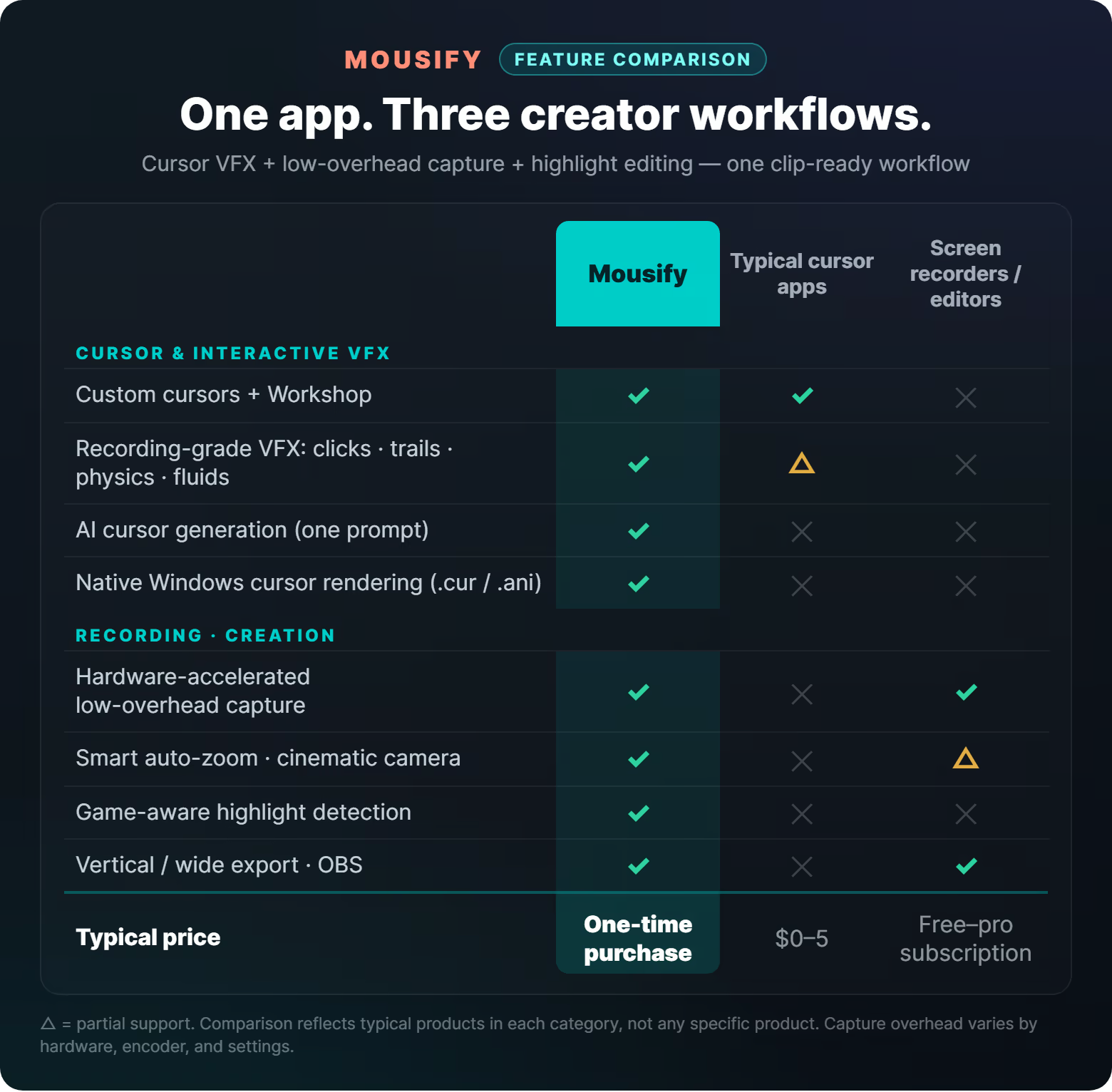
🔹 Event-Driven Timeline: Mousify features a built-in game log analyzer. By reading and parsing active game logs (supporting Minecraft, Dota 2, Path of Exile, WoW, etc.), it automatically flags critical milestones (such as kills, double kills, objectives captured, or boss kills) right on the recording timeline!

🔹 One-Click Highlight Cutting: No video editing skills required. Click "Generate Highlight," and Mousify instantly crops and clips the action surrounding the flagged event.

🎬 2. Smart Auto-Zoom & Cinematic Camera Work

Why do professional montages look so dramatic? Because the camera actually communicates!

🔹 Intelligent Intent Tracking: Utilizing our proprietary spring-damper camera physics model, Mousify anticipates cursor movement and actions. The camera glides like a million-dollar professional cinematography rig, zooming in and out smoothly on the gameplay focus point to instantly elevate raw clips into masterpieces!

🔹 Smooth Slow-Mo: Highlight key moments with ultra-smooth 60fps slow-motion playback, making precise micro-mechanics and godly reaction speeds crystal clear.

🔹 One-Click Social Sharing: Export highlights in classic 16:9 widescreen or automatically adapt them to a 9:16 vertical layout (TikTok, YouTube Shorts, Reels), ready to go viral!

📢【GIF Asset Guide】

⚡ 3. High-Performance Zero-Copy Game Recording

🔹 FPS is Everything: Powered by our native D3D11 and NVENC/AMF hardware-accelerated pipeline, frame data is transferred directly within the VRAM. CPU usage is kept at a jaw-dropping 1% to 3%! Fully isolated from the game's 3D engine, it ensures zero performance drops even during intense 240Hz competitive shooter sessions.

🎨 4. Native System-Level Cursor Rendering

🔹 Zero Desktop Overlay Lag: Unlike conventional cursor tools that render through heavy overlay windows causing noticeable cursor lag, Mousify compiles your custom designs into native Windows .cur / .ani files. Experience esports-grade, zero-latency feedback where the cursor responds instantly to your hand!

🔮 5. Dynamic Physics & Interactive Click Particles

🔹 Physics-Driven Feedbacks: Features realistic gravity-sensing motion effects like inertia, chains, pendulums, and jelly-like deformations.

🔹 Dozens of Click Effects & Trails: Electrifying lightning, shattering frost, flowing ink, cyberpunk matrices... paired with unique click sound effects for massive impact.

🔹 Smart Evade Mechanism: All visual effects dynamically fade away when you enter fullscreen games to ensure an absolute zero-distraction view, and return instantly once you head back to the desktop.

🎥 6. Presentation Master & OBS Integration

🔹 Features a high-end presentation spotlight, a real-time magnifier (up to 8x), and semi-transparent on-screen keystroke overlays.

🔹 Streamer-Friendly: Uses our exclusive transparent overlay capture technology to feed click particles and cursor trails directly into OBS. Your stream viewers see exactly what you see!

---

Own every moment. Download Mousify today and customize your highlight universe!

System Requirements

    Minimum:
    • Requires a 64-bit processor and operating system
    • OS: Windows 10 (64-bit)
    • Processor: Intel Core i3 / AMD Ryzen 3 or equivalent
    • Memory: 4 GB RAM
    • Graphics: DirectX 11 compatible GPU
    • DirectX: Version 11
    • Storage: 200 MB available space
    • Additional Notes: WebView2 Runtime required (auto-installed on Windows 10/11)
    Recommended:
    • Requires a 64-bit processor and operating system
    • OS: Windows 11 (64-bit)
    • Processor: Intel Core i5 / AMD Ryzen 5 or equivalent
    • Memory: 8 GB RAM
    • Graphics: NVIDIA GTX 1050 / AMD RX 560 or better
    • DirectX: Version 11
    • Storage: 500 MB available space
    • Additional Notes: FFmpeg required for screen recording (free download prompted on first use)
There are no reviews for this product

You can write your own review for this product to share your experience with the community. Use the area above the purchase buttons on this page to write your review.

Review Filters