Kandungan ini memerlukan permainan asas Elemental Heroes di Steam untuk bermain.

Tarikh Keluaran:
3 Mac, 2016
Pembangun:
Tag

Daftar masuk untuk menambah item ini ke senarai hajat anda, ikuti atau tandakannya sebagai diabaikan

Bahasa Bahasa Melayu tidak disokong

Produk ini tidak menyokong bahasa tempatan anda. Sila semak senarai bahasa yang disokong di bawah sebelum membuat pembelian

Notis: Elemental Heroes - Quick Starter Pack tidak tersedia di gedung Steam lagi.

Kandungan Boleh Muat Turun

Kandungan ini memerlukan permainan asas Elemental Heroes di Steam untuk bermain.


Tentang Kandungan Ini

Starter pack for Elemental Heroes game is a good way to start the game with maximum comfort and a considerable discount.
You will get the following features with it:

  • First 5 unit types for each game faction (otherwise you will only have 3 units of your own faction)
  • 10 charges (think of charges as lives) for each unit (it's enough not to worry about mistakes)
  • Premium account for 7 days which gives you:
    - 2x higher experience
    - 2x higher resource pump rate from your mines
    - 2x higher resources amount received from battles including diamonds
    - 2x higher chance for getting a new card and charges for it
    - 2x higher chance to get a better artifact in obelisk dungeons
    - full mana in every battle you start
    - fast action points regeneration
    - cool golden HUD skin!
  • 250 diamonds (rarest resource)
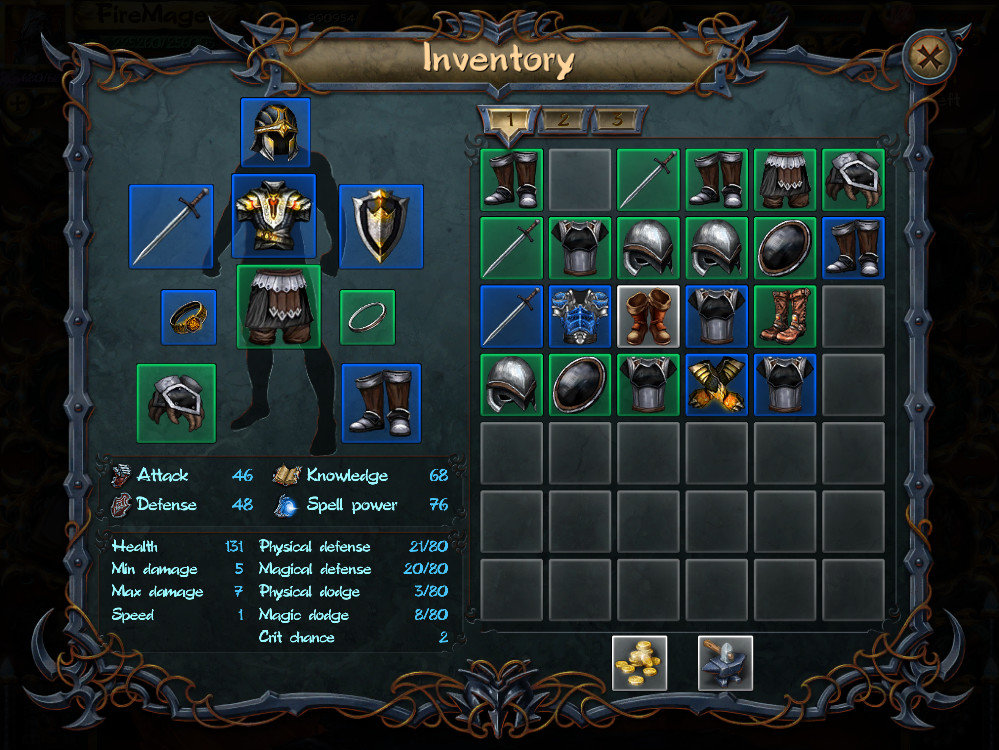
  • White set of artifacts for your character

WARNING! If you have several characters, this DLC will be delivered to the first character who will enter the game! Be careful!

To claim your purchase, please restart the game.

To get the artifacts set, you will need to:
1. restart the game and look into the in-game mail.
2. find a message from SERVER, get it and close the in-game mail.
3. open the inventory and find a new box, once double clicked it will give you all the items which you will be able to wear.

To add acquired cards into the active deck, you need to:
1. enter the game lobby with the appropriate character
2. open the card upgrades window
3. press the Add button under the cards you need

If you need to remove some of the currently active deck cards, you need to press a small button with a "minus" sign which appears while the upgrades window is opened, on the active deck cards.

Keperluan Sistem

Windows
macOS
SteamOS + Linux
    Minimum:
    • OS *: Windows XP
    • Memori: 1 GB RAM
    • DirectX: Versi 9.0
    • Storan: 1 GB ruang tersedia
    Dicadangkan:
    • OS *: Windows 7
    • Pemproses: Core i5
    • Memori: 2 GB RAM
    • DirectX: Versi 9.0
    • Rangkaian: Sambungan Internet jalur lebar
    • Storan: 1 GB ruang tersedia
* Mulai 1 Januari 2024, Steam Client hanya akan menyokong Windows 10 dan versi yang lebih baharu.
    Minimum:
    • Memori: 1 GB RAM
    • Storan: 1 GB ruang tersedia
    Dicadangkan:
    • OS: OS X El Capitan
    • Pemproses: Core i5
    • Memori: 2 GB RAM
    • Rangkaian: Sambungan Internet jalur lebar
    • Storan: 1 GB ruang tersedia
* Mulai 15 Februari 2024, Steam Client tidak akan menyokong permainan 32-bit atau macOS 10.14 atau lebih rendah lagi.
    Minimum:
    • Memori: 1 GB RAM
    • Storan: 1 GB ruang tersedia
    Dicadangkan:
    • OS: Ubuntu
    • Pemproses: Core i5
    • Memori: 2 GB RAM
    • Rangkaian: Sambungan Internet jalur lebar
    • Storan: 1 GB ruang tersedia
Tiada ulasan untuk produk ini

Anda boleh menulis ulasan anda untuk produk ini untuk berkongsi pengalaman anda dengan komuniti. Untuk menulis ulasan anda, gunakan kawasan di atas butang pembelian pada halaman ini.

Penapis Ulasan