Swipe to type in VR. Get back to your game faster.
發行日期:
2026
開發人員:
發行商:
標籤

登入以將此項目新增至您的願望清單、關注它,或標記為已忽略

搶先體驗軟體

立即開始使用,並參與軟體開發過程。

備註:這款搶先體驗軟體尚未開發完成,且內容可能會有所變動。如果目前的開發進度未使您產生興趣,建議您等待本軟體開發至下一階段再決定是否購買。了解更多

開發者的話:

為何採用搶先體驗模式?

「Tuning the swipe algorithm is key (heh) to making Scribeam feel good to use. While months of work has been put in already, getting feedback from the community is necessary to push it to the next level. It's very difficult to tell how the keyboard will actually feel to use while developing. Only by using it "in the moment" while playing a game do all the rough edges become obvious.

Being able to collect this sort of day-to-day feedback from real users playing all sorts of games will make improvements happen much faster, and find problems we've never even considered.」

這款軟體的搶先體驗時間大約會持續多久?

「We are hoping to leave Early Access in early 2027. We'll be looking to the community to tell us when it feels good enough and we can slow down on algorithm changes.」

正式版預計會與搶先體驗版有何不同?

「There will be no major feature differences in the first full release, rather this will serve as a marker that the behavior of swipe should no longer change significantly between updates. After the early access period we plan to shift focus to exploring a wider variety of game and system integrations, as well as activating data sharing for those users who have it enabled to start improving the vocabulary based on real world use.」

搶先體驗版目前的開發進度如何?

「Scribeam is usable, and already in day-to-day use during development. More work on the algorithm is needed to make typing faster by reducing how often you have to make corrections. The UI is not 100% complete, but core features are present. Data sharing is not yet active, but the settings are exposed so users can make privacy choices now and not be surprised by them appearing later.」

軟體售價在搶先體驗期間前後會有所變動嗎?

「We're not planning on changing the price after Early Access.」

在開發過程中,您打算如何與社群互動?

「In addition to swipe behavior feedback, we'll be open to any and all feedback on UI design, keyboard layout, etc to make the keyboard as comfortable and easy to use as possible. The goal is to create a keyboard that gets out of your way and lets you enjoy your games.

We'll be watching for feedback in the Steam community and on Bluesky, and the app itself will provide a report button to send feedback on specific words or situations that need to be improved. We're open to exploring other community platforms as well.」
繼續閱讀
不支援繁體中文

本產品尚不支援您的目前所在地的語言。購買前請先確認語言支援清單。

此遊戲尚未在 Steam 上發售

預計發行日期: 2026

感興趣嗎?
將這款遊戲加入願望清單,以便在發售時收到通知。
 
查看所有討論

在討論區回報錯誤並留下對於此軟體的意見

關於此軟體

Scribeam brings one-handed swipe typing from the smartphone world into VR. Instead of playing laser tag with a desktop-style keyboard wider than your IRL desk, simply drag your laser across the keys and it will figure out what you meant. The keyboard is sized to fit your hand and floats just in front of it, keeping your laser as accurate as possible.

Features

  • Swipe-to-type

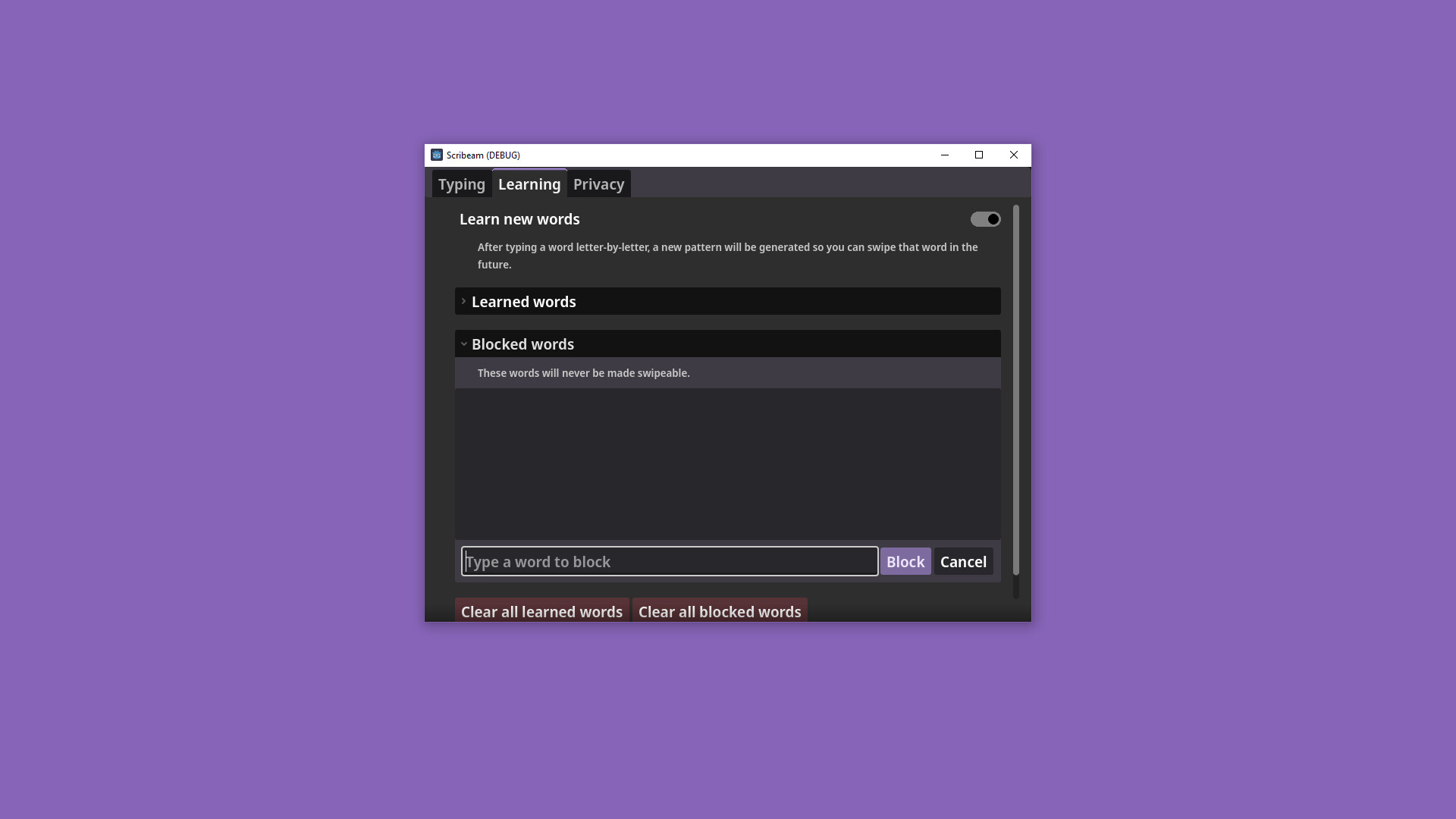
  • Learns new words automatically

  • Emoji search + recents

  • VRChat chatbox integration

  • Full support for Windows keyboard shortcuts

  • Works alongside your desktop overlay of choice

Built to be social

Scribeam is for responding to pings in Discord, those days when you're feeling a bit mute in VRChat, or jotting down a quick note for later when you take off the headset. You came for the immersion, you need a keyboard that can get out of your way and get you back to the game faster. Save the 101-key for when you really need it, like responding to the guy who is still wrong after 17 messages in that thread. You know the one.

The layout is designed to keep the symbols you use for conversation front and center. Recently used emoji are just a click away, or swipe to search for the perfect one.

Inside VRChat, the keyboard automatically sends directly to the in-game chatbox, letting you keep both hands six levels deep in your Expressions menu. When you need to interact with the rest of the world, switching to Desktop input is just a click away.

(Got another game you'd like to see chat integration for? Let us know!)

Always improving

When you swipe, the keyboard suggests a handful of words that look like the path you traced. The best match is typed automatically. When it makes a mistake, choosing a different suggestion will automatically backspace and replace it. Unlike on a phone where you get three suggestions at most, Scribeam makes use of the extra space in the VR environment to offer many more, reducing how often you have to erase and try swiping again.

When you have to type a word key-by-key because the keyboard doesn't know it at all, it will learn how to let you swipe it in the future. If you choose to do so, you can help improve the keyboard for all users by sharing the words you use most often and new words you've taught it.

When something isn't right, reporting an issue is only a click away. Provide details if you wish, or just select a category and get back to your conversation.

Respects your privacy

Your conversations are never sent to a cloud service. You can choose to send information about occasional, randomly selected words you've used to Liminetics to help improve the suggestions and swipe recognition for other users. These submissions will always be kept anonymous, will never include the context in which they were said, and will be deleted from the server as soon as possible.

Additionally, we want to assure you that while Scribeam feels intelligent if we've done our job, the swipe algorithm is just good old-fashioned math. There is no generative AI here, and we will never train a model using your data.

Other info

Opening and closing the keyboard is bound to thumbstick click on either hand by default. Whichever hand you use to open it is the one it will follow. Feel free to remove the binding for your non-dominant hand if you need it for other bindings!

Featured VRChat worlds

  • Thad Home of Cuddles

  • Rooftop Bar

  • Fort Duvet

  • 終点の住処 Last Station Home

系統需求

    最低配備:
    • 需要 64 位元的處理器及作業系統
    • 作業系統: Windows 10
    • 處理器: Intel Core i5-4590 / AMD FX 8350
    • 記憶體: 8 GB 記憶體
    • 顯示卡: NVIDIA GeForce GTX 1050, AMD Radeon RX 460
    • 儲存空間: 400 MB 可用空間
    • VR 支援: SteamVR, requires motion controllers
    建議配備:
    • 需要 64 位元的處理器及作業系統
此產品無任何評論

您可以撰寫評論來與社群分享您對於本產品的看法。請使用本頁面中位於購買按鈕上方的區塊來進行評論的編寫。

評論篩選條件