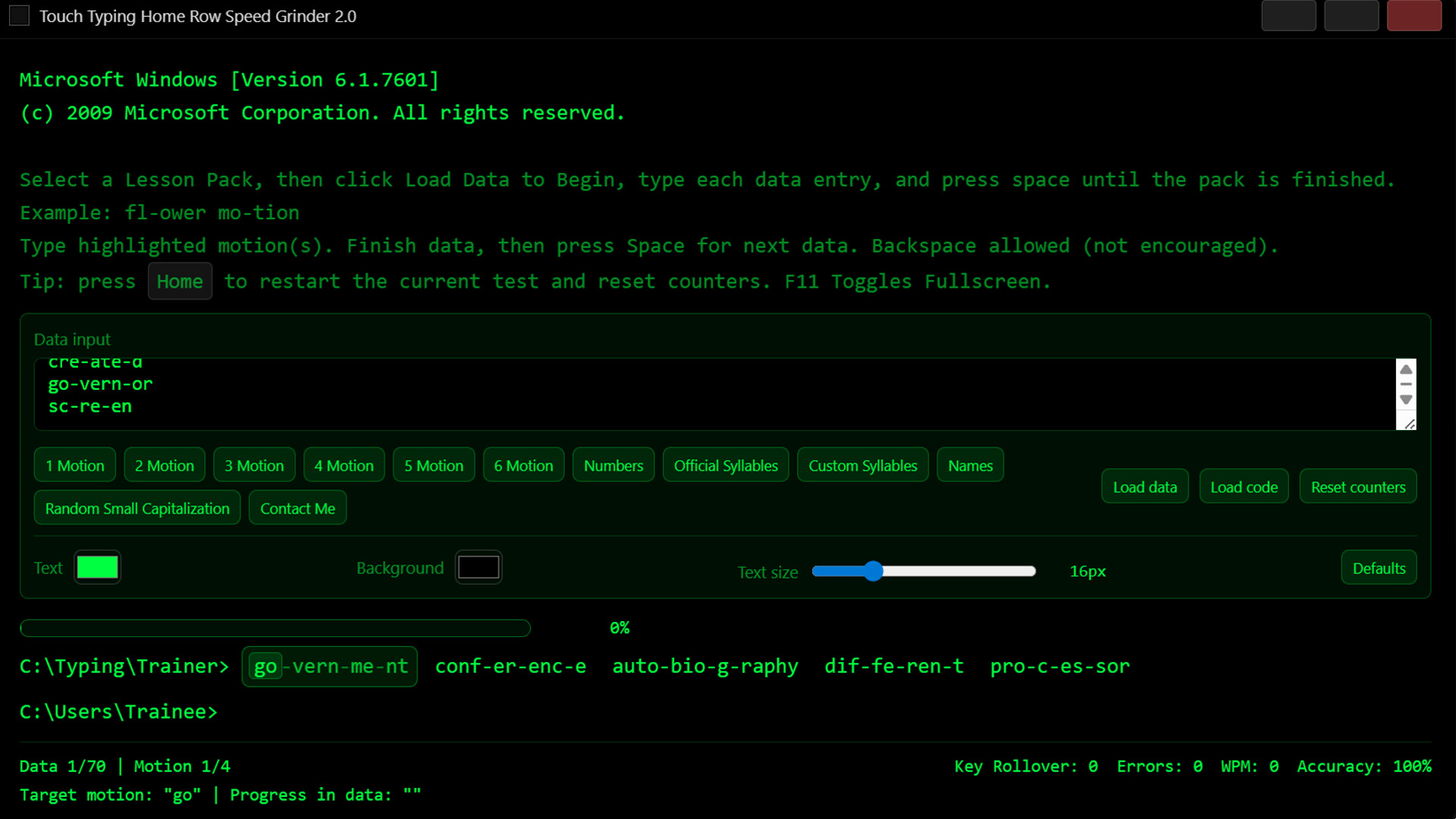
A focused typing trainer that builds real speed through motion-based practice, teaching efficient key rollover and muscle memory through structured exercises and adaptive word patterns.

Sign in to add this item to your wishlist, follow it, or mark it as ignored

This game is not yet available on Steam

Coming soon

Interested?
Add to your wishlist and get notified when it becomes available.
Add to your wishlist
 

Reviews

“As a beginner in IT, I found this very useful and easy to use.”
***** – Course Participant

“Great refresher.”
***** – IT Person

“Quick, simple, and easy to use. Would love to see more.”
**** – Student

Weekend Typing Challenges

WEEKEND TYPING CHALLENGE — OPEN TO EVERYONE

Think you're fast? Prove it.

Join the Discord hit me up during the weekends and challenge me live.
Any keyboard. Any platform. Any Person.

My rule is simple:
If I can’t beat you, I don’t deserve to teach you.

Bring your best speed & accuracy. Leave even faster.

About This Game

Touch Typing Home Row Speed Grinder 2.0 is a precision training tool designed to build real typing speed through controlled motion practice — not games, not random word spam, and not gimmicks.

This trainer focuses on key rollover mechanics, the same physical principles used by high-speed typists, competitive keyboard users, and data-entry professionals to achieve consistency, accuracy, and endurance.

Instead of throwing endless paragraphs at you, Speed Grinder isolates the exact movements your hands must master, allowing you to train them deliberately — like strength training for your fingers.

────────────────────────────

WHAT MAKES IT DIFFERENT

• Motion-Based Training
Practice grouped key motions instead of memorizing words. Train how your hands actually move.

• First-Contact Capture Method
Learn to press combinations efficiently without unnecessary finger reuse — a foundational skill for high WPM.

• Custom Lesson Input
Paste your own drills, lessons, or movement sets directly into the program.

• Real-Time Performance Metrics
Track rollover count, WPM, accuracy, and error detection instantly.

• Distraction-Free Environment
No animations. No sound spam. No artificial scoring. Just focused repetition.

• Built for Serious Practice
Designed for learners, programmers, transcriptionists, and anyone who wants measurable improvement.

────────────────────────────

WHO THIS IS FOR

✓ People stuck at the same typing speed for years
✓ Users who want control over how they improve
✓ Anyone training for consistency, not just bursts of speed
✓ Keyboard enthusiasts and efficiency-focused professionals
✓ Learners who prefer deliberate practice over gamified guessing

────────────────────────────

HOW TO USE

  • Paste or load a lesson block.

  • Type the highlighted motions.

  • Build consistency.

  • Repeat. Improve. Measure.

That’s it.

No accounts. No unlocks. No nonsense.

────────────────────────────

Speed Grinder isn’t a typing game.

It’s a training instrument.

AI Generated Content Disclosure

The developers describe how their game uses AI Generated Content like this:

Some marketing text and store presentation materials were assisted by generative AI tools during development.

The application itself does not use AI to generate lessons, analyze typing, or alter gameplay. All training content and functionality are authored and controlled by the developer.

System Requirements

    Minimum:
    • Requires a 64-bit processor and operating system
    • OS: Windows 10 (64-bit)
    • Processor: Any modern dual-core CPU
    • Memory: 2048 MB RAM MB RAM
    • Graphics: Integrated graphics supported
    • Storage: 300 MB available space MB available space
    • Sound Card: Optional
    • Additional Notes: Designed for physical keyboard use. Laptop and desktop keyboards supported. No internet connection required. Runs locally.
    Recommended:
    • Requires a 64-bit processor and operating system
    • OS: Windows 10 or Windows 11 (64-bit)
    • Processor: Intel i3 or equivalent
    • Memory: 4096 MB RAM MB RAM
    • Graphics: Integrated or dedicated GPU
    • Storage: 300 MB available space MB available space
    • Additional Notes: Designed for physical keyboard use. Laptop and desktop keyboards supported. No internet connection required. Runs locally.
There are no reviews for this product

You can write your own review for this product to share your experience with the community. Use the area above the purchase buttons on this page to write your review.