OpenVR Metrics is a real-time VR profiling and monitoring tool for developers and users, providing frame timing analysis, device metrics, and performance insight.
วันวางจำหน่าย:
เตรียมวางจำหน่าย
ผู้พัฒนา:
ผู้จัดจำหน่าย:
แท็ก

เข้าสู่ระบบ เพื่อเพิ่มผลิตภัณฑ์นี้ลงในสิ่งที่อยากได้ของคุณ ติดตาม หรือทำเครื่องหมายเป็นถูกละเว้น

ไม่รองรับภาษาไทย

ผลิตภัณฑ์นี้ไม่รองรับภาษาท้องถิ่นของคุณ โปรดตรวจสอบรายชื่อภาษาที่รองรับก่อนทำการสั่งซื้อ

เกมนี้ยังไม่พร้อมใช้งานบน Steam

เตรียมวางจำหน่าย

น่าสนใจ?
เพิ่มในสิ่งที่คุณอยากได้ และรับการแจ้งเตือนเมื่อผลิตภัณฑ์พร้อมใช้งาน
เพิ่มลงในสิ่งที่อยากได้ของคุณ
 

เกี่ยวกับซอฟต์แวร์นี้

Overview

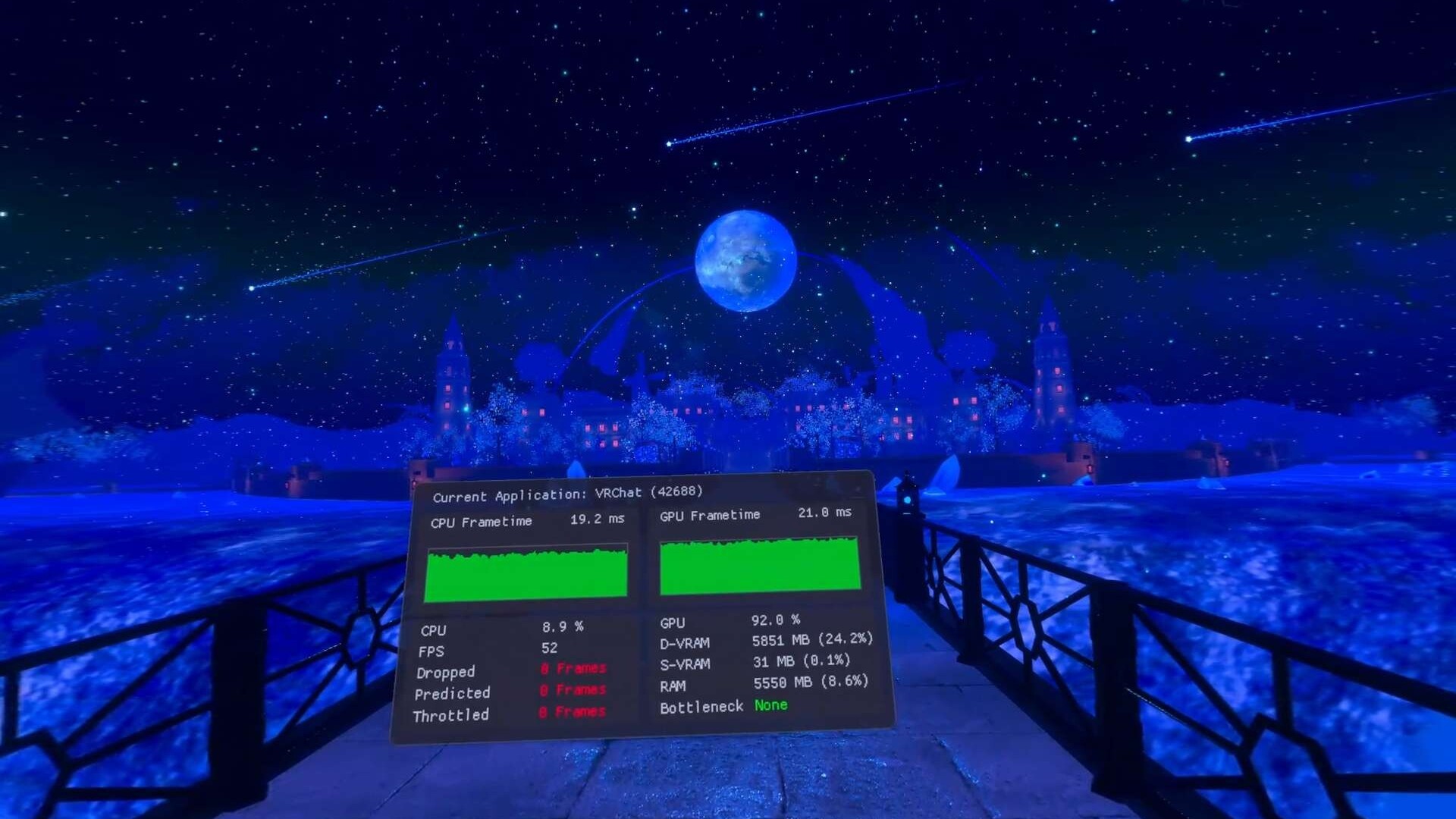
OpenVR Metrics is a real-time VR performance monitoring tool designed for both developers and users who want deeper insight into application performance and device behavior within SteamVR. It provides per-process metrics, system resource visibility, and device status information through an accessible in-VR overlay.

Features

  • Performance Monitoring

Use CPU and GPU frame time metrics, real-time FPS display, and reprojected and dropped frame counters to quickly and accurately assess how programs impact system performance.

  • Resource Monitoring

Track per-application resource usage including CPU and GPU utilization, dedicated and shared VRAM consumption, and video encoding utilization to quickly identify bottlenecks and optimize performance.

NOTE: VRAM and Video Encoding monitoring are not available on Linux

  • Process List

View applications currently consuming system resources directly within the SteamVR dashboard without closing your games. Displays detailed process information and allows you to terminate processes as needed.

  • Device Battery Monitoring

Display battery levels for connected VR devices and assign tracker roles to easily identify and manage individual devices.

  • Accessibility and Overlay Customization

Customize overlay placement (left or right hand), scale and mounting position (Above, Wrist, or Below) for a comfortable and accessible VR experience.

  • SteamVR Adjustments

Modify SteamVR resolution directly from within OpenVR Metrics. Apply universal color filters and brightness adjustments across supported devices.

NOTE: Display color adjustment features, including color filters and brightness controls, are only available on SteamVR devices with native display connections (e.g., HDMI or DisplayPort).

ความต้องการระบบ

Windows
SteamOS + Linux
    ขั้นต่ำ:
    • ต้องการโปรเซสเซอร์และระบบปฏิบัติการแบบ 64 บิต
    • ระบบปฏิบัติการ: Windows 10 (Build 24H2) or newer
    • โปรเซสเซอร์: Intel Core i5-4590/AMD FX 8350 equivalent or better
    • หน่วยความจำ: แรม 256 MB
    • กราฟิกส์: GeForce RTX 2050, Radeon RX 6600 equivalent or better
    • พื้นที่จัดเก็บข้อมูล: พื้นที่ว่างที่พร้อมใช้งาน 16 MB
    • การ์ดเสียง: N/A
    • การรองรับ VR: SteamVR, requires motion controllers
    • หมายเหตุเพิ่มเติม: Requires Vulkan 1.3+ support
    แนะนำ:
    • ต้องการโปรเซสเซอร์และระบบปฏิบัติการแบบ 64 บิต
    ขั้นต่ำ:
    • ระบบปฏิบัติการ: SteamOS 3.7+ or other distribution
    • โปรเซสเซอร์: Intel Core i5-4590/AMD FX 8350 equivalent or better
    • หน่วยความจำ: แรม 256 MB
    • กราฟิกส์: Mesa 25.2.2 or newer
    • พื้นที่จัดเก็บข้อมูล: พื้นที่ว่างที่พร้อมใช้งาน 16 MB
    • การ์ดเสียง: N/A
    • การรองรับ VR: SteamVR, requires motion controllers
    • หมายเหตุเพิ่มเติม: Requires Vulkan 1.3+ support
    แนะนำ:
    ไม่พบบทวิจารณ์สำหรับผลิตภัณฑ์นี้

    คุณสามารถเขียนบทวิจารณ์ของคุณเองสำหรับผลิตภัณฑ์นี้เพื่อแบ่งปันประสบการณ์ของคุณให้กับชุมชน ใช้พื้นที่ด้านบนของปุ่มซื้อในหน้านี้เพื่อเขียนบทวิจารณ์ของคุณ