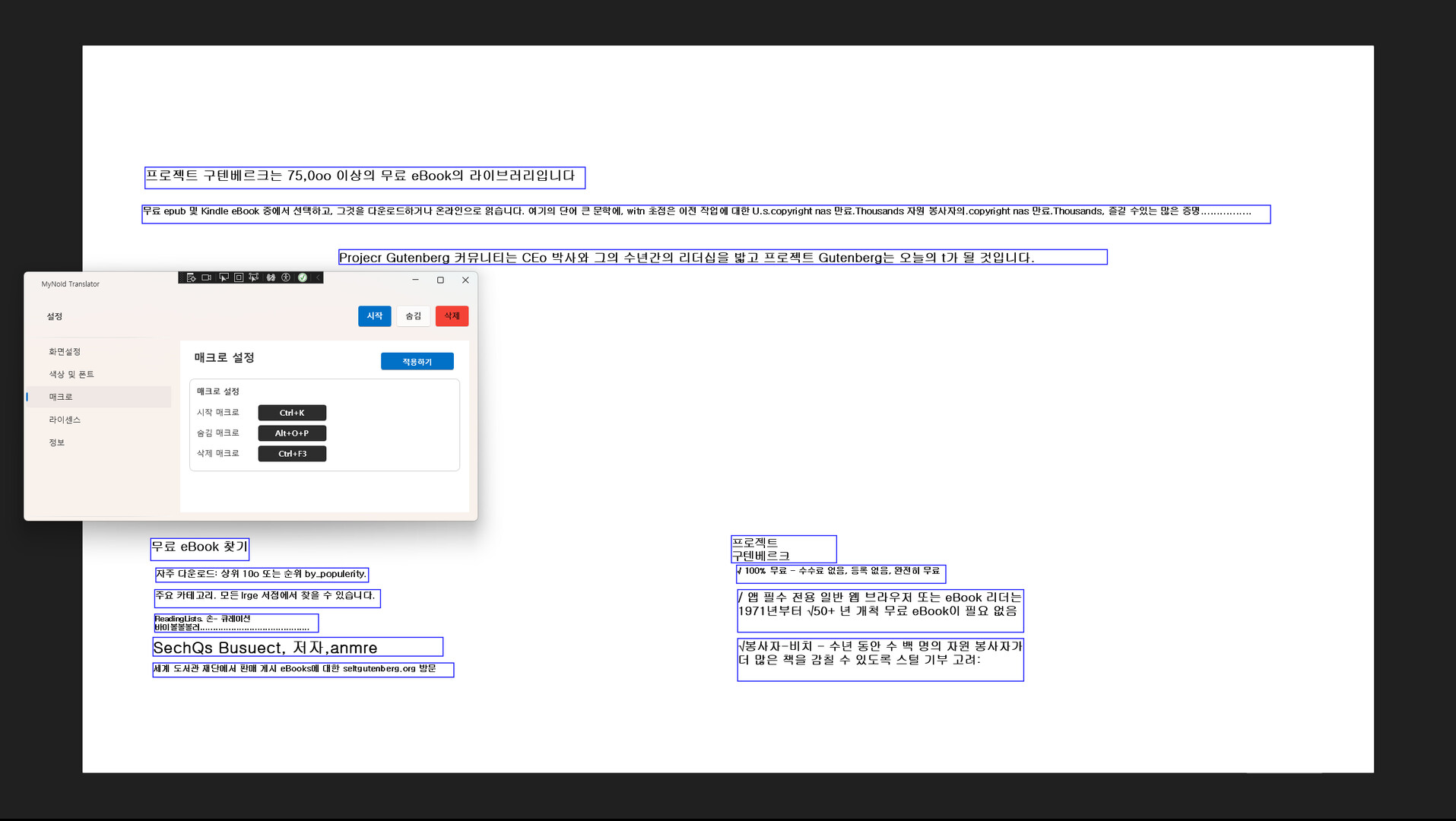
A desktop translator that recognizes text from any window and translates it on screen. Everything is processed locally for security, and once purchased, you can use it forever with no subscription. Future updates will add features such as real-time voice translation and keyboard input translation.
Tarikh Keluaran:
Akan datang
Pembangun:
Penerbit:
Tag

Daftar masuk untuk menambah item ini ke senarai hajat anda, ikuti atau tandakannya sebagai diabaikan

Bahasa Bahasa Melayu tidak disokong

Produk ini tidak menyokong bahasa tempatan anda. Sila semak senarai bahasa yang disokong di bawah sebelum membuat pembelian

Muat turun MyNoId-Translator Demo

Akan datang

Item ini belum tersedia lagi

Berminat?
Tambah ke senarai hajat anda dan terima pemberitahuan apabila permainan sudah tersedia.
 

Tentang Perisian Ini

About This Application

MyNoid Translator is a desktop translation tool that recognizes any visible window as an image and translates the text on screen. Unlike Chrome extensions or web-based translators, it works consistently across all Windows applications, providing a much broader and more flexible usage environment.

All OCR and translation processes are performed entirely on your local machine. No data is sent to external servers, ensuring strong privacy and security. Because it doesn’t rely on network conditions or server availability, translation remains stable at all times.

Currently, the application focuses on screen translation (OCR + English → Korean), but it will continue to expand into a more versatile translation platform with additional input methods and translation features.

Key Features

  • Fully local processing with strong security
    From screen capture to OCR and translation, every step happens inside your PC.
    No external server requests — ideal for users concerned about privacy or sensitive content.

  • Works on any program
    Websites, games, documents, videos, software interfaces —
    if the text is visible on your screen, it can be recognized and translated.
    This provides powerful versatility without depending on specific browsers or apps.

  • One-time purchase, lifetime use
    Buy once and enjoy unlimited access to all features without any subscription.

  • Expanding translation capabilities
    Beyond the current English → Korean screen translation, upcoming updates will add:

    • English ↔ Korean bidirectional translation

    • Major languages ↔ Korean translation

    • Cross-language translation

    • Real-time voice translation

    • Keyboard input translation

    • Clipboard auto-translation
      and more input/output modes planned for future releases.

  • Overlay-based translation display
    Clean, unobtrusive overlay UI displays translations on screen
    without disrupting your workflow or overlapping with other applications.

Keperluan Sistem

    Minimum:
    • Memerlukan pemproses 64-bit dan sistem pengendalian
    • OS: Windows 11
    • Pemproses: Intel Core i5-6400
    • Memori: 8 GB RAM
    • Grafik: NVIDIA GTX 1050 Ti / GTX 1650 or equivalent
    • Rangkaian: Sambungan Internet jalur lebar
    • Storan: 4 GB ruang tersedia
    Dicadangkan:
    • Memerlukan pemproses 64-bit dan sistem pengendalian
    • OS: Windows 11
    • Pemproses: Intel Core i5 or better
    • Memori: 16 GB RAM
    • Grafik: NVIDIA GTX 1660 / RTX 2060 or better
    • Rangkaian: Sambungan Internet jalur lebar
    • Storan: 4 GB ruang tersedia
Penapis Ulasan