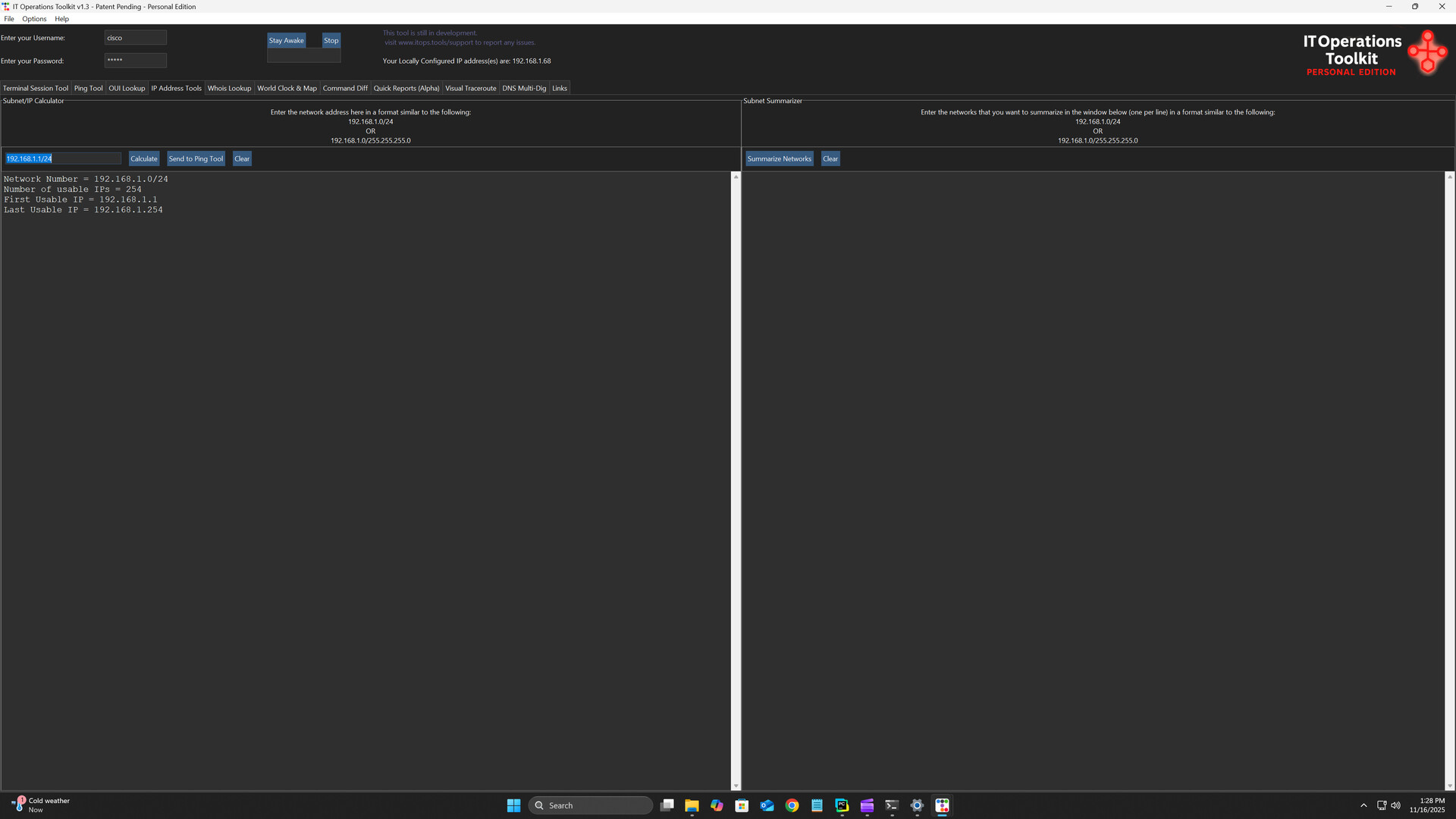
IT Operations Toolkit – Personal Edition gives home labs and learners a unified dashboard to run batch tasks, use built-in network tools, connect via SSH/RDP/Telnet, and manage up to 25 devices from one fast, intuitive interface.

Log på for at føje dette emne til din ønskeliste, følge det eller markere det som ignoreret

Bemærk: IT Operations Toolkit Personal Edition er ikke længere tilgængeligt i Steam-butikken.
Dette spil er ikke tilgængeligt på Steam endnu

Kommer snart

Interesseret?
Tilføj det til din ønskeliste, og få besked, når det bliver tilgængeligt.
Føj til din ønskeliste
 

Om denne software

About This Utility

Welcome to the IT Operations Toolkit Personal Edition— your all-in-one command center built for managing devices.

The Personal Edition is designed for home labs and small environments, supporting up to 25 devices.  Organizations requiring more devices or additional features can review licensing information on our official website.

Key Features

  • Centralized management dashboard – Manage your entire infrastructure (network devices, servers, applications) from a unified interface.

  • Batch and bulk operations – Execute tasks across multiple machines simultaneously: ping sweeps, multi-server commands, device inventory actions.

  • Remote access made easy – Connect to devices using SSH, Telnet, RDP or via web interfaces — all from one tool. Send devices/IP's between tools without having to copy/paste.

  • Network utility suite integrated – Includes tools like IP calculator, IP summarizer, WHOIS lookup, OUI lookup, and interactive world map for infrastructure visualization.

  • Customizable dashboard & workflow – Build your device hierarchies, favorite the tools you use most, apply custom themes (including Dark Mode).

  • Interactive world‐map view – Visualize your global network footprint: device locations, zoom controls, and live world clock.

Why It Matters

For home-lab builders, students, hobbyists, and technicians sharpening their operational skills, time and clarity are everything. The IT Operations Toolkit – Personal Edition brings your most important utilities together in one clean interface so you can:

  • Reduce repetitive tasks and configuration mistakes

  • Eliminate tool-hopping and manual lookups

  • Understand your environment faster with unified visibility

  • Build better habits by working the same way real operations teams do

Whether you're learning, experimenting, or managing a small set of devices, the Personal Edition keeps you focused and efficient.

Who It’s For

  • Home lab enthusiasts managing routers, switches, servers, or virtual environments

  • IT students and early-career engineers building hands-on experience with real-world operations workflows

  • Small environments or makerspaces that need simple, centralized utilities

  • Tech hobbyists who enjoy automation, command-line operations, and unified toolsets

  • Anyone managing up to 25 devices who wants a more streamlined, professional workflow

Systemkrav

    Minimum:
    • Kræver en 64-bit processor og operativsystem
    • Styresystem: Windows 10 (64-bit)
    • Processor: 1.5 GHz or faster (Intel/AMD)
    • Hukommelse: 4 GB RAM
    • Grafik: Integrated graphics (Intel HD Graphics or equivalent)
    • Diskplads: 250 MB tilgængelig plads
    • Lydkort: N/A
    Anbefalet:
    • Kræver en 64-bit processor og operativsystem
    • Styresystem: Windows 10/11 (64-bit)
    • Processor: 2.0 GHz or faster dual-core
    • Hukommelse: 8 GB RAM
    • Grafik: Integrated graphics (Intel UHD 600 series or better)
    • Diskplads: 250 MB tilgængelig plads
    • Lydkort: N/A
Der er ingen anmeldelser af dette produkt

Du kan skrive din egen anmeldelse for dette produkt for at dele din oplevelse med fællesskabet. Brug området over købsknapperne for at skrive din anmeldelse.