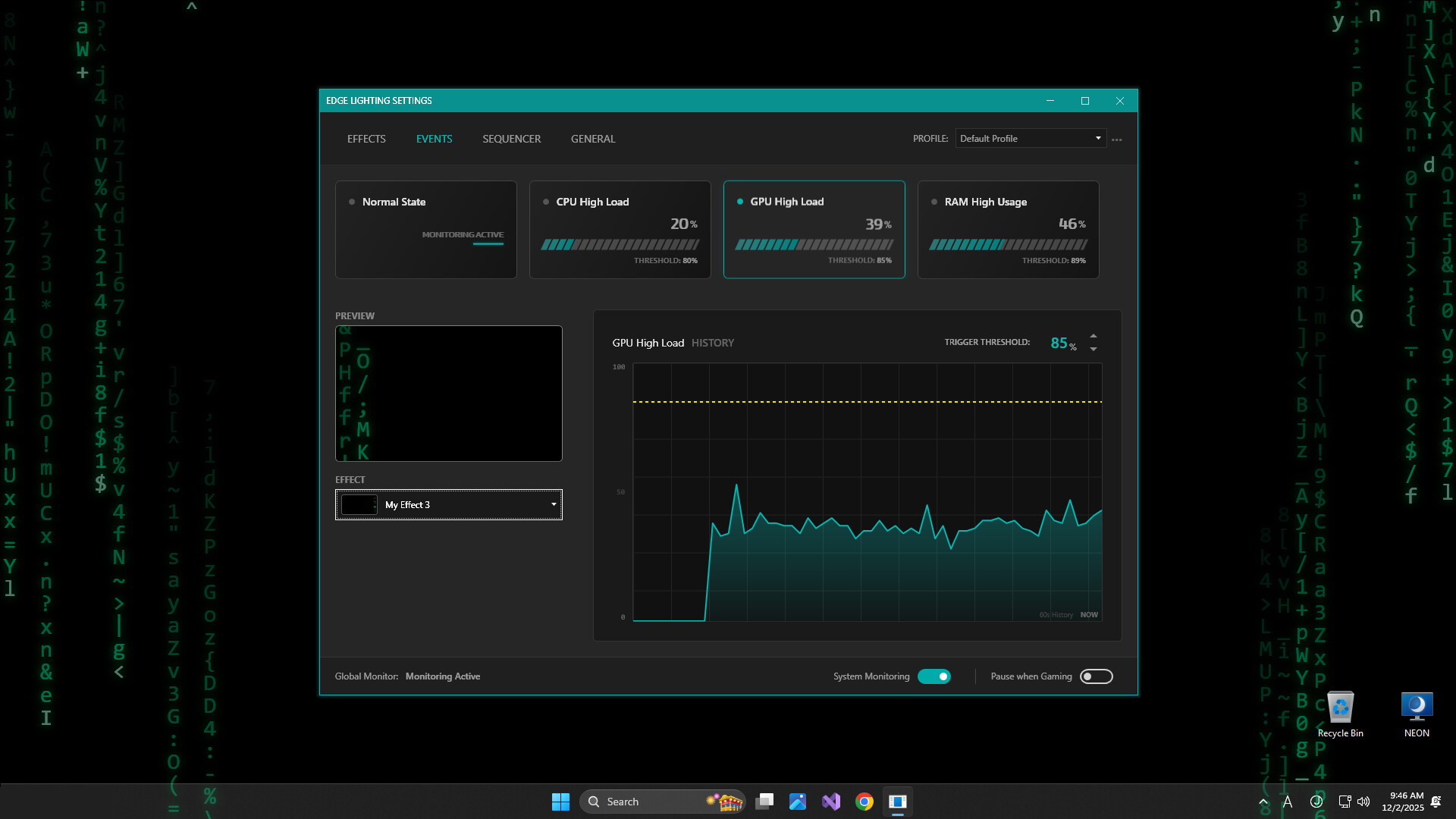
Monitor your system performance with a reactive screen border. Edge Lightning Engine visualizes CPU, GPU, and RAM usage via dynamic ambient lighting. Lightweight, fully customizable, and designed to be a non-intrusive "click-through" overlay for your desktop.

登入以將此項目新增至您的願望清單、關注它,或標記為已忽略

搶先體驗軟體

立即開始使用,並參與軟體開發過程。

備註:這款搶先體驗軟體尚未開發完成,且內容可能會有所變動。如果目前的開發進度未使您產生興趣,建議您等待本軟體開發至下一階段再決定是否購買。了解更多

開發者的話:

為何採用搶先體驗模式?

「As this is a new venture into desktop accessories, we need your feedback.」

這款軟體的搶先體驗時間大約會持續多久?

「The project will be in Early Access for approximately two months after initial release.」

正式版預計會與搶先體驗版有何不同?

「The final version will be an improved version based on user feedback during the Early Access period.
The following features are currently lacking in the Early Access version:
- Multilingual support
- Performance improvements
- Other attractive customization features」

搶先體驗版目前的開發進度如何?

「Basic effects editing and settings are available.
Available in English only.」

軟體售價在搶先體驗期間前後會有所變動嗎?

「Yes, Edge Lightning Engine will go from "Free" to "Paid" upon release.」

在開發過程中,您打算如何與社群互動?


We will incorporate user reports and feedback on the discussion board into the development process.
https://steamcommunity.com/app/4170560/discussions/

We will post news and other information about the development status on the community bulletin board and share it with users as needed.」
繼續閱讀
不支援繁體中文

本產品尚不支援您的目前所在地的語言。購買前請先確認語言支援清單。

此遊戲尚未在 Steam 上發售

預計發行日期: 2026 年 3 月

感興趣嗎?
將這款遊戲加入願望清單,以便在發售時收到通知。
新增至您的願望清單
 
查看所有討論

在討論區回報錯誤並留下對於此軟體的意見

關於此軟體

Edge Lightning Engine: Ambient System Monitor

Don't just stare at a static desktop. Monitor your system health with style.

Edge Lightning Engine is a lightweight utility that adds a customizable, reactive glowing border to your screen. It visualizes your real-time hardware performance (CPU, RAM, GPU) through dynamic lighting effects.

Designed to work alongside your favorite wallpapers (including Wallpaper Engine), it acts as a non-intrusive "heads-up display" for your PC's status.

Why use Edge Lightning Engine? Keep track of system loads without opening the Task Manager or using clunky overlays. The border acts as a peripheral indicator, letting you know instantly if your system is under stress.

Key Features:

  • Reactive Hardware Monitoring: Visualize load instantly. Assign colors to specific metrics.

    • Example: Border glows Blue at <20% CPU load, but shifts to Pulsing Red when load hits >80%.

    • Supported Metrics: CPU / GPU / RAM usage, Battery level, Network activity.

  • Deep Customization (Not just RGB): Fine-tune the look to match your setup.

    • Styles: Solid lines, Breathing glow, Dashed indicators, Gradient flows.

    • Tuning: Adjust corner radius, thickness, glow intensity, and animation speed.

  • Performance First (Zero-Distraction):

    • Click-Through Overlay: The visuals never block your mouse input.

    • Game Mode: Automatically pauses or dims when a fullscreen game is detected to save resources.

    • Lightweight: Optimized for minimal CPU/RAM footprint.

AI 生成內容聲明

開發者針對他們的遊戲使用 AI 生成內容方式的說明如下:

The following uses AI-generated content:
#AppDescriptionTranslation
#StoreVideoBGM
#StoreVideoAssets

系統需求

    最低配備:
    • 作業系統: OS: Windows 10 (64-bit)
    • 處理器: Processor: Dual-Core CPU (2.0 GHz or higher)
    • 記憶體: 4 GB 記憶體
    • 顯示卡: GPU capable of running OS desktop composition (Aero/DWM)
    • 儲存空間: 512 MB 可用空間
    • 備註: Requires .NET Desktop Runtime (often installed automatically by Steam).
    建議配備:
    • 作業系統: Windows 10 / Windows 11 (64-bit)
    • 處理器: Quad-Core CPU (Intel Core i5 / AMD Ryzen 5 series or better)
    • 記憶體: 8 GB 記憶體
    • 顯示卡: GPU capable of running OS desktop composition (Aero/DWM)
    • 儲存空間: 2 GB 可用空間
    • 備註: This application runs in the background. Recommended specs are based on a typical gaming PC setup to ensure minimal performance impact during gameplay.
此產品無任何評論

您可以撰寫評論來與社群分享您對於本產品的看法。請使用本頁面中位於購買按鈕上方的區塊來進行評論的編寫。