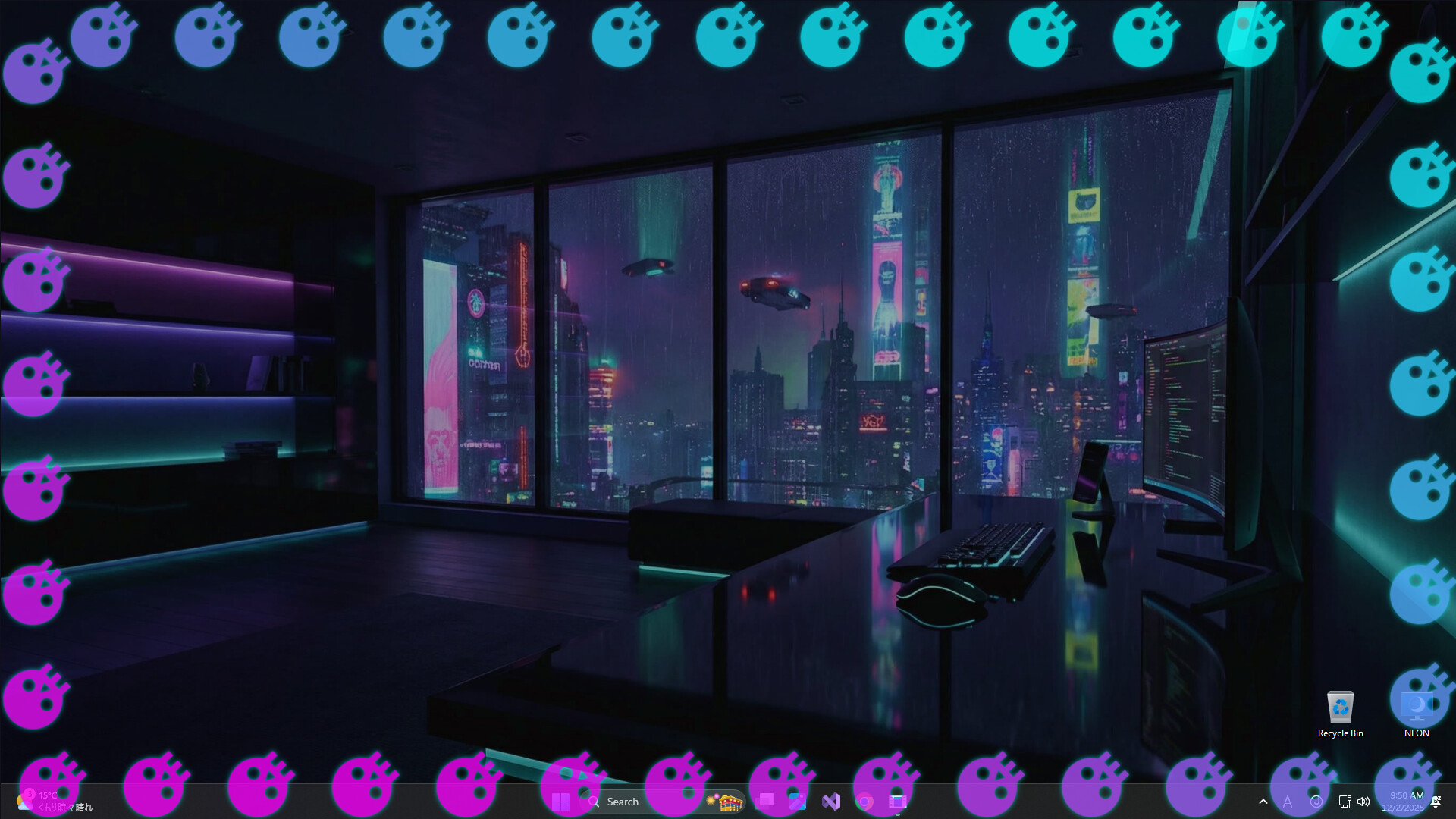
Monitor your system performance with a reactive screen border. Edge Lightning Engine visualizes CPU, GPU, and RAM usage via dynamic ambient lighting. Lightweight, fully customizable, and designed to be a non-intrusive "click-through" overlay for your desktop.

เข้าสู่ระบบ เพื่อเพิ่มผลิตภัณฑ์นี้ลงในสิ่งที่อยากได้ของคุณ ติดตาม หรือทำเครื่องหมายเป็นถูกละเว้น

ซอฟต์แวร์ระหว่างการพัฒนา

มีส่วนร่วมกับซอฟต์แวร์นี้ในขณะที่กำลังพัฒนา

หมายเหตุ: ซอฟต์แวร์ระหว่างการพัฒนานี้ยังไม่เสร็จสมบูรณ์ ซึ่งอาจจะมีหรืออาจจะไม่มีการเปลี่ยนแปลงเพิ่มเติมก็ได้ หากคุณไม่ตื่นเต้นกับการใช้ซอฟต์แวร์นี้ในช่วงสถานะปัจจุบัน คุณควรจะรอเพื่อตัดสินใจในกรณีที่ซอฟต์แวร์มีความคืบหน้าในการพัฒนาเพิ่มเติมมากกว่านี้ เรียนรู้เพิ่มเติม

สิ่งที่ผู้พัฒนาต้องการจะบอก:

เหตุใดจึงเป็นช่วงระหว่างการพัฒนา?

“As this is a new venture into desktop accessories, we need your feedback.”

ซอฟต์แวร์นี้จะอยู่ในช่วงระหว่างการพัฒนานานเท่าไรโดยประมาณ?

“The project will be in Early Access for approximately two months after initial release.”

เวอร์ชันเต็มได้ถูกวางแผนไว้ให้แตกต่างจากเวอร์ชันระหว่างการพัฒนาอย่างไร?

“The final version will be an improved version based on user feedback during the Early Access period.
The following features are currently lacking in the Early Access version:
- Multilingual support
- Performance improvements
- Other attractive customization features”

สถานะปัจจุบันของเวอร์ชันระหว่างการพัฒนาเป็นอย่างไร?

“Basic effects editing and settings are available.
Available in English only.”

ซอฟต์แวร์นี้จะมีราคาเปลี่ยนแปลงไปหรือไม่ในระหว่างและหลังจากช่วงระหว่างการพัฒนา?

“Yes, Edge Lightning Engine will go from "Free" to "Paid" upon release.”

คุณกำลังวางแผนให้ชุมชนมีส่วนร่วมในขั้นตอนการพัฒนาของคุณอย่างไร?


We will incorporate user reports and feedback on the discussion board into the development process.
https://steamcommunity.com/app/4170560/discussions/

We will post news and other information about the development status on the community bulletin board and share it with users as needed.”
อ่านเพิ่มเติม
ไม่รองรับภาษาไทย

ผลิตภัณฑ์นี้ไม่รองรับภาษาท้องถิ่นของคุณ โปรดตรวจสอบรายชื่อภาษาที่รองรับก่อนทำการสั่งซื้อ

เกมนี้ยังไม่พร้อมใช้งานบน Steam

วันวางจำหน่ายที่วางแผนไว้: มีนาคม 2026

น่าสนใจ?
เพิ่มในสิ่งที่คุณอยากได้ และรับการแจ้งเตือนเมื่อผลิตภัณฑ์พร้อมใช้งาน
เพิ่มลงในสิ่งที่อยากได้ของคุณ
 
ดูกระดานสนทนาทั้งหมด

รายงานจุดบกพร่องและฝากข้อเสนอแนะสำหรับซอฟต์แวร์นี้บนกระดานสนทนา

เกี่ยวกับซอฟต์แวร์นี้

Edge Lightning Engine: Ambient System Monitor

Don't just stare at a static desktop. Monitor your system health with style.

Edge Lightning Engine is a lightweight utility that adds a customizable, reactive glowing border to your screen. It visualizes your real-time hardware performance (CPU, RAM, GPU) through dynamic lighting effects.

Designed to work alongside your favorite wallpapers (including Wallpaper Engine), it acts as a non-intrusive "heads-up display" for your PC's status.

Why use Edge Lightning Engine? Keep track of system loads without opening the Task Manager or using clunky overlays. The border acts as a peripheral indicator, letting you know instantly if your system is under stress.

Key Features:

  • Reactive Hardware Monitoring: Visualize load instantly. Assign colors to specific metrics.

    • Example: Border glows Blue at <20% CPU load, but shifts to Pulsing Red when load hits >80%.

    • Supported Metrics: CPU / GPU / RAM usage, Battery level, Network activity.

  • Deep Customization (Not just RGB): Fine-tune the look to match your setup.

    • Styles: Solid lines, Breathing glow, Dashed indicators, Gradient flows.

    • Tuning: Adjust corner radius, thickness, glow intensity, and animation speed.

  • Performance First (Zero-Distraction):

    • Click-Through Overlay: The visuals never block your mouse input.

    • Game Mode: Automatically pauses or dims when a fullscreen game is detected to save resources.

    • Lightweight: Optimized for minimal CPU/RAM footprint.

การเปิดเผยข้อมูลเกี่ยวกับเนื้อหาที่สร้างด้วย AI

ผู้พัฒนาอธิบายว่าเกมของตนใช้เนื้อหาที่สร้างด้วย AI ในลักษณะนี้:

The following uses AI-generated content:
#AppDescriptionTranslation
#StoreVideoBGM
#StoreVideoAssets

ความต้องการระบบ

    ขั้นต่ำ:
    • ระบบปฏิบัติการ: OS: Windows 10 (64-bit)
    • โปรเซสเซอร์: Processor: Dual-Core CPU (2.0 GHz or higher)
    • หน่วยความจำ: แรม 4 GB
    • กราฟิกส์: GPU capable of running OS desktop composition (Aero/DWM)
    • พื้นที่จัดเก็บข้อมูล: พื้นที่ว่างที่พร้อมใช้งาน 512 MB
    • หมายเหตุเพิ่มเติม: Requires .NET Desktop Runtime (often installed automatically by Steam).
    แนะนำ:
    • ระบบปฏิบัติการ: Windows 10 / Windows 11 (64-bit)
    • โปรเซสเซอร์: Quad-Core CPU (Intel Core i5 / AMD Ryzen 5 series or better)
    • หน่วยความจำ: แรม 8 GB
    • กราฟิกส์: GPU capable of running OS desktop composition (Aero/DWM)
    • พื้นที่จัดเก็บข้อมูล: พื้นที่ว่างที่พร้อมใช้งาน 2 GB
    • หมายเหตุเพิ่มเติม: This application runs in the background. Recommended specs are based on a typical gaming PC setup to ensure minimal performance impact during gameplay.
ไม่พบบทวิจารณ์สำหรับผลิตภัณฑ์นี้

คุณสามารถเขียนบทวิจารณ์ของคุณเองสำหรับผลิตภัณฑ์นี้เพื่อแบ่งปันประสบการณ์ของคุณให้กับชุมชน ใช้พื้นที่ด้านบนของปุ่มซื้อในหน้านี้เพื่อเขียนบทวิจารณ์ของคุณ