เนื้อหานี้ต้องการเกมหลัก Fortiori บน Steam ในการเล่น

เข้าสู่ระบบ เพื่อเพิ่มผลิตภัณฑ์นี้ลงในสิ่งที่อยากได้ของคุณ ติดตาม หรือทำเครื่องหมายเป็นถูกละเว้น

ไม่รองรับภาษาไทย

ผลิตภัณฑ์นี้ไม่รองรับภาษาท้องถิ่นของคุณ โปรดตรวจสอบรายชื่อภาษาที่รองรับก่อนทำการสั่งซื้อ

เนื้อหาดาวน์โหลด

เนื้อหานี้ต้องการเกมหลัก Fortiori บน Steam ในการเล่น

ดาวน์โหลด Fortiori Wallpaper Editor

เล่นฟรี
 

เกี่ยวกับเนื้อหานี้

Engine & System Integration

  • True Desktop Integration: The application runs as a genuine, non-interactive wallpaper layer behind your desktop icons, not just a maximized borderless window.

  • System Tray Control: A convenient icon in your system tray gives you quick access to pause animations, take screenshots, or exit the application cleanly.

  • Crash-Proof Restoration: Your original desktop wallpaper is automatically saved upon launch and restored upon exit, even if the application crashes.

  • Integrated Screenshot Tool: Capture your beautiful creations with a built-in tool that can save directly to your Desktop or your Steam screenshot folder.

Complete Creative Control

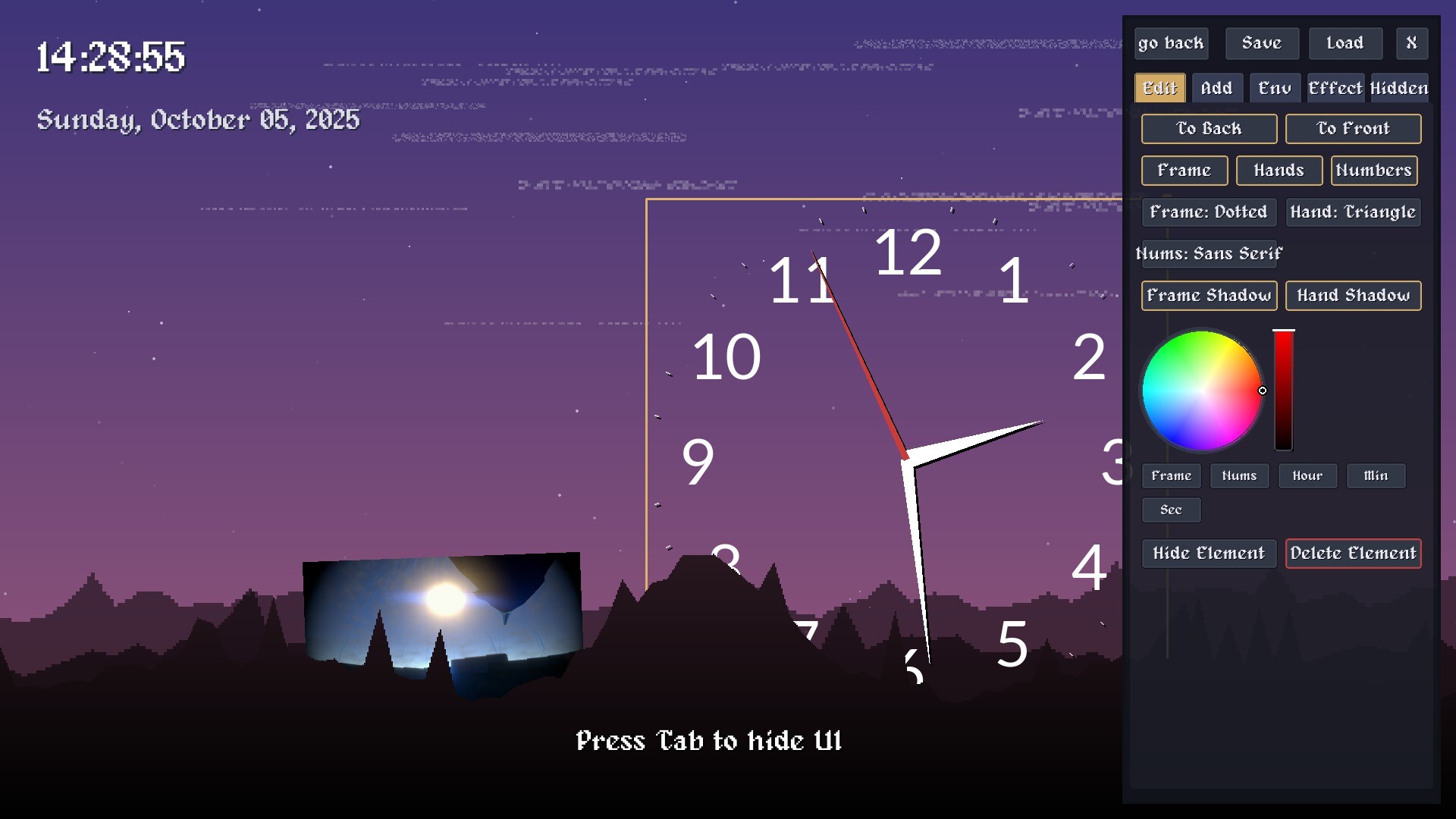
  • Powerful On-Screen UI Editor: A comprehensive, tab-based user interface allows you to tweak every single aspect of your wallpaper. Simply press Tab to hide or show it.

  • Save & Load Your Creations: Your entire layout, including every element's position, rotation, size, and settings, can be saved to a local wallpaper_settings.json file to be loaded later.

  • Smooth, Physics-Based Manipulation: Drag, resize, and rotate any element on screen with a fluid, smoothed motion that makes placement intuitive and satisfying.

  • Complete Z-Layer Control: Place elements anywhere in the scene, including moving them in front of or behind the individual landscape layers for incredible depth effects.

Customizable On-Screen Elements

  • Advanced Text & Info:

    • Add fully editable custom text boxes, digital clocks, and date displays.

    • Customize fonts, size, color, and add multi-color effects.

    • Apply adjustable shadows (color, X/Y offset) and borders (color, thickness).

    • Cycle through multiple time (%H:%M:%S, %I:%M %p, etc.) and date (%Y-%m-%d, %A, %B %d, etc.) formats.

  • Highly Modular Analog Clock:

    • Construct your perfect analog clock by individually customizing its components.

    • Choose from multiple styles for the frame, hands, and numbers

    • Individually color every component: Frame, Hour Hand, Minute Hand, Second Hand, and Numbers.

    • Toggle shadows on the frame and hands for added depth.

  • Image & Animated GIF Support:

    • Place your own images (.png, .jpg, etc.) and animated GIFs (.gif) directly onto the wallpaper.

    • Control how the image fits its container with modes like "Contain," "Cover," "Stretch," or "Original Size."

    • Add adjustable borders and drop shadows with custom colors and offsets.

ความต้องการระบบ

    ขั้นต่ำ:
    • ระบบปฏิบัติการ: 10
    • โปรเซสเซอร์: same as game
    • กราฟิกส์: same as game
    • พื้นที่จัดเก็บข้อมูล: พื้นที่ว่างที่พร้อมใช้งาน 300 MB
    • การ์ดเสียง: bruh
    • การรองรับ VR: no
    • หมายเหตุเพิ่มเติม: sandwich
    แนะนำ:
    • ระบบปฏิบัติการ: 10
    • โปรเซสเซอร์: same as game
    • กราฟิกส์: same as game
    • พื้นที่จัดเก็บข้อมูล: พื้นที่ว่างที่พร้อมใช้งาน 300 MB
    • การรองรับ VR: noo
    • หมายเหตุเพิ่มเติม: do not play the game on your smart watch
ไม่พบบทวิจารณ์สำหรับผลิตภัณฑ์นี้

คุณสามารถเขียนบทวิจารณ์ของคุณเองสำหรับผลิตภัณฑ์นี้เพื่อแบ่งปันประสบการณ์ของคุณให้กับชุมชน ใช้พื้นที่ด้านบนของปุ่มซื้อในหน้านี้เพื่อเขียนบทวิจารณ์ของคุณ