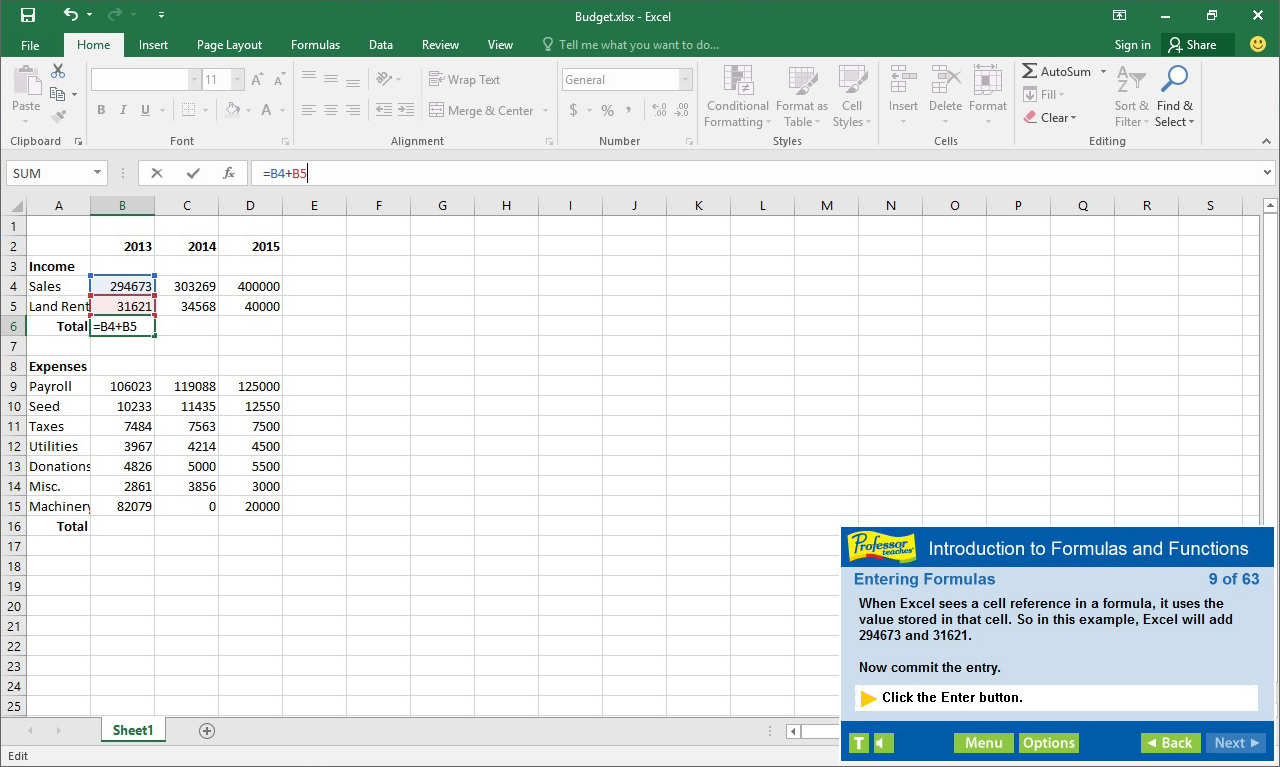
Professor Teaches Excel 2016 is a computer training course developed by experts to help you learn the features of Excel 2016. Unlike other training courses, Professor Teaches provides a realistic simulation of the software, so you can practice and apply what you learn right away.

Daftar masuk untuk menambah item ini ke senarai hajat anda, ikuti atau tandakannya sebagai diabaikan

Bahasa Bahasa Melayu tidak disokong

Produk ini tidak menyokong bahasa tempatan anda. Sila semak senarai bahasa yang disokong di bawah sebelum membuat pembelian

Beli Professor Teaches Excel 2016


Tentang Perisian Ini

Professor Teaches Excel 2016 is a computer training course developed by experts to help you learn the features of Excel 2016. Unlike other training courses, Professor Teaches provides a realistic simulation of the software, so you can practice and apply what you learn right away. Learn Excel 2016 with hours of interactive, hands-on training lessons and exercises.

What is Microsoft Excel 2016?
Excel 2016 is the latest version of this popular spreadsheet management program developed by Microsoft. This powerful program allows you to analyze, manage and share data in more ways than ever before. With the analysis tools, you can track and highlight important data trends and share data.

What Are the Benefits of Learning Microsoft Excel 2016?
• Discover how to create spreadsheets quickly
• Learn how to analyze data and share information
• Learn how to use critical information to make business decisions

Excel 2016 – Over 80 Lessons!
Our extensive computer training course will cover the following topics:
• Getting to Know the Excel Window
• Navigating a Workbook
• Creating Workbooks
• Entering Text, Numbers, and Dates
• Moving and Clearing Data
• What are Formulas and Functions?
• Copying and Moving Formulas
• Using Statistical Functions
• Using Linked Values in Formulas
• Introduction to Formatting
• Changing Cell Alignment
• Inserting and Deleting Rows and Columns
• Hiding Worksheet Components
• Copying and Moving Worksheets
• Splitting and Freezing a Worksheet
• Previewing and Printing the Worksheet
• Arranging Multiple Workbooks
• Saving Workbooks in Different Formats
• Adding a Hyperlink
• Saving a Workbook as a Web Page
• E-Mailing a Workbook
• Exploring the Interface
• Signing in with Microsoft Accounts

Features of Professor Teaches Excel 2016
• Practice in a Realistic Simulation of the Software
• Hundreds of Learning Topics
• 4 to 8 Hours of Training per Course
• Realistic Simulations
• Beginner to Advanced Topics
• Self-Paced Learning Objectives
• Introductions and Summaries
• Interactive Exercises
• Professional Voice Narration
• End-of-Chapter Quiz Questions
• Check marks for Completed Topics
• Glossary, Index, and Search
• Professor Answers for Instant Training

Benefits of Professor Teaches Excel 2016
• Accurate screen presentations, menus, and buttons provide an easy transition to the real application
• Step-by-step interactive exercises help you achieve high retention rates
• Practical exercises and examples make learning easy
• Professional voice narration assists retention
• The most realistic, interactive & complete training

Keperluan Sistem

    Minimum:
    • OS: 10, 8.1, 8, 7, XP
    • Memori: 150 MB RAM
    • Storan: 150 MB ruang tersedia
    • Kad Bunyi: Not Required

Ulasan pelanggan untuk Professor Teaches Excel 2016 Tentang ulasan pengguna Pilihan anda

Keseluruhan Ulasan:
2 ulasan pengguna (2 ulasan)


Untuk melihat ulasan dalam sesuatu jangka masa tarikh, sila klik dan seret pilihan pada graf di atas atau klik pada bar tertentu.


Tapis ulasan mengikut masa bermain pengguna semasa ulasan ditulis:


Tiada minimum hingga Tiada maksimum

Tunjuk ulasan dalam susunan paparan yang dipilih


Ketahui Lebih Lanjut
Penapis
Tidak termasuk Aktiviti Ulasan di Luar Topik
Masa bermain:
Kerap Dimainkan di Steam Deck
Operating System:
CPU:
GPU:
Device Type:
Penapis Ulasan