Defeat monsters in dungeons for XP and materials. Level up to craft better gear and enchantments using skill points and materials. Challenge bosses for rare gem drops. Socket gems into equipment to boost power.

로그인하셔서 게임을 찜 목록에 추가하거나, 팔로우하거나 또는 제외로 지정하세요.

한국어(을)를 지원하지 않습니다

이 제품은 귀하의 로컬 언어를 지원하지 않습니다. 구매하기 전에 아래에 있는 지원하는 언어 목록을 확인해주세요.

第一次挂机 구매


게임 정보

—This is a simple idle game, created by the author after their initial programming learning.

—Basics—

The game's content is concise and clear. Click "Training" to start idling from the first dungeon. You can try higher difficulties or later dungeons to obtain higher-level materials, increasing your experience and gold gain efficiency.

—Boss—

In any training dungeon, there's a chance to encounter a boss. It will be displayed on the "Challenge" page. You can challenge it at any time or give up. Bosses drop gems, which can be used to socket equipment, greatly enhancing your strength.

—Skills—

Every 3 levels, you gain skill points, which can be used to unlock enchantment effects and equipment crafting. Remember to save one skill point to unlock the special skill—Gem Synthesis. After learning it, clicking this icon will automatically synthesize gems.

—Enchantment—

After leveling up, unlock enchantment on the "Skills" page. This allows you to enchant equipment on the "Crafting" page, increasing attribute damage or resistance. Each piece of equipment can have two enchantments, and there are no restrictions on the equipment slot. —Crafting, Enhancement, and Socketing—

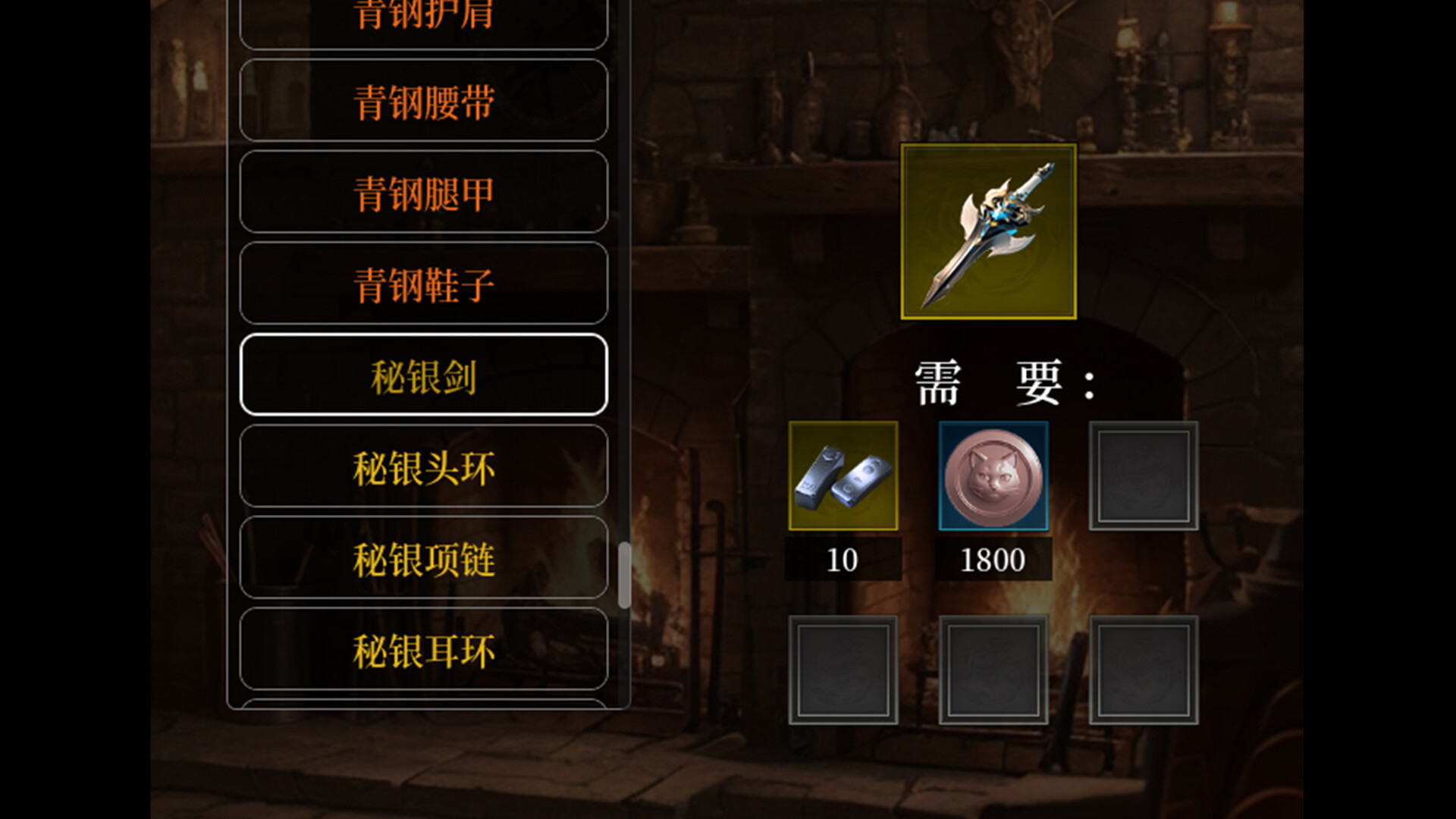
On the Crafting page, consume materials and currency to craft higher-level equipment. When existing equipment recipes don't meet your needs, you can use skill points on the Skills page to unlock higher-level equipment recipes. The number of socketable items is randomized during crafting; you can increase the minimum number by allocating skill points.

—Quests—

On the Quests page, completing tasks as required will increase your achievement level and grant attribute rewards. Strength, Constitution, and Spirit have multifaceted effects; hovering your mouse over an attribute will display its description.

—Inventory—

Here, check your items and change equipment. At the bottom of the inventory interface, you can click to open the mini-shop, where you can expand your inventory and purchase gems.

—That's all. Learning to make games for the first time was very exciting, but the learning process was quite painful. I couldn't understand various programming concepts at all; I could only keep trying and observing the effects after running the program. Asking the AI ​​often didn't give me the answers I wanted; it just made things up. It would be great to have an expert guide me. Even the most basic things take me a long time and effort to understand.

Next time I'll try something a bit more "advanced"!

AI 생성 콘텐츠 사용 공개

개발사는 게임에서 AI 생성 콘텐츠를 사용하는 방법을 다음과 같이 설명합니다.

Game icons and background images are created using AI.

시스템 요구 사항

    최소:
    • 64비트 프로세서와 운영 체제가 필요합니다
    • 운영 체제 *: Windows 7
    • 메모리: 4 GB RAM
    • DirectX: 버전 11
    • 저장 공간: 150 MB 사용 가능 공간
    권장:
    • 64비트 프로세서와 운영 체제가 필요합니다
    • 운영 체제 *: Windows 7
    • 메모리: 4 GB RAM
    • DirectX: 버전 11
    • 저장 공간: 150 MB 사용 가능 공간
* 2024년 1월 1일부터 Steam 클라이언트는 Windows 10 이상 버전만 지원합니다.

第一次挂机에 대한 사용자 평가 사용자 평가 정보 환경 설정

종합 평가:
사용자 평가 5개 (평가 5개)


특정 날짜 범위에 속하는 평가를 보려면, 위의 그래프에서 선택 항목을 클릭한 후 드래그하거나 원하는 바를 클릭하세요.


평가를 작성한 시점의 사용자 플레이 시간을 기준으로 평가를 필터링:


최소 시간 없음 ~ 최대 시간 없음

선택한 표시 순서로 평가 보기


자세한 정보
필터
게임과 관련없는 평가 활동 제외
플레이 시간:
주로 Steam Deck에서 플레이
위에서 설정한 필터 조건에 맞는 평가가 없습니다
다른 평가를 보려면 위에서 필터를 조정해주세요
평가 불러오는 중...